

Sep 23, 2026Posted by Kevin Miller to Rip DVD
Quick Summary
DVD copy protection is the protective system in commercial DVDs to prevent data copying and reproduction. It is used as a preventive measure against piracy. Learn the most common DVD protection measures in this article as well as the steps to watch protected DVDs.
Among physical media enthusiasts, DVD collections are the most popular due to the quality of their content and their modernity. Unfortunately, most DVD content experiences playback errors or copying issues due to built-in copy protections and copy locks. To help our readers understand how DVD copy protections work, we will discuss the essential concept of this system, including what it does, why it exists, and how to access protected media for personal use.

Table of Contents
Part 1. What Is DVD Copy Protection & Why Does It Exist
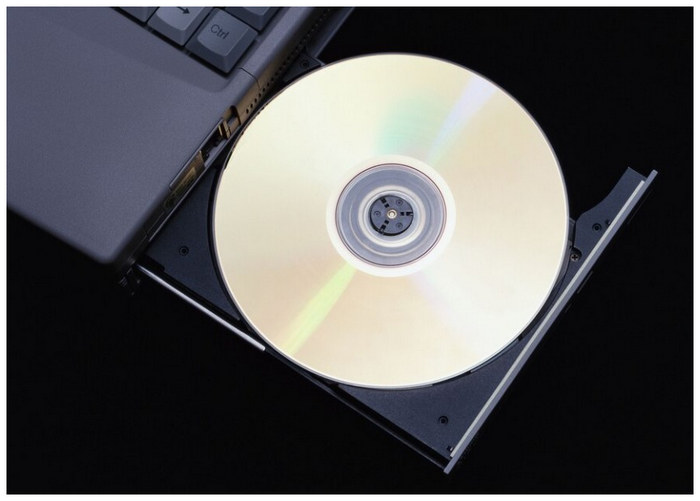
DVD protection is designed to prevent physical content from being copied and illegally distributed, serving as a deterrent to piracy. This is set by movie studios to secure content when officially releasing DVD media and modern Blu-ray releases. Ultimately, DVD copy protection is made to protect intellectual property and creator revenues.
Unfortunately, DVD protection prevents the creation of personal digital backups. It can also prevent the DVD media from running on modern portless devices. Fortunately, there are options to bypass protections such as ripping copy-protected DVDs, making physical media more accessible to modern users.
Part 2. Common Types of DVD Copy Protection
With the concept of DVD copy protection now discussed, we will proceed to the introduction and quick reviews of the most common systems for removing copy protection from DVD content.
CSS (Content Scramble System)
The Content Scramble System is the protection system embedded in DVDs, designed to scramble content and make it difficult to access. Due to its basic nature, this option is the standard encryption method used to prevent direct file copying. CSS is usually enough to block generic media players such as VLC Media Player.
Region Codes
Region codes are the limitation system set on both DVDs and physical players. These codes are set for each global region and limit a certain DVD code to be playable on the same physical player code. For example, a Region 1 DVD (Canada, USA, and US Territories) can only be played on media players that are also Region 1 coded.
To learn the specific region codes, we have provided a quick table below:
| DVD Region Number | Included Countries in the Region |
| Region 1 | Canada and the U.S.A and its territories. |
| Region 2 | Middle East, South Africa, Japan, and Europe, along with Egypt. |
| Region 3 | Hong Kong, East Asia, and Southeast Asia. |
| Region 4 | New Zealand, Australia, Central America, Pacific Islands, South America, Mexico, and the Caribbean. |
| Region 5 | Africa, North Korea, Eastern Europe, Mongolia, and the Indian subcontinent. |
| Region 6 | China. |
| Region 7 | Reserved for special cases. |
| Region 8 | Special international venues like cruise ships and airplanes. |
Disney X-Project / Fake Titles
The next copy-protection system is the Disney 99-title or fake-title system. Commonly used on officially released Disney DVDs, this system confused DVD copy tools by embedding proxy titles, making it harder to identify the correct title.
Sony ARccOS / APS
Finally, the most advanced copy-protection is Sony ARccOS, which was designed to deliberately create bad sectors in the DVD memory. When these bad sectors are detected, the copy software will be blocked. These copy-protection tools may only be bypassed by the best DVD decoders, such as the one featured in the next section of the article.
Part 3. How to Watch DVDs with Copy Protections
With copy protections severely limiting DVD accessibility, specialized ripper tools that can bypass these systems are vital for opening physical media on laptops and tablets, or simply for creating digital backups. In this case, we will provide a tutorial on using Blu-ray Master Free DVD Ripper to make DVDs more accessible.
Designed as a ripper software, Blu-ray Master’s ripping program converts protected DVDs into accessible, modern digital video formats such as MP4, AVI, and MKV. It was also equipped with specific systems to bypass standard copy protection such as CSS, Region Codes, and even the more advanced Sony ARccOS program.
However, what sets the program apart is its ease of use and extremely beginner-friendly interface. Ripped videos by the software are also preserved in original video and audio quality to keep personal archives high-quality.
To learn the basics of using Blu-ray Master Free DVD Ripper, make sure to read our three-step guide below. Make sure to download it as well for an easier time learning to use the tool.
Free Download
For Windows
Secure Download
Free Download
for macOS
Secure Download
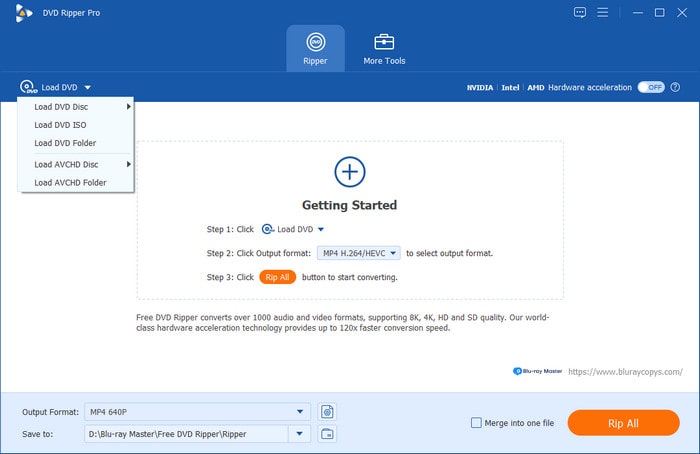
Step 1.Open Blu-ray Master Free DVD Ripper and select Load DVD. Then click Load DVD Disc to access the DVD you want to rip to your computer.
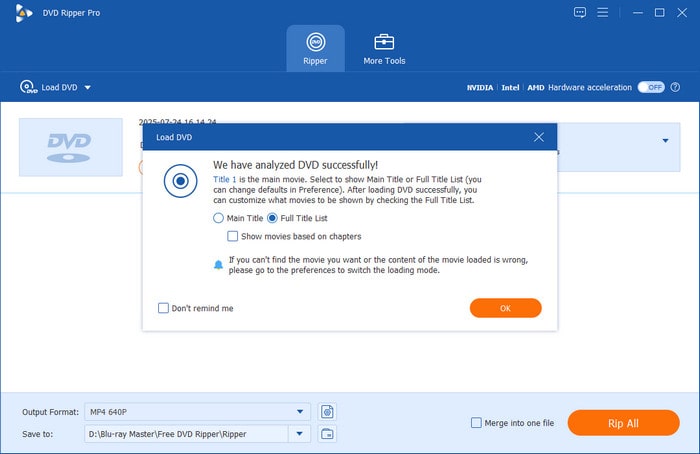
In the menu that pops up, select Main Title to rip only the DVD's main content. Otherwise, click on Full Title List to rip the entire DVD content.
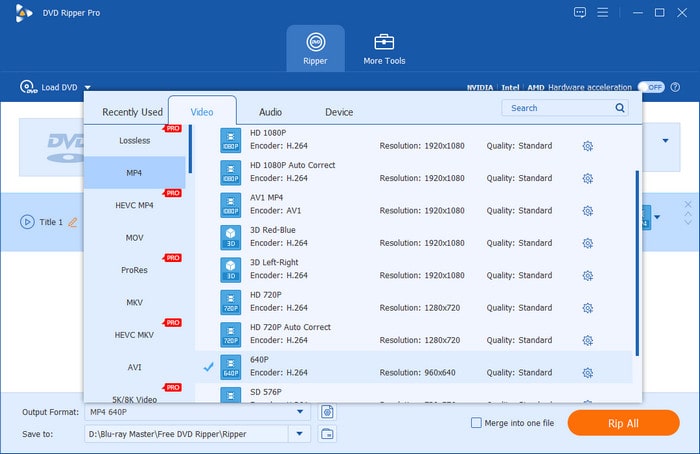
Step 2.With the DVD content loaded, select Output Format and choose the video format you want to convert your ripped media into.
Step 3.Now that the DVD ripping option and the output format are set, select Rip All to begin converting the protected DVD content to a more accessible digital video.
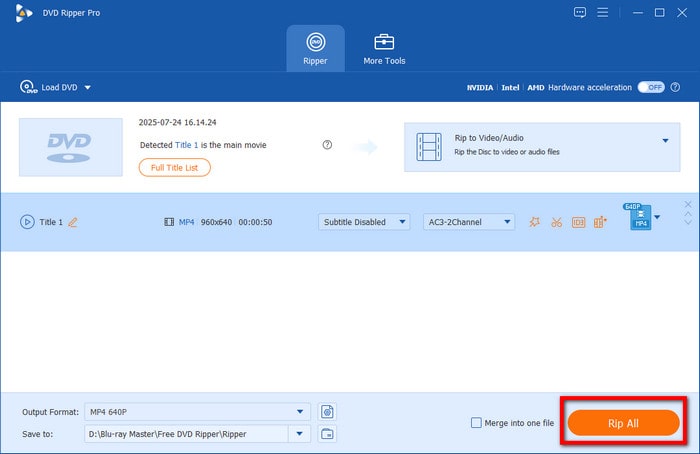
Among the most reliable options for bypassing DVD encryption, DVD ripping is the most accessible solution. Fortunately, Blu-ray Master Free DVD Ripper checks all the boxes.
Part 4. FAQs About DVD Copy Protection
-
Can standard tools rip protected DVDs?
No, they cannot. You need high-end DVD rippers to rip protected DVDs. Fortunately, there are free DVD rippers you can use to rip protected content, such as Blu-ray Master Free DVD Ripper.
-
How do background decrypters work?
DVD rippers work by totally bypassing the copy protection on DVDs. They are usually equipped with advanced systems to rip common protection options. When choosing an option, make sure it can rip from common CSS to advanced Sony ARccOS; a good example is HandBrake and Blu-ray Master Free DVD Ripper.
-
Is removing protection legal?
No, it is not. Bypassing copy protection is illegal in most state laws. To avoid such issues, make sure not to share ripped media.
-
Why does my ripper freeze midway through processing a Disney DVD?
Disney DVDs are usually well-protected. The 99-title system has a high security standard. Fortunately, Blu-ray Master Free DVD Ripper can bypass this problem.
-
How do region codes affect international DVD playback on computer drives?
Region codes prevent DVDs from being playable on a media player with a different code. Computer drives can also prevent region code-protected media from being played.
Conclusion
With the basic concept of DVD copy protection now discussed, we hope this article has provided our readers with the essential information needed to understand how these protection measures work. As an added bonus, we also added a detailed tutorial on ripping DVDs to make protected DVDs more accessible with none other than Blu-ray Master Free DVD Ripper.
