

Nov 07, 2025Posted by Kevin Miller to Rip DVD
You might think that all DVDs are the same since they physically look like one. Hence, in most cases, when you need to pick one for yourself, you must know the DVD capacity or its ability to store data. This is especially true when trying to burn a new DVD, and you must always consider the size or amount of data that the DVD can give you. Therefore, you will need this article that outlines the information about the various DVD types with their corresponding capacities and the best tips to get more storage capacity for your DVD contents.

- Part 1. What is DVD Capacity
- Part 2. DVD Capacity of Different DVD Types
- Part 3. 2 Ways to Save More DVD Capacity
- Part 4. FAQs about DVD Capacity
Part 1. What is DVD Capacity
The capacity that a DVD has something to do with how much data a DVD can hold. This capacity depends on the format that the DVD has. Most of the time, there is a variation in the claimed capacity versus the actual capacity due to technical factors and formatting factors. And so, to give you some information on the commonly used DVD formats that was categorized based on their capacity, here are the corresponding details.
| DVD Format | Claimed Capacity | Actual Capacity | DVD Layers | DVD Capacity in Minutes |
| DVD-18 | 17.1GB, which gives 8.5GB per side. | 15.9GB. | 2 | 485.28 minutes |
| DVD-10 | 9.4GB, which represents 4.7GB per side. | 8.75GB. | 1 | 266 minutes |
| DVD-9 | 8.5GB. | 7.95GB. | 2 | 240 minutes |
| DVD-5 | 4.7GB. | 4.37GB. | 1 | 120-130 minutes |
DVD-18
Starting up with this DVD-18, which has the highest DVD storage capacity among the most used DVD formats above. This type of DVD is a dual-layer and a double-sided kind of disc. Each side has the capability to store around 8.5 GB of media data, which offers you up to 17.1GB capacity.
DVD-10
Next is this DVD 10 format that has a total of 9.4GB capacity. This disc format is infused with a single-layer disc and double sides. Each side of this format is capable of storing up to 4.7GB of media data.
DVD-9
Moving on to this dual-layer disc format, the DVD 9 capacity is approximately 8.5GB. With this size, you can already store a movie with 240 minutes duration. Moreover, it comes with two layers, and each layer is capable of storing 4.7 GB of input.
DVD-5
Lastly, a DVD format contains a single-layer disc, DVD 5. This format actually has the smallest capacity storage among them all. The DVD 5 capacity claims to be 4.7 GB, and it is 4.37GB for the actual.
Please note that the slight difference between the discs' claimed, and real usable capacity varies due to the discrepancy in the computer decimal system. Wherein the 1GB is equal to 1,073,741,824 bytes as read.
Part 2. DVD Capacity of Different DVD Types
Besides DVD-5, DVD-10, etc., there are also many DVD types, like DVD-R, DVD-RW, and others. Follow us to see their capacities.
| Format | Capacity (Single-Layer) | Capacity (Dual-Layer) | Write Functionality |
| DVD-R | 4.7 GB | 8.5 GB (DVD-R DL) | Write Once (Recordable) |
| DVD-RW | 4.7 GB | 8.5 GB (DVD-RW DL) | Rewritable (Erase and rewrite up to ~1,000 times) |
| DVD+R | 4.7 GB | 8.5 GB (DVD+R DL) | Write Once (Recordable, a competing format to DVD-R) |
| DVD+RW | 4.7 GB | 8.5 GB (DVD+RW DL) | Rewritable (Erase and rewrite, a competing format to DVD-RW) |
| DVD-RAM | 4.7 GB (SS/SL) or 9.4 GB (DS/SL)B | No | Highly Rewritable (~100,000 times), often housed in a cartridge |
The standard capacity for most recordable DVDs is 4.7 GB. The capacity changes only when the disc uses a second recording layer or is double-sided.
DVD-R: This is a recordable disc, meaning it is write once. The standard, single-layer capacity is 4.7 GB. The dual-layer version (DVD-R DL) holds 8.5 GB.
DVD-RW: This is a rewritable disc. You can erase the content and rewrite new data onto the disc. The standard, single-layer capacity is 4.7 GB and dual-layer version holds 8.5 GB.
DVD+R: This is also a Recordable (Write Once) disc, but it uses a competing format technology to DVD-R. It has both 4.7 GB and 8.5 GB.
DVD+RW: This is a Rewritable disc, using a competing format technology to DVD-RW. It can be erased and reused about 1,000 times. The standard, single-layer capacity is 4.7 GB and dual-layer is 8.5 GB.
DVD-RAM: This is a specialized, highly-rewritable disc known for its durability and file-based approach to data storage. It can be rewritten up to 100,000 times. The common single-sided capacity is 4.7 GB, but the less common double-sided version can hold up to 9.4 GB.
Part 3. 2 Ways to Save More DVD Capacity
Suppose you want to save more capacity for your DVDs. In that case, you should utilize the 2 best ways or tips below to do so.
1. Rip the DVD to Digital Video
Yes, ripping the DVD movies into a digital video will let you save a DVD's GB storage capacity. But to do so, you must have an all-out and remarkably excellent ripping tool to use, like the Blu-ray Master Free DVD Ripper. It is a powerful ripper that can detect and rip multiple DVD types, including DVD-R, DVD-RW, and others. This free tool supports more than 500 media formats for your outputs, like MP4, MOV, MKV, AVI, AAC, MP3, Android, and more. Furthermore, advanced technologies such as GPU acceleration, Ultrafast conversion, and Artificial Intelligence empower the tool more. Imagine, it works to rip and convert files up to 30 times faster! Such a wise decision to transcode data from DVD for size preservation.
Key Features
• Support various types of DVDs to rip.
• Support all popular digital video formats for the output.
• Manually select the titles and audio tracks you want to retain.
• With editing and enhancing tools to tweak during the ripping and conversion process.
Free Download
For Windows
Secure Download
Free Download
for macOS
Secure Download
Step 1.Get the software for your computer by using the Download buttons above. And while installing it, you can prepare your DVD disc to insert it into your optical disc. Then, launch the software when done installing it.
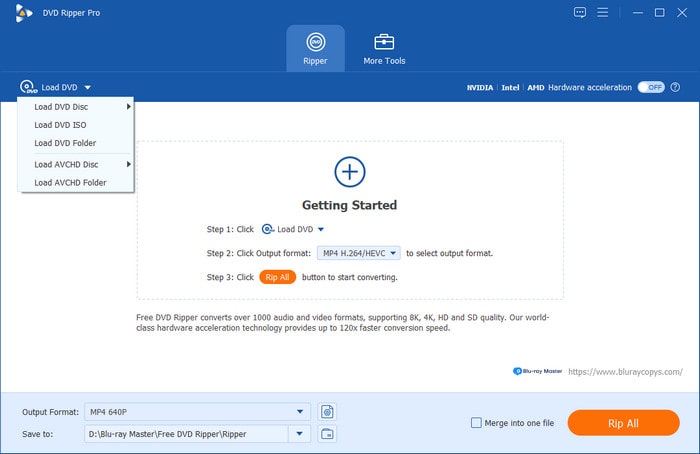
Step 2.On the main interface, click the Load DVD tab menu or the Plus icon at the center to import the DVD you have inserted.
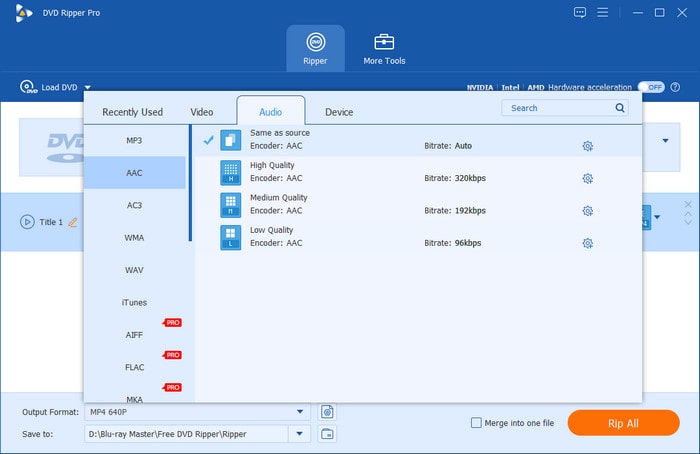
Step 3.Once the DVD is loaded, you can select a digital output profile from the Output Format drop-down list. After doing so, a new window will prompt, where you can choose a video or audio format of different parameters.
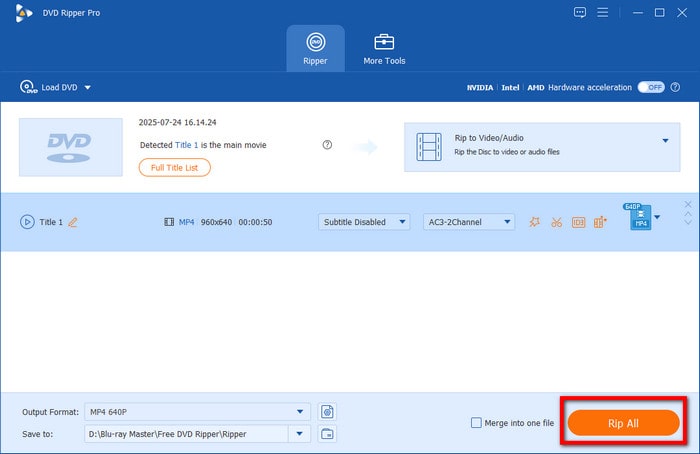
Step 4.Afterward, you will be brought back to the main interface, where you need to hit the Rip All button. This will initiate the fast DVD ripping process.
Ok, now you have learned the complete steps of using this free tool to rip DVDs for easy backups. If you want to free up some of your DVD collection space, this tool will help you. This powerful tool also has many interesting features, like adjust DVD video filters, and you can explore it to make your DVDs better effects.
2. Compress DVD Disc
You can also use the AnyMP4 DVD Copy to transform your DVD 5,8,9,10 and even the DVD R up to their maximum storage capacity. This software is a remarkable burning program that allows you to copy your DVD into your computer's hard drive. It lets you clone and save your DVD movies as ISO files and folders. Meanwhile, this DVD copy software has the ability to compress your DVD 5 and DVD 9 without losing their quality. Here are the steps to do so.
Step 1.Grab a copy of the program on your computer, and launch it. But before launching the software, ensure you have inserted the DVD disc into your computer’s disc drive. Now upload the DVD when you hit the Arrow button of the Source section.
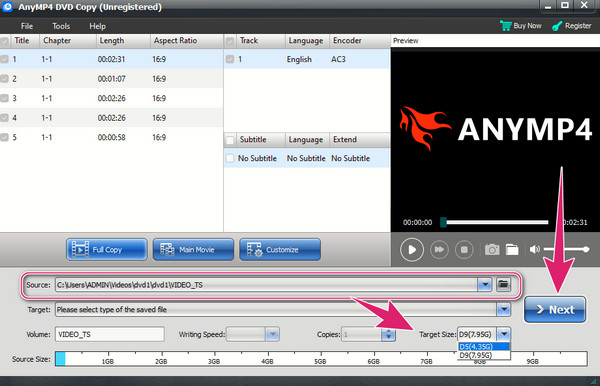
Step 2.Afterward, select your desired size in the Target Size section. Then, hit the Next tab.
Step 3.Finally, hit the Start button on the next page to begin the compression.
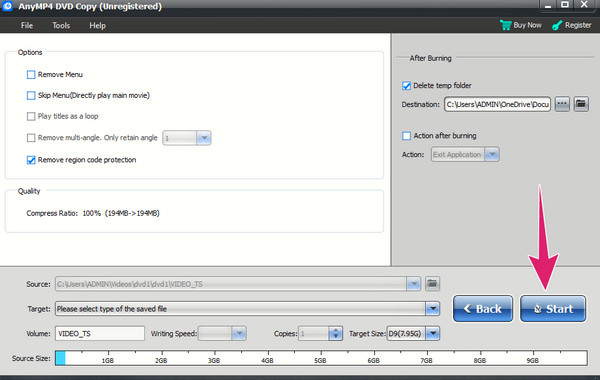
This DVD copy tool also performs well in compressing the DVD sizes. It can output the large DVDs to DVD-9 or DVD-5, which saves space for you to store more data on the discs. Note that it is a paid software, but you can try its free trial to evaluate its DVD copying ability.
Part 4. FAQs about DVD Capacity
-
How much data does a DVD-R hold?
Standard DVD-R has a capacity of 4.7GB.
-
Can I save a high-definition movie on a DVD?
It depends if the storage capacity of your DVD is capable of holding the size of the HD movie you want to store.
-
Is it possible to increase the storage capacity of a DVD?
No. It is impossible to increase the capacity of the DVD. Hence, select a DVD format that will meet your storage requirement if you want to have high storage.
Wrapping up
The DVD capacity depends on the type of format your DVD has. If you want to expand the capacity, unfortunately, it is impossible. However, you can always do it in reverse. Instead of expanding the storage capacity, you can just shrink the DVD content by ripping it or compressing it using the 2 ways for turning your DVD into a digital media file to play on all media players out there. Hence, use Blu-ray Master Free DVD Ripper.
More from Blu-ray Master
DVD Tips

Fast and free ripping software to decrypt all DVDs to digital easily on your computer.
100% Secure. No virus
