

Jul 30, 2025Posted by Kevin Miller to Rip Blu-ray
Blu-ray and DVDs are still widely prized for their exceptional audio and video quality as well as their unique supplementary features, even in the digital age. But these physical media are quite prone to permanent damage from scratches, aging, or loss, which is where professional copying software such as Leawo Blu-ray Copy comes in handy.
This post aims to thoroughly and impartially examine a popular Blu-ray/DVD copy software, Leawo Blu-ray Copy, from a variety of aspects, including its features, price, pros, and cons.
Table of Contents
Part 1. What is Leawo Blu-ray Copy
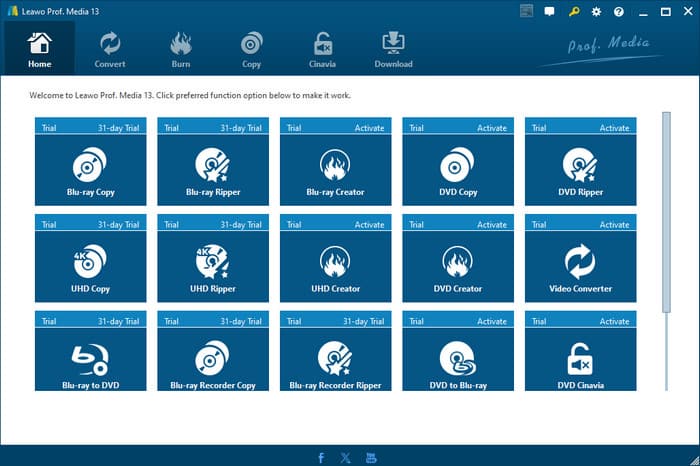
Leawo Blu-ray Copy is a software created especially for backing up or copying Blu-ray discs. Leawo Blu-ray Copy has emerged as one of the top Blu-ray copy programs for Blu-ray users, thanks to its exceptional capabilities on both the Mac and Windows operating systems.
You can create 1:1 copies of Blu-ray and DVD films on discs, ISO image files, and folders losslessly with the aid of this Blu-ray copying tool. More significantly, users can copy Blu-ray discs without any limits because of its potent ability to get around Blu-ray region code restrictions. In addition, it offers three copy modes to meet the needs of different users.
Part 2. Key Features and Functionality
After learning about Leawo Blu-ray Copy’s fundamental characteristics, we will analyze its key features and functionality. After all, its primary competitiveness in the Blu-ray backup market is comprised of these painstakingly created functions. Here are its core features:
1:1 Lossless Blu-ray & DVD Copy
Leawo Blu-ray Copy has the ability to copy BD50, BD25, DVD-9, and DVD-5 discs 1:1 without sacrificing original quality. In contrast to other copy tools that lower file quality in order to conserve space, this software is able to preserve all material, including metadata, menus, special features, chapters, and subtitles. Moreover, it supports copying Blu-ray 3D discs 1:1 without losing the 3D effect.
Three Copy Modes
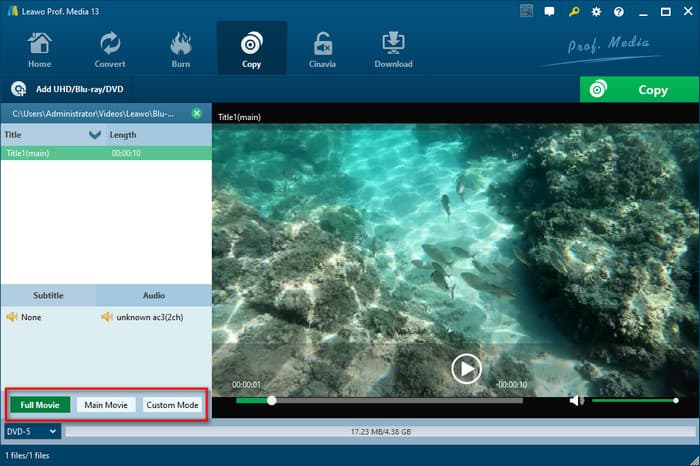
Leawo Blu-ray Copy offers three distinct copying options to accommodate various user needs: full movie, main movie, and custom mode.
• Full Movie: It precisely replicates the entire Blu-ray or DVD, including all contents and menus, and it is suitable for those collectors who wish to preserve the viewing experience.
• Main Movie: Trailers and supplementary features are not included in this mode, which merely extracts the main movie file. Users who want to conserve device storage space will mostly benefit from this functionality.
• Custom Mode: It allows users to select specific titles, subtitles and audio tracks that they might want to include in the backup, which maximally ensures flexibility.
Blu-ray Copy Protection Removal
One of the highlights of Leawo Blu-ray Copy is its ability to bypass a lot of copy protections that usually prevent users from backing up their discs. This software supports removing BD+, MKB, CSS, AACS, and region codes, which means that no matter what type of Blu-ray it is, you can easily copy it.
Compress BD-50 to BD-25
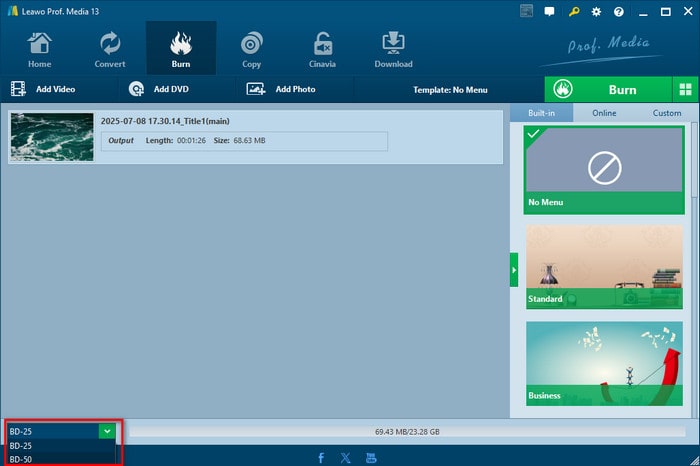
Additionally, Leawo Blu-ray Copy is capable of compressing the content from BD50 to BD25 without sacrificing quality. This technique works well for making backups that save space. It is especially helpful for people who wish to have their own library of movies without having to worry about disc quality degradation.
Part 3. Does Leawo Blu-ray Copy Work on DVDs
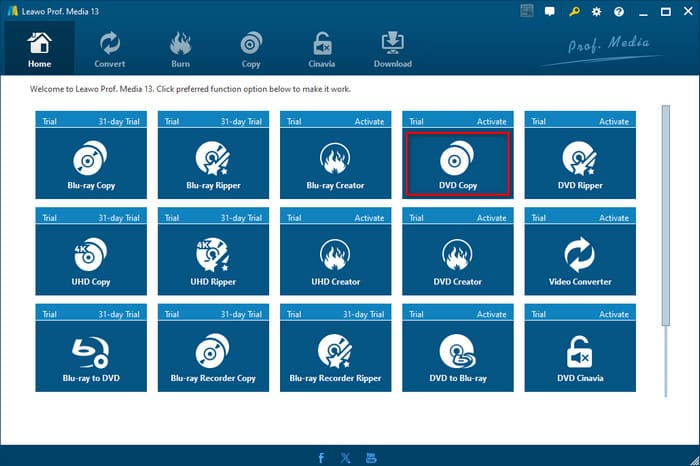
After exploring Leawo Blu-ray Copy's primary functions, it is evident that this program is quite good at processing Blu-rays. Does Leawo Blu-ray Copy work on DVDs? Can it offer the same level of support for the DVD discs as it does for Blu-ray? Many users may be curious about that. Therefore, we will then examine the software's features and real performance when working with DVD discs.
Leawo Blu-ray Copy is compatible with DVD disc backup. It could copy a DVD disc, a DVD folder, and an ISO image file. Also, it is able to compress DVD content from DVD-9 to DVD-5 with high quality. What’s more, similar to Blu-ray copy, there are also three DVD copy modes: full movie, main movie, and custom mode. Additionally, Leawo Blu-ray Copy is capable of decrypting, copying, and backing up CSS-DVD contents to a computer or disc, and removing disc region restriction to get a region-free DVD copy.
Part 4. Is Leawo Blu-ray Copy Free
So, is it necessary to pay for such a complete Blu-ray/DVD copying tool? Next, let's analyze in detail the price of Leawo Blu-ray Copy.
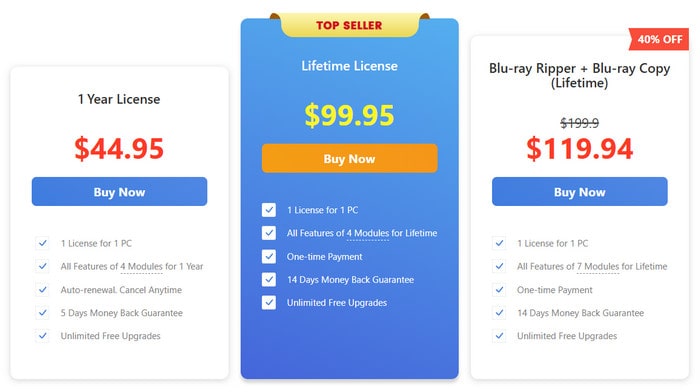
• $44.95: all features of 4 modules (Leawo Blu-ray Copy, Leawo DVD Copy, Leawo Blu-ray Recorder Copy, and Leawo Blu-ray to DVD Converter) for 1 year.
• $99.95: all features of 4 modules (Leawo Blu-ray Copy, Leawo DVD Copy, Leawo Blu-ray Recorder Copy, and Leawo Blu-ray to DVD Converter) for lifetime.
• $119.94: all features of 7 modules (Leawo Blu-ray Ripper, Leawo DVD Ripper, Leawo Blu-ray Recorder Ripper, Leawo Blu-ray Copy, Leawo DVD Copy, Leawo Blu-ray Recorder Copy, and Leawo Blu-ray to DVD Converter) for lifetime.
Although Leawo Blu-ray Copy provides a free trial version for 30 days, it only allows you to copy the first 5 minutes of Blu-ray or DVD content.
Part 5. Leawo Blu-ray Copy Pros and Cons
Pros
- Copy protection removal.
- Clean interface design.
- Compatible with both Windows and Mac.
Cons
- A little bit high price.
- Consumes too much memory.
- Long downloading process.
Part 6. How to Use Leawo Blu-ray Copy: A Step-by-Step Guide
Following a review of Leawo Blu-ray Copy's capabilities and license options, this part will offer a comprehensive operational guidance on how to copy Blu-ray movies, enabling you to quickly become proficient in every step of the process, from installation to output.
Step 1. Insert Disc: To begin with, download and install Leawo Blu-ray Copy on your computer. Then, insert the disc into the drive.
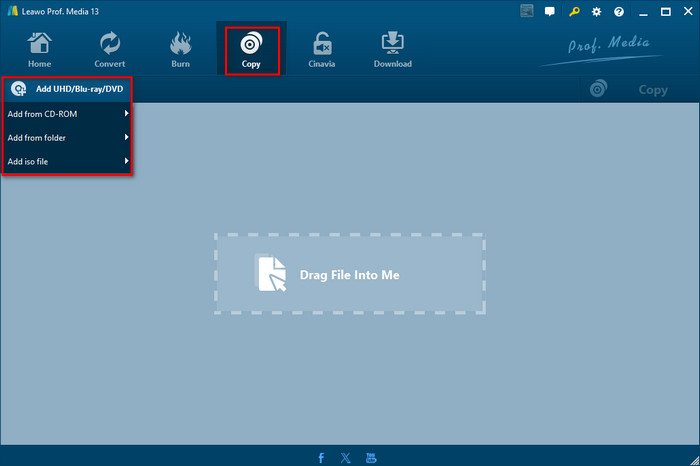
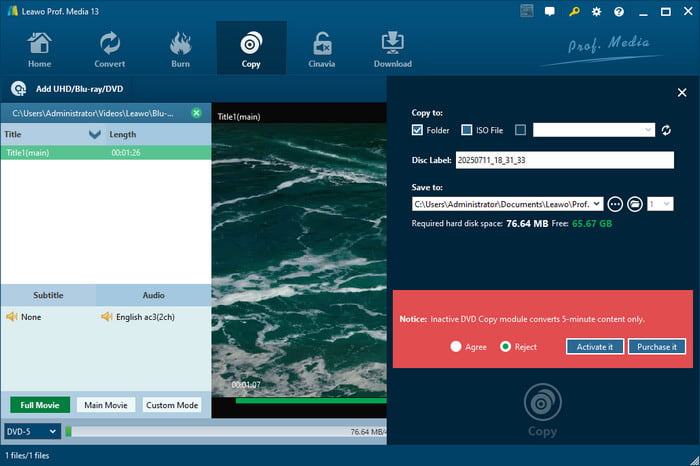
Step 2. Add Blu-ray Source: Open the software, navigate to the Copy menu and click it. Then, click Add UHD/Blu-ray/DVD to select: add from CD-ROM, add from folder, or add iso file according to your need. Also, you can drag the file directly.
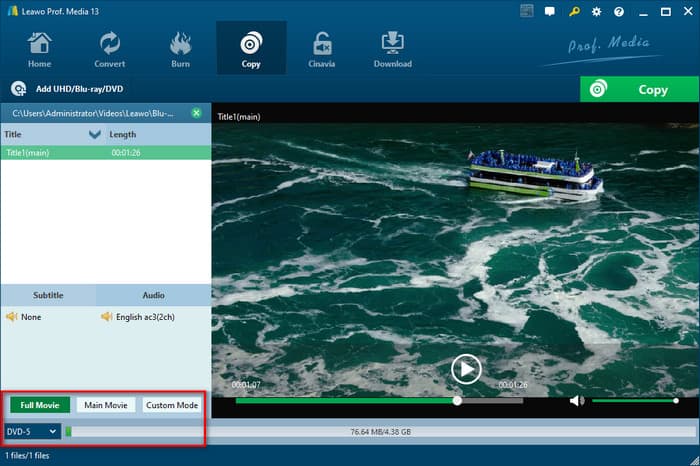
Step 3. Copy Settings: The left panel displays a number of settings once the Blu-ray content has been loaded. Choose the desired audio tracks and subtitles, and then select the appropriate copy mode from Custom Mode, Main Movie, or Full Movie.
Step 4. Start Copying: Click the Copy button in the top right corner to activate a pop-up panel to edit the destination, output format, and disc label. After that, click the Copy button in the bottom right corner to start copying.
Step 5. Copy Completed: The software will play an audio alarm and show an on-screen message when the process is complete.
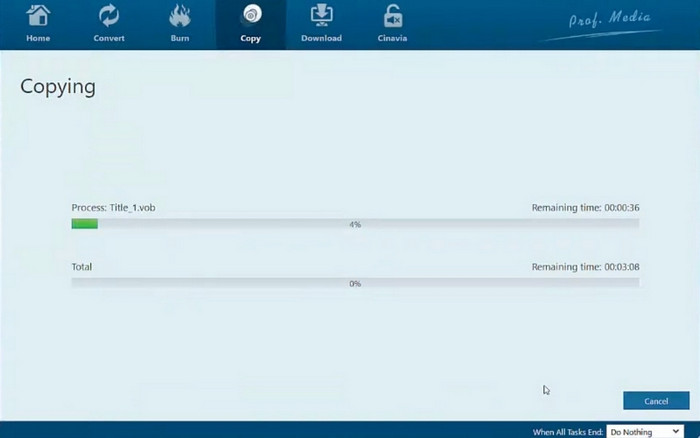
By now, you have fully mastered the complete process of how to use Leawo Blu-ray Copy from installation to output.
Part 7. Leawo Blu-ray Copy Alternative
As mentioned above, Leawo Blu-ray Copy is a large and expensive software for many users. If you are not satisfied with that, Blu-ray Master Free Blu-ray Copy is a superb tool that can make up for these shortcomings.
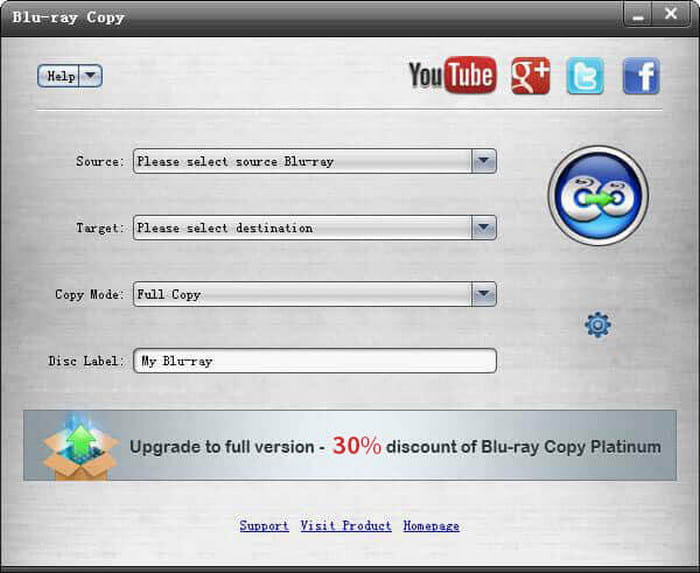
Blu-ray Master Free Blu-ray Copy is capable of creating a lossless copy of any Blu-ray file to a hard drive or disc. Like Leawo Blu-ray Copy, it supports acceleration technology and copy protection removal. Also, it possesses a straightforward interface and operation process. However, because of its compact installation package, it won't take up much computer space, and its download speed is fast. Furthermore, the most crucial aspect is that it is totally free and doesn't ask customers to invest any money.
Free Download
For Windows
Secure Download
Wrapping up
In this Leawo Blu-ray Copy review, we have evaluated this tool’s key features and price, and learned how to copy a Blu-ray disc with it. At the same time, we have drawn a conclusion that although Leawo Blu-ray Copy is able to perfectly copy a Blu-ray or DVD disc losslessly, its cost is too high, and the installation package is large. Therefore, you can download Blu-ray Master Free Blu-ray Copy to enjoy better Blu-ray copy performance. And we hope you could share your experience in the comments.
Free Download
For Windows
Secure Download
More from Blu-ray Master
