

Mar 05, 2026Posted by Kevin Miller to Play DVD
Best for
Best Premium Hardware: Sony UBP-X800M2
Best Budget Hardware: Panasonic S700EP-K
Best Versatile Software: Blu-ray Master Free Blu-ray Player
Best Open-Source Tool: VLC Media Player
DVDs are protected by region codes, and you can’t play DVDs from other countries unless you have a region-free DVD player. Finding the right multi-region DVD player allows you to enjoy international DVDs in 4K without interruption. This article lists the top 10 region-free Blu-ray/DVD players with a detailed introduction, and you can select one based on your specific needs to enjoy movies smoothly.

Part 1. What Is Multi Region DVD Player
A region-free DVD player, also called a multi-region or all-region DVD player, can play DVDs from any part of the world. Usually, region code is encoded on DVDs to protect unreleased movies. Each country has a different region code, and you can take a careful look at the following chart. For instance, Region 1 includes the US and Canada, while Region 2 covers Europe and Japan.
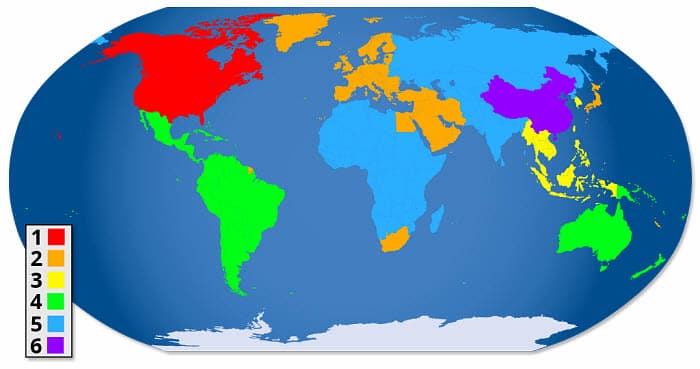
| Region Code | Geographic Scope |
| Region 1 | the United States and the US Territories, Canada. |
| Region 2 | Europe, Japan, the Middle East, South Africa, and Greenland. |
| Region 3 | Southeast Asia and East Asia |
| Region 4 | New Zealand, the Pacific Islands, Australia, Central America, Mexico, South America, and the Caribbean |
| Region 5 | Eastern Europe, the Indian Subcontinent, Russia, Africa, North Korea, and Mongolia |
| Region 6 | China |
If your DVD player is region-locked, it won’t play DVDs from other regions. It will be inconvenient if you have DVDs from different regions. A region-free DVD player can bypass all these restrictions and can play DVDs from any region. Keep on reading to look for region-free DVD players.
How We Tested
'To provide a transparent evaluation, our lab conducted rigorous stress tests on each hardware unit. We utilized a diverse disc library, ranging from brand-new 4K UHD titles to 15-year-old legacy DVDs showing minor oxidation and surface scratches. We focused on the drive's error-correction capabilities—specifically testing whether the laser pickup could maintain a stable bitrate without stuttering on older, single-layer (DVD-5) and dual-layer (DVD-9) discs. Each player was connected to a calibrated 4K OLED display and a 7.1.4 Dolby Atmos setup to verify signal integrity during PAL-to-NTSC transcoding.'
Hardware Modification vs. Firmware Hacks
'It is crucial for users to distinguish between Hardware Modification (Pro-Mod) and Firmware Hacks.
- Hardware Modification: Most high-end units (like the modified Sony UBP series) involve a physical chip soldered onto the motherboard. This is the most reliable method as it remains unaffected by official manufacturer software updates.
- Firmware Hacks: These are software-based patches. While cost-effective, they are volatile; a single 'System Update' from the manufacturer could potentially re-lock your player to its original region.'
Advanced Audio/Video Parameters (Bitstream & More)
'For audiophiles, these players support Bitstream Audio Output, allowing the raw encoded data (Dolby Atmos or DTS:X) to be processed by your external AV receiver for superior spatial accuracy. Furthermore, we analyzed the Chroma Upsampling performance, ensuring that when upscaling standard definition DVDs to 4K, the color gradients remain smooth without 'banding' artifacts.'
New Section: How to Check DVD Region Codes & Remote Hacks
- 'Identifying Region Codes on Your Media Before attempting playback, check the back of your DVD case. Look for a small 'Globe' icon with a number (1 through 6) inside. If you see 'Region 0' or 'All,' the disc is region-free.
- The Possibility of Remote Hacks For some budget-friendly models (especially older LG or Magnavox units), users may unlock region-free capabilities via Remote Hacks. This involves entering a specific sequence of buttons (e.g., 'Repeat, 2, 9, 3, 3, 4') on the remote control to access a hidden service menu. However, please note that for major brands like Sony or Panasonic, these 'Easter eggs' are virtually non-existent in modern 4K models, making a professionally modified hardware unit the only definitive solution.'
Part 2. Top 5 Multi-Region DVD Players (Hardware)
Here are the top 5 multi-region external DVD players we have evaluated best, including the multifunction, stability, durability, convenience, and more. All these products are from well-known and reliable manufacturers such as Sony, Panasonic, and LG. You can have a comprehensive review and select one that best suits your demands.
1 Sony UBP-X800M2
$248
MP3, DVD, Blu-Ray Disc
4K High Dynamic Range; HDR to SDR Conversion; High-Resolution
Versatile Connectivity
HDMI, Coaxial
Wi-Fi, Ethernet
8.4 Pounds
Surround
This multiregion DVD player has a Dolby Vision display and HDR 10 compatibility, ensuring a fantastic movie viewing experience with crisp images and sound. This Player uses Sony’s DSEE HX function, which can enhance the sound quality of audio files. Besides, it can play nearly all Blu-ray video formats and upscales lower resolution to 4K.
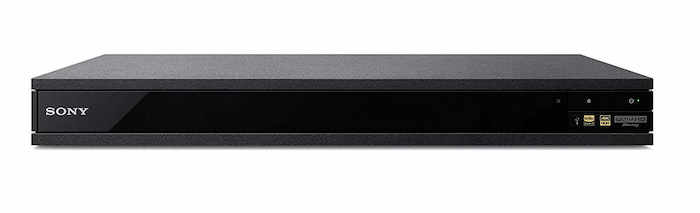
Features:
- 4K UHD resolution
- WiFi, Ethernet connectivity
- Dolby Vision and HDR 10 support
- DSEE HX audio upscaling software
- 1, 2, 3, 4, 5, and 6 region codes supported
Pros
- Supports high-display resolution
- Smart compatibility
- Anti-vibration design for clear sound quality
Cons
- Comparatively expensive Blu-ray player
Bottom Line: Sony’s UBP-X800M2 offers a premium movie experience with Dolby Vision, HDR 10, and DSEE HX audio enhancement. While it supports high-res displays and intelligent features, it comes at a higher price point.
2 WGC Sony Region Free Blu-ray Player
$248
DVD, Blu-Ray Disc
Built in Video PAL/NTSC Converter
HDMI
HDMI
2 Pounds
Surround
The WGC Sony Region Free Blu-ray Player allows you to play DVDs and Blu-ray discs from all regions, offering flexibility for your movie choices. With Full HD 1080p resolution and upscaling capabilities, it delivers enhanced viewing quality, even for older DVDs.
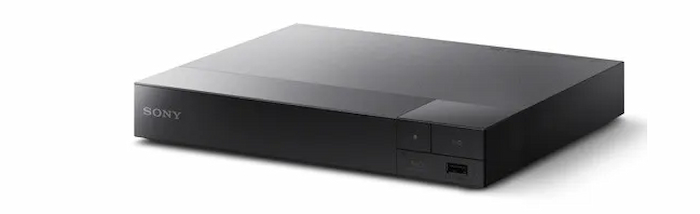
Features:
- Full HD 1080p resolution
- HDMI connectivity
- 0-8 region codes supported
- Versatile region-free Blu-ray player
- Upscales the content up to 1080p resolution
- PAL, NTSC, DVD, and Blu-ray discs supported
Pros
- Compatible with older discs
- Dedicated region codes for Blu-ray discs
- The upscaling feature is great for older movies
Cons
- Does not have WiFi support
Bottom Line: The WGC Sony Region Free Blu-ray Player offers flexibility with region-free playback for DVDs and Blu-ray discs. Its Full HD resolution and upscaling capabilities enhance viewing quality, but it doesn’t support a WiFi connection.
3 Panasonic S700EP-K
$68.99
CD, DVD, SVCD
Progressive Scan
Micro USB
USB, HDMI
3 Pounds
Stereo
DD
The Panasonic S700EP-K Multi-Region DVD player is a Full HD player that can play DVDs from any region, supporting region codes 0 to 8, so you can enjoy movies worldwide. It supports the conversion of PAL format video signals to NTSC, preventing playback issues for smoother viewing.
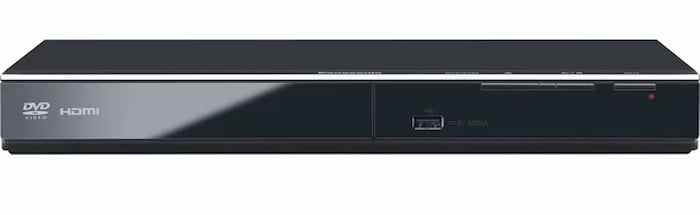
Features:
- Full HD 1080p resolution
- USB, HDMI connectivity
- 0-8 region codes supported
- PAL and NTSC DVDs supported
- Power resume feature
Pros
- Support all kinds of CDs and DVDs
- Affordable price
Cons
- Does not support WiFi connectivity.
Bottom Line: The Panasonic S700EP-K Multi-Region DVD player offers Full HD playback from any region, supporting region codes 0 to 8. While it’s affordable and supports various discs, it lacks WiFi connectivity.
4 LG UBK90
$249 – $299 (Depending on region-free modification)
4K UHD Blu-ray, Blu-ray (Region A/B/C), DVD (Region 0-9), CD
Dual HDMI Output (Audio/Video Separation), Dolby Vision, HDR10
HDMI 2.0a, HDMI 1.4 (Audio only), Optical, LAN, USB
Wi-Fi, Ethernet, USB
Dolby Atmos, DTS-HD Master Audio, Dolby TrueHD
The LG UBK90 is a powerhouse for physical media enthusiasts in the US and Europe who demand 4K HDR performance. As a step up from the BP series, it supports both Dolby Vision and HDR10, ensuring compatibility with the premium HDR formats used by major Hollywood studios. Its dual HDMI outputs allow users to send high-definition video to a 4K TV while routing high-res audio to older receivers, making it a flexible centerpiece for any home theater setup.

Features:
- Delivers four times the resolution of standard 1080p Blu-rays.
- Includes Dolby Vision and HDR10 for optimized frame-by-frame brightness and contrast.
- Dedicated audio output to reduce interference and support legacy audio equipment.
- Access to 4K versions of Netflix and YouTube directly from the device.
- When modified, it seamlessly plays DVDs from regions 1-6 and Blu-rays from zones A, B, and C.
Pros
- Excellent HDR format support (especially Dolby Vision).
- Dual HDMI outputs are a rare and valuable feature at this price point.
- Fast disc loading times compared to older Sony models.
- Sleek, minimalist design fits well in modern AV racks.
Cons
- Lacks an interface for advanced settings (very basic menu).
- No front-panel display (only a power LED).
- Streaming app library is limited compared to dedicated sticks like Roku or Apple TV.
Bottom Line: The LG UBK90 is the ultimate ‘set-it-and-forget-it’ 4K player for movie lovers who want premium Dolby Vision visuals and hassle-free global disc compatibility without breaking the bank.
5 LG 4K Smart Blu-ray player
$370
Blu-Ray Disc
Blu ray support
USB, HDMI
USB
Surround
LG 4K Smart Blu-ray player is another choice from LG and can also serve as a multi-region DVD player. It can upgrade lower-quality content to 4K for better viewing and is compatible with HDR, HDR10, and Dolby Vision for video, and Dolby Digital, Dolby TrueHD, and DTS for audio. Besides, it can stream 4K content via WiFi.
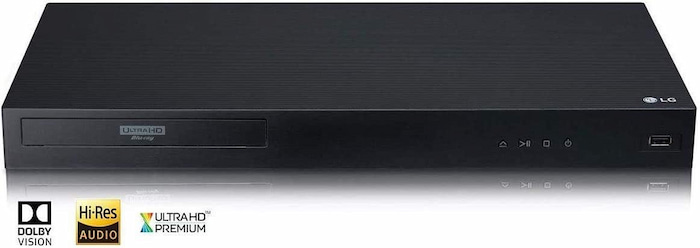
Features:
- 4K UHD resolution
- WiFi, HDMI connectivity
- 0-8 region codes supported
- Region A, B, and C supported for Blu-ray discs
- Dolby Digital, Dolby TrueHD, and DTS audio processing
Pros
- Excellent audio and video quality are available
- All types of discs are supported
Cons
- Comparatively expensive Blu-ray player
Bottom Line: The LG 4K Smart Blu-ray player offers high-quality audio and video, supports various disc types, and features WiFi streaming for 4K content. However, it has a higher price.
Part 3. Top 5 Multi-Region DVD Players (Software)
If a physical multiregion DVD player is not handy for you, we also provide software to ease your burden. Here are the top 5 multi-region DVD player software we have evaluated best, and each has a detailed introduction, including the operating platforms, price, and other features you may be interested in.
1 Blu-ray Master Free Blu-ray Player
Free
Windows 11/10/8, Mac OS X 10.9 or above.
4K, 8K
Select subtitles and add external subtitles.
Yes
Blu-ray Master Free Blu-ray Player is a premium multiregion DVD player we recommend due to its support for diverse discs without region limitations. It supports all types of DVDs from any region, including DVD+R, DVD-RW, DVD-ROM, DVD-R, DVD-RAM, DVD+RW, DVD-DL, and more. When watching DVDs or high-bitrate 4K content, users can enable the GPU Hardware Acceleration toggle in the settings to ensure smooth, stutter-free playback by offloading decoding to the graphics card. The interface is also fully optimized for High-DPI (High-Resolution) displays, ensuring a crisp and clear UI on modern monitors. Additionally, it features advanced settings that allow you to manage playlists, select audio tracks, and customize your viewing experience with ease.
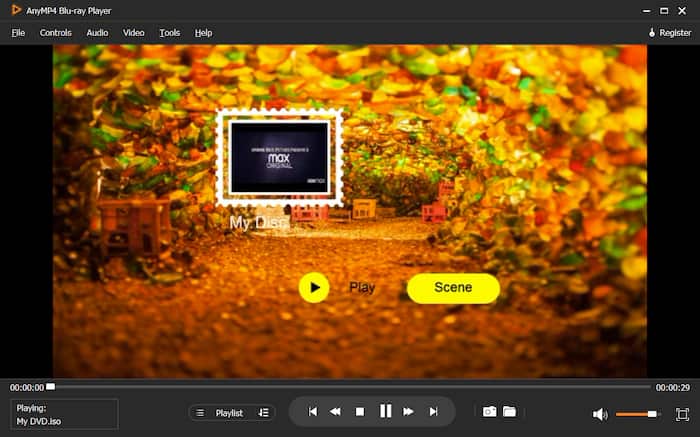
Features:
- Support both DVD and 4K Blu-ray disc
- Play the latest DVD movies and 4K/1080p video
- Allow to choose title, chapter, audio track, and subtitle
- Provide options to adjust playback progress, video effects, audio effects, and manage the playlist
Free Download
For Windows
Secure Download
Free Download
for macOS
Secure Download
Pros
- Play discs without regional limitation
- Support multiple file formats, including disc, folder, and ISO files
- Easy-to-operate and user-friendly
- Hotkeys offer great convenience
Cons
- The trial version doesn’t support upgrades
Bottom Line: Overall, Blu-ray Master Blu-ray Player is a premium and cost-effective Blu-ray player we have reviewed. It supports various formats and allows users to make customizable settings and watch DVDs from any region smoothly.
2 DVDFab Player 6
$59.99/year
Windows 11/10/8.1/8/7, macOS 10.10 – 14.x.
4K
Select subtitles and add external subtitle files.
Yes
DVDFab Player 6 is a versatile media player that handles DVD discs, ISO files, and folders, even those with encryption. It provides smooth playback for Blu-ray movies and supports a wide array of formats like MP4, MKV, M2TS, MP3, and WAV. To address its premium subscription cost, the software now offers a specialized Lite Version for users seeking a more streamlined, cost-effective experience. Furthermore, the 2026 update introduces cutting-edge AI Upscaling technology, allowing users to real-time enhance legacy 480p DVD content to near-1080p clarity. Available for both Windows and Mac OS, it remains a powerful choice for high-fidelity media management.
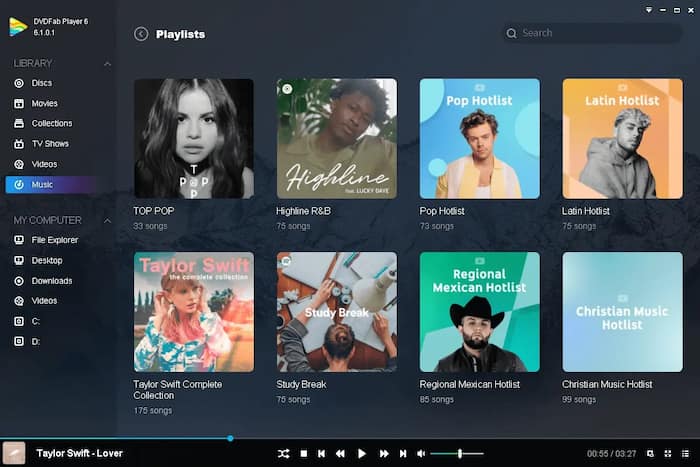
Features:
- Region-free playback for all DVDs, Blu-rays, and 4K Ultra HD Blu-rays
- Easy to organize and manage all local media files
- Support 4K UHD, HEVC (H.265), and all other regular media files
- Allow to manage Playlist with customized options
Pros
- Compatible with 4K UHD and 3D playback
- Support to import DVDs/Blu-rays to the local library
- Collect movie info from the Internet
Cons
- The price is very high
- The program sometimes crashes under Windows 7
- It doesn’t support Dolby Vision HDR
Bottom Line: DVDFab Player 6 is a versatile media player that handles DVDs, Blu-rays, and 4K Ultra HD Blu-rays, even encrypted ones. It offers smooth playback and supports various formats. However, it’s pricey and may crash on Windows 7.
3 VLC Media Player
Free
Windows 11/10/8, macOS 10.9 or later
4K, 8K
This best multi-region DVD player provides subtitle synchronization adjustments and supports a wide range of subtitle formats.
Yes
VLC is a cross-platform and open-source player available on Windows, Mac, Linux, Android, and iOS. VLC can also perform as a multi-region DVD player and can handle DVDs, CDs, and online streams. With the libdvdcss library, it can bypass DVD encryption to play region-locked DVDs. To enable this, users simply need to download the libdvdcss.dll file and place it in the VLC installation directory; this essential step allows the player to automatically decrypt and access discs from any region, providing a seamless viewing experience for international movie fans.
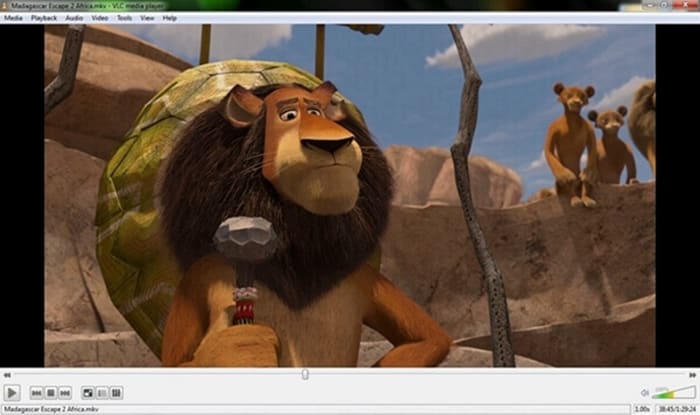
Features:
- Support various file formats
- Allow to play CDs, DVD folders, and ISO files
- Transform files to other formats
- Free and open-source to use on different operating systems
Pros
- Offer an easy-to-use interface
- Make customizable settings on video playback
- Completely ad-free
Cons
- The playback quality of VLC needs to be improved
- Bypassing DVD encryption requires libdvdcss
- It may crush sometimes, and the screen becomes black and white
Bottom Line: VLC is a versatile player that handles DVDs, CDs, and online streams. It’s free and open-source, available on multiple platforms. While easy to use and ad-free, playback quality may vary, and libdvdcss is needed for DVD decryption.
4 5KPlayer
Free
Windows 11/10, macOS 10.12 or later.
4K, 5K, 8K
Subtitle customization options and subtitle importation.
Yes
5KPlayer is another multi-region DVD player, praised as an all-in-one multi-functional media hub that serves as a music player, online video downloader, and AirPlay streamer. This multi-zone DVD player can play ultra-high-definition videos with multiple subtitle tracks and soundtracks on both Windows and macOS. To ensure a smooth experience with high-bitrate 4K discs, users should enable the Hardware Acceleration feature to leverage the GPU for stutter-free playback. Furthermore, the 2026 version features a modernized, High-DPI compatible interface, offering a crisp and intuitive layout that looks stunning on high-resolution monitors.
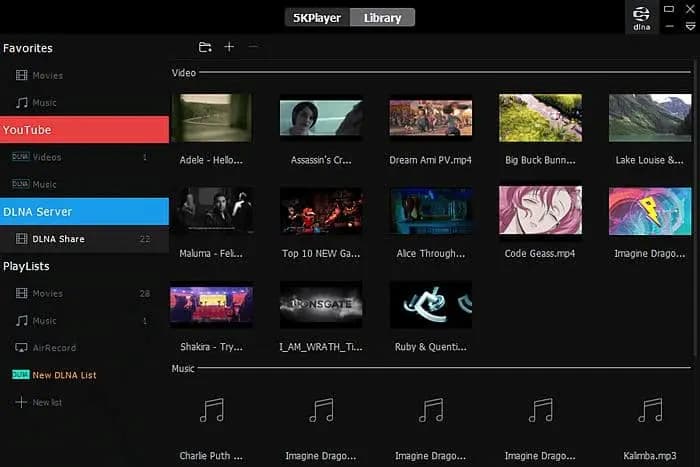
Features:
- Region-free playback for any DVD
- Support various formats like MKV, AVI, MP4, FLAC and MP3
- Allow to download videos from YouTube, Vimeo, and Dailymotion
Pros
- Allow to download videos from more than 300 websites
- Support wireless streaming audio and video via AirPlay and DLNA
- Users can create and manage decent library
Cons
- The interface may be a bit confusing for beginners
- Outdated and dark user interface
Bottom Line: 5KPlayer allows users to download MP4 videos, movies, and songs in full HD, Ultra HD, 4K, etc for free on Mac OS and Windows. However, it may not be a good choice for users who prefer a fashionable interface.
5 BlazeDVD
Free
Windows 11/10/8
SD
Supports multiple types of subtitles.
Yes
BlazeDVD is a Windows-based region-free DVD player. Its professional version can unlock and play any region-code/CSS-encrypted DVDs. It is a feature-rich media player and supports various video and audio formats like AVI, MPEG, VOB, WMV, DTS, and HD (high-definition) videos. To stay relevant for modern users, the 2026 version has undergone a significant UI overhaul to be touch-friendly, making it the perfect choice for Windows 2-in-1 devices and tablets. This modernization ensures that while the core engine remains powerful and compatible with legacy formats, the navigation is intuitive and responsive for the latest touchscreen hardware.
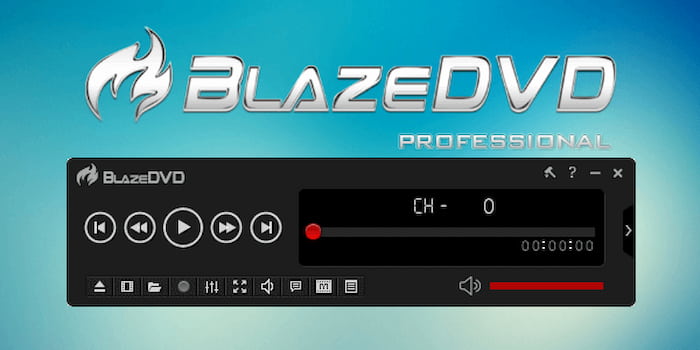
Features:
- Play DVD/VCD/SVCD/CD/DV/WebCam
- All-region-free DVD Player to play movies of regions 1-6
- Equip with cinematic surround sound and has special audio effects
- Provide rich playback experience
Pros
- The audio playback quality is excellent
- Provide the Smart Stretch technology
- User-friendly interface and is easy to use
Cons
- Unable to play Blu-ray discs
- It does not serve as a Mac DVD player
Bottom Line: BlazeDVD is a Windows-based region-free DVD player that is able to unlock and play any region-coded/CSS-encrypted DVDs. It offers excellent audio quality and a user-friendly interface. However, it doesn’t support Blu-ray discs and is limited to the Windows operating system.
Part 4. FAQs of Multi-Region DVD Player
-
Are there any DVD players that play all regions?
Yes, DVD players, known as multi-region or region-free, can play DVDs from all regions. These players are designed to bypass the region coding system, allowing users to play DVDs from any region. Blu-ray Master Blu-ray player is a premium multiregion DVD player.
-
Do multi-region DVD players work?
Yes, multi-region DVD players do work as advertised. They are specifically designed to ignore the region coding on DVDs, enabling users to play discs from any region without restrictions.
-
How do I know if a DVD player is multi-regional?
You can check the information on product specifications or descriptions provided by the manufacturer. You can search for reviews or forums where users may have discussed the player’s region-free capabilities. Or you can directly contact the manufacturer or retailer to inquire about the DVD player’s region-free functionality.
-
Can I play a Region 2 DVD on a US Sony DVD player without buying a new one?
Generally, no. Most US Sony players are hardware-locked to Region 1. While some older models have ‘hack codes’ via the remote, modern units usually require a professional hardware modification. For a free workaround, try playing the disc on a computer using VLC Media Player with the libdvdcss library installed.
-
What is the best cheap region-free DVD player with HDMI for an old TV?
The Panasonic S700EP-K is the top budget-friendly choice. It features HDMI with 1080p upscaling, a robust multi-region (0-8) drive, and PAL/NTSC conversion, making it perfect for connecting global discs to older HD or analog-ready televisions.
-
Does the Sony UBP-X800M2 really support all Blu-ray regions out of the box?
No. Standard retail units are region-locked (Region A for the US). To play discs from all regions (A, B, and C), you must purchase a ‘Region-Free Modified’ version from specialized retailers. Always verify the ‘multi-region’ or ‘region-free’ status in the product listing before buying.
Wrapping up
In summary, this article explores the top 10 multi-region DVD players, including both hardware and software, and gives a comprehensive and reliable review of each player. Just pick any of these versatile players and watch DVDs worldwide with an amazing audiovisual experience smoothly.
More from Blu-ray Master
Best DVD Player

Easily play Blu-rays, DVDs, and various video/audio formats with rich playback features.
100% Secure. No virus
