

Oct 23, 2026Posted by Kevin Miller to Play DVD
Quick Answer:
Is there dedicated ‘DVD Music Player’ software built exclusively for audio discs? No. Modern software companies do not make standalone players strictly for DVD music. However, you can perfectly enjoy your concert DVDs and high-definition DVD-Audio discs using universal Blu-ray/DVD players that offer superior audio decoding (Dolby/DTS), multi-channel passthrough, and manual audio track switching.
• Our Top Pick for Free Playback: VLC Media Player (100% Free & Open-source)
• Best Lightweight & Easy-to-Use: Blu-ray Master Free Blu-ray Player (Clean Interface & Regional Lock Removal)
• Our Top Pick for Audiophiles & Home Theater: DVDFab PlayerFab (Full menu support & high-res audio passthrough)
Nowadays, streaming is the common way for most people to enjoy a wide range of music. However, for true audiophiles and collectors, nothing beats the uncompressed sound of concert DVDs and high-definition DVD-Audio, which Apple Music and Spotify can’t provide.
Modern systems like Windows 11 and macOS have not supported DVD playback for years. Users often face frustrating roadblocks, from region code errors on imported concert discs to dead silence caused by missing DTS or Dolby codecs.
To help you enjoy your physical music library hassle-free, we hands-on tested dozens of tools. Here are the 4 best DVD music player software options for PC and Mac that guarantee smooth playback and crystal-clear audio.

Table of Contents
- How We Test and Pick the Best DVD Music Player Software
- Top 1. VLC - The Best Free & Open-Source Choice
- Top 2. Blu-ray Master Free Blu-ray Player - Best for Simple & Stable Playback
- Top 3. DVDFab PlayerFab - Best for High-Fidelity Audio & DVD-Audio Discs
- Top 4. CyberLink PowerDVD - Best Ultimate Home Theater Experience
- How to Play DVD Music on Your Computer
- Troubleshooting & Pro Tips for DVD Music Playback
- FAQs About DVD Music Player
How We Test and Pick the Best DVD Music Player Software
Finding the right software to play music DVDs isn’t just about pressing 'Play'—it’s about preserving audio fidelity, multi-channel sound, and disc functionality. To give you honest and reliable recommendations, we hands-on tested each software on both Windows 11 and macOS Sonoma using a dedicated external LG USB 3.0 DVD drive and a wired Sennheiser HD 600 headphone / 5.1 AV receiver setup.
To give reliable test results, we test the DVD player tools for audio codec support & sound quality, disc compatibility & region lock bypassing, menu navigation & track controls, and system performance & ease of use. Here is the final comparison table of the 4 best DVD music players.
| Software | Best For | Supported OS | Price | DVD Sound Quality | Ease of Use | Audio Codecs Supported | Region Bypass | DVD Menu Support | Resource Impact |
| VLC Media Player | Completely Free & Universal Playback | Windows, macOS, Linux | 100% Free | Good: Neutral output, solid equalizer | 4/5 | Dolby Digital, DTS, LPCM, AAC, FLAC | Yes | Hit-or-Miss on Complex Menus | Very Low |
| Blu-ray Master Free Blu-ray Player | Simple & Lightweight Disc Listening | Windows, macOS | Free (Paid upgrade for DTS 5.1) | Very Good: Clear stereo, requires upgrade for 5.1 | 4.5/5 | Dolby Digital, AAC, MP3 (DTS via upgrade) | Yes | Basic Navigation | Low |
| DVDFab PlayerFab | Audiophiles & High-Res DVD-Audio | Windows, macOS | Paid | Excellent: Studio-grade, high-res audio passthrough | 4.5/5 | Dolby Atmos, DTS:X, LPCM, DTS-HD, FLAC | Yes | Full Interactive Menu Support | Medium |
| CyberLink PowerDVD | Ultimate Home Theater & TV Casting | Windows Only | Paid | Outstanding: Virtual surround, cinematic bass boost | 3.5/5 | Dolby Digital Plus, DTS-HD, DSD, FLAC | Yes | Full Interactive Menu Support | Medium – High |
Top 1. VLC - The Best Free & Open-Source Choice
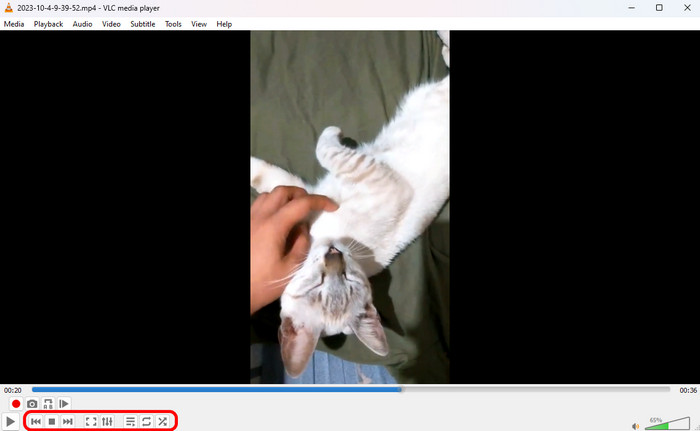
VLC is one of the best DVD music players that you cannot miss. It can play various digital files with ease, as well as DVD music. It is a reliable choice for playing music DVDs and concert discs. It excels at reading raw audio streams directly from optical drives. With the built-in libdvdcss library, it can bypass most DVD copy protections and DVD region codes, so you can enjoy your DVD music with ease. If you want to play your physical album on Windows, Mac, and Linux, VLC gets the job done.
Pros
- Its open-source engine supports DVD-Video and ISO images.
- It has a built-in 10-band equalizer and audio spatializer for fine-tuning sound.
- Its manual track switching feature allows you to switch between multi-language or multi-channel audio tracks.
Cons
- It occasionally lags when processing complex music DVDs.
- Its interface design is outdated.
Editor’s Tip:
If you think the volume is low, you can go to Tools > Effects and Filters > Audio Effects, enable the Equalizer, and choose the ‘Rock’ or ‘Live’ preset to instantly boost vocal clarity for concert DVDs.
Top 2. Blu-ray Master Free Blu-ray Player - Best for Simple & Stable Playback
Blu-ray Master Free Blu-ray Player is also an easy-to-use DVD music player. Though its name shows Blu-ray player, it can actually play DVD files with ease. It is a lightweight tool that uses minimal CPU resources, which is ideal for users who want a straightforward way to play on laptops. It has powerful DVD decryption ability to handle almost all DVD encryptions. With the flexible playback settings, you can control DVD music playback.
Free Download
For Windows
Secure Download
Free Download
for macOS
Secure Download

Pros
- It supports DVD discs, folders, and ISO image files.
- You can flexibly switch audio tracks and stereo mode.
- It's region-free, allowing you to listen Region 1-6 music DVDs.
- You can use the convenient hotkeys to adjust volume.
Cons
- You need to upgrade to the Pro version to unlock full DTS-HD and Dolby TrueHD decoding.
- It lacks advanced audio customization tools compared to premium players.
Top 3. DVDFab PlayerFab - Best for High-Fidelity Audio & DVD-Audio Discs
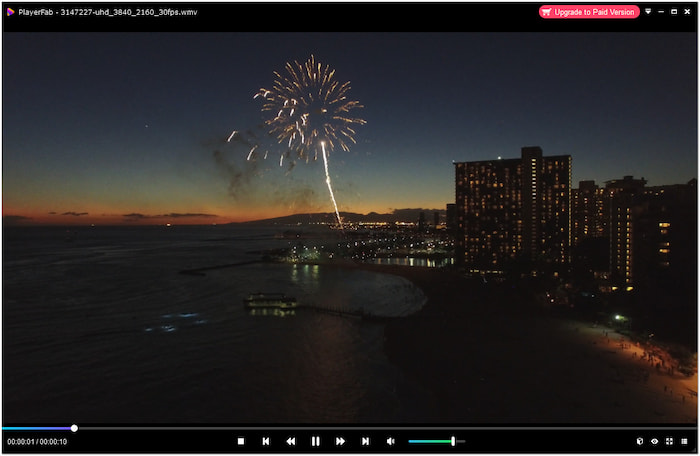
DVDFab PlayerFab is a robust DVD music playback tool designed specifically for serious audiophiles and home theater enthusiasts. It is outstanding for its full menu navigation support and native compatibility with high-resolution audio formats like Dolby Atmos, DTS:X, and uncompressed LPCM. With advanced decryption technology, you can play commercial DVDs with ease. If you don't care about the price and collect rare DVD-Audio discs or multi-channel concert releases, PlayerFab delivers an immersive acoustic experience.
Pros
- Its full menu lets you select chapters.
- It provides outstanding audio output quality with multi-channel surround sound passthrough.
- The TrueTheater audio enhancement technology can boost bass and vocal clarity.
- Its smart poster wall library helps organize digitized music DVD collections automatically.
Cons
- Its price is $169.99, which is high for most people.
- Slightly heavier on system resources during initial startup.
Top 4. CyberLink PowerDVD - Best Ultimate Home Theater Experience
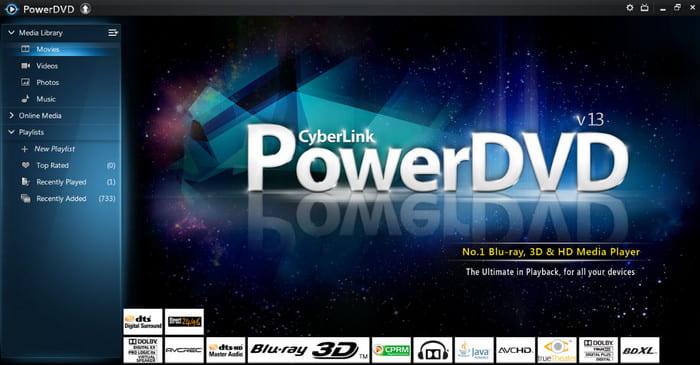
CyberLink PowerDVD is the industry flagship when it comes to optical disc playback on Windows. It is equipped with studio-grade audio technologies, giving you an immersive DVD music listening experience. For users who connect their PC to a TV or soundbar to watch live concerts, PowerDVD provides unmatched acoustic depth and visual refinement.
Pros
- It has Dolby Digital Plus, DTS-HD, and multi-channel audio decoding.
- You can use it to cast your music DVD to Apple TV, Chromecast, or Roku for wireless listening.
- TrueTheater Audio technology expands stereo tracks into virtual surround sound.
Cons
- It only supports Windows computers.
- Its price is also not friendly for most people.
Editor’s Tip:
If you’re listening through headphones, turn on PowerDVD’s Virtual Surround Sound mode in the Audio settings—it simulates a live concert hall environment surprisingly well!
How to Play DVD Music on Your Computer
Blu-ray Master Free Blu-ray Player is a media player software that supports DVD playback. This means that beyond Blu-rays, you can play concert DVDs, music videos, and audio-rich movie discs. You can choose an audio track, adjust stereo mode, or control playback using hotkeys.
Here's how to play DVD music using the best DVD Music player:
Step 1.Beforehand, download the Blu-ray Master Free Blu-ray Player for free. Install the audio player software on your system and finish the installation process. Once completed, place the DVD in the external disc drive and run the software.
Free Download
For Windows
Secure Download
Free Download
for macOS
Secure Download
Step 2.Click the Open Disc button to access your disc drive and load the DVD music. In addition to physical discs, you can also import a VIDEO_TS folder and ISO file. To do so, click the Open File button instead. The software will then read the disc and play it back automatically.

Step 3.Once the DVD is loaded, you can choose to play the music or navigate through menus. In addition, you can go to the Control tab and select Play, Pause, Stop, Forward, or Backward to control music playback. Optionally, you can click Audio to select different audio tracks, adjust stereo modes, or switch to a different audio device.

Blu-ray Master Free Blu-ray Player makes it easy to enjoy music directly from DVDs. It is a great choice for playing concert recordings or music DVDs without complicated settings. If you're looking to relax with a favorite album on a disc, this player is what you need.
Troubleshooting & Pro Tips for DVD Music Playback
Troubleshooting: Disc Not Recognized or 'Region Code Error'
Commercial or overseas music DVDs trigger DVD region locks or fail to play.
To solve this problem, you can try the following 2 solutions:
1. Use region-free software (like Blu-ray Master Free Blu-ray Player) to bypass regional restrictions safely.
2. Plug external DVD drives directly into a powered USB 3.0 port instead of an unpowered hub.
Tip 1: Optimize Lows and Vocals with Audio Equalizer
Concert DVDs can sound flat on standard PC setups.
You can open the player's Audio Equalizer, select presets like 'Live' or 'Rock' to boost vocals and instrument clarity, and enable Dolby/DTS pass-through for surround sound.
Tip 2: Rip DVD Audio into Digital Formats (MP3/FLAC)
If you want to enjoy live concert tracks on your phone or car stereo on the go, you are recommended to use a DVD ripper tool to convert the disc audio into FLAC/ALAC for lossless quality, or MP3 (320kbps) for universal device compatibility.
FAQs About DVD Music Player
-
What is the best free DVD music player software for Windows 11?
VLC is the best completely free option for Windows 11. It can play DVD Dolby/DTS audio smoothly with no ads and hidden costs.
-
Can I play region-locked music DVDs from other countries on my Mac?
Yes, you can. You can use a region-free player, like Blu-ray Master Free Blu-ray Player, to play any region DVD.
-
How can I get 5.1 surround sound when playing a concert DVD on my PC?
You need to connect your PC to a 5.1 AV receiver or sound bar via HDMI or Optical cable. Next, open the player's audio settings and set the output mode to 'Passthrough' and turn off the stereo downmixing.
-
Do modern computers need special software to play music DVDs?
Yes. Both Windows and Mac computers removed support for DVD playback years ago. You need to use a third-party media player to watch DVDs.
-
Is VLC Media Player good enough for playing commercial music DVDs?
Yes, for most users. VLC can handle most DVD copy protections to play DVD music. However, for extremely complex interactive menus or advanced Dolby Atmos passthrough, it fails.
-
How do I convert my old music DVD tracks into digital MP3 files?
You can use modern DVD ripping tools to extract audio tracks from DVDs, such as VLC, Blu-ray Master Free DVD Ripper, etc.
Conclusion
With the 4 best DVD music player software introduced in this article, you can effortlessly enjoy your DVD audio and concerts. You don't need expensive standalone hardware to experience pristine surround sound and rich audio details from your favorite physical discs. VLC and Blu-ray Master Free Blu-ray Player are good choices for people who pursue an easy workflow and free tools. If your budget allows, PlayerFab and PowerDVD are, of course, the choices for an immersive DVD music listening experience.
More from Blu-ray Master
Best DVD Player
Easily play Blu-rays, DVDs, and various video/audio formats with rich playback features.
100% Secure. No virus
