

Sep 24, 2025Posted by Kevin Miller to Create DVD
When it comes to dvd burning, ImgBurn is one of the free software that will get the job done. It is reliable not only for being a free program but also because it is effective for common DVD burning on PC. Unfortunately, it is unavailable on Mac, and if you use this OS, you are missing out on a great deal. But how about looking for alternatives to ImgBurn for Mac? We choose the best ones that are on par with ImgBurn regarding its quality, speed, and performance.
- Part 1. Does ImgBurn Work on Mac
- Part 2. Top 5 Alternatives to ImgBurn for Mac
- Part 3. How to Burn DVD/Blu-ray on Mac
- Part 4. FAQs about Alternatives to ImgBurn for Mac
Part 1. Does ImgBurn Work on Mac
To quickly answer you: No. ImgBurn is not supported on any macOS version.
The DVD burner is not supported on Mac OS. While it is a popular tool for computers, the developers of ImgBurn do not intend to create an Apple version of the software. More likely, this is because Mac’s system does not allow further modification that allows ImgBurn to use the libraries and frameworks to operate. And so, the developers only focus on upgrading the DVD burner for Windows OS for better user experience.
Part 2. Top 5 Alternatives to ImgBurn for Mac
It is important to give you precise information when recommending the ImgBurn alternatives for Mac OS. So, the following tools are tested according to proper requirements, such as quality, supported formats, features, and overall result. After the test, we picked the best 3 software that met the criteria.
AnyMP4 DVD Creator
This ImgBurn alternative is a toolkit that provides effective DVD-burning and video-editing functions. You can also create other DVD types with the DVD Creator, including Blu-ray, folder, and ISO image files. Additionally, it works well for the latest version of Mac OS.
iSkysoft
If you want to focus on burning DVDs on your Mac, iSkysoft is the suggested alternative. It works well for a wide variety of formats, so it is easy to burn MKV, AVI, and MP4 on a blank disc. Additionally, you can add photos to the DVD, which is a great deal for freeing up more storage space.
Express Burn
It is a perfect alternative to ImgBurn for Mac OS X 10.5 and above because it burns DVDs at a fast speed. While it is suitable for burning video formats, Express Burn also works well for images without losing quality.
| AnyMP4 DVD Creator | iSkysoft | Express Burn | Burn | LiquidCD | |
| Overall Rate |
|
|
|
|
|
| Ease of Use |
|
|
|
|
|
| Price | $12.45 | $59.95 | $40 | Free | Free |
| Best For | Fast-speed process and high-quality results | Personalize video, image, and audio before burning to DVD | Burn CDs for free | Interactive and open-source | Support M-Disc, bootable, and multisession discs |
| Supported Input Formats | MOV, MKV, FLV, MPG, etc. | WMV, MOV, 3GP, MPEG, etc. | DivX, EMV, MP4, etc. | MP3, MOV, MP4, MLV, etc. | ISO, MP4, FLV, etc. |
| Output Formats | DVD-R, DVD+R, DVD-ROM, BD-DL, BD9, and more | DVD disc, folder, ISO file, and BDMV | DVD+R, CD-DA | DVD, CD | DVD-R, CD-Text, ISO image |
| Subtitle |  | |  | | |
| Editing Tools | Various | Basic | | | |
| Menu Templates | | | | | |
| Burning Speed | High | Medium | High | Medium | Medium |
Blu-ray Master DVD Creator
Create the desired DVD and Blu-ray disc with Blu-ray Master DVD Creator for Mac as the ImgBurn alternative on Mac. The tool is equipped with the latest burning technology, allowing movies, homemade videos, audio, and images to be transferred to disc without losing quality. MP4, MOV, MP3, FLAC, MKV, and many other formats are supported. It also has the best menu templates that you can use to design the menu, specifically with a theme for holidays, travels, and so on. Most importantly, it allows you to select output TV standards, NTSC or PAL. The lack of ImgBurn on the Mac OS will suffice with this DVD creator, with efficiency and an easier learning curve.
Free Download
For Windows
Secure Download
Free Download
for macOS
Secure Download
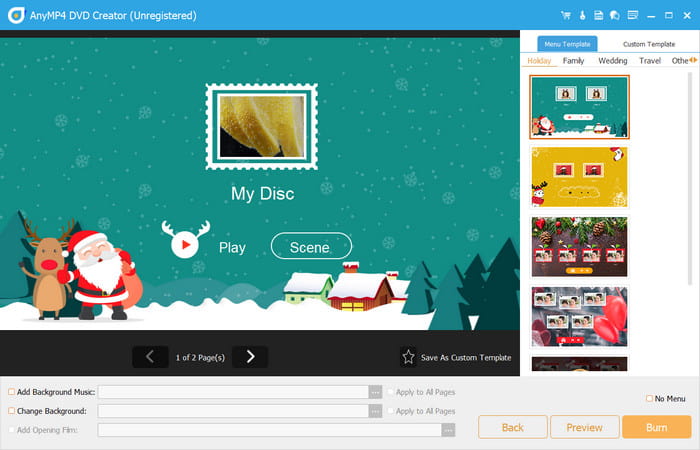
Features:
- Professionally burn multiple media content to DVD, Blu-ray, and CD.
- Provide built-in editing features to crop, cut, split, and edit files.
- Allow users to save newly edited menus as custom menu templates.
- Lightweight and quick with the DVD burning process.
Pros
- It has a generous free version for Windows and Mac.
- Configure the output resolution, quality, and aspect ratio.
Cons
- It limits the burning capacity on the free version.
iSkysoft DVD Creator
iSkysoft DVD Creator can be one of the best alternatives to ImgBurn on Mac because it works perfectly well in DVD burning with the operating system. While ImgBurn is primarily a simple and free burning tool focused on data and ISO files, iSkysoft DVD Creator offers a more comprehensive suite of tools for Mac, allowing you to burn videos and photos to DVD. It is easy to set up and use, so burning DVDs or CDs is flawless. On top of that, you can use its functions to make a few changes to the media content before processing it.
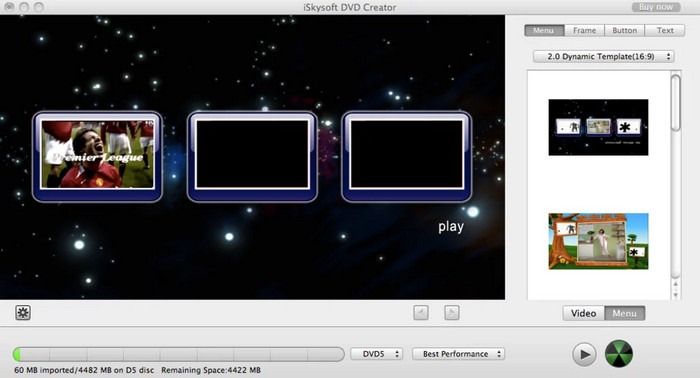
Features:
- Personalize videos and images with watermarks or effects.
- Create slideshows easily with background music.
- Suitable for Blu-ray and DVD making.
- Preview the output before burning it to the disc.
Pros
- High-quality output.
- Support a wide range of media file formats.
Cons
- The burning process is too slow.
- Unstable at random times.
Express Burn
Express Burn is often considered a suitable Mac alternative to ImgBurn. Express Burn offers a clean, user-friendly interface for Mac users, focusing on fast and efficient disc burning. Whether you're creating CDs, DVDs, or Blu-ray discs, it offers fast performance without overwhelming you with complex settings. With support for a wide range of formats and a focus on simplicity, Express Burn makes it easy to burn data, audio, or video discs in just a few clicks.
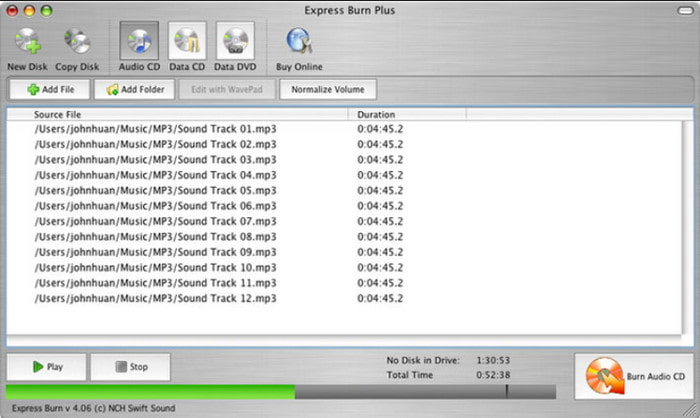
Features:
- Multimedia burner for video and audio formats.
- User-friendly and clean interface.
- It can work on multiple discs at once.
- Create menus and chapters manually.
Pros
- Back up important data information.
- Available on Windows and Mac.
Cons
- It does not support MP3 and other common formats.
- The editing features are lacking.
Burn
For a free ImgBurn alternative for Mac, Burn is an excellent solution to burn multiple and different files onto one disc. Burn provides a simplified and streamlined user experience for Mac users. It's capable of handling a wide range of tasks, including burning data, audio, and video discs. Surprisingly, one of its unique functions is to upload media content from various platforms to your computer, making uploading easier.
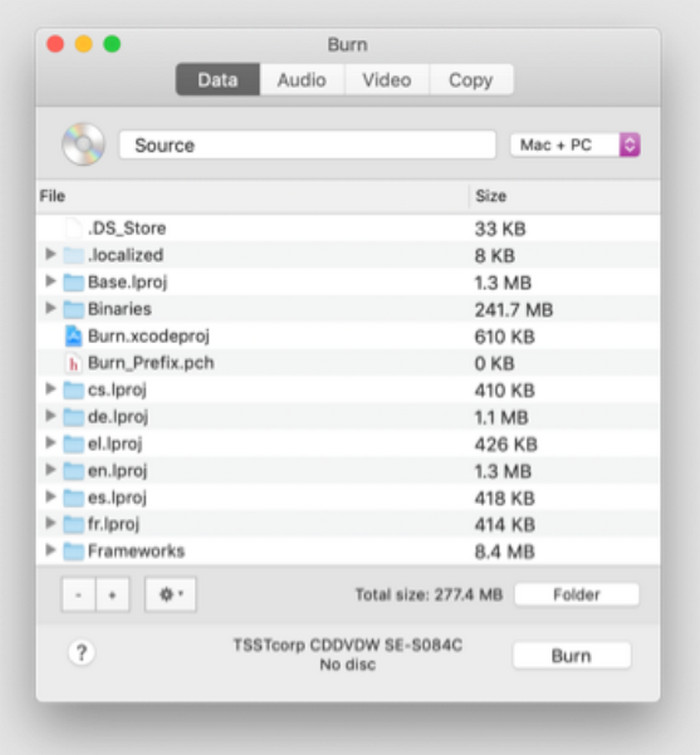
Features:
- Configurable output settings.
- Edit metadata for each file.
- Open for more modification on the system.
- 100% free to download and use on Mac,
Pros
- It has basic editing features,
- Copy discs or make clones before burning.
Cons
- Templates are old-fashioned.
LiquidCD
Another free ImgBurn alternative for Mac is LiquidCD, which offers a straightforward and free solution for burning various types of discs. This desktop DVD creator includes burning Blu-ray and M-Disc, apart from DVD. It can burn data, audio, and video files to DVDs. It is also quicker to burn bootable and multisession discs with this platform without distorting the original quality.
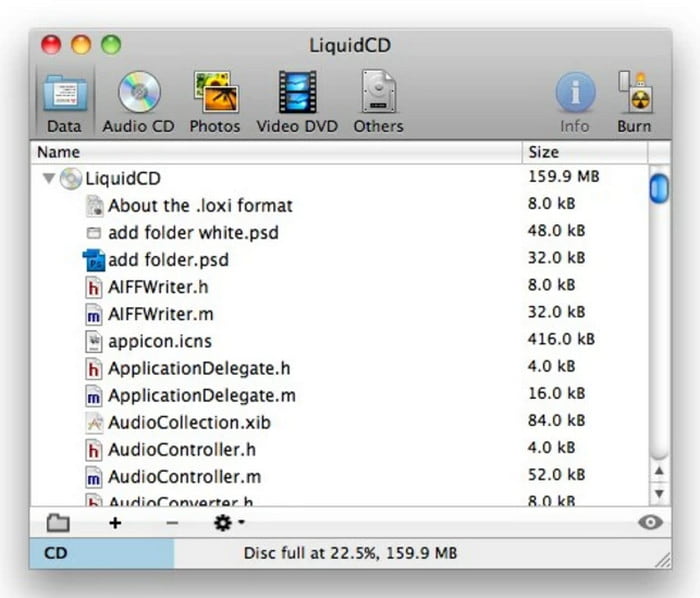
Features:
- Full user control of the output settings.
- Write audio tag and CD-text.
- No extra plugins to burn DVDs.
- Work well for dual-layer DVDs.
Pros
- A good alternative for audio CD creation.
- Print disc labels and covers.
Cons
- No further updates since 2011.
Part 3. How to Burn DVD/Blu-ray on Mac
Now, read ahead to see how to burn DVDs or Blu-rays on Mac computers in detail with Blu-ray Master DVD Creator.
Step 1.Download and install Blu-ray Master DVD Creator on your Mac. Launch the software, and choose from DVD Disc and Blu-ray Disc as your needs.
Free Download
For Windows
Secure Download
Free Download
for macOS
Secure Download
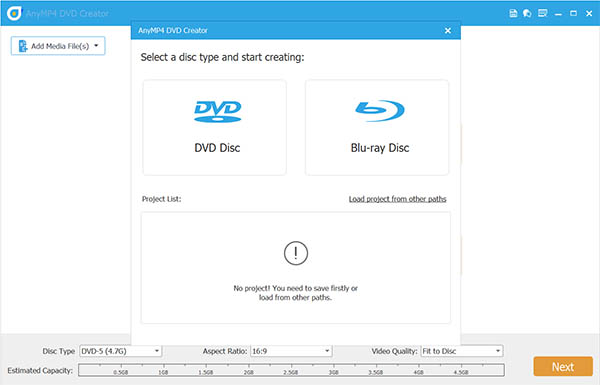
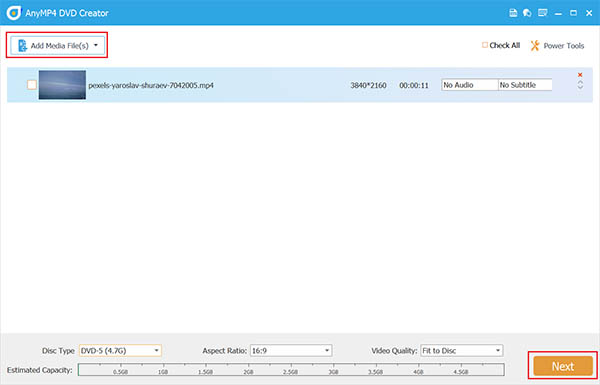
Step 2.Next, click Add Media File(s) to import the video files you want to burn. Note that you are allowed to add up to 5GB files of different video and audio formats. Then, click Next to go on.
Note: You can choose Powerful Tools to open the editing tool right panel to adjust videos, audio tracks, and subtitles.
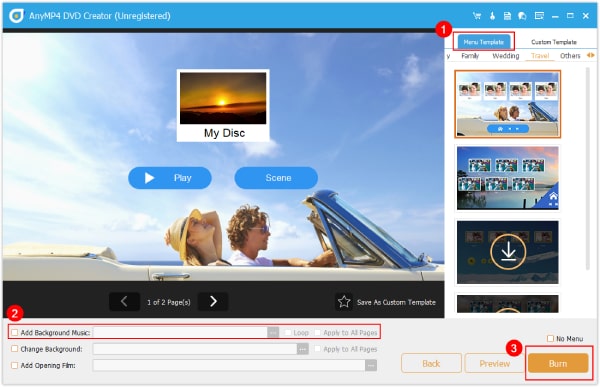
Step 3.You will see the settings for you to choose from the menu templates. If you need, you can use the provided settings to customize. Click Burn to go to the final step.
Tip: Here is a preview window to see the effects of the selected menu template. You can also click Back to return to the last interface to adjust.
Step 4.Lastly, decide the settings one by one, and click Start to begin the DVD or Blu-ray burning process.
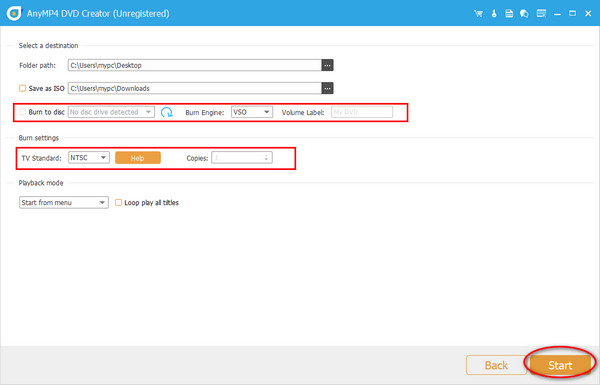
We use this tool as an example to show you how to burn DVDs on a Mac computer. This software provides intuitive buttons for you to navigate and use it to burn easily. Moreover, this tool can output DVDs losslessly. The only shortcoming is that its free version is limited, and you need to subscribe to enjoy its full features.
Part 4. FAQs about Alternatives to ImgBurn for Mac
-
How do I burn an ISO file on a MacBook?
Using AnyMp4 DVD Creator, install the software on your Mac and click the Add Files button to upload videos or audio files. Then, proceed to the editing windows and add watermarks, subtitles, and other elements as needed. Click the Burn button to start the process.
-
Does .ISO work on Mac?
Yes, ISO files are supported on Mac. So, you can work on burning DVDs on your computer without a problem.
-
Is it legal to rip a DVD?
In reality, it is illegal to extract DVD content from commercial types. But if you intend to create a personal copy and no reselling of videos, then you are safe.
Wrapping up
This article shares with you 5 alternatives to ImgBurn for Mac that you can use for burning DVDs. Although ImgBurn does not work on Mac, you can use these powerful tools to create DVDs and Blu-rays. Among the tested and recommended tools, Blu-ray Master DVD Creator is the most professional DVD and Blu-ray burner to get on Mac and Windows. Other than it being easy to use, its efficiency is undeniably outstanding. Download it to try its powerful technology!
Best DVD Creator Review
