

Sep 26, 2025Posted by Kevin Miller to Create DVD
Unlike before, burning a DVD is easier now with a bunch of tools that quickly convert digital videos to disc content. Just like DVD Flick, its system is built to provide a professional and quick burning experience with just a few clicks on the user’s computer. With that said, you might also want to try this software, but first, we encourage you to read this review to learn more about its features, pricing, supported platform, and other information.
- Part 1. Overview of DVD Flick
- Part 2. Full Review of DVD Flick
- Part 3. What Users Say about DVD Flick
- Part 4. Final Verdict of DVD Flick
- Part 5. The Best Alternative to DVD Flick
- Part 6. FAQs about DVD Flick
| How We Test | |
| Step | Description |
| Software Download | DVD Flick is downloaded and installed on an updated computer. |
| Selection of Uploads | To ensure the process will go smoothly, we used an AVIvideo file for the DVD-burning process. |
| Customize Video | Since it is stated that the software offers editing functions, such as clipping, splitting, and adding effects, we made sure to use every tool for customization. |
| Analyzation and Results | We note the speed during the process and analyze the results after. The duration of burning videos took too much time, while the results are unexpectedly lower in quality. This ends the software testing. |
Part 1. Overview of DVD Flick
DVD Menu Creation :
Service :
Update :
Quality:
Burning Speed :
DVD Flick is an open-source and free DVD authoring software designed for Windows users who want to convert digital video files into playable DVDs. It supports a wide range of input formats, including AVI, WMV, MPEG, VOB, and more, along with popular codecs like MPEG-2, DivX, AC3, and AAC. Users can add subtitles (SRT, SSA, SUB), create basic DVD menus, and burn projects directly to disc after encoding.
While it includes essential features like subtitle integration and menu customization, its interface and editing tools remain minimal and outdated. The software relies on FFmpeg for encoding and always re-encodes audio streams, which may affect efficiency and output quality.
Features:
- Input DVD Flick subtitle formats like SRT, SSA, and SUB.
- It can burn most video files to DVD.
- Add DVD menu, subtitles, and other elements easily.
- Burn project files to standard DVDs after encoding.
- 100% free without limitation and ads.
Pros
- DVD Flick is free and open-source DVD burner.
- Support DVD encoding via FFmpeg for MPEG-2 streams.
Cons
- Always re-encode audio streams during the DVD-burning process.
- Lacks software updates since 2009.
For basic tasks, DVD Flick is still a useful entry-level DVD burner, especially for users with older Windows systems. However, it is less appropriate for contemporary DVD authoring needs due to its limited editing capabilities and lack of updates since 2009. Perfect for simple conversions, but not for creating polished or expert discs.
Part 2. Full Review of DVD Flick
System Compatibility
Overall Rating:
DVD Flick works on older Windows versions (2000, XP, Vista, 7) but has limited or no compatibility with Windows 8, 10, 11, or macOS. Users on modern systems may encounter compatibility issues or need to run the software in compatibility mode.
Safety and Stability
Overall Rating:
As an open-source tool, DVD Flick is generally safe when downloaded from trusted sources. However, since it hasn’t been updated since 2009, it may lack modern security patches and could be vulnerable to system-level conflicts. Stability is acceptable for basic tasks, but crashes may occur with large or complex projects.
Price Plans
Overall Rating:
DVD Flick is completely free to use, with no paid tiers or hidden charges. It’s licensed under the GNU General Public License, making it accessible to budget-conscious users and hobbyists.
Effortless Software Installation
Overall Rating:
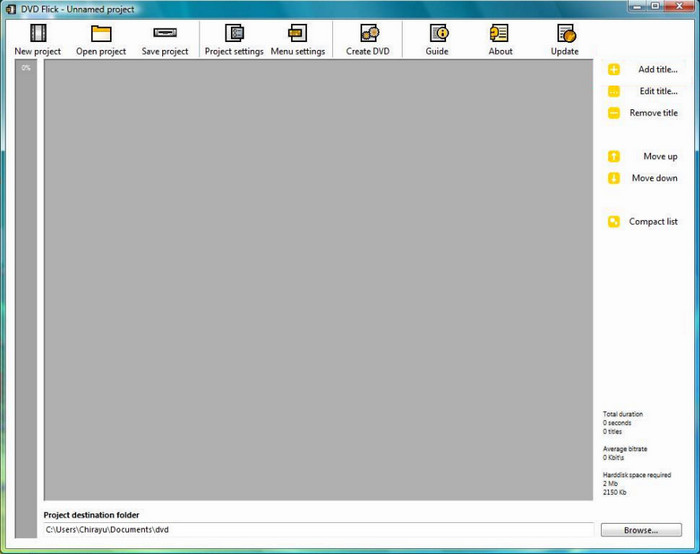
When you download DVD Flick on your Windows, you only need a few steps to install it completely. This is the first thing we observed, which is unlikely for most DVD burners.
Excellent Selection of DVD Type Support
Overall Rating:
DVD Flick supports burning a standard DVD, but we have learned that it supports DVD-5 and DVD-9 output or single-layer and dual-layer DVDs. Of course, it also allows you to set the specification to PAL, NTSC, or both.
Realistic Menu Customization
Overall Rating:
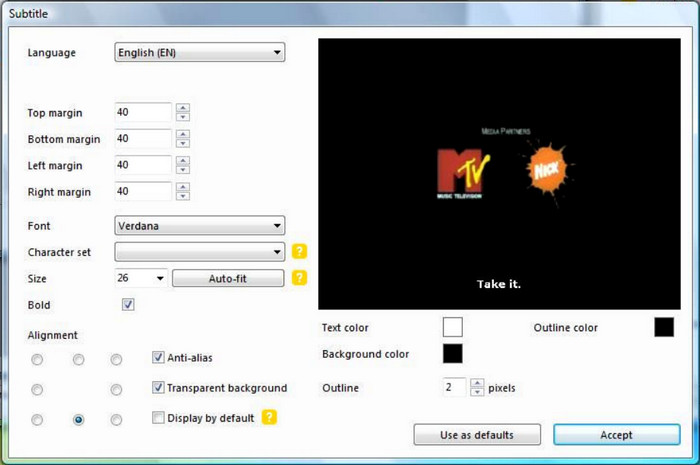
It is only right to mention that DVD Flick can add subtitles, menu, audio, and other elements as a part of its editing functions. You can also upload more videos in this part to make your DVD menu, where you can easily organize the titles and chapters.
Real-Time Preview
Overall Rating:
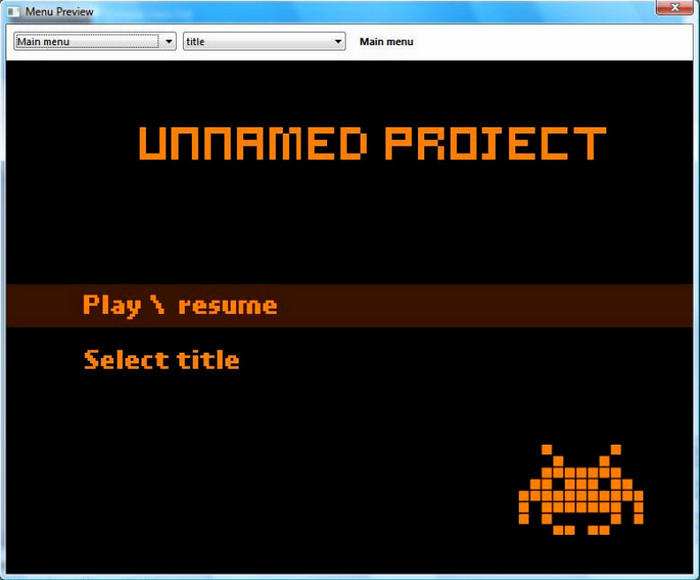
After editing and customizing the video content, an option will show the overall output you made. It is a great addition to the software because only a few similar tools have a preview option.
DVD Flick is still helpful for creating DVDs, but we think that it is not enough for a high-quality disc. It supports a handful of DVD outputs, and the editing tools are too old-fashioned. This is what we observed with the software, but we also include some user reviews in the next part.
Part 3. What Users Say about DVD Flick
SourceForge
I like that DVD burners like DVD Flick are still around. I can still easily burn videos to blank discs. The only problem is the lack of support for Mac OS and more updates. Also, I think DVD Flick has no usable video track for burning, but maybe it is expected for an old software.
VideoHelp
It is meant to make DVD burning easy, but I heard that there have been no more updates for a long time. That’s why there are random glitches when processing the videos. Another thing is the outdated menu customization. I am into editing my content, but the built-ins are insufficient for a decent edit.
SnapFiles
I had DVD Flick downloaded on my computer a few years back. And now I have more videos to burn, I reinstalled it on an updated Windows OS. Unfortunately, it has not changed much since the last time I used it, which is a bummer because I expected that there would be some upgrades. DVD Flick does not also work on Windows 10 or any of the latest versions, so no room for improvement anymore.
Part 4. Final Verdict of DVD Flick
Based on practical testing and user feedback, DVD Flick is best suited for basic conversion tasks on older Windows systems. Its compatibility with modern Windows systems is unstable, and the lack of GPU acceleration and multithreaded encoding support makes it unsuitable for handling high-resolution or multi-track projects. However, its greatest advantage lies in its simplicity and being completely free, making it ideal for users who simply need to convert video files into playable DVDs.
Part 5. The Best Alternative to DVD Flick
As you have read the user reviews about the software, we urge you to use a modern DVD burner. DVD Creator is an updated application for Windows and Mac, and it is caught up with new media file formats for burning. This means you can easily upload FLV, AVI, MKV, and other hundreds of formats and turn them into DVD-ROM, DVD+R, Blu-ray, and other types. The software is also packed with essential editing tools, especially DVD menus that are picked for various occasions, such as an anniversary, travel, holiday, vacation, etc. DVD Creator is highly recommended by users worldwide because of its effectiveness in creating the best DVD and Blu-ray content.
- User-friendly interface, equipped with professional tools.
- Change video quality, aspect ratio, and video types in a few clicks.
- Burn other types of DVD/Blu-ray, such as discs, folders, and ISO image files.
- A huge library of menu templates with a real-time preview function.
Free Download
For Windows
Secure Download
Free Download
for macOS
Secure Download
| Evaluation Criteria | DVD Flick | AnyMP4 DVD Creator |
|---|---|---|
| Overall Rating | (Basic use only) | (Full-featured, professional-grade) |
| System Requirements | Windows XP, Vista, 7 (no macOS support). | Windows 11/10/8/7 & macOS 10.12 or later. |
| Input Formats | AVI, WMV, MPEG, VOB, etc. | MP4, MKV, MOV, AVI, FLV, MTS, WebM, and 150+ formats. |
| Editing Tools | Basic menu and subtitle support. | Video trimming, cropping, filters, subtitles, templates, and background music. |
| Burning Speed | Slow; no hardware acceleration. | Fast burning with GPU acceleration and multi-threading. |
| Output DVD Quality | Low definition. | Supports DVD-5/DVD-9, high-quality output with custom encoding settings. |
Part 6. FAQs about DVD Flick
-
Is DVD Flick really free?
Yes, the software is free to download and use for DVD burning on Windows OS. However, some users that modified the software sell their versions, which you can find on online stores like Amazon and eBay.
-
Is DVD Flick safe?
As long as you install the tool from the official website, it is safe to use. The website is still up, even though there are no further updates.
-
What is DVD Flick used for?
It is used to create DVD content from various video files on a computer. Mainly, it will transfer the uploaded files to a blank disc plus editing the videos with menu templates and other effects.
-
How to burn DVD on DVD Flick?
Launch the software once installed on your computer. Click the Add Title button to upload the video files to the interface. Open the Edit Title or Project Settings menu to modify the output settings. Set the destination to the next window, then click the Burn Project to Disc button to process.
Wrapping up
With this DVD Flick review, we hope you learn its whole properties, including the features, pricing, performance, and others. Some user reviews stated that it is outdated and causes malfunctions during the burning process, so as an alternative, we introduce DVD Creator to you. Check out this awesome solution by clicking the Free Download button and burn videos to DVD and Blu-ray without limitations.
Best DVD Creator Review
