

Oct 17, 2025Posted by Kevin Miller to Create DVD
DVDs' relevance remains to this day, and this is because you can use them to store and share data on a disc. However, creating your homemade DVD does not come in a straight line since you will need to choose whether the DVD type is a DVD-9 or DVD-5. But what are these? And why are they important when burning videos to DVD? All questions are answered in this DVD-9 vs DVD-5 post as we will cover the main functions of the DVD types and their differences.
- Part 1. What is DVD 9 and DVD 5
- Part 2. What are The Differences Between DVD-5 ad DVD-9
- Part 3. DVD-9 VS DVD-5: Key Differences in Detail
- Part 4. How to Convert/Copy DVD-9 and DVD-5
- Part 5. FAQs about DVD-9 and DVD-5
Part 1. What is DVD 9 and DVD 5
DVD-9 and DVD-5 are two types of DVD with different capacities.
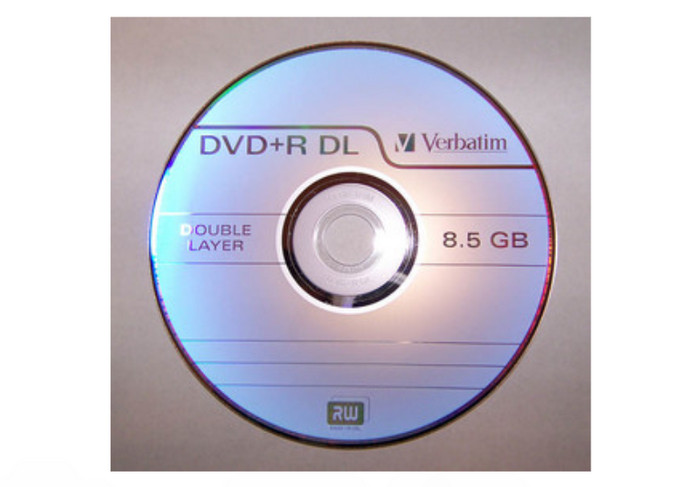
First, let us explain the definition of DVD-9. The DVD type is referred to as a dual-layer with a single-sided structure. The number 9 on its name indicates that it can hold up to 9 GB of data, or, to be precise, around 8.5 GB of data. This is equivalent to almost around 240 minutes of video, depending on the compression method. The dual layer on DVD-9 has solid and semi-transparent layers that store twice the data compared to DVD-5. Also, it is only right to mention that it is often used for retaining a higher bitrate, which is not feasible for other DVD types.
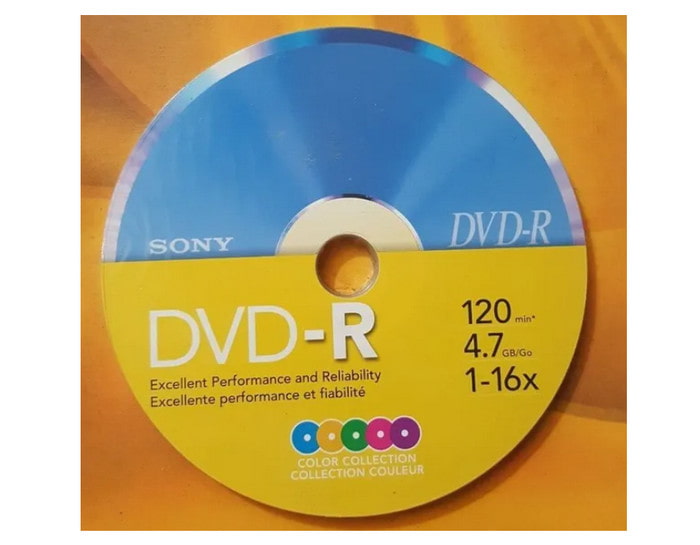
On the other hand, DVD-5 refers to a single-sided and single-layer DVD type. It is also known for its capacity for DVD ROM technology, DVD-5. Unlike DVD-9s dual layer, DVD-5 has only one layer on one side of the disc. It also means it holds only 4.7GB of data, thus the number 5 on its name. This DVD type is usually used on smaller video distributions, such as shorter films, TV shows, a couple of episodes, and so on. Surprisingly, you can tell that one is DVD-5 based only if it runs some hours of playback and the quality of the video is good.
Part 2. What are The Differences Between DVD-5 and DVD-9
| DVD-9 | VS | DVD-5 |
| 8.5GB of data | Size Capacity | 4.7GB of data |
| Dual Layer | Layer | Single Layer |
| Newer DVD players and computer drives | Compatibility | Old media players(hardware and software) |
| Extended hours of movies with higher quality and less compression | Applications | Best for storing short films, music playlists, software data, etc. |
| Slower | Burning Speed | Faster |
| High | Quality | Low to Average |
| Low | Compression | High |
| Expensive | Cost | Cheaper |
 | Reusable |  |
Part 3. Part 3. DVD-9 VS DVD-5: Key Differences in Detail
Capacity
DVD-5: It offers a maximum storage capacity of 4.7 GB. This is sufficient for standard-definition video content up to about 2 hours, or for storing moderate amounts of data like documents, photos, and small applications.
DVD-9: It provides up to 8.5 GB of space, nearly doubling that of DVD-5. This extra space accommodates longer movies, higher-resolution video, or larger software packages without the need for compression.
Why it matters: The increased capacity of DVD-9 is crucial for preserving video quality and reducing the need to split content across multiple discs.
Layers
DVD-5: It is constructed with a single data layer. The laser reads from one surface, making production simpler and playback seamless.
DVD-9: Built with two layers stacked vertically. The laser shifts focus to read the second layer, allowing more data to be stored on the same physical disc.
Technical note: Dual-layer technology requires precise manufacturing and can introduce a brief pause during playback when switching layers, though modern players handle this smoothly.
Playback
DVD-5: It is universally supported across all DVD players, including older models and computer drives.
DVD-9: Compatible with most modern DVD players and drives, but older or budget devices may experience hiccups during the layer transition.
User experience: For critical applications like commercial movie releases, DVD-9 is tested extensively to ensure smooth playback across devices.
Usage
DVD-5:
• Ideal for short films, promotional videos, software installers, and personal backups.
• Common in educational materials, wedding videos, and small-scale distribution.
DVD-9:
• Preferred for Hollywood movies, TV series box sets, and high-definition content.
• Used in enterprise software distribution, archival storage, and professional presentations.
Decision point: Choose DVD-5 for cost-effective, short-form content; DVD-9 for quality and quantity.
Recording & Rewritability
DVD-5: It is available in both recordable (DVD±R) and rewritable (DVD±RW) formats. Widely supported by consumer DVD burners.
DVD-9: Primarily available as dual-layer recordable (DVD±R DL). Rewritable dual-layer discs (DVD±RW DL) exist but are rare, expensive, and less reliable.
Practical tip: If you need to frequently update or overwrite data, DVD-5 RW is more dependable.
Tips
You can also use the DVD rippers to convert DVDs to digital for better backup.
Part 4. How to Convert/Copy DVD-9 and DVD-5
Is it possible to convert DVD-9 to DVD-5?
Definitely, yes. We recommend using Blu-ray Master DVD Copy to copy and convert the content from DVD-9 to another DVD type. The software is designed with an excellent cloning technique, allowing you to back up DVDs, folders, and ISO image files without quality loss. It is also used for data backup to a hard drive or clone to a blank DVD for safekeeping. Besides its 1:1 content cloning, DVD Copy lets you manage the output settings to keep the original quality, compress the content to save space, or edit the subtitle format. Click the Download button to get started on converting DVD types on Windows or Mac.
- Copy DVD-9 to DVD-5 in Full Copy, Main Movie, or Custom mode.
- Maintain the original quality, DVD menu, subtitles, and audio track.
- Configurable subtitles, loop titles, and audio tracks with a preview option.
- Compress and change DVD-9 to DVD-RW, DVD-RAM, DVD+R, etc.
Free Download
For Windows
Secure Download
Free Download
for macOS
Secure Download
Step 1.Free download and install DVD Copy on your Windows and Mac. Once set up, launch the software to start converting DVD-9 to DVD-5. Insert the disc as the source and another blank disc as the target. Wait for a few moments until the program recognizes the DVD. Open the Source dropdown list and choose the Open DVD Folder option. You will find all the content there.
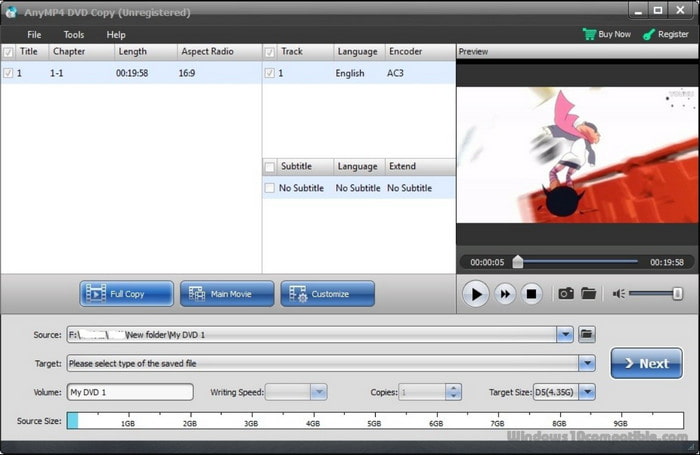
Step 2.rom the Target dropdown list, select the Save as ISO (*.iso) option, then pick a location to save the output. After that, choose between Full Copy, Main Movie, and Customize. The Full Copy will copy the entire DVD, including credits and promotions. The Main Movie will only clone the main parts, while Customize is to manually choose the content you want to burn.
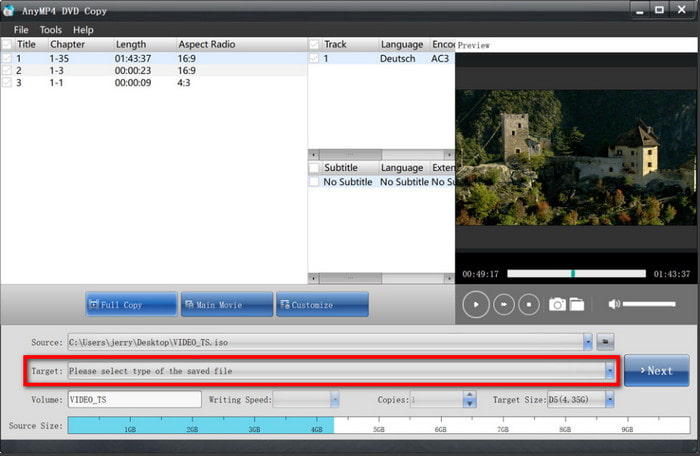
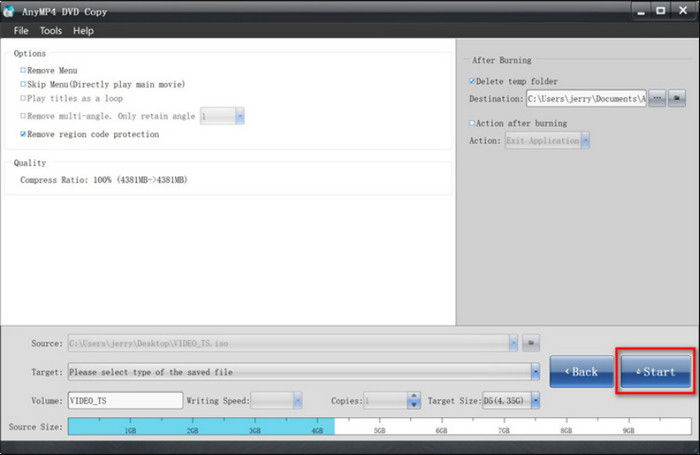
Step 3.Proceed to configure other settings on the DVD-9, such as adjusting the volume level, video size, subtitles, and so on. When you click Next, you can edit the output by removing or retaining the DVD menu, play the titles as a loop, etc. Most importantly, adjust the compression ratio under the Quality option to make room for DVD-5 output. Once done, click the Start button to begin the process.
Thankfully, there is a way to change DVD-9 to DVD-5, and DVD Copy is easy to use. Not only that, but it also has more functions that you can discover once you download the software. Try it today on Windows or Mac OS.
Part 5. FAQs about DVD-9 and DVD-5
-
What does the V in DVD mean?
The V on DVD stands for ‘versatile.’ However, a few debated that the V is actually for ‘Video’ since it is primarily used to store video content. But now, it has been changed to Versatile since DVDs can store other types of content, including games, software, multimedia, etc.
-
Which DVD is better?
It actually depends on what you need. For example, if you want to store a huge amount of data, DVD-9 can be your choice. It is also ideal for lesser compression and higher quality. On the other hand, DVD-5 is outstanding for storing a decent amount of data, which means you can still store multiple movies but compressed or lower resolution and quality.
-
What does DVD 16x mean?
It refers to the maximum speed at which a DVD can be read or written by a compatible drive. 16x represents the speed multiplier compared to the standard DVD reading and writing speed. To give an example, a standard 1x drive can only read at 1.32MB per second, while a 16x drive will read at an estimated 21.12MB per second.
-
Will DVD-9 discs run on my DVD player?
As long as the DVD player supports DVD-9, it is guaranteed that you can play a DVD type without a problem. Mostly, a DVD player must be capable of reading double-layer discs without a problem.
Wrapping up
In conclusion, DVD-9 and DVD-5 are DVD types that differ regarding storage capacity, format, bitrate, resolution, and compatibility. They are both useful, depending on the user’s needs. However, anyone would need to convert DVD-9 for many reasons, so it is recommended to use DVD Copy to copy or convert the content to another DVD type. Try it for free on your PC to experience the best DVD conversion.
More from Blu-ray Master
