

Aug 07, 2025Posted by Kevin Miller to Create DVD
Today, we live in a world where media consumption is increasingly dominated by digital streaming. Still, creating DVDs remains essential for safekeeping personal videos and home movies. To facilitate media file preservation, a reliable DVD authoring tool is essential. iSkysoft is one such tool designed to convert media files into DVDs. The goal of this post is to provide a comprehensive review of iSkysoft DVD Creator. We will cover everything, including features, pros, cons, and its best alternative. If you'd like to know more, continue reading this post.

- Part 1. What is iSkysoft DVD Creator
- Part 2. iSkysoft DVD Creator Review: Pros
- Part 3. iSkysoft DVD Creator Review: Cons
- Part 4. Best iSkysoft DVD Creator Alternative
Part 1. What is iSkysoft DVD Creator
iSkysoft DVD Creator is a DVD authoring software that enables you to create DVDs from media files. It can burn most media stream profiles to a physical DVD, a VIDEO_TS folder, or an ISO file. Some of these formats include MOV, MKV, MP4, AVI, MTS, TS, M4V, FLV, MPG, and MOD. To make DVD menu navigation special, it provides 40+ free disc menu templates to use. These initial features make it an excellent tool for preserving basic home movies and compiling personal videos.
Overall Ratings (out of 5 stars):
Video to Disc Burning: ⭐⭐⭐⭐
Disc Menu Creation: ⭐⭐⭐⭐
Speed Performance: ⭐⭐⭐
Built-in Editor: ⭐⭐⭐
Success Rate: ⭐⭐⭐⭐
Make DVD Movies from Any Video
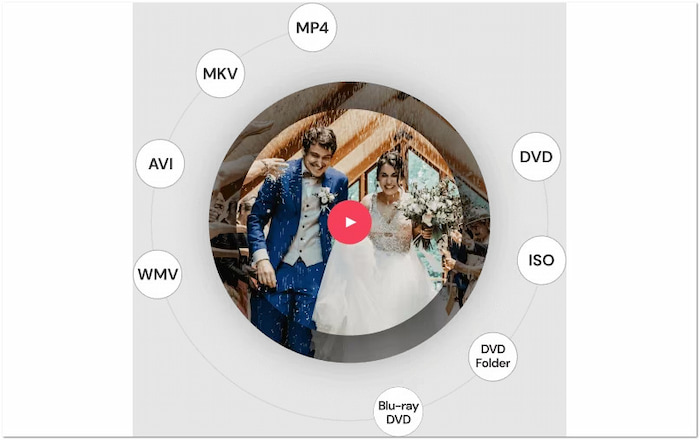
iSkysoft can create DVDs from virtually all video formats, including MOV, MKV, MPEG, MP4, and more. It can output any DVD type, including DVD-5 and DVD-9, a VIDEO_TS folder, and an ISO file. In addition to common media stream profiles, it also accepts videos from various sources. Some of these include digital cameras, mobile devices, camcorders, and many other types of devices.
Create Photo Slideshows with Music
Beyond video, the software features a slideshow creation tool that enables users to create slideshows from photos. By dragging the photos into the window, the software will automatically generate the photo slideshow. To make it engaging, consider adding a transition effect, adjusting the slide duration, including a caption, and incorporating music. Additionally, it supports adding background music that matches the slideshow.
Menu Editor and Built-in Video Editor

The software features a customizable menu editor with dozens of templates, allowing you to design stylish navigation menus with background images, text, buttons, and music. The built-in video editor offers essential tools, including trimming, cropping, rotating, adding watermarks, applying video effects, and inserting subtitles. These editing tools help polish your content before burning, offering a semi-professional authoring experience without requiring advanced skills.
Burning Speed
iSkysoft is optimized for quick disc burning. Depending on your system and the file size, it can convert and burn media to disc in as little as a few minutes. We use a 15-minute-long video as a sample to test its burning speed. It only took 2 minutes and 38 seconds to burn the video onto a DVD-5. Imagine how much time you can save when working with large video files.
Part 2. iSkysoft DVD Creator Review: Pros
Understanding the advantages of iSkysoft DVD Creator for Mac is essential. By knowing its possibilities, you can determine if it aligns with your project and technical skills. Highlighting these benefits will help you make wise decisions and maximize the value of your investment.
• Compatibility and Safety: The software is fully compatible with Windows and Mac systems. It's safe to install and is free from bundled malware or ads.
• Price Plans: iSkysoft offers two licenses: Perpetual License and Family License. The Perpetual License is a one-time purchase of $55.95 for a single device. Meanwhile, the Family License, with a regular price of $124.95 is accessible to 2-5 devices.
• Input Format Support: The software's key strength is its comprehensive support for various input formats. It supports most media formats, including MOV, MKV, MP4, AVI, MTS, TS, M4V, MOD, and more.
• Output DVD Options: iSkysoft can burn projects to DVD-5, DVD-9, VIDEO_TS folder, and ISO. It also supports NTSC and PAL, and allows you to burn content up to 1080p.
Test Results and User Reflections:
In a hands-on test, iSkysoft successfully burned an 800MB media file to a DVD in under 48 minutes. The output played smoothly on standard DVD players, and the menu navigation was responsive. As a non-professional user, I appreciated its ease of use.
Part 3. iSkysoft DVD Creator Review: Cons
Although iSkysoft DVD Creator for Windows offers many features, it's equally important to understand its limitations before committing, set realistic expectations, avoid surprises during use, and make better purchasing decisions.
• Limited Trial Version: Although a free trial is available, it comes with limitations. To fully access the software's features, you'll need to upgrade to the paid version.
• No Modern Format Support: The software doesn't support newer formats and codecs. It can limit compatibility with newer playback systems that rely on advanced codecs.
• Editing Tools Are Basic: Although functional, the built-in video editing tools are limited in their capabilities. There are no advanced editing tools offered, making it insufficient for professional users.
• Occasional Crashes on Older PCs: The software occasionally freezes or crashes during the burning process. Though not frequent, it's worth noting for those on low-spec OS.
Test Results and User Reflections:
The software occasionally crashed during the final burning process when tested on older or low-spec systems. Although the limited features in the trial version were expected, I am dissatisfied and hoped it would address the burning process issues and expedite its completion.
Part 4. Best iSkysoft DVD Creator Alternative
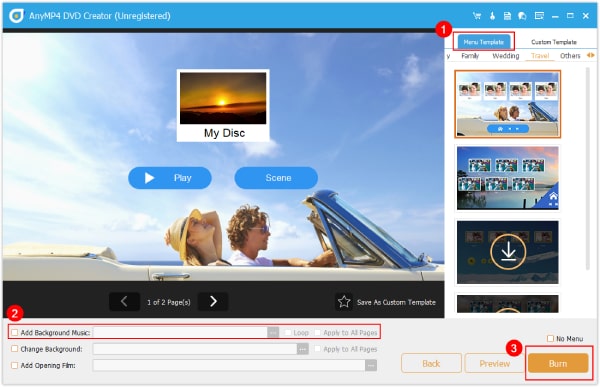
After we reviewed iSkysoft DVD Creator and didn't meet your specific requirement, consider using Blu-ray DVD Creator. It is an all-in-one disc authoring software that offers DVD and Blu-ray burning modes. It is fully compatible with Windows and Mac operating systems. With it, you can load more than one file and burn them to a physical DVD, a VIDEO_TS folder, or an ISO. It supports inputting various media stream profiles, including MP4, MKV, MOV, M2TS, and 500+ others. Additionally, it comes with a built-in editor, allowing you to edit videos, audio, subtitles, and chapters. Additionally, it offers several disc menu templates to enhance navigation within the menu.
Free Download
For Windows
Secure Download
Free Download
for macOS
Secure Download
| iSkysoft DVD Creator | Versus | Blu-ray Master DVD Creator |
|---|---|---|
| Windows and Mac | Platform | Windows and Mac |
| MOV, MKV, MP4, AVI, MTS, etc. | Input | MP4, MKV, MOV, and 500+ others |
| DVD, VIDEO_TS folder, and ISO | Output | DVD, Blu-ray, VIDEO_TS folder, BDMV folder, and ISO |
| Average | Burn Speed | Fast |
| Video | Built-in Editor | Video, audio, subtitles, and chapters |
| Good, up to 1080p | Quality | High, up to 4K |
Conclusion
This concludes our iSkysoft DVD Creator review. Our featured software is a capable tool for basic DVD authoring. It is ideal for those seeking a flexible and easy disc-burning experience. However, many users find it limited. If you need a more versatile solution, Blu-ray Master DVD Creator is the ideal choice. It offers broader format support, faster burning, customizable menus, and full compatibility with DVD and Blu-ray.
More from Blu-ray Master
Best DVD Creator Review
