

Oct 10, 2025Posted by Kevin Miller to Create DVD
Burning videos to DVDs is one of the best ways to keep videos safe from potential file loss on computers. This also helps to free up consumed storage space and will allow you to share videos on physical disks. To achieve this, you will need to use a DVD burner, and fortunately, Nero Burning ROM is one of the best tools to look for. But how great it can be for DVD burning? Here, we figure out its advantages and disadvantages, and full details about its features, quality, and overall performance. Stick around and see if it’s the ideal DVD burner for you or find a better alternative.
Table of Contents
Part 1. What is Nero Burning ROM
The software is part of the Nero Multimedia Suite by Nero AG. It was a stand-alone product that was initially released in 1997, mainly for burning DVDs, CDs, and Blu-ray discs. Since it is a long-running tool, it was developed with more functions, including ripping, copying, and protecting, which are all available when downloaded on Windows 11, 10, and 8. Currently, Nero Burning ROM is free to download on the official website for a free trial version with features and function limitations.
Many users' first choice is Nero, and they are not wrong because the software includes many features. Let’s take a look at the list below that might grab your attention.
- Burn, copy, and convert media files to DVDs, CDs, and Blu-ray discs.
- Support a wide range of file formats, including audio, video, and image.
- Edit audio tracks, including the volume levels and metadata.
- Unlimitedly create a copy of DVDs and CDs.
- Designed to print labels on discs using LightScribe and LabelFlash technology.
- Burning options for bootable and rewritable discs.
- HIgh-security with 256-bit encryption, digital password, and protection.
Part 2. What We Like About Nero Burning ROM
Safety and Stability
Overall rating:
Nero Burning ROM is a reliable and safe program for burning discs. It works well on most Windows computers and has tools like SecureDisc to keep your data safe and make sure the disc works properly. Some users have reported occasional crashes, but overall, it is safe and stable.
Clean User-Interface
Overall rating:
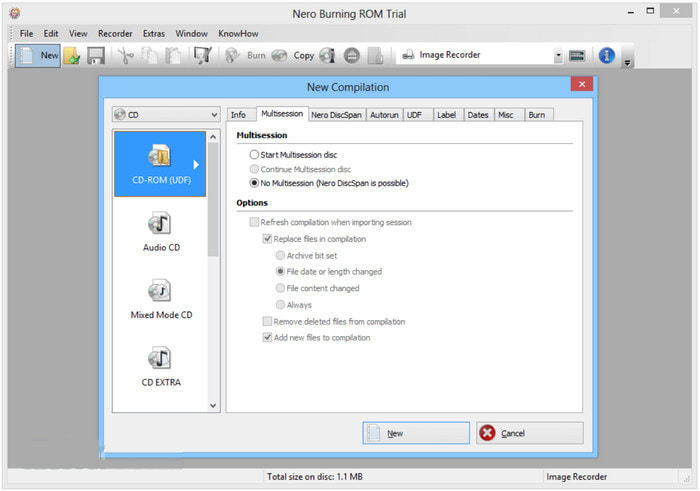
The user interface always determines the smoothness of the process. And Nero Burning ROM proves that it is the ideal tool by providing a clean and easy-to-use interface. Looking at the main menu, the software showcases various tools it offers, then once you click one of them, you can easily upload files to start burning. It also makes it quicker to learn how to use Nero Burning ROM, especially for beginners.
Full-Time DVD Tools
Overall rating:
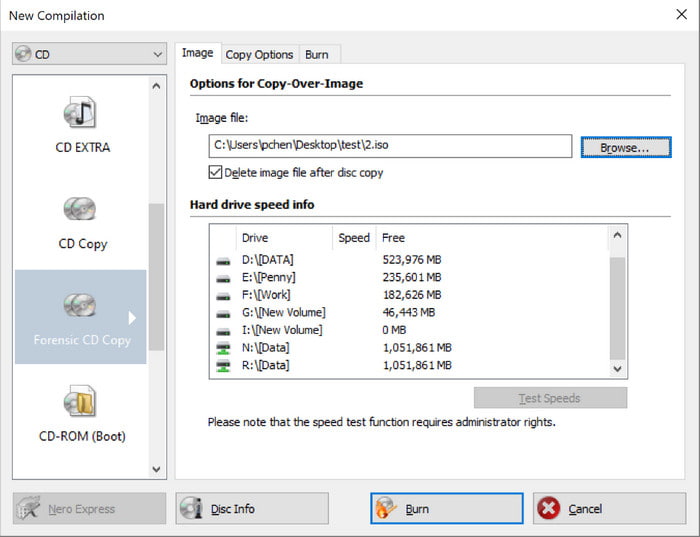
Nero Burning ROM is undeniably a multipurpose tool, allowing you not only to burn video and audio files, but also to create audio CDs, data discs, AVCHD videos, and other disc types. On top of that, you can also work on existing DVDs, Blu-ray, and CDs with this platform, providing tools to rewrite, copy, and backup data.
Learn from this guide to convert AVCHD to DVDs here.
Input Formats
Overall rating:
You can use lots of different file types with Nero, like music files (MP3, WAV), video files (MP4, AVI), and disc images (ISO). This gives you plenty of options when making your discs.
High-Security Level
Overall rating:
The final and stable release of the DVD burner has SecurDisc which protects the data on a burned disc with password encryption. This is a unique feature that most DVD-authoring programs rarely offer, and Nero still makes it a better function as it lets the user add a digital signature for verifying authentication.
Exceptional Output Settings
Overall rating:
Lastly, the advantage of the DVD burner includes tweaking settings for the quality, resolution, aspect ratio, and others. You can also add metadata, adjust volume levels, and enhance the track list with just a few clicks. Furthermore, Nero can test and analyze the videos to check the reliability and performance of the new changes.
If these are the exact features you are looking for in a DVD burner, then Nero Burning ROM is the ideal tool for you. Provided with exceptional and professional functions, you may try the software on your computer. But before that, you may also need to learn about the downside of the tool before getting started with DVD burning.
Output DVD Types and Quality
Overall rating:
Nero can burn many kinds of discs, including CDs, DVDs, and Blu-rays. It also lets you make bootable discs and add more sessions later. The quality is great, with careful burning and error checks to make sure your discs last and play smoothly.
Price Plans
Overall rating:
• Nero free trial version.
• Nero Premium: $55.95
There’s a free trial available, which is suitable for you to evaluate the software in advance. It would also provides seasonal bundles like the Spring Bundle, which offer major discounts and bonus software, sometimes dropping the price to around $46.95 for a limited time. Upon checking out, there are many options to pay online, such as via credit or debit card, PayPal, Skrill, and others. It also guarantees 30 days of 100% money back if the software is incompatible or running issues on your computer.
Part 3. What We Don’t Like About Nero Burning ROM
Not Cross-Platform
Nero is only compatible with Microsoft Windows, specifically Windows 11, 10, 8, and 7. It has been about three decades since its initial release, and there is still no announcement for a Mac version. Although there was a Linux version made available from 2005 to 2012, it was discontinued eventually.
No DVD Menu
The DVD burner lacks video editing tools that allow users to trim, clip, merge, split, or add filters to the uploads. While it focuses on professional DVD burning, we think a tool with editing functions and DVD menu templates editing must be used for modern DVD creation.
Part 4. Final Verdict
The conclusion for Nero review is that it is an outstanding DVD-authoring program. It has all the tools necessary for creating the best output, and while it is quite expensive, we think that the pro version is convenient. However, it is a bit disappointing that it does not include basic functions, such as DVD menu templates and editing options. It is also a downside that there is no Mac version, especially if you use this device. In this case, proceed to the next part to see the best alternative we recommend for you.
Part 5. Best Alternative to Nero Burning ROM
DVD Creator is the ultimate DVD burner for Windows and Mac. And the reason it is highly recommended is because of its advanced technology that allows you to burn video and audio files with promising quality. Of course, it supports an array of input formats, supporting from MP4, MOV, MKV, AVI, FLV, and WMV, to MP3, AAC, MP3, WAV, and so on. It has a built-in video editor that can cut, trim, rotate, and merge video clips, while you can also choose a stylish menu template to design the DVD menu. All of these can be easily used for your DVD or Blu-ray making with DVD Creator on Windows or Mac.
- Designed to create high-quality DVD, Blu-ray, and ISO images.
- Fast-burning process with promising excellent video performance.
- Enhance and edit quality, resolution, aspect ratio, and other settings.
- Add effects, watermarks, subtitles, DVD menu, and other elements.
Free Download
For Windows
Secure Download
Free Download
for macOS
Secure Download
| DVD Creator | VS | Nero Burning ROM |
| $12.45 | Pricing | $55.95 |
| Windows 11/10/8/7, Mac OS X 10.9, Sonoma, and later versions | Supported Platform | Windows 10/8/7, Linux (Discontinued) |
| MOV, AVI, MP4, MKV, FLV, WMV, VOB, Xvid, etc. | Input Formats | MP4, MOV, WMV, AVI, HEVC, etc. |
| DVD/Blu-ray disc, folder, and ISO image file | Output Formats | CD, DVD, Blu-ray, M-Disc, and BDXL |
 | Regular Update |  |
| Low CPU Usage | |
| Video Editor | |
| Menus, Titles, and Chapters | |
| High | Burning Speed | Fast |
Part 6. FAQs about Nero Burning ROM
-
Is Nero Burning ROM free?
It has a free trial version that you can download for free on Windows. However, the features are very limited and you might not burn all videos in this software edition.
-
Is Nero Burning ROM worth it?
Definitely, yes. The review shows that it has powerful functions not only for burning, but also for copying, rewriting, and protecting discs. A few problems with it are no Mac version, video editing tools, and probably no regular software updates that can fix the bugs or issues.
-
Is Nero Burning ROM A virus?
No. The tool is a legitimate product of Nero AG, and the company is known for high-level security. It is guaranteed that using the DVD burner will be safe for any user.
-
Is Nero Burning ROM an antivirus?
No. The software only focuses on disc-related works, including burning, backing up, etc. An antivirus tool is used primarily to detect or remove viruses, which are threats to your computer system.
Wrapping up
The Nero Burning ROM review talked about its whole purpose with the provided features, performance, and quality. It has the best set of tools that are not only for disc burning, but also for copying, protecting, and further working on existing discs. While it is too good to be true, the downside relies on the lack of a Mac edition and no built-in video editing tools. So, DVD Creator is the recommended alternative that focuses on excellent results, editing, and simple navigation. It is also available to download on the latest versions of Windows and Mac, and you can try it by clicking the Free Download button.
Best DVD Creator Review
