

Sep 11, 2025Posted by Kevin Miller to Create DVD
Creating personalized DVD videos doesn’t have to be complicated, and WinX DVD Author aims to make the process as straightforward as possible. This lightweight software lets users add, remove, and customize video elements with ease, offering basic editing tools to shape the final output. However, with mixed reviews over the years, its relevance in 2025 deserves a closer look. In this updated review, we’ll explore its strengths, limitations, and whether it still holds up as a reliable DVD authoring solution. Let’s dive into the key facts and features that define WinX DVD Author today.
- Part 1. Overview of WinX DVD Author
- Part 2. WinX DVD Author Features
- Part 3. WinX DVD Author Pros
- Part 4. WinX DVD Author Cons
- Part 5. WinX DVD Author: Performance and Price Plans
- Part 6. Best Alternative to WinX DVD Author
- Part 7. FAQs about WinX DVD Author
Part 1. Overview of WinX DVD Author
Converting Speed :
Quality :
Service :
Features :
Input Support :
The main job of WinX DVD Author is to give you a professional DVD-burning experience with personalized menus, chapters, subtitles, and others. Its development revolves around various video formats, allowing you to burn MP4, ISO, VOB, AVI, etc., according to your desired order, themes, and settings. It also has the ability to turn files into compatible formats like NTSC and PAL with resolution options. Moreover, it boasts the simplicity of the learning curve while providing excellent results.
| How We Test | |
| Steps | Description |
| Software Installation | The latest version of the software is installed on an updated computer for the test. |
| Sample Selection | Since it is for burning DVDs, we chose MP4 videos within its scope. A few other files like VOB and ISO have also been uploaded to WinX DVD Author. |
| DVD Burning Testing | After uploading the files, we used every software feature, including burning modes, editing tools, and advanced settings as part of the test. |
| Processing | Lastly, the video files are run through the burning process. Speed and quality are both noted in this part.The processing speed is slow and average in scale, while the DVD quality is good to play on a common DVD player. |
Part 2. WinX DVD Author Features
What we observe about the software is its library of tools and multiple functions. The following list highlights the things we got for WinX DVD Author.
- Enable to convert video to VOB and compile them in one file.
- Download media content from YouTube directly.
- It has options to make standard 4:3 and 16:9 aspect ratios.
- Subtitle languages include English, Korean, Spanish, Greek, etc.
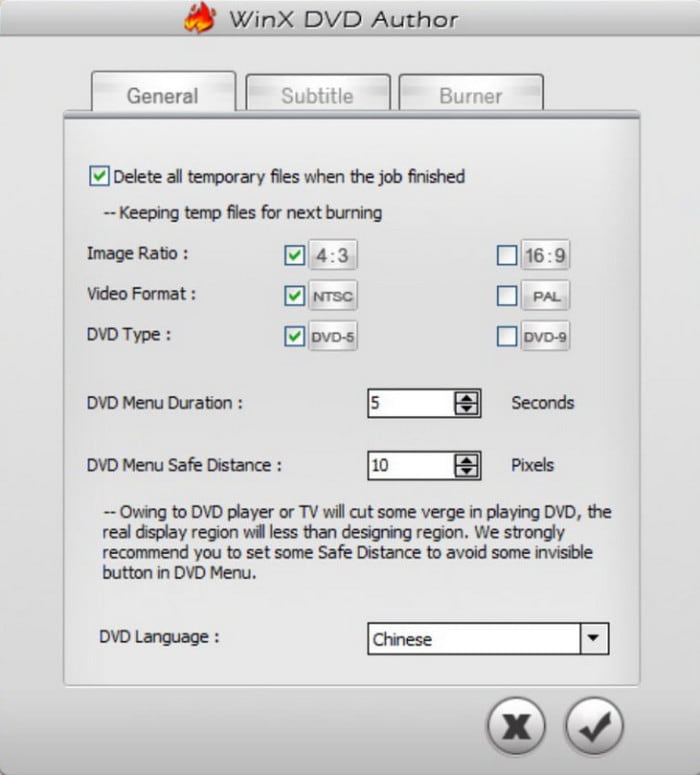
- Configure the DVD menu duration, safe distance, and DVD type.
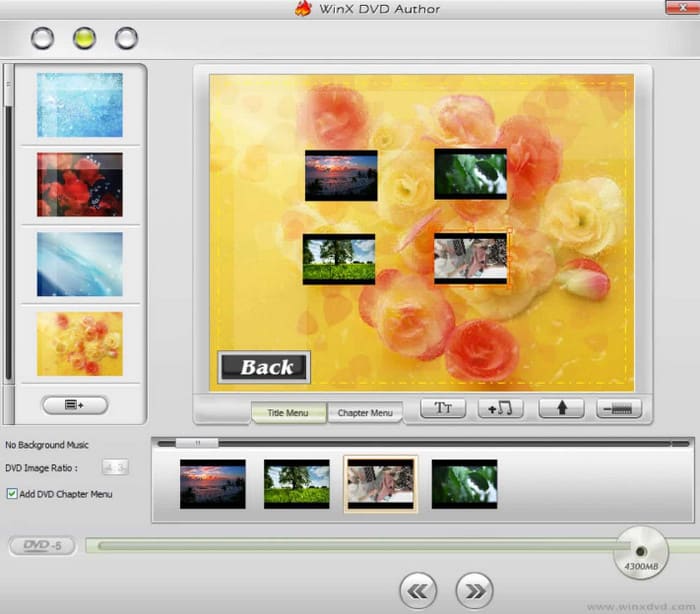
- 4 free and built-in menu templates for a decorative DVD menu.
- It has the chapter property that splits the content into chapters with a time specification.
Part 3. WinX DVD Author Pros
Straightforward Layout
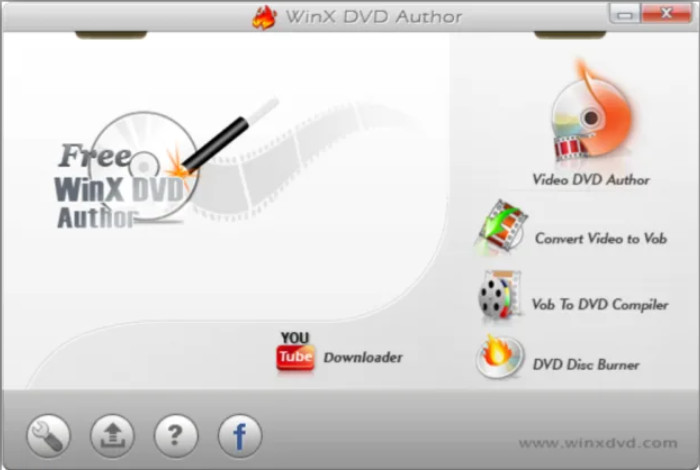
The DVD Author is designed with a clean gray-colored interface, making the burning and editing process easier for beginners. Although it looks old-fashioned, we like that the interface is clean, even on the free trial version.
Configurable Menu Templates
When trying its menu templates for making DVD menus, WinX DVD Author allows you to move the buttons around. Of course, this part of editing the video includes adding music, subtitles, and others, which is ideal if you prefer a quick edit.
Satisfactory Output Options
The software’s burning capabilities manage to turn MOV, FLV, and other video types into DVD output formats. This includes DVD+R/RW, DVD-R/RW, DVD-9, and DVD-5.
Sufficient Output Settings
You don’t have to worry if the aspect ratio or the standard TV format is wrong. The output setting has all the options you need to configure, such as the FPS, write speed, encoder, TV standard, and more.
Part 4. WinX DVD Author Cons
Any software has its downside, and it is only right to know about it before downloading and installing it on your computer. Here are the WinX DVD Author problems we discovered.
Slow Software Launch
The first thing we experience with the DVD burner is the slow launch progress. Given that DVD Author is an outdated application, no more update occurrence can be the possible cause.
High Pricing Plan
The free WinX DVD Author cannot meet your burning needs, so you will be required to choose the pro version, which costs $39.95 for only one device. We know that it offers a decent DVD-burning experience, but the price is too high for its features. You can find more free DVD creators here, if you have a limited money plan.
Limited Menu Templates
We discovered that there are only four menu templates within WinX DVD Author. Unlike most modern DVD burners, it does not offer built-in templates to match themes like holidays or anniversaries for homemade DVDs.
Part 5. WinX DVD Author: Performance and Price Plans
Performance
During testing on a Windows 10 laptop, I used WinX DVD Author to burn a 4GB MP4 video project, which took around 50 minutes. The installation process went smoothly, with no ads or bundled software. And the interface is simple to operate with clearly defined functional modules, making it ideal for beginners to get started quickly. Although the interface appears somewhat outdated, it demonstrated satisfactory stability during the burning process without experiencing any lag or crashes. In terms of burning speed, it performs adequately, which is suitable for home or personal use.
Price Plans
WinX DVD Author is completely free without paid versions. No subscriptions, no hidden fees, and no watermarks—making it one of the few truly free DVD authoring tools still available in 2025.
Therefore, WinX DVD Author remains a recommended free DVD authoring software in 2025. It is stable, secure, and easy to use, making it particularly suitable for users who want to preserve home videos or create simple discs. However, if you require support for more modern formats, a wider selection of menu templates, or Blu-ray burning capabilities, it won't meet your needs.
Part 6. Best Alternative to WinX DVD Author
Another thing we experience is WinX DVD Author burning process can go wrong. This can affect your workflow, especially for multiple videos to burn. However, you have DVD Creator by Blu-ray Master as an alternative. Its main objective is to provide an excellent burning experience with its updated interface and robust functions. Notably, it supports a wide range of input and output formats, including Blu-ray and DVD disc, folder, and ISO image file. When it comes to editing, it offers a library of customizable menu templates depending on the theme. On top of that, it has an abundant free version that you can download on Windows and Mac or buy the pro version for as low as $12.45 for a lifetime license.
- Advanced DVD/Blu-ray burning process with a quick learning curve.
- Effective editing functions to split, merge, cut, and rotate videos.
- Real-time preview to see the final result before processing.
- Professional technique support for a rapid burning speed.
Free Download
For Windows
Secure Download
Free Download
for macOS
Secure Download
| DVD Creator | VS | WinX DVD Author |
| $12.45 | Pricing Plan | $39.95 |
| DVD and Blu-ray disc, ISO, and folder | Supported Output Formats | DVD-9, and DVD-5, DVD+R/RW, DVD-R/RW |
 | Fast-speed Burning Process |  |
| 1080p to 4K | Resolution Option | 720p |
| Frequent | Software Update | None |
| Windows 11/10, Mac OS X 10.9 and above | Supported Platforms | Windows 11/10/8/7 |
| Free Version Watermark | |
| Customization | |
| Easy | Complexity | Easy |
Part 7. FAQs about WinX DVD Author
-
Is WinX DVD Author really free?
It has a free version that offers free usage on the DVD burner. Unfortunately, it has very limited features and requires the user to buy the premium version.
-
Is WinX DVD Author safe?
Yes, it is safe to download and use on your Windows. Whether you download the free or pro version, WinX ensures it is safe from viruses and malware. It is also better to download the tool from the official website.
-
Why does the WinX DVD Author not recognize the DVD burner?
It does not recognize the DVD burner for many reasons, including incompatibility and device manager errors. However, one thing to do is use DVD Creator by Blu-ray Master as an alternative.
-
How to burn a DVD with WinX DVD Author?
Download and install the tool on your computer. Choose the Video DVD Author option from the main menu. Click Add Video File to upload the files you want to burn. Create a DVD menu and edit the videos as you desire. Once done, click the Start button to burn a DVD.
Wrapping up
After reviewing WinX DVD Author from its features, pros, cons, performance, and pricing, it’s clear that the software still holds value for basic DVD burning tasks. It’s free, stable, and beginner-friendly, making it a practical choice for simple projects on Windows. However, its lack of Blu-ray support, outdated interface, and limited editing tools may not meet the needs of users looking for more flexibility and creative control. If you want a smoother experience with advanced features, Blu-ray Master DVD Creator is the best alternative. It supports both DVD and Blu-ray formats, offers powerful editing tools, and ensures high-quality output with ease. Click the Free Download button and try it now.
Best DVD Creator Review
