

Nov 19, 2025Posted by Kevin Miller to Tips
NTSC and PAL are color encoding systems that Blu-ray and DVD players use. So, if you have a PAL DVD player, playing NTSC and PAL files would be easy. However, if you own an NTSC platform, it can’t read PAL content. One of the reasons is its compatibility. If you want to understand more about the two color encoding systems, you must engage in this article. We will show the differences between the two. Then, we will introduce an amazing program, especially if you want to turn your NTSC to PAL and vice versa for playing the files. This article tells you 5 methods to achieve converting DVDs to ISO files on PC, macOS and Linux.

- Part 1. What are NTSC and PAL
- Part 2. NTSC vs. PAL
- Part 3. PAL vs. NTSC: Which is Better
- Part 4. Best Way to Play NTSC and PAL DVDs
- Part 5. FAQs about NTSC vs. PAL
Part 1. What are NTSC and PAL
If you are interested in TV technology or games, you have probably heard the terms PAL and NTSC. But the question is, what are they, and how do they differ? In that case, if you are eager to learn about these two terms, we got you. Come here to know a detailed explanation of NTSC vs. PAL.
What is NTSC?
NTSC is a format and color encoding system that DVD players use. It is, until recently, TV broadcasting in North America. Since black and white color television began to be replaced, the United States has been utilizing various methods for encoding colors to be broadcast to users’ homes. But these methods, including the black and white television sets, conflict. Also, it cannot interpret the signal’s color which is being sent to them. So, in 1953, NTSC, or the National Television System Committee, enforced and developed a single method. It could be across the nation and suitable with various TV sets. Also, the new NTSC stayed backward-compatible with BnW TVs. The color data is simple to filter out on older grayscale displays. Aside from that, the committee uses 525 scan lines and is split between two interlaced fields of 262.5 lines. Plus, the refresh rate of NTSC is 60Hz. Choosing a refresh rate that can’t sync up with the power grid can result in interference. With that, NTSC has a great frame rate of 30FPS.
Part 2. NTSC vs. PAL
NTSC and PAL are both television standards that were created to provide a better television experience back in the day. However, they are very different when it comes to streaming services, and you might as well learn their aspects so as not to mix them up eventually. Here is a side-by-side comparison of NTSC and PAL.
In this section, we will compare the two color encoding systems. This way, you will be given an idea about the two. Also, we will explain various factors. It includes color encoding, image quality, FPS, number of resolutions, and more. So, immediately check the details below and learn about NTSC vs. PAL differences.
NTSC vs. PAL: Color Encoding
When talking about NTSC, its receivers have manual tint color correction. Its higher saturation of NTSC makes off-hue colors more visible and noticeable. It is essential to create some adjustments. Meanwhile, PAL can manage color automatically. It utilizes color signal phase alteration to erase hue errors. In addition to that, PAL can easily eliminate chrominance phase errors.
NTSC vs. PAL: Camera
The NTSC contains 525 lines of resolution. More lines are an indication of greater image quality. Therefore, the image/picture quality is less compared to PAL. On the other hand, PAL lines can go out at 50 per second. It can also offer 25 alternating lines. It even produces 25 frames per second. This way, it can result in a faster photo display. Also, 625 is the total lines of resolution in PAL. It means that it is higher than NTSC. So, in terms of camera or image quality, PAL dominates NTSC.
NTSC 60 vs. PAL 50: Frequency & Frame Per Second (FPS)
Another difference between these standards is their frames per second rate.NTSC has 29.97, while PAL contains 25. NTSC used to be 30 FPS for every complete alteration of a 60HZ household outlet. But when color broadcasting emerged, the black and white TVs could not interpret brightness and color signals appropriately. It only displays nonsensical photos on the screens. The households in PAL regions utilize another type of outlet with a frequency-50Hz. It also explains the different FPS rates for PAL.
NTSC vs. PAL: Countries & Regions
For other information, the two standards are limited to certain parts of the world. NTSC is mostly found in certain countries in South America, North America, Myanmar, Taiwan, the Philippines, Japan, and South Korea. But PAL is more common. It covers most Western Europe, India, China, Africa, and Australia.
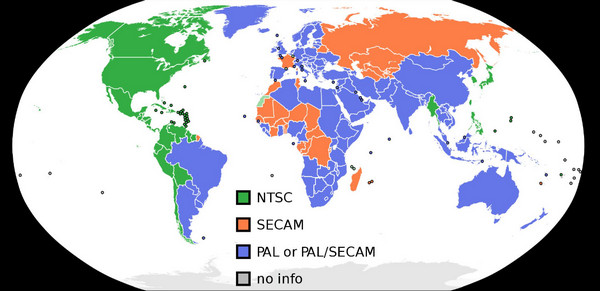
Part 3. PAL vs. NTSC: Which is Better
Between the two standards, it depends on your location and the audience. If you are making videos for global viewership, we suggest you use the NTSC. Most PAL DVD players, including the VCRs, can read and play NTSC video. On the other hand, some NTSC platforms can’t work with PAL content.
You can check the table below to give you more comparisons between NTSC and PAL.
| Standard | NTSC | PAL |
| Abbreviation | National Television System Committee | Phase Alternation Line |
| Sound Carrier | 4.5 MHz | 5.5 MHz |
| Video Bandwidth | 4.2 MHz | 5.0 MHz |
| Vertical Frequency | 60 Hz | 50 Hz |
| Horizontal Frequency | 15.734 kHz | 15.625 kHz |
| Bandwidth | 6 MHz. | 7 to 8 MHz |
| Color Subcarrier Frequency | 3.579545 MHz | 4.433618 MHz |
| Lines/Field | 525/60 | 625/50 |
| Active Lines | 480 to 487 | 576 |
Part 4. Best Way to Play NTSC and PAL DVDs
NTSC and PAL formats restrict DVD playback. If you have an NTSC DVD, you can only watch it in the specific region. But nowadays, you can use Blu-ray Master Free Blu-ray Player, which allows you to watch NTSC and PAL DVDs with ease, making it a versatile option for global disc playback. When playing DVDs with this tool, you can manually select audio tracks and subtitles. Moreover, it has many flexible settings to give you a good viewing experience, like snapshot for you to capture the wonderful moments of the movies.
Features
• Supports DVDs, Blu-rays, and various video playback.
• Bypass regions to play all DVDs and Blu-rays.
• Playlist feature to manage playback of multiple files.
• Select and add external audio tracks by yourself.
Part 5. FAQs about NTSC vs. PAL
-
Is NTSC or PAL better quality?
PAL has a better quality. It is because it has 625 lines of resolution while NTSC only has 525 lines.
-
Is Japan NTSC or PAL?
In Japan, they are using NTSC. They are with other countries or regions, like South Korea, the Philippines, Taiwan, Myanmar, etc.
-
Does PAL and NTSC matter anymore?
Yes. It does matter because you must consider the location when using a certain format. Also, we all know that PAL DVD players can read NTSC. However, some NTSC platforms cannot read PAL. These two still matter.
-
Is NTSC still being used?
Since we are always upgrading, especially in technologies, formats like NTSC are becoming outdated. Yes, it is still used but not as popular as other formats.
Wrapping up
You have learned about NTSC vs. PAL by reading the article. Also, you can discover more about their differences, which can help identify their capabilities. Aside from that, the post introduced Blu-ray Master Free Blu-ray Player to watch both NTSC and PAL DVDs. So, what are you waiting for? Access the program and have a better experience.
More from Blu-ray Master
