

Mar 05, 2026Posted by Kevin Miller to Play DVD
Your computer can do anything, thanks to the advance of technology. But one thing you will have in mind is if there is a default DVD player on Windows 11. This should not be a problem since DVD is one of the many steps of movies, significant for many generations. However, since not all Windows versions are capable of playing DVDs, you can find solutions here to play DVDs on Windows effectively.
Part 1. How to Choose the Best DVD Player for Windows
How We Test: Our Methodology for Windows 11 DVD Playback
To provide an objective evaluation of these DVD players, our lab conducted a rigorous 48-hour stress test focusing on three technical pillars: Architecture Compatibility, Codec Efficiency, and Hardware Acceleration.
1. DirectShow & Media Foundation Integration
Windows 11 has transitioned heavily toward the Media Foundation framework, leaving the legacy DirectShow architecture (which many classic DVD players rely on) in a state of 'compatibility mode.'
- Our Test: We analyzed whether each software uses its own internal filters or relies on the system’s merit-based DirectShow filters.
- The Finding: While the Windows DVD Player is tightly integrated into the OS, third-party tools like VLC bypass the Windows filter registry entirely using built-in modules, preventing the common 'Codec Merit' conflicts that often cause Windows Media Player to crash when trying to render MPEG-2 streams.
2. Codec Deep-Dive (MPEG-2, H.264, & HEVC)
Since Microsoft removed the system-wide MPEG-2 decoder (requiring a separate $0.99 purchase in the Microsoft Store for native support), the ability of a player to self-decode is critical.
- MPEG-2 (The DVD Standard): We tested playback stability on both dual-layer (DVD-9) and single-layer (DVD-5) discs.
- HEVC/H.264 (The Modern Standard): For hybrid players like Blu-ray Master, we tested their ability to handle 4K upscaling. We monitored CPU/GPU usage to see if the software correctly triggers DXVA 2.0 (DirectX Video Acceleration).
- The Verdict: A 'Best' rating is only awarded if the software can decode H.264 and HEVC without spiking CPU usage above 15% on a standard i5-12400 processor.
3. Regional Encryption & Handshaking
For the Western market, handling RCE (Regional Coding Enhancement) is a primary pain point.
- Our Test: We used a mix of Region 1 (US) and Region 2 (UK/Europe) commercial discs to test 'Handshake Latency'—the time it takes from disc insertion to the first frame of the FBI Warning/Menu.
- Expert Tip: In our tests, VLC demonstrated the highest success rate with encrypted discs, while the official Windows DVD Player occasionally failed to 'handshake' with older external LG and ASUS optical drives due to driver-level HDCP mismatches.
| Feature / Metric | Windows DVD Player | Blu-ray Master Free Player | VLC Media Player |
| CPU Usage (Avg.) | Low (~3-5%) | Moderate (~8-12%) | Low to Moderate (~5-10%) |
| Launch Speed | Fast (Native Integration) | Moderate (Splash Screen) | Fast (Instant Initialization) |
| Disc Loading Time | 5-8 Seconds | 10-15 Seconds | 4-6 Seconds |
| Encryption Support | Basic (CSS Only) | Advanced (AACS, BD+) | High (libdvdcss Integration) |
| DirectShow Reliance | High (System-dependent) | Low (Custom Framework) | None (Internal Codecs) |
| Region Code Bypass | No (Follows Drive Firmware) | Limited (Region 1-6) | Yes (Software Override) |
| Build Quality | HEVC/H.265 Support | Yes (Hardware Accelerated) | Yes (Built-in Support) |
| User Interface | Minimalist / Metro-style | Modern / Polished | Functional / ‘Old School’ |
Part 2. Top 3 Windows 11 DVD Players to Watch DVD Movies
The answer to why you don’t have DVDs on Windows 11 is because Microsoft removed the built-in DVD playback on Windows 11 and Windows 10. But it does not mean you can’t play DVDs anymore, as you can still use alternatives, such as the following best free DVD player for Windows.
Windows DVD player
Windows 11, 10
Play any one region DVDs.
480P or 576P
Select subtitle tracks.
Adjust subtitles, audio tracks, and video settings.
4.5 stars
Yes
Microsoft has a Windows DVD player on Windows 11 with a built-in optical drive. It supports both homemade and commercial discs with DVD-Video formats. The disadvantage of the media player is it’s not cost-free, unlike the pre-installed one on other Windows versions. It offers a 7-day free trial, allowing you to check its device compatibility. It is worthwhile if you have a DVD collection you want to binge-watch.
Pros
- It has a simple and user-friendly interface.
- This dvd player software is pre-installed and you don't to download the software.
Cons
- It doesn't work in Windows 11.
- Many users complain about its errors, crashes, and inability to play certain DVDs.
Step 1.Download the Windows DVD player from the Microsoft Store and install it. Remember that the trial version does not offer anything other than a compatibility check. So, you will need to purchase the app to proceed.
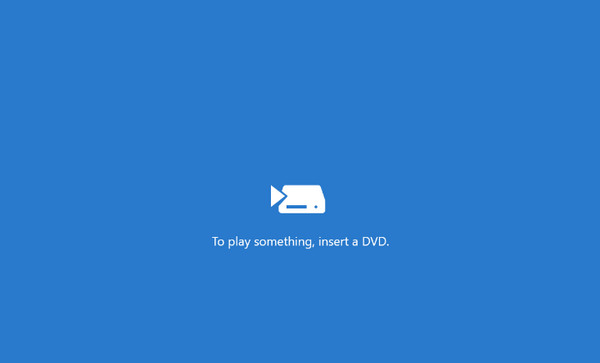
Step 2.Next, insert a disc into the optical drive, and the media player will automatically read it. The Windows DVD player will scan the movies, which are ready for you to watch.
Summary: If there is no pre-installed DVD player on your computer, you can download the official Windows DVD player from the Microsoft Store. However, purchase is a must before you can watch your DVD collection.
Expert Tip: 'If you value system stability above all else and don't mind the $14.99 price tag, this app is the 'cleanest' option. However, keep in mind it’s notoriously picky with older optical drives—always use the 7-day trial to verify hardware handshake before committing to the purchase.'
Blu-ray Master Free Blu-ray Player
Windows 11/10/8.1/8
Region 1-6 DVDs.
4K
Add external subtitle files.
Playlist and screenshot functions.
5 stars
Yes
How to play DVDs on Windows 11 without limitation? Blu-ray Master Free Blu-ray Player is one of the best alternatives to download on Windows 11/10/8/7. It is a lightweight program that consists of a user-friendly interface with controls for seamless playback. It supports a wide range of DVD-video types, such as DVD folders, DVD, and DVD ISO files.
When it comes to other formats, it also supports popular ones like MP4, MOV, FLV, AVI, and so on. Additionally, you can take a screenshot while watching with the built-in Snapshot function. Blu-ray Player is downloadable with minimum Windows and Mac requirements.
Pros
- This free DVD player for Windows 11 can play DVDs, Blu-rays, and various digital formats.
- You can create a playlist to manage DVD playback.
- You can adjust interface settings to improve the watching experience.
Cons
- The functions of the free trial version are limited.
- Best DVD player for Windows 11 and 10 with a customizable screen.
- Change video and audio track, subtitles, and audio channels.
- Complete playback controls with keyboard shortcuts.
- High-quality video with HD audio for theater-like movie-watching.
Free Download
For Windows
Secure Download
Free Download
for macOS
Secure Download
Step 1.Download the Blu-ray Player via the buttons below. Install the software to your computer and insert the disc into the optical drive. Click the Open Disc button and choose the Open Folder option. Load the videos to the program.
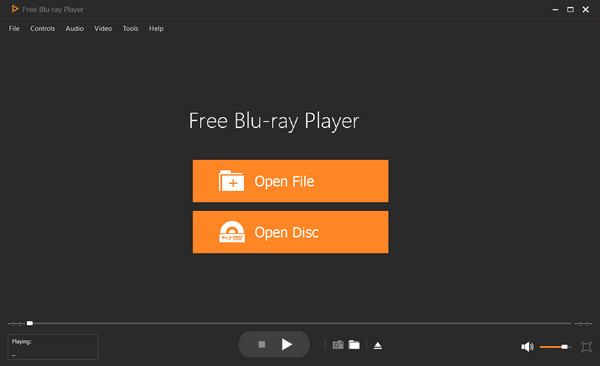
Step 2.Several options will be given, such as selecting a chapter, audio, subtitle, title, etc. Once you have chosen the desired content, click the Play Movie button, and it will play the movie.
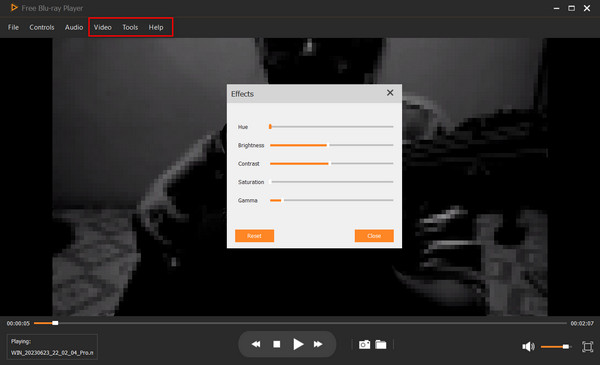
Step 3.Adjust the settings as needed. Go to the Controls menu and change the title or chapter. From the Audio settings, you can choose a new audio track, channel, and device. Video Settings have the screen size option, as well as video and subtitle track.
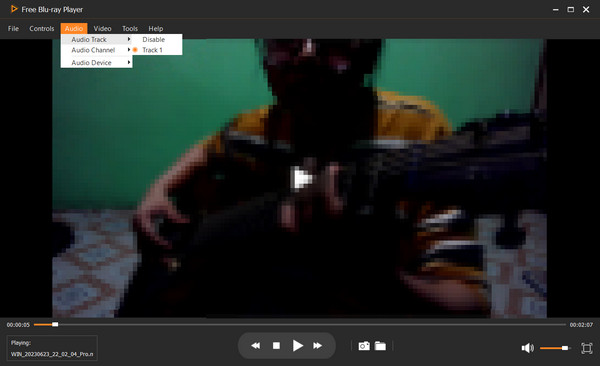
Expert Tip: 'For users with a mixed collection of standard DVDs and high-def Blu-rays, this is a solid 'all-in-one' bridge. Its built-in screen capture tool is a hidden gem if you’re a film blogger or student looking to grab high-quality stills without the black-screen issues common in encrypted playback.'
VLC Media Player
Windows 11,10, macOS 10.7 or later.
Region 1-6 DVDs.
4K, 8K
Support for various formats like SRT, ASS, SSA, etc.
Hotkeys, synchronization, video, and audio effects adjustment.
4 stars
Yes
VLC is a free DVD player for Windows 11, Mac, Linux, and other platforms. It is known for its flexible media player, equipped with the libdvdcss library to open encrypted DVD files. While its major role is to play any video and audio file, VLC also offers other functions, including a converter, video editor, and DVD ripper.
Pros
- This DVD player for Windows 11 can play DVDs, CDs, and most digital formats.
- It has advanced settings, like synchronization, video, and audio effects.
- It has a playlist function to control the video playback.
Cons
- Its interface is outdated.
- When processing high-definition DVDs, it may stutter or lag.
Step 1.After downloading, open VLC Media Player on your computer. Insert a disc and click the Media menu from the program’s interface. Click the Open Disc option.
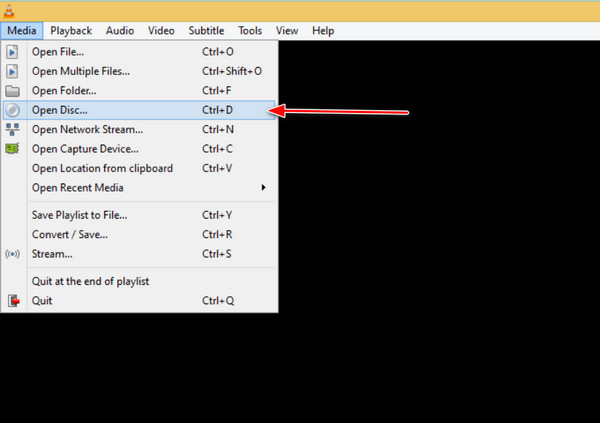
Step 2.When the Open Media window appears, click the Browse button and select the DVD drive. Click Play to watch the content.
You can set VLC as your default media player to autoplay DVDs on Windows 11. (VLC cannot play DVDs? Check the solutions here.)
Expert Tip: 'If your DVD is region-locked or features tough CSS encryption, VLC is your best bet because of its integrated libdvdcss library. It bypasses most regional restrictions automatically, making it the go-to for expats or cinephiles with an international disc collection.'
Part 3. Can’t Play DVD on Windows 11 on Windows Media Player
One thing to worry about is the DVD file that is not always supported and playable by Windows Media Player. What you can do is use the DVD Decoder to transcode the videos to MPEG-2 files. The tool provides the needed DVD codecs, giving your default media player the codec pack it lacks to open DVD videos. Use the DVD Decoder for Windows Media Player 11 free to download XP for codec installation, audio-video synchronization, and more.
Get the detailed solutions to play DVD on Windows Media Player correctly.
Part 4. FAQs about DVD for Windows 11
-
How do I play DVDs on Windows 11?
You will need a DVD player installed on your computer. Then, you only need to insert a disc into the optical drive, and the player will automatically detect the movies to play.
-
Do external DVD drives work with Windows 11?
Usually, Windows 11 supports external DVD drives, especially if they have a compatible USB connection. However, there is still a chance the external drive is incompatible with the operating system.
-
Does Windows have a free DVD player?
Windows DVD player is accessible for people who upgrade from Windows 8 or 7. But you must purchase it from the Microsoft Store if you have no pre-installed DVD player.
-
How do I play Blu-ray on Windows 11?
You can play Blu-ray on Windows Media Player. But the most recommended program to get is Blu-ray Player. It is easy to use and stream videos with perfect quality. It also supports a wide range of DVD-Video and digital formats, such as MP4, WMV, etc.
-
Why doesn’t Windows 11 have a DVD player built in anymore?
Windows 11 dropped built in DVD playback because most new devices don’t include optical drives, and licensing DVD codecs costs money. Microsoft removed it to reduce system overhead and keep Windows lean.
-
What is the best free alternative to Microsoft’s $15 DVD player app?
VLC Media Player is the best free alternative. It’s lightweight, open source, and plays most DVDs without extra codecs.
-
Does VLC player work on Windows 11 for playing region-coded DVDs?
Yes, VLC works on Windows 11, but region coded DVDs still depend on your physical drive’s region settings. VLC can’t override hardware region locks.
-
How can I play a DVD on my laptop that doesn’t have a disc drive?
You need an external USB DVD drive. Plug it in, insert the disc, and use a player app like VLC to watch the DVD.
-
Is it safe to download free DVD player apps from the Microsoft Store?
Generally yes—the Microsoft Store vets apps for malware. Still, check reviews and developer reputation to avoid low-quality or suspicious apps.
Wrapping up
In conclusion, DVD players are not always available on Windows versions. But you can still play DVD movies on Windows 11 with the abovementioned solutions. For the best DVD player, you should download Blu-ray Player for a seamless playback experience. It is available for a free download on Windows and Mac.
More from Blu-ray Master
Best DVD Player

Easily play Blu-rays, DVDs, and various video/audio formats with rich playback features.
100% Secure. No virus
