

Jan 27, 2026Posted by Brittany Garcia to Rip Blu-ray
The 31-disc complete sets of Harry Potter Blu-ray movies are very precious. It costs you more than one hundred dollars. The Harry Potter Wizards Collection needs three hundred dollars or more. How to take advantage of the complete 8-film collection of Harry Potter Blu-ray discs? Ripping Harry Potter Blu-ray movies to digital is a good choice for easy and safe backup!

- Part 1. Why the Harry Potter Blu-ray Collection Is Worth Ripping
- Part 2. What You Need Before Ripping a Blu-ray Disc
- Part 3. Best Tool to Rip Harry Potter Blu-ray - Rich Output Formats
- Part 4. FAQs
Part 1. Why the Harry Potter Blu-ray Collection Is Worth Ripping

The Harry Potter films are visually rich, with detailed environments, magical effects, and immersive soundtracks. Many people try Blu-ray ripping for several benefits:
- Instant access without swapping discs
- A safe backup in case your discs get damaged
- Better portability for phones, tablets, and laptops
- Smooth streaming on Plex, Kodi, or a home media server
- Smaller file sizes if you choose compressed formats
If you want the full Hogwarts experience without the hassle, digital copies are the way to go.
Part 2. What You Need Before Ripping a Blu-ray Disc
1. Legal Considerations and Ethics
Before you begin, it is crucial to understand the legal landscape, which is often a 'grey area.'
- Ownership vs. Licensing: In many regions, purchasing a disc gives you the right to view the content, but 'format shifting' (moving it from disc to digital) may technically bypass Digital Rights Management (DRM) protections.
- Regional Differences: In the U.S., the Digital Millennium Copyright Act (DMCA) generally prohibits bypassing encryption, even for personal use. However, in other countries, 'fair use' or private copy exceptions may apply.
- The Golden Rule: Regardless of local law, the ethical standard among enthusiasts is to only rip discs you physically own and never share or distribute the resulting files.
2. The Hardware: Blu-ray Drives
Not all disc drives are created equal. To read a Blu-ray, you need a laser specifically designed for it (standard DVD drives will not work).
- External vs. Internal: USB 3.0 external drives are the most popular choice for laptop users. If you have a desktop, an internal SATA drive is often faster and more reliable.
- '4K UHD Friendly' Drives: If you plan on ripping 4K Ultra HD discs in the future, you will need a specific 'UHD-friendly' drive. Some drives require 'flashing' (updating) the firmware to allow the software to read the raw data on the disc.
3. Ripping & Transcoding Software
'Ripping' is the act of copying the data, while 'Transcoding' is the act of compressing it into a smaller file. There are multiple powerful Blu-ray ripping software for you to choose from.
4. System Requirements
Blu-ray files are massive and require significant 'horsepower' to process, especially if you are compressing them.
- CPU (The Engine): A multi-core processor (Intel i5/i7 or AMD Ryzen 5/7) is essential. Transcoding a movie can take anywhere from 30 minutes to several hours, depending on your CPU speed.
- RAM: 8GB is the minimum, but 16GB is recommended if you want to use your computer for other tasks while the software is running in the background.
- Storage (The Vault): A single Harry Potter Blu-ray can range from 25GB to 45GB for a 1080p version. If you are ripping 4K versions, expect 50GB to 100GB per movie. An external Hard Drive or a NAS (Network Attached Storage) is highly recommended for long-term storage.
5. Free Download Harry Potter the Complete 8 Film Collection Blu-ray
If you have not purchased Harry Potter Blu-ray discs, you can free download complete set of Harry Potter movies online. You can find the resources from some sites, which enable you can free download Harry Potter film collections.
You can also find lots of other websites providing Harry Potter Blu-ray movies, such as the Kickass Torrents or HD Movie sites. But it is not always easy to download the Harry Potter the complete 8 film collection Blu-ray, you should make sure the download link and site is safe.
The Harry Potter Blu-ray set Ripper is able to convert Harry Potter complete eight films Blu-ray to popular video format and high quality video format. You can take advantage of Harry Potter Blu-ray box set for different types of devices anytime and anywhere you want.
Part 3. Best Tool to Rip Harry Potter Blu-ray - Rich Output Formats
If you have purchased the Harry Potter Blu-ray movie, you can easily rip Harry Potter the complete 8 film collections to popular video formats for free with Blu-ray Master Free Blu-ray Ripper. It is a powerful Blu-ray ripping tool that can efficiently convert your Blu-ray movies to digital formats. It offers a wide range of output profiles for you to choose from: MP4 with good compatibility, MKV with lossless quality and perfect for archiving, and many other formats. If you need, you can customize the encoder, bitrate, resolution, and other parameters. Give it a try, and you can playback the complete set of Harry Potter movies for any device with the best resolution.
Free Download
For Windows
Secure Download
Free Download
for macOS
Secure Download
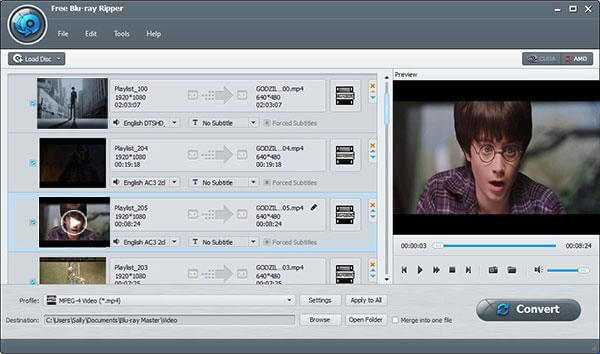
Step1.Launch Free Harry Potter Blu-ray Ripper
Just download and install the Free Blu-ray Ripper, you can launch the program as the screenshot.
Step2.Load the Harry Potter Blu-ray movie
Click the 'Load Blu-ray' option to load the Harry Potter Blu-ray movies to the program. Make sure the movies are playable. You can manually select the title, audio track, and subtitles you want to maintain.
Step3.Choose video format for your device
Make sure the video formats compatible with the device. You can also choose the device for playing Harry Potter Blu-ray movies.
Note: MP4 (H.264/AAC) is the best choice for mobiles that have universal compatibility and have a balanced size.
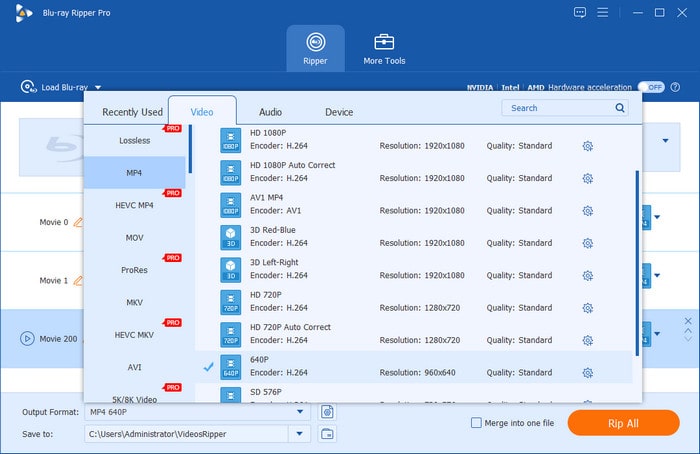
Step4.Free rip the complete eight films of Harry Potter Blu-ray set
You can also adjust the parameters for the device types, and then convert Harry Potter Blu-ray box set to the video format.
Note: You can use a Constant Rate Factor (CRF) to balance file size and clarity with ease.
Part 4. FAQs
-
1. Is Blu-ray ripping legal?
It is a legal grey area. In many regions, bypassing DRM (copy protection) is technically illegal under copyright law. However, ripping for personal, non-commercial backup is generally tolerated and rarely prosecuted.
-
2. What is the best format for Harry Potter movies?
MKV (H.265/HEVC) is the best choice. It preserves the high-quality visuals and dark details of the series while supporting multiple audio tracks (for different languages) and subtitles in a single file.
-
3. How long does it take to rip a Blu-ray?
20 - 40 minutes for a direct 'remux' (copying data without quality loss). 2 - 8+ hours if you are 'transcoding' (compressing the file to a smaller size), depending on your computer's power.
-
4. Can I rip Blu-ray for Plex?
Yes. Plex is designed specifically to host such files. Using MakeMKV to rip the disc is the standard method for Plex users to maintain full Blu-ray quality.
-
5. What’s the difference between MP4 and MKV?
MP4 is highly compatible with almost any device (phones, old TVs) but supports fewer subtitle and audio options.
MKV is highly flexible and acts as a 'container' that can hold unlimited audio, video, and subtitle tracks, making it the standard for high-quality movie collections.
Conclusion
Now, you must be clear about how to rip Harry Potter Blu-ray movies with the most-recommended Blu-ray converter. Follow the above detailed guide, and the process is easy to do by yourself. Moreover, you can follow the tips to choose the proper formats and parameters for better video compatibility of different use cases and devices. Have a try!
More from Blu-ray Master
Rip Blu-ray Movies
Rip Blu-rays to any video and audio formats of different parameters for free in minutes.
100% Secure. No virus
