

Oct 23, 2026Posted by Kevin Miller to Rip Blu-ray
Quick Summary
Ripping your TMNT Blu-ray to MP4 lets you watch it on any device and share it with friends. Based on the two methods we feature, we recommend using Blu-ray Master Free Blu-ray Ripper for one-click output, or MakeMKV for lossless 1:1 MKV copies.
When it comes to watching the 2014 movie Teenage Mutant Ninja Turtles, Blu-ray is the best option available today due to its superb quality and compatibility with modern Blu-ray players. Unfortunately, they are not the best option if what you are looking for is compatibility with modern devices. In this article, we will provide a detailed guide to ripping a Teenage Mutant Ninja Turtles Blu-ray copy to make the modern classic breach the device's Blu-ray limits and make it easier to watch and share with friends.

- Part 1. How We Test & Quick Comparison
- Part 2. Best Method: Blu-ray Master Free Blu-ray Ripper (Easiest Way)
- Part 3. 2 Free Alternatives Worth Trying
- Part 4. About the TMNT (2014) 3D Blu-ray — What Makes It Special
- Part 5. FAQs About Ripping TMNT Blu-ray
Part 1. How We Test & Quick Comparison
To objectively test the ripping tools we have featured for converting TMNT Blu-ray to digital video, we used them on a modern desktop. As such, the testing environment we have used is a modern Ryzen 5 computer with 16GB RAM and an iGPU. We also ensured that only the ripping program under testing was active on the computer during ripping.
Based on our testing, the results below reflect the measurements we used.
| Blu-ray Ripper Tools | Best Used For | Pricing | Output Formats | Ease of Use |
| Blu-ray Master Free Blu-ray Ripper | Modern Blu-ray ripping. | Free | MP4. MKV, MOV, AVI, WebM, 200+ formats. | Very Easy |
| MakeMKV | 1:1 quality ripping to MKV format. | Free (Open Source) | MKV | Intermediate |
| HandBrake | Customizable ripping with its advanced settings. | Free (Open Source) | MP4, WebM, MKV | Hard |
Part 2. Best Method: Blu-ray Master Free Blu-ray Ripper (Easiest Way)
Among the programs we have tested, the Blu-ray Master Free Blu-ray Ripper stands out as the most practical modern ripping tool. This software is one of the best on the market, as it is highly optimized for Blu-ray ripping.
For high-quality Blu-ray movie releases, the tool can also operate highly efficiently thanks to its GPU-accelerated system, delivering conversions up to 50x faster than standard Blu-ray and DVD ripper tools.
With the features and efficiency now discussed, let us now proceed to how to use the program. Make sure to read our detailed tutorial below, and do not forget to download it for an easier time following our tutorial.
Step 1.Download & Install the Ripper
Download the Blu-ray Master Free Blu-ray Ripper from the program's website. After installing, check for updates to ensure your tool is at optimal performance.
Free Download
For Windows
Secure Download
Free Download
for macOS
Secure Download
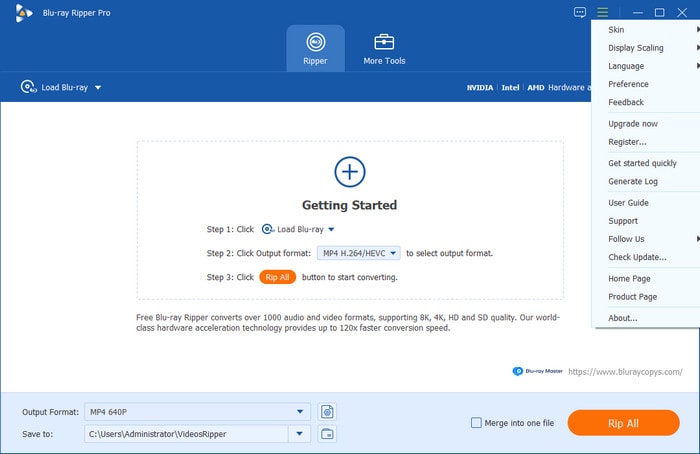
Step 2.Load the TMNT Blu-ray
Once the TMNT Blu-ray has been loaded on your computer, click Load Blu-ray, then select Load Blu-ray Disc to allow the software to access the loaded Blu-ray media. In the Load DVD menu, select Full Title List to rip the entire Blu-ray content, or choose Main Title if the main movie video is enough for you.
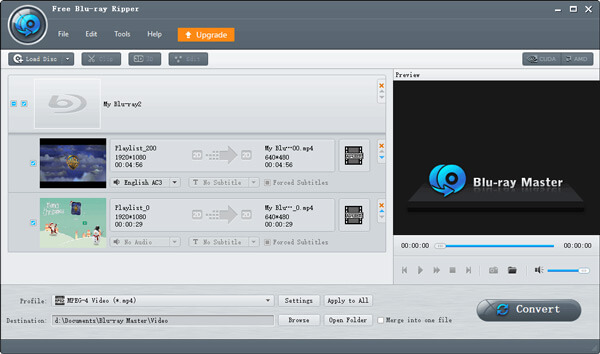
Step 3.Choose Output (MP4 recommended for sharing/uploading)
With the Blu-ray media now loaded into your program, select Output Format and choose MP4 to ensure your converted digital video is compatible with modern devices. MP4 is also a good choice for sharing and uploading media content.
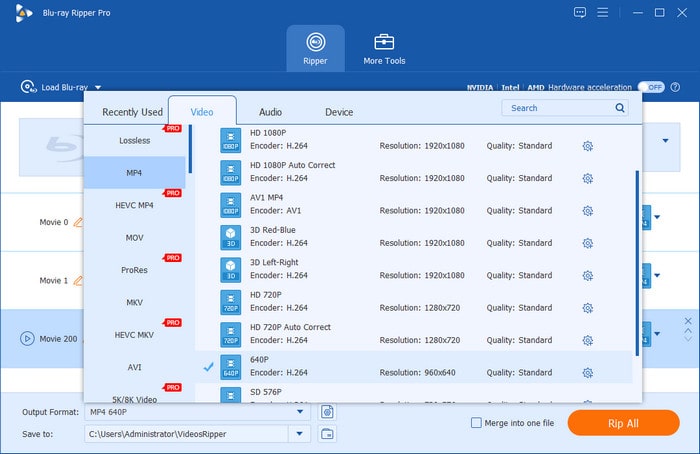
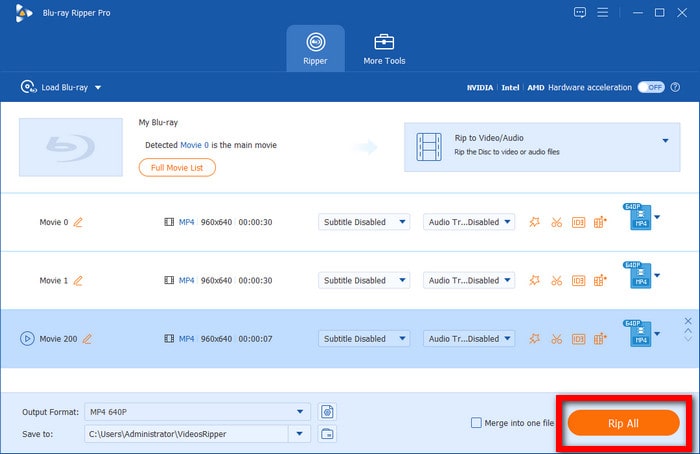
Step 4.Rip and Share with Friends
Now that you have set how you want to load the Blu-ray and set the Output Format to a highly compatible MP4, you may return to the Ripper menu. There, select Rip All to begin converting the Blu-ray media to the digital MP4 format.
Compared to the other alternative rippers below, Blu-ray Master’s option is the best in terms of accessibility and ease of use. This made the program an excellent solution if you are only looking for a tool especially designed for ripping Blu-ray content.
Part 3. 2 Free Alternatives Worth Trying
MakeMKV — Best for Lossless 1:1 MKV
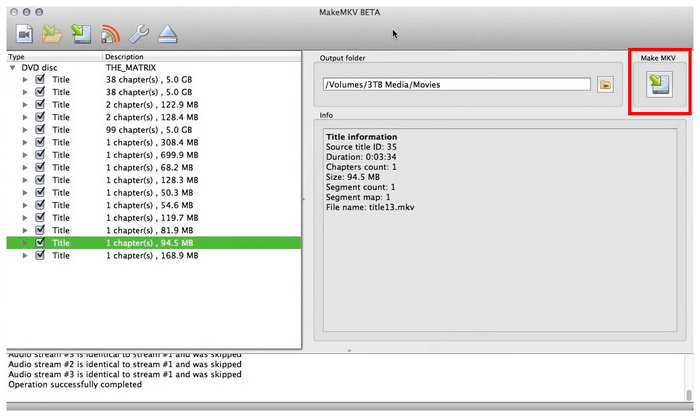
When your main concern with Blu-ray media is retaining Blu-ray quality, we highly recommend using MakeMKV as your primary solution. Among the programs on this list, this software offers top-quality 1:1 ripping, allowing users to enjoy full Blu-ray-quality video.
Unfortunately, it has a modern downside: the program produces extremely large video files that consume a lot of digital storage space. It is also slightly confusing for beginners, making the program more advisable for intermediate users.
HandBrake — Best for Re-encoding Control
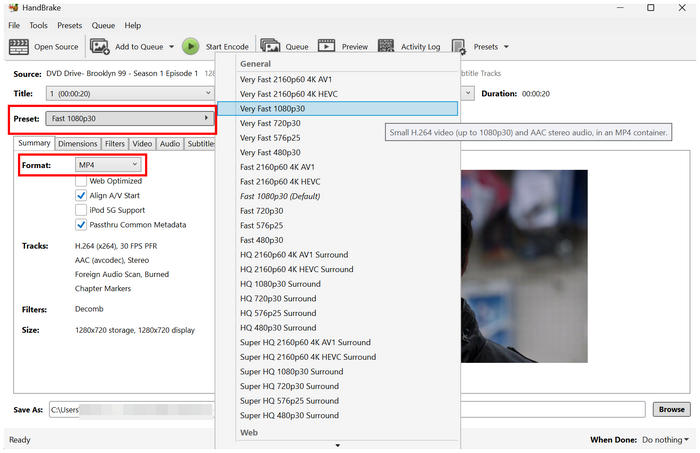
If you want an option with advanced settings and editing, HandBrake may get the job done for you. This video re-encoder software is equipped with advanced media editing solutions designed to provide users with manual editing tools.
However, these manual editing options make HandBrake less than ideal for beginners and even for intermediate practitioners. The program may be overwhelming if what you are looking for is generic movie ripping.
Part 4. About the TMNT (2014) 3D Blu-ray — What Makes It Special
The 3D Blu-ray release of Teenage Mutant Ninja Turtles is designed and produced exclusively for 3D visuals. As such, looking for a reliable format converter tool that can make the program more pleasing to watch in 3D is a good solution. Fortunately, all three methods we have provided in this article guide are all optimized for high-quality Blu-ray ripping.
Part 5. FAQs About Ripping TMNT Blu-ray
-
Can I rip a 3D Blu-ray to a normal 2D MP4?
Yes, you can. Most 3D Blu-ray content has an option to rip to regular 2D video. This makes converting to regular MP4 not an issue in the software.
-
What’s the best format for sharing a movie with friends?
MP4 is the best format for file sharing. This is because the format has superb compatibility. This makes the video playable on any device.
-
Is it legal to rip my own Blu-ray?
Yes, it is. Ripping Blu-ray is easy to do. However, make sure not to commercialize your Blu-ray copies to avoid piracy issues.
-
Why is my ripped TMNT file darker than the disc?
It may be an issue with the ripping software. To avoid such issues, do not edit the program's ripping settings. We also suggest using lossless rippers like Blu-ray Master Free Blu-ray Ripper and MakeMKV.
Conclusion
Now that we have provided the best methods for ripping a Teenage Mutant Ninja Turtles Blu-ray copy, we hope you will be able to experience the full quality of the physical release of the 2014 movie. For the balance of ease of use and quality, we suggest using Blu-ray Master Free Blu-ray Ripper. For lossless quality, MakeMKV is the way to go. Finally, experienced users looking for manual controls should check out HandBrake.
More from Blu-ray Master
Rip Blu-ray Movies
Rip Blu-rays to any video and audio formats of different parameters for free in minutes.
100% Secure. No virus
