

Oct 21, 2026Posted by Kevin Miller to Rip Blu-ray
Quick Summary
Rio 2’s Blu-ray comes in 2D and 3D. To watch it on your tablet or phone, rip it with a Blu-ray ripper — Blu-ray Master Free Blu-ray Ripper is the fastest free option, and this guide covers the full ripping process plus adjustments for kids’ viewing.
Rio 2 is a popular, family-friendly film that explores important family dynamics, making it a good choice for children. However, the Blu-ray release of the movie is considered one of the best official versions, which makes it challenging to watch today, since Blu-ray is hard to play on tablets, modern TVs, and computers. In this article, we will provide two methods to rip Rio 2 from Blu-ray using popular ripper tools such as Blu-ray Master Free Blu-ray Ripper, as well as open-source alternatives like MakeMKV and HandBrake.

Table of Contents
- Part 1. How We Tested These Ripping Methods & Quick Comparison
- Part 2. Rio 2 Blu-ray — What's on the Disc (2D/3D, family-friendly)
- Method 1. Free Rip Rio 2 with Blu-ray Master Free Blu-ray Ripper
- Method 2. Rip Rio 2 with MakeMKV + HandBrake (Free Alternative)
- Part 5. Tips to Make the Blu-ray Rip Kid-Friendly (Brightness, Effects, Watermarks)
- Part 6. FAQs About Ripping Rio 2 Blu-ray
Part 1. How We Tested These Ripping Methods & Quick Comparison
To assess how the two ripping methods we have featured can handle Blu-ray ripping, we used a modern Windows laptop to rip an official Blu-ray copy of Rio 2. For an objective performance review of Blu-ray Master Free Blu-ray Ripper and MakeMKV+HandBrake, the Windows test system is equipped with an AMD Ryzen 5 iGPU and 16GB of RAM. During conversion, we also made sure to rip Rio 2’s Full Title to assess if the 2D and 3D versions of the movie will be ripped and converted digitally.
Method Comparison Table
| Blu-ray Master Free Blu-ray Ripper | VS | MakeMKV + HandBrake |
| GPU Accelerated (50x Faster) | Speed | Standard |
| Compressed | Output Size | Compressed |
| MP4, MOV, MKV, AVI, and 200+ formats. | Output Formats | MKV, MP4, WebM |
| Easy | Ease of Use | Intermediate |
| Free | Pricing | Free (Open Source) |
Part 2. Rio 2 Blu-ray: What's on the Disc
What makes Rio 2’s Blu-ray release special is the additional features included with the main movie. This is specifically the option to make the movie 2D or 3D. Moreover, advanced kid-friendly settings are available, including brightness, effects, and a watermark adjustment option to make the movie more enjoyable for young viewers.
As such, the methods featured in this article are designed to preserve the advanced viewing settings available in Rio 2’s Blu-ray release.
Method 1. Free Rip Rio 2 with Blu-ray Master Free Blu-ray Ripper
The best method for ripping modern Blu-ray media is to use dedicated ripper tools designed specifically for Blu-rays. One good example on the market is Blu-ray Master Free Blu-ray Ripper.
As its name suggests, this program is designed specifically to handle Blu-ray media for free, and it is equipped with features optimized for efficiency, the most notable being its GPU hardware acceleration system, which allows it to rip videos 50x faster than standard speed.
Moreover, the program offers versatile output formats, including popular options such as MKV, MP4, and AVI, as well as device-specific formats and more. As such, if you are looking to convert your Rio 2 Blu-ray copy, you have many options for handling DVD media.
To learn how to use the program, make sure to read our 5-step tutorial below. Do not forget to download it as well to make it easier to follow our guide.
Free Download
For Windows
Secure Download
Free Download
for macOS
Secure Download
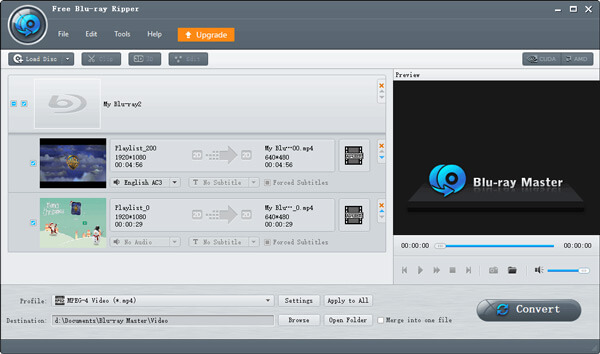
Step 1.Open Blu-ray Master Free Blu-ray Ripper and click on Load Blu-ray > Load Blu-ray Disc. In the menu that opens, select the loaded Rio 2 Blu-ray from your file manager.
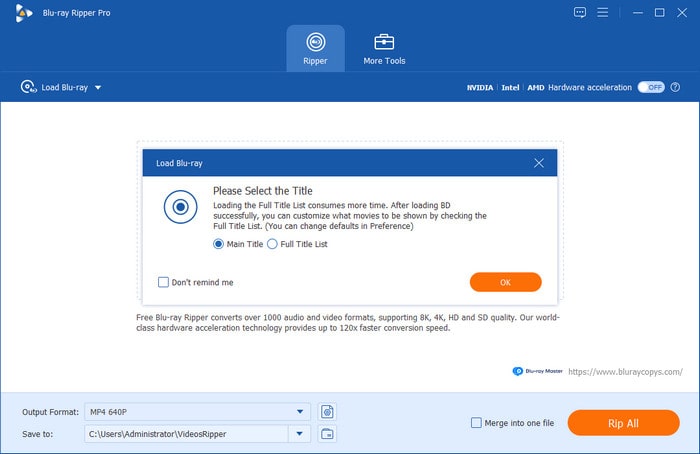
Step 2.Once the Blu-ray content loads, select the Full Title List on the Load Blu-ray menu that appears. Make sure to select Full Title, as this lets you manually select the Blu-ray content you want to rip. Make sure to check all the titles in the Blu-ray.
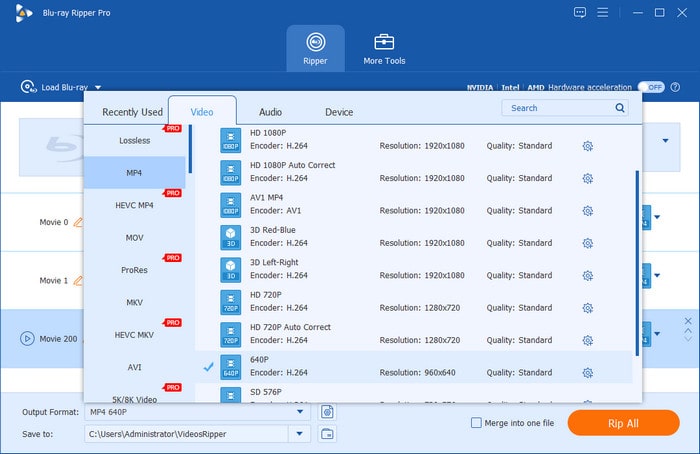
Step 3.Now that you have set how you want to load the Blu-ray content, select Output Format to choose the format in which you want to save your Blu-ray media. Among the options, we advise using MKV as it is an excellent container format.
Step 4.However, if you wish to rip the Blu-ray content to a format optimized for specific devices, go to Device and select from the available device presets as the output format.
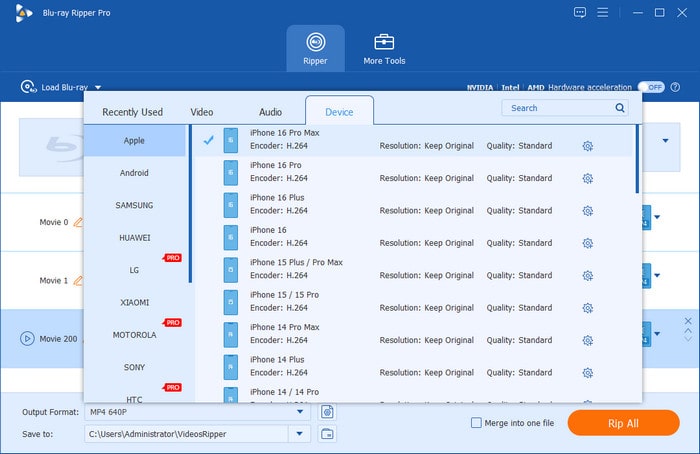
Step 5.Now that your Blu-ray conversion settings have been set up, you will be redirected back to the Ripper menu. Finally, click on Rip All to begin ripping the Rio 2 Blu-ray version into the digital format you selected.
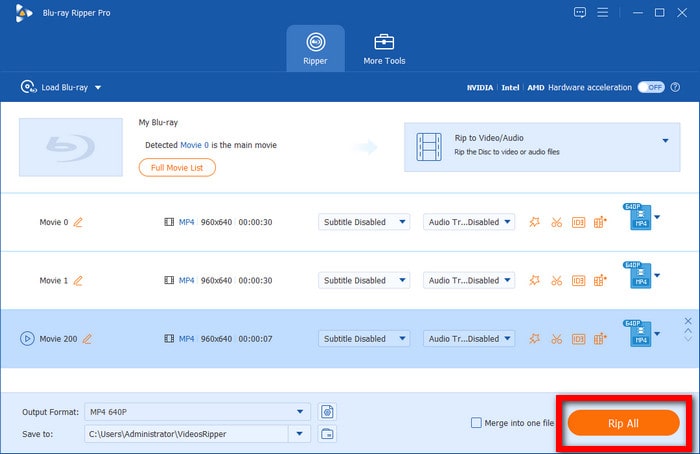
If you wish to rip Blu-ray movies, such as Rio 2, for compatibility with specific devices, Blu-ray Master Free DVD Ripper is a solid option. The program is a good choice to ensure your Blu-ray videos play well on modern devices by ripping the content to formats with good compatibility or to specific device presets.
Method 2. Rip Rio 2 with MakeMKV + HandBrake (Free Alternative)
When converting Blu-ray media with open-source programs, we highly recommend using the combination of MakeMKV and HandBrake. These two programs work hand in hand, with MakeMKV handling DVD ripping and HandBrake compressing the large raw MKV file.
However, if you plan to retain the raw content of the Rio 2 Blu-ray, MakeMKV may do the job. Unfortunately, raw MKV data are extremely large, making them not the best option for devices with limited storage space. As such, using HandBrake to compress these files is always a smart choice to keep on standby.
Learn how to use the combination of MakeMKV and HandBrake using our 5-step guide below.
Step 1.Open MakeMKV, click on Source, and select the loaded Rio 2 Blu-ray on your computer. Then click the DVD Icon to start reading the source content.

Step 2.Wait for MakeMKV to read the Blu-ray content, then select all the titles read from the Rio 2 Blu-ray to ensure that all data is converted to MKV. Finally, click on the MakeMKV icon to begin ripping the Blu-ray to an MKV file.

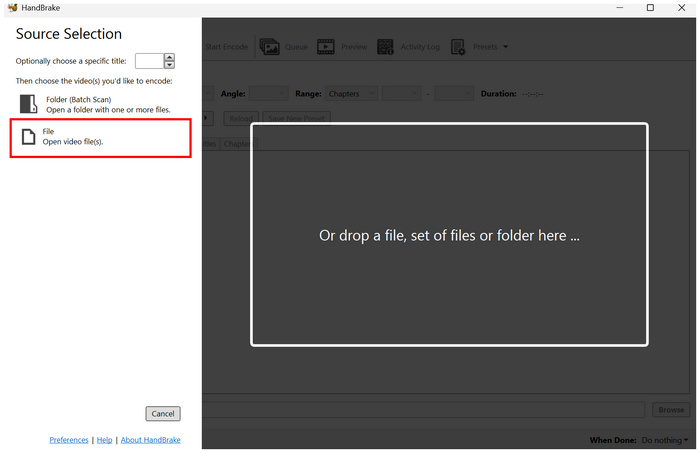
Step 3.To compress the ripped MKV video, open HandBrake and select File to open the converted video.
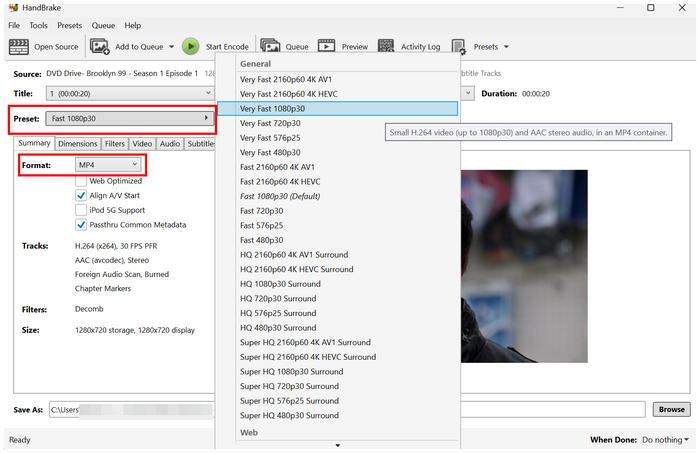
Step 4.In HandBrake’s main menu, click Preset to choose the conversion profile you want to use to save the raw MKV video. Then, select Format to choose how you want to save the file; a good option is MP4 for best compatibility.
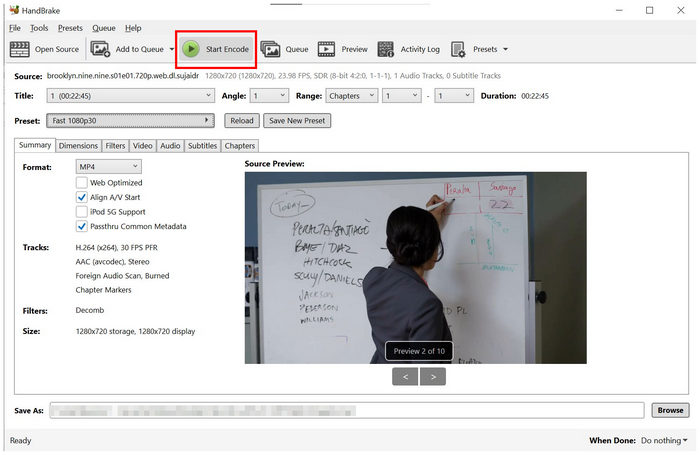
Step 5.Now that you have set the Preset and Format for your raw MKV video, click Start Encode to begin converting it to a compressed video format using HandBrake.
Since HandBrake does not support the MKV format for video encoding, we can also recommend skipping that step when using the program. However, think twice before using the tool, since videos produced by MakeMKV are very large.
Part 5. Tips to Make the Blu-ray Rip Kid-Friendly
Ripping Blu-ray is not limited to making the video playable. Instead, you have to make sure that your converted video will be safe for your children to watch. Since Rio 2 is a movie based on colorful birds, an imbalanced brightness and aggressive contrast may harm the developing eyes of young kids.
As such, make sure to choose a program that can control the Blu-ray video’s brightness and effects and that offers watermark removal to improve video clarity without sacrificing the viewing experience.
Part 6. FAQs About Ripping Rio 2 Blu-ray
-
Can I rip Rio 2 3D Blu-ray to 2D MP4?
Yes, you can. Rio 2 Blu-ray copies may be converted to regular 2D video. Good options to do this are Blu-ray Master Free DVD Ripper and MakeMKV.
-
Why does my Rio 2 rip look dark on the tablet?
It may be on the side of the tablet. However, this problem may also occur if your ripping settings are poor. To avoid this problem, make sure to not go overboard with brightness adjustments.
-
Is it legal to rip my own Rio 2 Blu-ray?
Yes, it is. Ripping Blu-ray content is not inherently illegal. However, distributing ripped copies is illegal, as it constitutes piracy.
Conclusion
With two of the best methods to rip Rio 2 Blu-ray now discussed, we hope watching video will become accessible to new users. Watching such movies on modern hardware should be easier, as you can now do so on tablets, smartphones, and laptops.
More from Blu-ray Master
Rip Blu-ray Movies
Rip Blu-rays to any video and audio formats of different parameters for free in minutes.
100% Secure. No virus
