Quick Summary:
Ripping your Iron Man Blu-ray collection gives you the freedom to watch Tony Stark’s full trilogy on your phone, tablet, or home media server. This guide covers the two best ways to get it done: using Blu-ray Master Free Blu-ray Ripper for a fast, simple, one-click solution, or using the popular free combo of MakeMKV + HandBrake for maximum quality and custom encoding options.
There is nothing quite like owning Marvel Studios’ Iron Man trilogy on physical Blu-ray—holding the crisp 4K artwork and knowing you have the ultimate uncompressed video and audio ready for movie night. But let’s be honest: those discs end up sitting on your shelf collecting dust when you actually want to watch them on the go, whether you’re heading out on a 14-hour flight or just relaxing in bed with your iPad.
Since portable screens don't come with disc drives, turning your physical collection into digital MP4 or MKV files is the easiest way to enjoy Tony Stark’s full journey anywhere, anytime. Here is how to quickly rip your Iron Man Blu-ray collection to high-quality digital video for all your devices.

Part 1. Iron Man Blu-ray Trilogy Specifications & Audio Profiles
Iron Man Blu-ray Trilogy Introduction
Iron Man 3 is the first entry of Marvel’s Cinematic Universe Phase Two. It was nominated for many awards like Oscar, BAFTA, Saturn Award, BMI Film Music Award, C.A.S Award, Gold Derby Award, Golden Camera, etc., and received the People’s Choice Award for Favorite Movie in 2014, Kid’s Choice Award for Favorite Male Buttkicker, and more.
Iron Man 3 from Buena Vista Home Entertainment, is available in a couple different forms. This 3-Disc edition includes the Blu-ray 3D, Blu-ray, and a DVD.
The Blu-ray Iron Man 3 is on the left underneath a paper inserted with the code to download an HD Digital Copy and 12 Music Tracks from and inspired by the motion picture.
Both Blu-rays are compatible with Regions A, B, and the noise free 1080P/AVC MPEG-4 encode Iron Man Blu-ray presents the mighty quality. Just as the other Blu-ray movie of Paramount, Iron Man Blu-ray has an English Dolby TrueHD 5.1 Surround mix.
Can You Legally Download Iron Man Digital Files
Since its release date in 2013, you can find various versions of the digital format of Iron Man. However, you can watch the trailers for free, instead of the full-length movie. For watching the full movie, you need to buy it from YouTube, Vimeo, etc.

There are some free online video downloaders claim they can download the movies, however, they cannot download the full movie due to the copyright issues.
Surely, if you have the Blu-ray Iron Man series, you can rip them into the digital formats for playing on your portable devices.
How We Tested: Ripping the Retail Iron Man 3-Disc Collection
To write this guide, we didn't just guess or summarize marketing specs—we pulled our retail Iron Man 3-Disc Combo Pack (Blu-ray 3D + Blu-ray + DVD from Buena Vista Home Entertainment) off the shelf and ran a complete hands-on test.
- Test Setup: LG WH16NS40 internal BD drive (flashed to LibreDrive firmware) on a Windows 11 PC.
- TrueHD / Dolby Atmos Retention: The primary 1080p feature disc comes with an English Dolby TrueHD 5.1 surround track (and DTS-HD MA on 4K releases). During our test, standard HandBrake re-encoding downmixed this to AAC stereo by default. To preserve the lossless immersive spatial audio, you must manually select TrueHD Passthru or Auto Passthru under HandBrake's Audio tab.
- Subtitle Tracks (PGS Subtitles): Disney Blu-rays rely on PGS (Presentation Graphic Stream) bitmapped subtitles. If you plan to stream through Plex or Jellyfin, avoid 'burning in' the subtitles. Instead, set MakeMKV or HandBrake to Embed/Passthrough PGS Subtitles so you can freely toggle English forced subtitles (for foreign language scenes/JARVIS UI text) without triggering high CPU transcoding on your media server.
Now, here is a parameter guide for you to rip Iron Man Blu-rays.
| Output Goal | Target Resolution | Recommended Video Codec | Video Quality (RF) / Bitrate | Audio Setting | Est. File Size (per movie) | Best For |
| Uncompressed Raw Copy | 1080p / 4K UHD | Passthrough (Original AVC/HEVC) | Lossless (Bit-for-Bit) | Lossless Dolby TrueHD / DTS-HD Passthru | 28 GB – 65 GB | Archival backup, high-end home theater setups |
| Balanced 4K UHD | 4K (2160p) | H.265 / HEVC 10-bit | RF 18 – 20 | Auto Passthru (TrueHD/DTS) | 12 GB – 18 GB | Plex/Jellyfin streaming on 4K TVs |
| High Quality 1080p | 1080p Full HD | H.264 or H.265 (x264/x265) | RF 19 – 21 | AC3 5.1 (640 kbps) or AAC 5.1 | 6 GB – 10 GB | Apple TV, Firestick, PC playback |
| Mobile / Travel Storage | 1080p / 720p | H.264 (AAC Stereo) | RF 22 – 24 | AAC Stereo (160 kbps) | 2.5 GB – 4.5 GB | iPads, iPhones, laptops on flights |
How to Rip Iron Man Blu-ray Discs to MP4/MKV
Now, let's see two powerful ways to rip Iron Man Blu-rays to MP4 or MKV format.
Way 1. Blu-ray Master Free Blu-ray Ripper to Back Up Iron Man Blu-ray
Blu-ray Master Free Blu-ray Ripper is a powerful Blu-ray decryption and conversion tool that can rip Iron Man Blu-ray to your desired video formats. It can rip Iron Man 1, 2, and 3 into various digital formats, including MP4, MKV, and some device-compatible formats, enabling smooth playback on any device. It has robust decryption ability to handle Blu-ray copy protection and Blu-ray region codes, so you can use this tool to rip Iron Man from any region. What’s more, this software is free to use on your Windows 11/10 computer and the latest macOS 26 Tahoe.
With customizable output settings for resolution, bitrate, frame rate, etc., it gives you the flexibility to make adjustments to get good video/audio effects. Besides, it has many editing tools for you to adjust the video effects, like filters, audio tracks, subtitles, etc.
Now, let’s check how to use this free Blu-ray ripping software on your computer to extract the digital formats from Blu-ray.

Hardware Requirements Before You Begin
To rip your Iron Man Blu-ray collection, you’ll need the right hardware setup before running any software:
- External Blu-ray Drive (BD Drive): A standard DVD drive won’t work. You need an external USB 3.0 Blu-ray drive (such as an LG, ASUS, or Pioneer drive) capable of reading dual-layer BD-ROM discs.
- 4K UHD-friendly drive (For 4K Discs): If you own the 4K Ultra HD Iron Man releases, a standard Blu-ray drive cannot read them due to stricter hardware encryption. You must use a 4K ‘UHD-friendly’ drive flashed with LibreDrive-compatible firmware (such as the LG WH16NS40 or Archgon Star). This allows software like MakeMKV to access the raw 4K data.
Step 1.Download and Install Blu-ray Master Free Blu-ray Ripper
Click the download buttons below to get the software on your computer. Launch the software.
Step 2.Load Iron Man Blu-ray
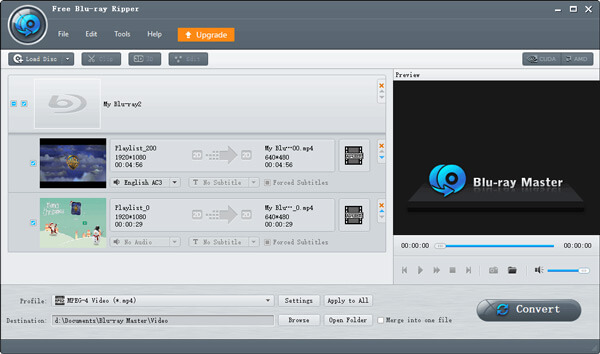
In the Ripper section, click Load Blu-ray > Load Blu-ray Disc to load the inserted Iron Man Blu-ray disc. Then, choose the Full Title List mode in the pop-up.
Step 3.Choose An Output Profile
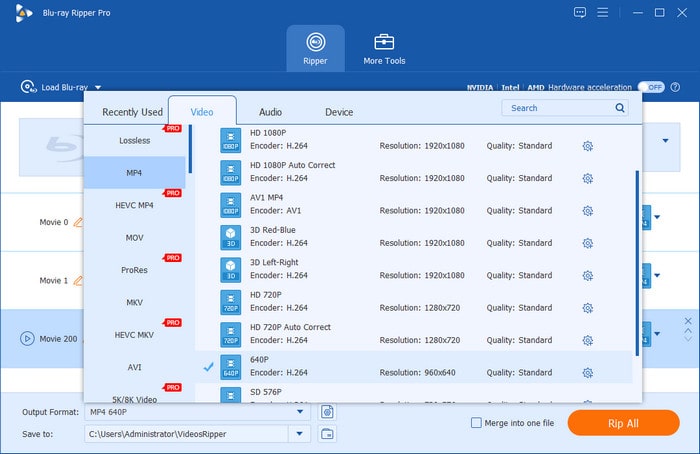
You can choose the MP4, Same as Source profile from the Video section. Otherwise, you can also choose a specific device profile, like Apple, iPhone 16.
Note: The high-resolution profiles, like 4K/8K, require a premium version.
Step 4.Start Iron Man Blu-ray Conversion
To help you quickly locate the ripped Blu-ray video, select the folder button to set a download folder. Then, you can click the Rip All button to start the decryption and conversion.
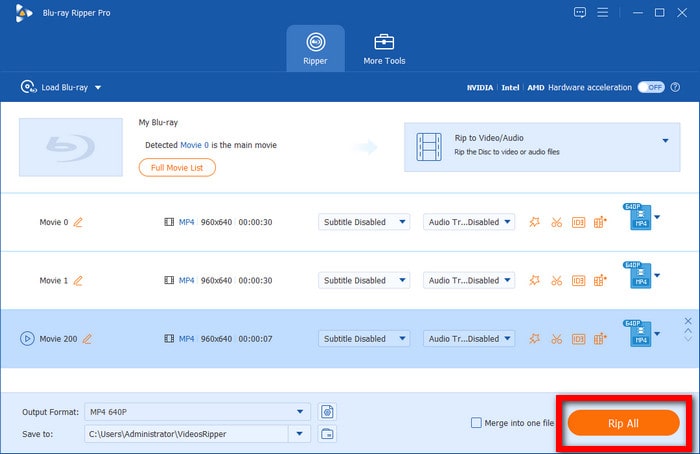
This tool provides an easy way to back up Iron Man Blu-rays. Its interface is clear, and you can get to know how to use it in seconds. Its shortcoming is its limitations on high-resolution outputs.
Way 2. Decrypt and Compress Iron Man Blu-rays: MakeMKV + HandBrake
The combination of MakeMKV and HandBrake provides a streamlined, high-performance workflow for preserving Blu-ray and 4K UHD Blu-ray discs. MakeMKV handles copy protection removal and extracts raw video, multi-channel audio, and subtitle streams into a lossless MKV container, maintaining full support for 4K HDR10 and Dolby Vision metadata at high speeds.
Because uncompressed source files easily reach 20GB to 80GB, HandBrake efficiently transcodes the file to fit your playback setup without sacrificing visual fidelity. For on-the-go streaming across phones and tablets, choose the MP4 format with H.264 encoding for universal hardware compatibility. Alternatively, select the MKV format with HEVC (x265) encoding to retain 10-bit HDR/Dolby Vision dynamic range and multi-track spatial audio, creating the ultimate media library for home theater servers like Plex or Jellyfin.
So, how to use these two tools to rip your Iron Man Blu-rays?
Step 1.Download and install MakeMKV and HandBrake on your computer from the official websites. If you have installed them, go to Step 2. You need to use MakeMKV to decrypt and convert Iron Man Blu-rays to MKV first.
Step 2.Insert an Iron Man Blu-ray disc into the optical drive. Open MakeMKV and load it in the Source area.
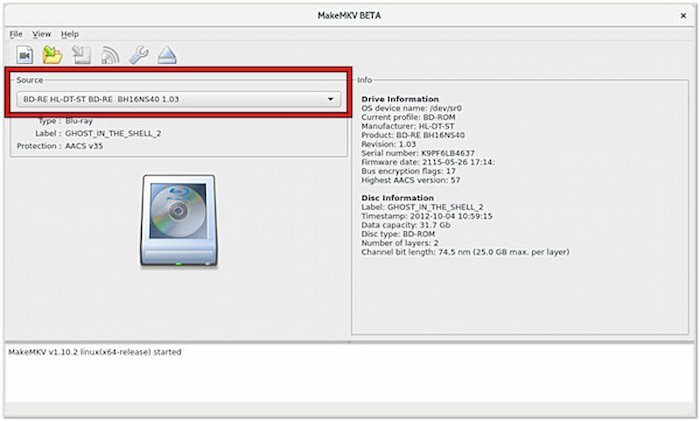
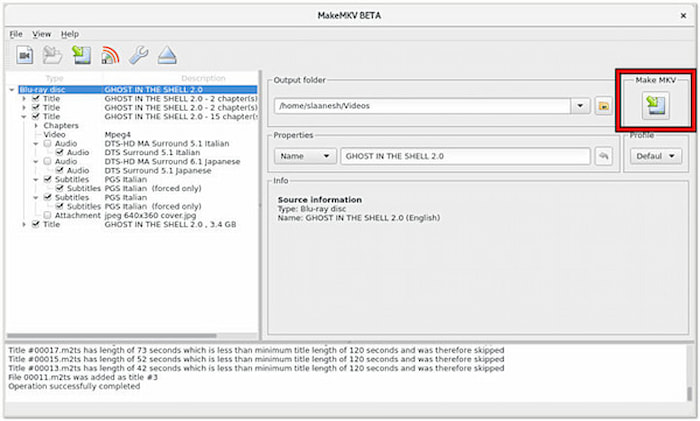
Step 3.MakeMKV will automatically scan and analyze the Blu-ray information and show them in the main interface. Then, you can check the titles, audio tracks, and subtitles you want to preserve.
After that, click the right Make MKV button to start the conversion.
Note:
- Ensure you expand the title tree and check the main Dolby TrueHD (for 1080p) or DTS-HD MA / Atmos (for 4K UHD) audio tracks.
- Marvel movies like Iron Man often include on-screen foreign translations or alien dialogue. Select Forced Subtitles Only in HandBrake or MakeMKV if you only want subtitles to display automatically when non-English text appears on screen.
- Remember to prepare the enough storage spce to place the large output MKV files.
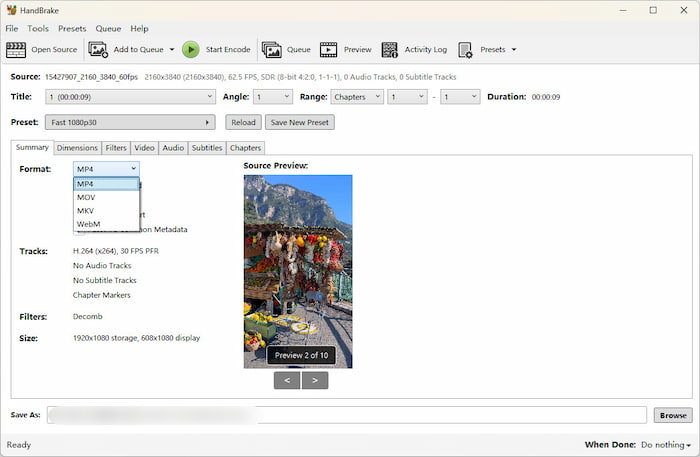
Step 4.Next, open HandBrake and click File to load the ripped MKV file. Then, under the Summary section, choose MP4 as the output format.
Tips
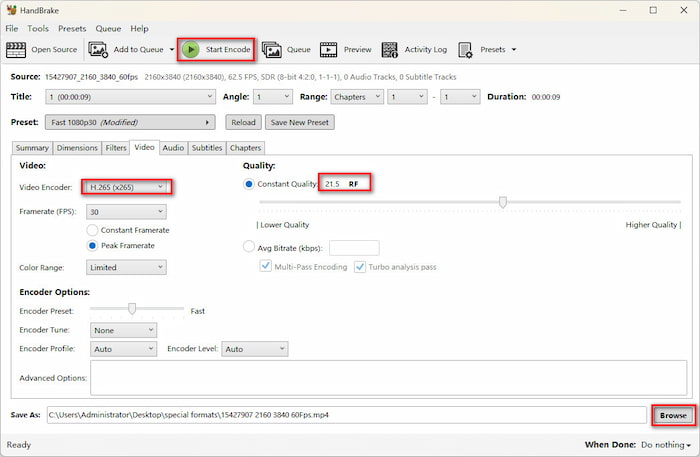
You can set H.265(x265) or AV1 (SVT-AV1), and RF 20 – 22 to balance the video volume and image quality.
Step 5.The final step is to set a download folder by clicking the Browse button and click Start Encode to start the MKV to MP4 conversion.
Though it is time-consuming, these two tools allow you to rip and convert encrypted Iron Man Blu-ray discs to 4K MP4 in a totally free way. The output video shows clear image clarity that gives you an immersive and convenient video viewing experience.
FAQs about Ripping Iron Man Blu-ray
-
How do I rip Iron Man 3 Blu-ray movie to iPhone or iPad?
You’d better use a Blu-ray ripper to rip Iron Man 3 Blu-ray movie. Blu-ray Master Free Blu-ray Ripper is a free Blu-ray ripper that enables you to directly rip Blu-ray movies to iPhone or iPad supported formats. Then you can enjoy your Blu-ray movies on your iPhone or iPad.
-
How to easily convert a Blu-ray to MKV file using free tools?
Using Blu-ray Master Free Blu-ray Ripper is an easy way to convert a Blu-ray to MKV file without quality loss. Besides, you can also use this free ripper to rip Blu-ray disc to other popular formats including MP4, AVI, MOV and more.
-
Can I rip Blu-ray movies to HD video?
Yes, but you’d better find a Blu-ray ripper which supports ripping Blu-ray movies to high definition video. Blu-ray Master Free Blu-ray Ripper is exact the one that allows you to rip Blu-ray movies to HD MP4, HD MKV, and more with fast speed and excellent quality.
-
Can you play a Blu-ray disc on a computer?
Blu-ray discs play in 1080p resolution, which is significantly better than the maximum resolution standard DVDs can play in. The only way you can use Blu-ray discs is by inserting them into a Blu-ray player. If your computer comes with a Blu-ray drive, you just need to insert your Blu-ray drive to it. If not, you need to buy an external Blu-ray drive to play a Blu-ray disc.
-
How do I get past the copy protection when ripping Marvel Blu-ray discs like Iron Man?
You can use MakeMKV and other modern Blu-ray ripping tools, like DVDFab Blu-ray Ripper and Blu-ray Master Free Blu-ray Ripper, to handle the Blu-ray copy protections.
-
Can HandBrake rip Iron Man 3 Blu-ray directly, or do I need MakeMKV first?
No. HandBrake cannot process the Blu-ray copy protections. You can use MakeMKV first to decrypt the Blu-ray and then use HandBrake to convert and compress the MKV file.
-
What are the best video settings in HandBrake for ripping 4K Marvel movies without quality loss?
Here are the recommended settings:
• Format: MP4 or MKV
• Video Codec: H.265 10-bit (NVENC/AMD/QuickSync if using hardware acceleration, or x265 for better efficiency)
• Framerate: Same as source (Variable Framerate)
• Quality: Constant Quality (RF) 18 to 20 (lower RF means higher quality)
• Encoder Preset: Slow or Medium
-
Why is my ripped Iron Man Blu-ray audio out of sync, and how can I fix it?
Audio desync usually happens when HandBrake encounters variable framerates, dropped frames during ripping, or complex Seamless Branching (multiple file segments on the disc).
Ensure HandBrake is set to 'Constant Framerate' or use MakeMKV to create a clean raw file before encoding. You can also adjust the audio offset (delay) in media players like VLC.
-
How big will the file size be if I rip the full Iron Man trilogy Blu-rays to MKV?
It varies in different situations:
• 1080p Standard Blu-ray (Uncompressed MakeMKV rip): ~25 GB to 35 GB per movie (~75 GB – 105 GB total).
• 4K UHD Blu-ray (Uncompressed MakeMKV rip): ~50 GB to 75 GB per movie (~150 GB – 225 GB total).
• Encoded via HandBrake (Compressed): ~8 GB to 15 GB per movie depending on your quality settings.
Conclusion
Iron Man is a movie that you are not willing to miss. Now, you know the 2 easy ways to rip Iron Man Blu-rays to digital formats. If you want various output formats and flexible settings, Blu-ray Master Free Blu-ray Ripper is a goo option. If you want a free way and want to maintain the high-quality video effects, use MakeMKV and HandBrake.
Select the product rating:
Rating: 4.9 / 5 (based on 626 votes) 
Free Blu-ray Ripper
Rip Blu-rays to any video and audio formats of different parameters for free in minutes.
100% Secure. No virus


