

Oct 21, 2026Posted by Kevin Miller to Rip Blu-ray
Quick Summary
The Seinfeld Complete Series Blu-ray holds all 9 seasons (1989–1998). To rip the whole set to MP4/MKV for your devices, the fastest free method is Blu-ray Master Free Blu-ray Ripper; this guide covers the full steps, a MakeMKV + HandBrake alternative, and why you should skip YouTube and torrent rips.
It's the 26th anniversary of the show that defined 90s TV — 9 seasons, 180 episodes, and your Complete Series Blu-ray box sits unwatched because the only player is in the living room. Ripping Seinfeld Blu-ray and all its 9 seasons to digital format lets you watch 'The Soup Nazi' on the subway. Here's how to do it without wasting a weekend. We will feature two Blu-ray ripping methods you can use on modern computers in 2026, including a dedicated Blu-ray Ripper and an open-source solution using MakeMKV + HandBrake.

Table of Contents
- Part 1. How We Tested These Ripping Methods & Quick Comparison
- Part 2. Seinfeld Complete Series Blu-ray — What You Get
- Method 1. Free Rip Seinfeld with Blu-ray Master Free Blu-ray Ripper
- Method 2. Rip with MakeMKV + HandBrake (Free Alternative)
- Part 5. Where NOT to Download — YouTube 480P/720P & Torrent Risks
- Part 6. FAQs About Ripping Seinfeld Blu-ray
Part 1. How We Tested These Ripping Methods & Quick Comparison
For an objective test of the Blu-ray rippers we have featured, we made sure to rip a complete episode of Seinfeld from the Complete Series Blu-ray box of the classic sitcom. To assess how both programs perform, testing was conducted on a modern Windows computer equipped with an AMD Ryzen 5 processor and 16GB of RAM.
For an objective comparison of how Blu-ray Master Free Blu-ray Ripper and MakeMKV + HandBrake work, we have provided a detailed table below featuring key comparison points.
Method Comparison Table
| Blu-ray Master Free Blu-ray Ripper | VS | MakeMKV + HandBrake |
| GPU Accelerated (50x Faster) | Speed | Standard |
| Compressed | Output Size | Compressed |
| MP4, MOV, MKV, AVI, and 200+ formats. | Output Formats | MKV, MP4, WebM |
| Easy | Ease of Use | Intermediate |
| Free | Pricing | Free (Open Source) |
Part 2. Seinfeld Complete Series Blu-ray — What You Get
Since the Blu-ray release of Seinfeld is a complete series box set, it contains all 9 seasons and 180 episodes. When choosing a season to watch, the Blu-ray content also features a graphic of the series' 26th-anniversary background.
For modern viewing, the classic sitcom is also presented in widescreen and high-definition aspect ratios to make the Blu-ray media compatible with and pleasing to watch on modern television screens.
Method 1. Free Rip Seinfeld with Blu-ray Master Free Blu-ray Ripper
The first method we will highlight will be the best exclusive Blu-ray ripper on the market: Blu-ray Master Free Blu-ray Ripper. This software is one of the best on the market, as it was exclusively designed to handle Blu-ray ripping.
In terms of handling large Blu-ray collections, the tool can also operate highly efficiently, as it is equipped with a powerful GPU acceleration system that can deliver conversions 50x faster than standard conversion speeds
To learn how to use the program, make sure to read our detailed tutorial below. Make sure to download it as well for an easier time following our tutorial of the program.
Free Download
For Windows
Secure Download
Free Download
for macOS
Secure Download
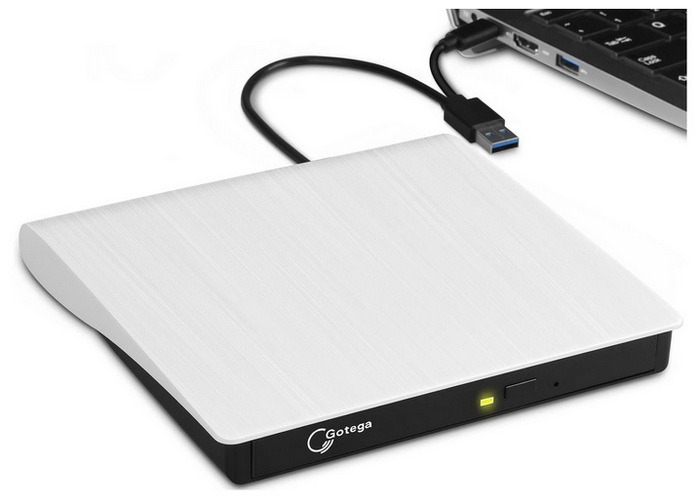
Step 1.Prepare your Seinfeld. The Complete Series Blu-ray box set and the external DVD drive you will use. Connect your DVD drive to your computer, load the DVD, and check your file manager to check if the Blu-ray content was read properly.
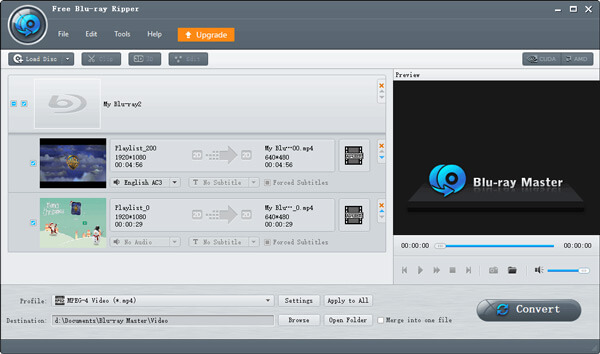
Step 2.Open Blu-ray Master Free Blu-ray Ripper, then click on Load Blu-ray > Load Blu-ray Disc to access the Seinfeld Blu-ray media on your computer. To rip the entire content of the Blu-ray, select Full Title List from the menu that opens.
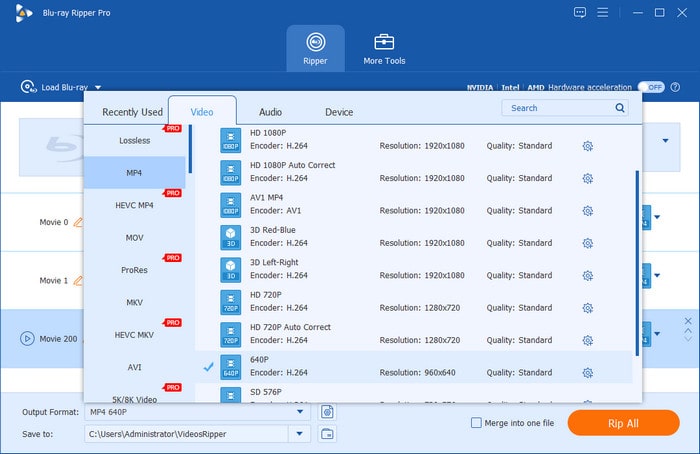
Step 3.Once the Seinfeld Blu-ray is loaded, click on Output Format and select the file type you want to use for conversion. We advise using MP4 or MKV, as both are well-supported.
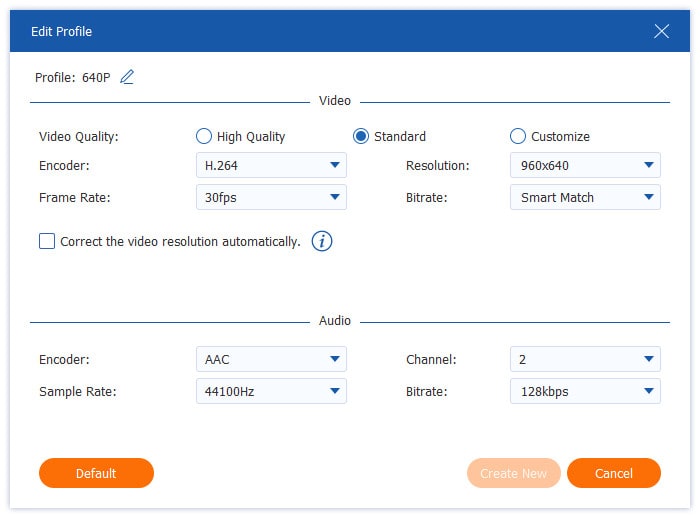
Step 4.To access the more advanced Output Format settings, click the Settings option next to the format you selected.
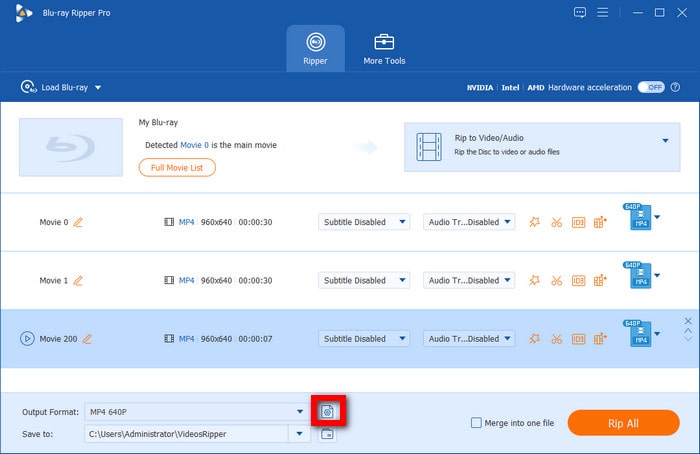
Then, you can access more advanced video settings for the selected output format, including Video Quality, Encoder, Resolution, Frame Rate, Bitrate, and more.
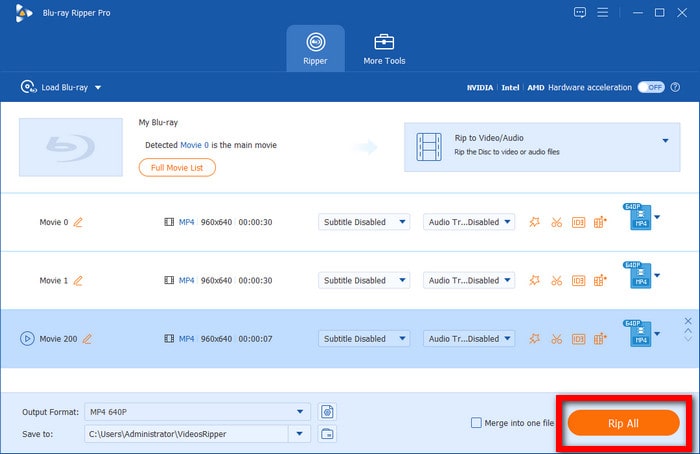
Step 5.With the Blu-ray title now selected and the output format set, you will be redirected back to the Ripper menu. There, select Rip All to begin ripping the Game of Thrones content.
If you want to use the modern standard of Blu-ray ripping tools, Blu-ray Master Free Blu-ray Ripper is the most advisable option. This makes the program the best choice for modern software.
Method 2. Rip with MakeMKV + HandBrake (Free Alternative)
Now that we have provided our readers with the exclusive Blu-ray ripper tool, let us now proceed to the open-source options for ripping Blu-rays with none other than MakeMKV + HandBrake.
These tools are best used together, since MakeMKV will handle raw Blu-ray ripping, and HandBrake will handle compressing the large MKV file.
Step 1.Open MakeMKV, set the Source to the Seinfeld The Complete Edition Blu-ray loaded on your computer, and then click on the DVD Icon to read the source.

Step 2.Wait for MakeMKV to read the content, then select the MakeMKV icon to begin ripping the Seinfeld Blu-ray to a raw MKV file.

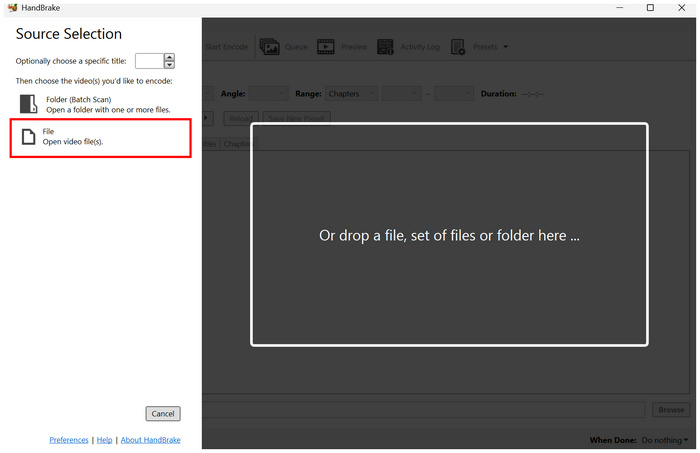
Step 3.After the MKV file is ripped, open HandBrake and select File to open the converted digital video.
Step 4.In HandBrake, select Preset to choose your conversion profile. Then, select Format to set how you want to save your raw MKV video from MakeMKV.
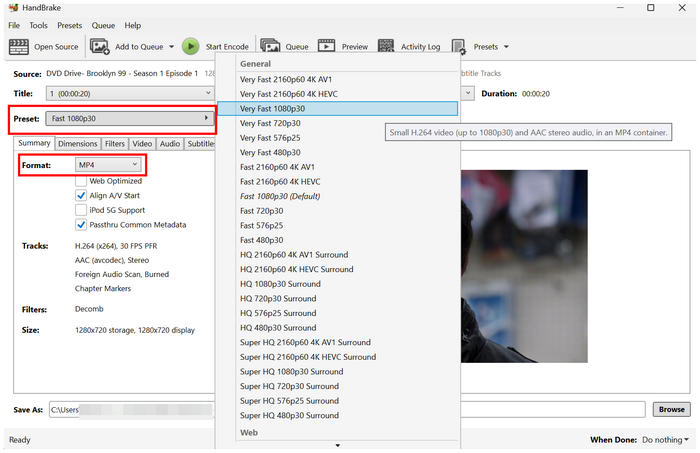
Step 5.With your preferred Preset and Format set, click Start Encode to begin converting and compressing the MKV using HandBrake.
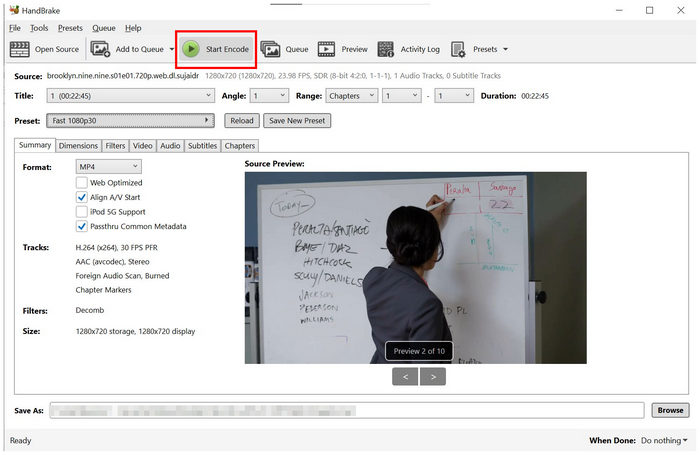
Due to the complexity of HandBrake presets and the challenges of using MakeMKV, this method is only advisable for users with intermediate knowledge of ripper tools. As such, we do not recommend it for complete beginners.
Part 5. Where NOT to Download — YouTube 480P/720P & Torrent Risks
Although downloading from torrents and video-sharing sites like YouTube is technically possible, getting your TV episodes, like Seinfeld, is not advisable from these sources. To start, the risk of a virus from torrent sites is real; getting your videos from YouTube is not advisable either, since it offers poor download options that are highly inefficient for a 9-season show.
Part 6. FAQs About Ripping Seinfeld Blu-ray
-
Can I rip the whole Seinfeld series at once?
Yes, you can. However, you need dedicated ripper tools to do it. A good option in the market is Blu-ray Master Free Blu-ray Ripper, which was specifically designed to handle Blu-ray collections.
-
Why do my ripped episodes look worse than the Blu-ray?
You may have used a suboptimal ripper tool. To ensure your ripped episodes are high quality, choose reliable ripping software. Good options for raw quality ripping are Blu-ray Master Free Blu-ray Ripper and MakeMKV.
-
Is it legal to back up my Seinfeld Blu-ray set?
Yes, it is. Creating a digital backup of Blu-ray collections is safe for personal use. However, make sure not to distribute them, as this will constitute piracy.
Conclusion
Now that we have discussed the two best methods for ripping the Seinfeld Blu-ray collection, we suggest using whichever method suits your preferences and needs best. For a one-click rip of all 9 seasons, choose Blu-ray Master Free Blu-ray Ripper. For free-tool purists who don't mind using two apps, the combination of MakeMKV and HandBrake works well. Finally, make sure to avoid using YouTube and torrent downloads entirely, especially if you have access to the legal Blu-ray set you own.
More from Blu-ray Master
Rip Blu-ray Movies

Rip Blu-rays to any video and audio formats of different parameters for free in minutes.
100% Secure. No virus
