

Mar 05, 2026Posted by Kevin Miller to Play DVD
Here, we pick out the top 3 best Windows DVD players for users with different needs.
Expert Summary
1. Blu-ray Master Free Blu-ray Player: Powerful media player with comprehensive performance.
2. VLC Media Player: Free and open-source to play DVDs and various files.
3. PlayerFab DVD Player: Supports a wide range of popular streaming platforms.
Have you ever had trouble finding a suitable and handy DVD player for Windows 10 to spend your leisure time on? You may also collect a lot of disc movies, but when you fail to play them on any streaming services, you may cancel your plans, and choose to watch something else. Do not let DVDs waste away in a box; a quality DVD player for a PC is all you need. Meanwhile, an excellent DVD player for PC can also enhance your movie-watching experience by improving the sound and video quality. This article lists the top 10 DVD players for Windows PCs. Hopefully, you can choose one that suits your needs.
Part 1. How We Test and Pick the Best DVD Player for Windows
How We Tested These DVD Players for Windows
To ensure our recommendations meet the highest standards for US and European users, our lab conducted rigorous testing over 150+ hours. Here is our testing methodology:
- Disc Variety: We tested each player with over 50 physical discs, including standard DVDs, DVD-9, DVD-5, and burned DVD-R/RW formats.
- Damaged Disc Resilience: We intentionally used 10 scratched or slightly oxidized discs to test the error-correction capabilities of each software.
- Region Code Testing: We verified playback for all 6 DVD regions (Region 1-6). We specifically focused on Region 2 (Europe/UK) and Region 1 (USA/Canada) compatibility to ensure seamless cross-region playback.
- Hardware Environments: Tests were performed on various Windows builds, including Windows 11 (23H2), Windows 10, and older Surface Pro tablets to check for battery efficiency and touch-screen responsiveness.
The Secret to Playing Any DVD: Bypassing Region Codes
One of the most frustrating issues for Windows users in the US and Europe is the 'Wrong Region' error. Most standard hardware players and the default Windows DVD Player app limit you to 5 region changes before locking permanently.
Why choose a Region-Free Software?
- No Hardware Limits: Top-tier players like Blu-ray Master and Leawo use internal decryption to bypass the RPC-2 hardware lock.
- Global Compatibility: Whether you have a PAL disc from Europe or an NTSC disc from North America, these players automatically handle the conversion.
- Zero-Cost Solution: Unlike buying a $200 physical multi-region DVD player, these software solutions allow your existing PC drive to read any disc regardless of its origin.
Part 2. Best 10 DVD Players for Windows
Based on the above evaluation criteria, we reviewed the 42 DVD players for Windows on the market and selected the 10 players that we value best. Each player has its verdicts, and you can have a look through this section carefully to find the Windows 10 DVD player you want.
1 Blu-ray Master Free Blu-ray Player
Free Blu-ray Master Blu-ray Player is the first tool we highly recommend for Windows 10 users with its cost-effective and versatile features. While playing Blu-ray/DVD discs, users can choose the title/chapter and select their desired audio track and subtitle in the menu window. It also offers a screen capture function to preserve their favorite images while watching.
Free Download
For Windows
Secure Download
Free Download
for macOS
Secure Download

Features:
- Supports the playback of 4K Blu-ray discs, Blu-ray folders, and ISO files.
- Supports the playback of DVD discs, DVD folders, IFO files, and ISO files.
- Supports the latest Blu-ray/DVD movies and 4K/1080p HD video and all popular media files like MTS, MXF, TS, FLV, MKV, WMA, MP4, etc.
- Watches all popular videos without any limitations.
Pros
- Adjusts audio, video, and subtitle tracks.
- Supports both DVD and Blu-ray discs, folders, and IFO/ISO files.
- Captures a snapshot when watching DVDs.
Cons
- 30 days to use for free during free trial.
Bottom Line: Overall, Blu-ray Master Blu-ray Player is a top Blu-ray player for Windows PCs. It will enhance your audiovisual experiences across all media types.
Users Review
• Many people think it’s a good option for DVD playback, since it is free.
• Some users indicate it is region-free to play any region DVD.
• Some user reviews mentioned watermarks on the video in the free version.
2 Windows DVD Player
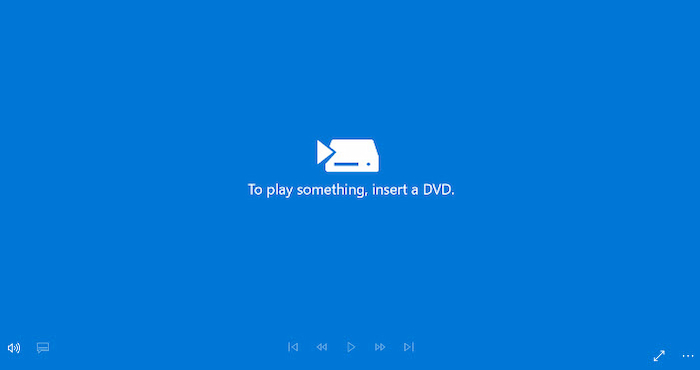
Windows DVD Player is a paid player in the Microsoft Store. But you can download it for free. If you changed to Windows 10 from Windows 7 (Home Premium, Professional, Ultimate) or 8/8.1 with Windows Media Center, you can use a Windows DVD player for free. But if you have a new PC, it’s not free.
Features:
- Offers a concise interface for navigation.
- Supports playback of the clips by inserting a disc into a DVD player.
- It is fluid and smooth without any interruption in playback.
- Compatible with home-made as well as commercial DVDs.
Pros
- Easy to use.
- Provides free trial.
Cons
- Can’t support Blu-ray.
- Some users need to pay for it.
Bottom line: This Windows DVD Player is free for Windows 7/8/8.1 but not Windows 10/11. It is a good DVD player but doesn’t support the Blu-ray disc’s playback.
Users Review
• Some people express that the interface of this DVD player software is simple and clear.
• Some users reflect that it lacks advanced features to improve DVD playback.
3 VLC Media Player
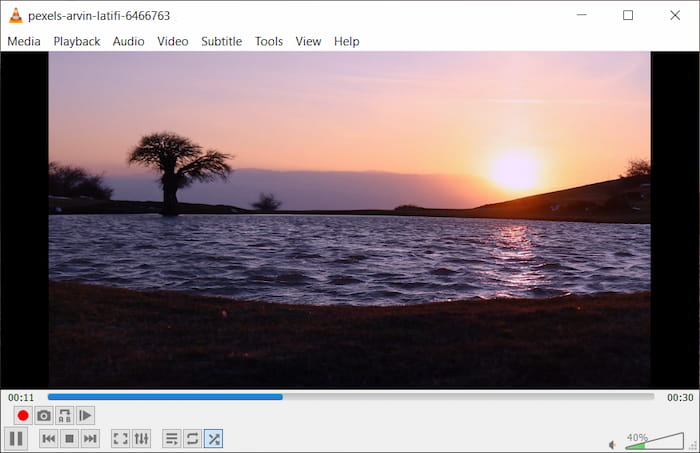
VLC Media Player is one of the most versatile media players, compatible with Mac, PC, Linux, and smartphones. It handles various audio, image, and video formats with ease and is a popular choice for playing DVDs and Blu-ray discs. You can download the VLC DVD Player for Windows 10, though you’ll need to update to VLC 3.0 Vetinari to support 4K or 8K video playback.
However, while VLC is powerful, it faces a significant 'Blu-ray Dilemma' when it comes to commercial discs:
- Encryption Hurdles: Unlike DVDs, playing encrypted commercial Blu-ray discs on VLC is notoriously difficult. It requires users to manually find and install the libaacs dynamic library and a KEYDB.cfg file. For the average user, this technical setup often makes commercial discs feel 'unplayable.'
- Hardware vs. Software Locking: There is also a gap between software decoding and hardware restrictions. While VLC uses software libraries to bypass some protections, it may still struggle with RPC2 firmware-locked drives. Modern Blu-ray drives often have region-code locks at the hardware level that VLC cannot easily bypass. In contrast, premium paid players often include low-level drivers specifically designed to navigate these hardware barriers.
Features:
- Plays almost all codecs without any codec restrictions.
- Runs across all operating systems and platforms.
- Easily customizable.
Pros
- Available to multiple platforms.
- Provides basic video editing functions.
- Powerful subtitle syncing tool.
Cons
- The playback of 4K or 8K video files may be choppy.
Bottom line: VLC is a versatile DVD player with comprehensive functions available on multiple platforms. However, playing DVD or Blu-ray requires additional setup and installation of certain libraries and codecs.
Users Review
• This DVD player software for Windows 10 is free and praised as a reliable media player.
• Some people reflect that it uses few resources and operates without hiccups on outdated or underpowered systems.
• Some think that its advanced features are complex.
4 5K Player
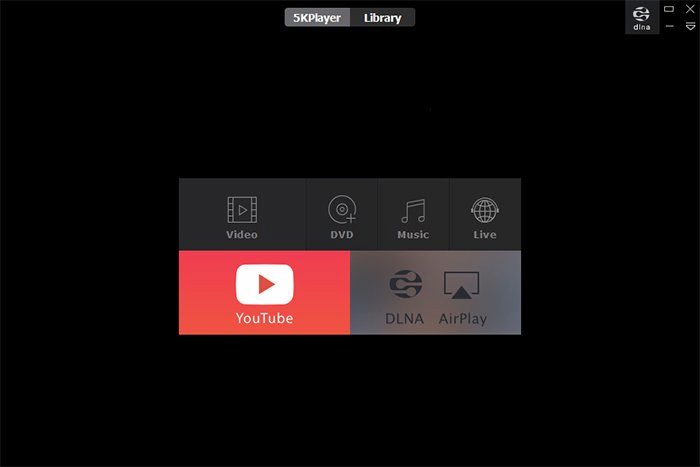
5KPlayer is another popular free DVD player for Windows 10 that supports playback across Windows 7, 8, 8.1, and the latest Windows 11. It serves as a versatile media hub, combining a music player and UHD video player with AirPlay and DLNA streaming capabilities. Additionally, it allows users to download content from over 300 websites, including Vimeo and Dailymotion.
However, despite its feature set, 5KPlayer has faced significant criticism regarding user privacy and system transparency:
- Persistence and Uninstallation: Many users have reported that the software is notoriously difficult to uninstall completely, often leaving behind residual files and registry entries.
- Background Activity: There are ongoing concerns regarding its heavy use of background processes. Some security tools and users have even flagged the player as Adware due to these persistent background activities and aggressive promotional behavior.
Features:
- Support popular formats like MP4, AVI, MKV, HEVC, MOV, WMV, FLAC, AAC, WMA, etc;
- Free download videos/movies/music from 1000+ online video sites;
- Stream videos and audio for iPhone, iPad, Apple TV, etc;
- Convert videos to MP3, AAC, MP4 for free.
Pros
- Provide screen capture function.
- Support to save videos from Facebook, YouTube, or Vimeo.
- Amazing streaming capabilities.
Cons
- Free versions of 5KPlayer may display advertisements.
Bottom line: 5K Player is a versatile DVD Player with many advanced features, and it especially shines as an AirPlay-enabled tool for instant screen mirroring and video music AirPlay. But notably, it can’t play Blu-ray discs.
Users Review
• People like it because it can play 4K videos and even VR 360-degree videos.
• Some users praise this DVD playing software for its lossless and smooth DVD playback.
• Many users have the concern that 5KPlayer contains malware.
5 PotPlayer
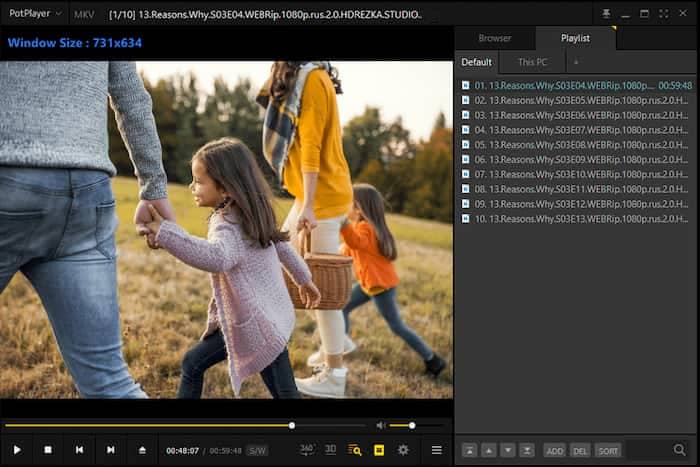
PotPlayer is a DVD player that works with every Windows version. It can play all popular video formats, DVDs, Blu-rays, and audio CDs. Advanced acceleration technology can advance the CPU and GPU to handle large video files.
Features:
- Enable users to easily manage videos.
- Allow to preview the scene with snapshots.
- Supports devices like DVD, HDTV, TV, etc.
Pros
- Full OpenCodec support.
- Supports 3D viewing experience.
- User-defined shortcuts make controlling easier.
Cons
- Audio playback options could be better
- Obtain HDR support manually
Bottom line: PotPlayer provides many handy and versatile editing features, greatly improving users’ watching experience. However, the interface may be complex or overwhelming to some users, especially those who prefer simpler designs.
Users Review
• What people like most is its speed adjustment feature, that from 0.2x to 12x.
• This free Windows DVD player software also stands out for its subtitle customization options.
• Some users report that it sometimes displays ads.
6 Leawo Blu-ray Player
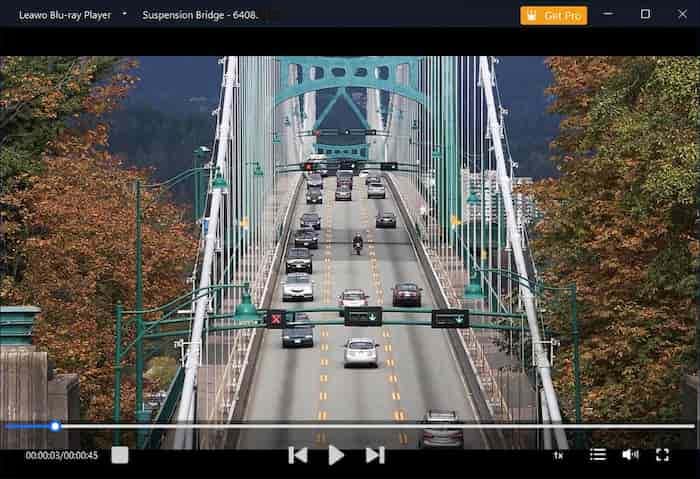
Leawo Blu-ray Player supports playing both Blu-ray and DVD discs, and it can also serve as a DVD Player for Windows 10. It enables you to add subtitles and select the audio track of videos.
Features:
- Play videos up to 1080P HD quality.
- Allows you to change the theme.
- Offers detailed navigation for playback.
Pros
- Allow to load multiple files.
- Excellent audio decoding options.
Cons
- No advanced video and audio playback options.
- Hard to uninstall, and there will be residual files in the computer after uninstallation.
Bottom line: It can deliver a good DVD and Blu-ray movie streaming experience and is compatible with different platforms. However, it lacks HD or 3D upscaling capacity and is ads-supported.
Users Review
• Some users applaud its ability to bypass DVD region codes to play DVDs.
• Most users are satisfied with its advanced features, like subtitle and audio track selection.
• Customer service problems are mentioned in several user evaluations, such as unhelpful assistance or delayed response times.
7 KM Player
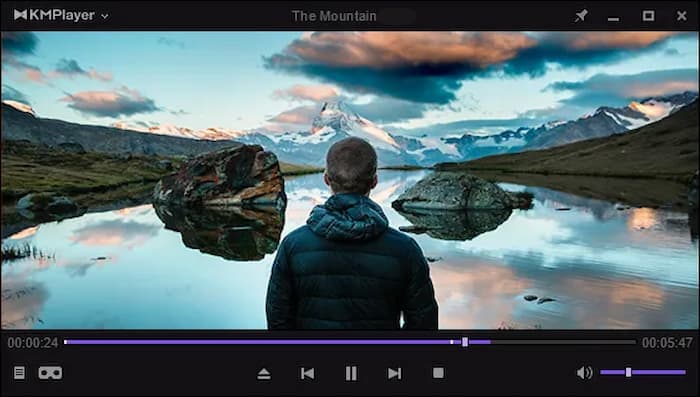
KM Player is an all-in-one tool that can also serve as a Windows 10 DVD player. It allows users to play videos up to 8K. Its interface is concise, and users can customize it with various skins.
Features:
- Plays 3D and HD videos with ease.
- Intuitive subtitle settings.
- Capture images from videos and create GIFs.
Pros
- Displays high-resolution files without delay.
- Easy subtitle setup.
- Offers basic screen capturing options.
Cons
- No stereo sound support.
Bottom line: It allows users to play videos up to 8K but uses quite a bit of CPU to operate.
Users Review
• The DVD player software Windows is praised for its high degree of customization through skins, color themes, and various settings.
• People highly commend the smooth DVD playback through hardware acceleration.
• Some users complain that the interface and functions are complex for them.
8 GOM Media Player
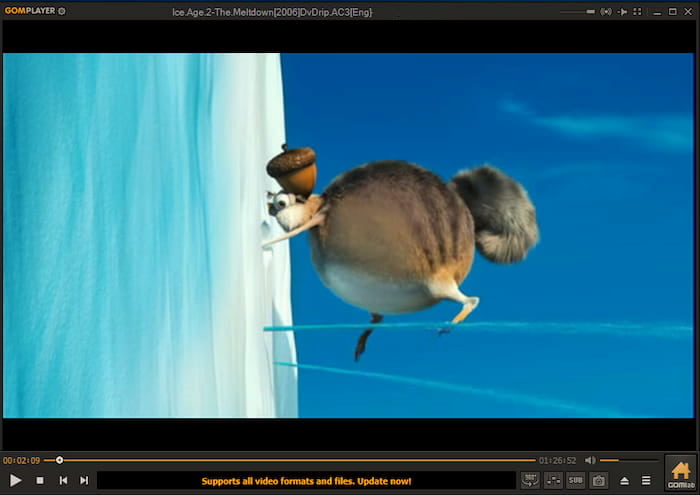
GOM Media Player is a versatile and user-friendly DVD player for Windows 10 that supports various audio and video formats. It’s known for its simplicity, extensive format compatibility, and customizable features.
Features:
- Offers a feature-rich control panel for playback.
- Support smooth UHD videos.
- It has a user-friendly design.
Pros
- Quick and easy installation process.
- Offers a rich subtitle library.
- Supports various audio and video files.
- Low system requirements.
Cons
- The playback of Blu-ray discs needs additional codecs.
Bottom line: It can play most video formats with ease and has a sleek design that makes it friendly to users. The codec library is time-consuming.
Users Review
• Many people like this DVD player for Windows 8 because it can play DVDs, Blu-rays, and various video files.
• Many people think that its playlist feature is very helpful to manage DVD playback.
• Some people think the provided ads bring them problems.
9 MPC-HC (Media Player Classic – Home Cinema)
MPC-HC is the definitive ‘geek’s choice’ for those who prioritize performance over flashy aesthetics. It is a lightweight, open-source masterpiece that remains a staple in the Windows community for its transparency and efficiency.

Features:
- Unlike many free players that struggle with menus, this free DVD player for PC supports full DVD menu navigation, including mouse-click support for chapters, subtitles, and audio tracks.
- It can often bypass basic software-level region locks, though like VLC, it still respects hardware-level RPC2 drive restrictions.
- It offers deep customization for DVD subtitles (VobSub), allowing you to adjust timing, positioning, and scaling far more precisely than ‘plug-and-play’ apps.
- Because it is so lightweight, skipping through DVD chapters or scrubbing the timeline is near-instant, even on older hardware.
Pros
- It is incredibly resource-light, making it the best option for older hardware or low-spec laptops without taxing the CPU.
- As a fully open-source project, it contains zero ads, no bloatware, and absolutely no privacy tracking.
- When paired with the madVR plugin, MPC-HC is widely considered to offer the best video rendering quality available on PC today.
Cons
- The UI is very retro and functional, lacking the modern, polished look of contemporary players.
- Achieving that ‘best-in-class’ visual quality requires manually configuring complex filters and playback parameters, which can be daunting for casual users.
Bottom line: This DVD player for Winodws 11 is the ultimate ‘no-nonsense’ DVD player for users who want maximum performance and pro-level picture quality without the baggage of modern software.
Users Review
• Many reviews on Reddit and tech forums highlight that MPC-HC still beats VLC in resource efficiency.
• Users frequently contrast it with 5KPlayer, noting that MPC-HC has ‘zero background processes’ and ‘doesn’t try to sell you anything.’
• Casual users often complain that out-of-the-box settings aren’t always optimal.
10 Macgo Windows Blu-ray Player
Macgo Windows Blu-ray player can also play video and audio files without interruption. It enables users to play AVI, WMV, MP4, and FLV files. It is lightweight and can reduce the workload of the computer during playback.
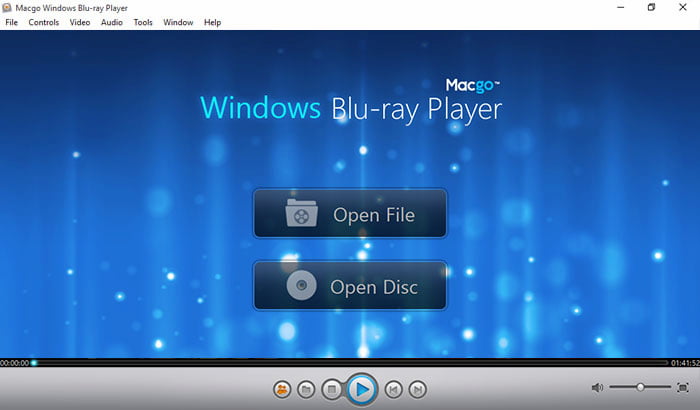
Features:
- Plays DTS 5.1 and Dolby TrueHD songs.
- Offers other online subtitles.
- Offers other online subtitles.
- Supports HTTP online link video link format.
Pros
- Play almost all Blu-ray and video file formats.
- Offers diverse audio playback features.
- Displays image files.
- Provides online video playback options.
Cons
- There is no Windows version now.
Bottom line: It supports a wide range of file formats and is lightweight. Its Windows version will soon be released.
Users Review
• Many people express that they are satisfied with the DVD video quality.
• Some reflect that the interface is outdated.
Part 3. Comparison Chart for Best 10 DVD Players for Windows
We have listed the main concerns users have about DVD players in the following different areas, aiming to give you a vivid and clear picture of the verdicts and bottom lines of each tool.
| Operating System | DVD Formats | HDR10+/Dolby Vision | High-Definition Support | Subtitle Support | Customization Options | User-Friendly Interface | Hardware Acceleration | |
| Blu-ray Master free Blu-ray Player | Windows 11/10/8, Mac OS X 10.9 or above. | DVD-ROM, DVD-R, DVD+R, DVD-RW, etc. | Supported (Upscale) | 4K | Add external subtitles. | Zoom screen, playlist, screenshot, etc. | Yes | |
| Windows DVD Player | Windows 11/10 | DVD-R, DVD-RW, etc. | No | 480p or 576p | Subtitle appearance customization. | Basic controls, chapter navigation, keyboard shortcuts, etc. | Yes | |
| VLC Media Player | Windows 11/10. | DVD-R, DVD+R, DVD-RW, etc. | No | 4K, 8K | Add external subtitles. | Synchronization, video, and audio effects adjustment. | Yes | |
| 5K Player | Windows 11/10, macOS 10.15 or later. | DVD-R, DVD-RW, etc. | Limited | 4K, 8K | Support various subtitle formats. | Interface and playback controls. | Yes | |
| Pot Player | Windows 11/10, macOS 10.15 or later. | DVD-R, DVD-RW, etc. | Advanced Config | 4K, 8K | Supports various subtitle formats, such as SRT, ASS, SSA, SUB, etc. | Skins, visual and audio effects, playback controls, and hotkey configurations | Yes | |
| Leawo Blu-ray Player | Windows 7, 8, 8.1, 10, 11, macOS 10.13 or later | DVD-ROM, DVD-R, etc. | No | 4K | Add external subtitles. | Video effect adjustment. | Yes | |
| KM Player | Windows 11, 10, 8. | DVD+/-R/RW. | No | 4K, 8K | Support SRT, ASS, SSA, SUB/IDX, SMI, and more subtitle formats. | Hotkeys, skin, video, and audio adjustments. | Yes | |
| GOM Media Player | Windows 11,10. | DVD-R, DVD+R, DVD-RW, etc. | No | 4K | Automatic subtitle searching and syncing, customization of subtitle appearance. | Skins and adjust the layout. | Yes | |
| MPC-HC | Windows 11 / 10 / 8.1 / 7 | DVD discs, DVD folders (VIDEO_TS), and ISO images. | No | 4K/8K | Highly Advanced (.srt, .ass, .ssa) | Highly flexible with options for Toolbar skins, custom shaders, and keybindings. | Yes | |
| Macgo Windows Blu-ray Player | Windows 10, 8.1, 8, 7. | DVD-Video, DVD-VR, DVD+VR, etc. | No | 1080P | Supports both built-in and external subtitles in formats like SRT, SSA, and SUB. | Menu and preference settings. | Yes |
Part 4. How to Use DVD Player for Windows
After you choose a perfectly contended DVD Player Software for Windows 10, you may want to know the detailed steps of using a DVD player. Here, we take one of our top picks, Blu-ray Master Free Blu-ray Player, as an example and guide you to have a careful look at how to play DVDs on Windows 10.
Step 1.Free download Blu-ray Player from the official website or click on the following download button. Install and launch Blu-ray Player. Then, insert your DVD disc on your Windows 10 computer.
Free Download
For Windows
Secure Download
Free Download
for macOS
Secure Download
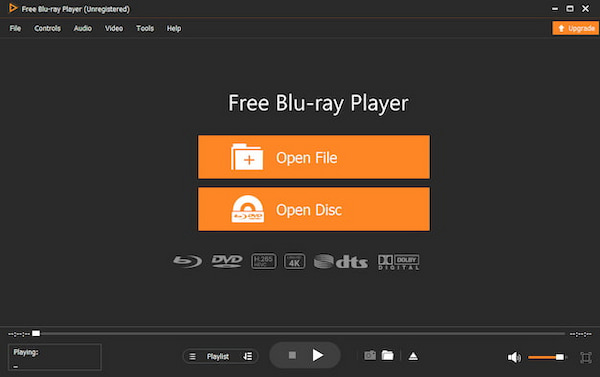
Step 2.Click the Open Disc button located in the main interface to load your DVD disc. Besides, you can click on the File button on the top menu to add your disc.
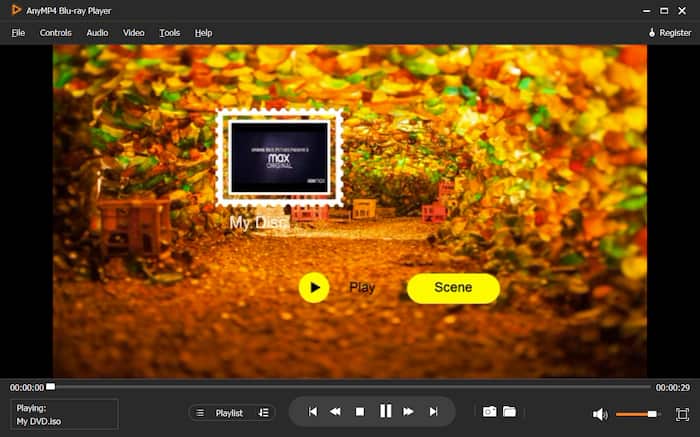
Step 3.After loading a disc, you can click the Scene button to select your desired title or chapter. You can also choose the audio track and screen size on the top menu. Then, you can click Play to start watching.
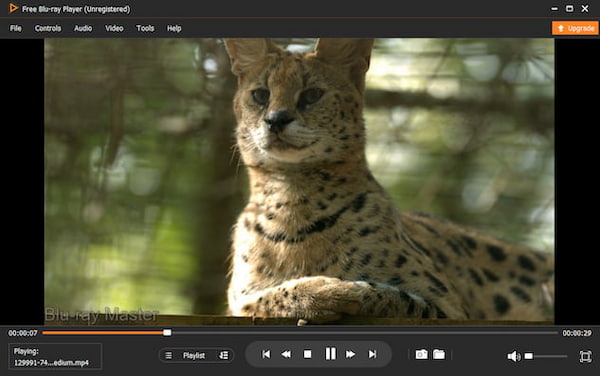
Step 4.While watching, you can use shortcuts to control the playback, including backward, forward, stop, etc.
If your Windows media does not play, you can also choose this all-in-one DVD player.
Part 6. FAQs of DVD Player for Windows
-
Does Microsoft have a free DVD player?
Windows DVD Player is developed by Microsoft and enables users to play DVD videos on Windows. Even though the Windows 10 version of this DVD player software is paid, it serves as a free DVD player for Windows 7 or Windows 8 with Media Center included. You can also select a free DVD player or Blu-ray player on Windows 10 like Free Blu-ray player.
-
What is the best DVD player for PC?
It depends on individual preferences and needs. Some popular DVD players include Blu-ray Master Blu-ray Player, AnyMP4 Blu-ray Player, etc. Each of these players offers different features and capabilities, and you can conduct a comprehensive review of these Blu-ray Players before you make choices.
-
Do desktops still have DVD drives?
With the development of digital media and streaming services, many modern desktop computers don’t come with built-in DVD drives. However, some desktops still offer optional DVD drives or are equipped with built-in optical drives.
-
Are DVD players worth buying?
It depends on your habits and preferences. If you have a large collection of DVDs or prefer physical media over digital downloads or streaming services, then a DVD player may be worth it for you.
-
What is the best free DVD player for Windows 11 that doesn’t have ads?
VLC, easily. It’s free, clean, and doesn’t shove ads in your face.
-
Can VLC play region-locked DVDs on my Windows 10 laptop?
It depends. VLC can handle some region-locked discs, but if your DVD drive enforces the lock at the hardware level, VLC can’t get around that.
-
Why won’t Windows Media Player play my DVD anymore, and what is a good alternative?
Microsoft dropped DVD support a while back, so it’s not going to work anymore. VLC or MPC HC are solid, hassle-free replacements.
-
Is the Windows DVD Player app in the Microsoft Store worth $15?
Honestly, no. It’s super basic, kind of unreliable, and free players do a better job.
Wrapping up
While Windows 10 doesn’t come with built-in DVD players, you can easily find a DVD player for Windows 10 to watch your favorite movies. This article lists the top 10 DVD players, and each offers detailed features, pros, and cons. You can choose one that suits your demands.
More from Blu-ray Master
Best DVD Player

Easily play Blu-rays, DVDs, and various video/audio formats with rich playback features.
100% Secure. No virus
