

Jul 16, 2025Posted by Kevin Miller to Copy Blu-ray
Many Blu-ray owners find themselves looking for ways to copy their discs. There are several reasons why people choose to copy their Blu-ray discs. Many want to archive collections, create backups in case of damage, enjoy convenient playback, or simply preserve the original disc from scratches. However, the process isn't always straightforward. Most commercial Blu-ray discs come with copy protections that prevent unauthorized duplication. Bypassing these restrictions requires specialized software designed to decrypt and copy Blu-ray content without quality loss. This post is created to help you navigate the best Blu-ray copy software options available. We will explore the free and paid options, highlighting their features and performances. Additionally, we will cover the key features you need to consider for selecting the top tool.

- Part 1. Why Do You Need Blu-ray Copy Software
- Part 2. Key Features to Look for in Top Blu-ray Copy Software
- Part 3. Top 5 Blu-ray Copy Software
Part 1. Why Do You Need Blu-ray Copy Software
Blu-ray disc copy software is an essential tool for anyone who owns Blu-ray discs. Many still hold collections of Blu-ray discs for movies, personal videos, or any other data. Such tools let you safeguard your physical discs by creating a duplicate for easier access. Here are some of the reasons why you might need a Blu-ray cloning software, each explain in detail:
Preservation & Backup of Physical Media
Although Blu-rays are known for their durability, they are still prone to physical damage over time. Not to mention, a single scratch can make the entire disc unreadable. BD copy software lets you create a digital backup of Blu-ray discs. You can clone them to another blank disc, save them as ISO files, or save them as BDMV folders on a hard drive.
Avoid Wear and Tear on Original Discs
Every time you load a Blu-ray disc into a drive, it undergoes mechanical stress, which can contribute to long-term wear and tear. Over time, the frequent usage of discs can lead to accidental mishandling. Using a copied version of the disc while keeping the original safe allows you to preserve the original media in mint condition.
Digital Archiving and Storage Flexibility
Blu-ray duplication software enables you to convert and store Blu-ray content digitally. It offers flexibility that physical media simply can't. By copying physical discs into ISO files or BDMV folders, you can store them on external drives. It enables instant access and playback across multiple devices, including computers and smart TVs.
Customization and Compression Options
Blu-ray cloner tools offer flexible copy modes and compression features. It allows you to select specific titles, chapters, audio tracks, or subtitles. It is ideal for trimming down content to suit personal preferences or storage limitations. Some software can also compress larger discs (BD-50) to fit smaller ones (BD-25) without loss in quality.
Part 2. Key Features to Look for in Top Blu-ray Copy Software
When choosing Blu-ray copy tools, it's essential to consider more than just the ability to clone discs. The best programs offer a blend of power, flexibility, and user-friendliness. These aspects ensure high-quality copies while accommodating various needs, such as format conversion, compression, and disc protection removal. Here are the key features you need to look for in a top tool:
• Bypassing Copy Protections: Look for software that can handle advanced DRM and copy protection, such as AACS, BD+, and region codes.
• Multiple Copy Modes: Select a program that offers flexible copying methods tailored to your needs. Options include Full Disc, Main Movie, and Custom.
• Output Quality: Ensure the software offers lossless copying to maintain original Blu-ray quality with no degradation. Additionally, consider reducing the file size while maintaining a reasonable video quality.
• Speed and Performance: Look for GPU acceleration or multithreading support for faster copying and conversion. High-performance software minimizes wait times.
• Format Support: If you need digital copies, choose software that supports outputting ISO image files and BDMV folders. It is useful for storing and streaming content on multiple devices.
• User Interface: Good software should be intuitive, beginner-friendly, and easy to navigate. It should have a clear layout and tooltips to expedite the process.
• op software should run smoothly without crashes, freezing, or Top software should run smoothly without crashes, freezing, or corrupted outputs. Reliable performance ensures your data and time aren't wasted during long copying sessions.
• Customer Support: Quality programs should offer responsive support, including Live chat or email support, FAQs, troubleshooting guides, and regular updates.
Part 3. Top 5 Blu-ray Copy Software
| Blu-ray Master Free Blu-ray Copy | DVDFab DVD Copy | Leawo Blu-ray Copy | MakeMKV | HandBrake | |
| System Requirement | Windows 10, 8, 8.1, 7, and 11 | Windows and Mac | Windows and Mac | Windows, Mac, and Linux | Windows, Mac, and Linux |
| Bypass Copy Protection | AACS, BD+, region code, etc. | AACS, BD+, BD-J, etc. | AACS, BD+, MKB, etc. | AACS and BD+ | Cannot decrypt protected Blu-ray discs |
| Copy Mode | Full Disc and Main Movie(It offers Clone and Write Data mode in the upgraded version) | Full Disc, Main Movie, Clone/Burn, Merge, and Split | Full Movie, Main Movie, and Custom | Full Movie | Full Movie, Main Movie, and Custom |
| Output Quality | Same as the original quality | Lossless quality | 1:1 Copy | Lossless quality | Minimal loss in quality |
| Speed and Performance | Up to 6× copy process speed | Up to 50× copy process speed | Up to 6× copy process speed | Depends on how the driver can read | Depends on how the driver can read | Format Support | Blu-ray discs and BDMV folders | Commercial and rental Blu-rays | Blu-ray discs | Blu-ray discs, ISO image files, and BDMV folders | Blu-ray discs, ISO image files, and BDMV folders | Output Format | Blu-ray discs, ISO image files, and BDMV folders | Blu-ray discs, ISO image files, and BDMV folders | Blu-ray discs, ISO image files, and BDMV folders | MKV | MP4, MKV, and WebM |
| Customer Support | Yes | No | No | No | No |
| Overall Ratings |
Blu-ray Master Free Blu-ray Copy
Pricing: Free, with an option to upgrade for $69.95 (lifetime access) only.
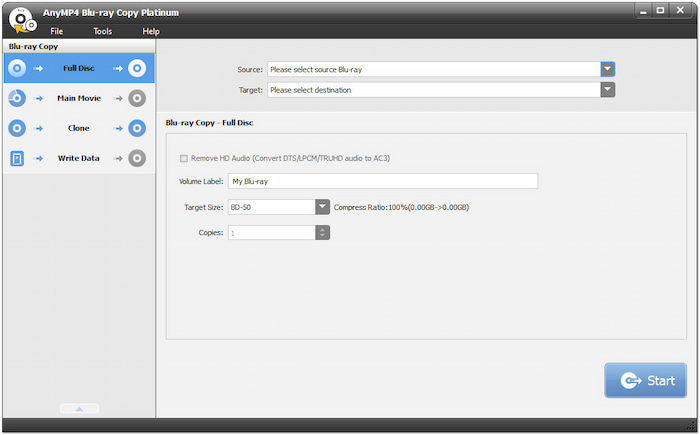
Blu-ray Master Free Blu-ray Copy ranks as the leading Blu-ray copy application for Windows systems. It supports Blu-ray discs and BDMV folders as inputs for duplicating Blu-ray discs. It can make an exact 1:1 copy of Blu-ray content without quality loss. This software allows you to back up the entire disc, including menus and extras, or just the main title. With it, you can make a new Blu-ray disc or save the copied content as a BDMV folder or ISO file. It uses the latest GPU acceleration technology to expedite the copy process up to 6 times.
Free Download
For Windows
Secure Download
Pros
- It is compatible with most Blu-ray drives.
- It supports Blu-ray in both NTSC and PAL formats.
- It can efficiently handle DRM protections and region codes.
- It allows compressing BD-50 to BD-25 without any quality loss.
- It can output Blu-ray directly to a blank disc, BDMV folder, or ISO file.
Cons
- It requires an upgrade to achieve a fast processing speed.
DVDFab Blu-ray Copys
Pricing: $69.99 starting price
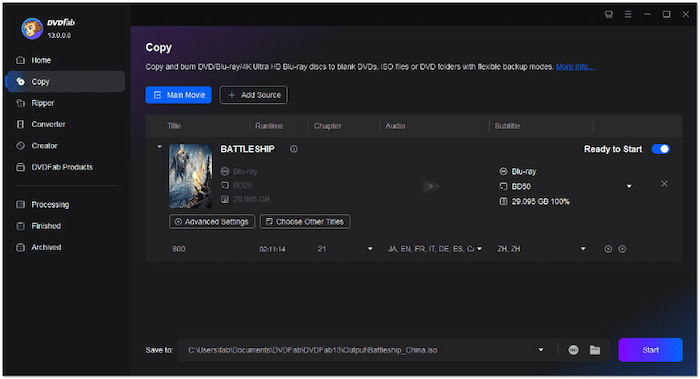
DVDFab Blu-ray Copy is among the several modules within DVDFab, along with the Blu-ray Decrypter and other tools. It is a premium Blu-ray cloner software that enables you to create lossless backups or compressed copies of Blu-ray discs. It can output Blu-rays to a blank disc or save them as ISO or BDMV folders. It offers five different copy modes: Full Disc, Main Movie, Clone/Burn, Merge, and Split. Each mode is designed for its intended use in DVD cloning.
Pros
- It can copy Blu-ray discs at 50 times the speed.
- It can produce a lossless backup for BD-50 or BD-25.
- It can auto-detect and decode common copy protections.
Cons
- It is not a standalone software.
- It requires purchasing a license for full access.
Leawo Blu-ray Copy
Pricing: $44.95 starting price
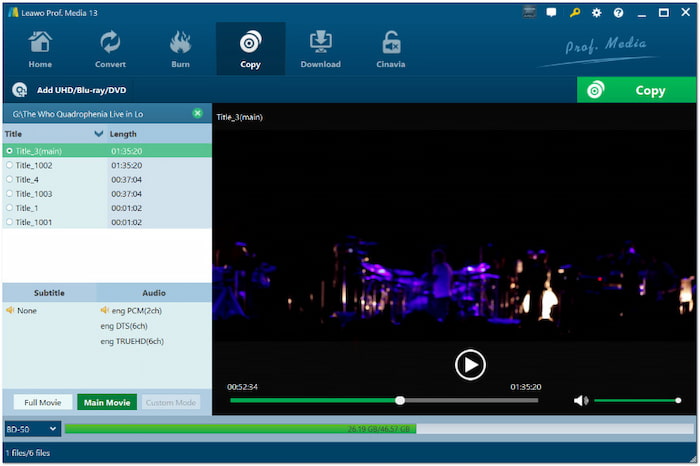
Leawo Blu-ray Copy is a Blu-ray copy program that allows you to copy both Blu-ray and DVD movies. This software can clone Blu-ray discs to BD-50, BD-25, BDMV folders, and ISO image files. It offers three copy modes: Full Movie, Main Movie, and Custom Mode. It lets you duplicate Blu-rays while retaining the subtitles and audio tracks of your choice. Additionally, it can copy Blu-rays released in any region by most movie studios in any format.
Pros
- It can deliver up to 6 times higher copy speed.
- It supports 1:1 disc-to-disc backup of BD50 and BD25.
- It is fully compatible with Windows 7-11 and Mac OS 10.13 and later.
Cons
- It cannot decode the latest Blu-ray copy protections.
- Its trial version can only copy the 5-minute Blu-ray content.
MakeMKV
Pricing: Free during the BETA version
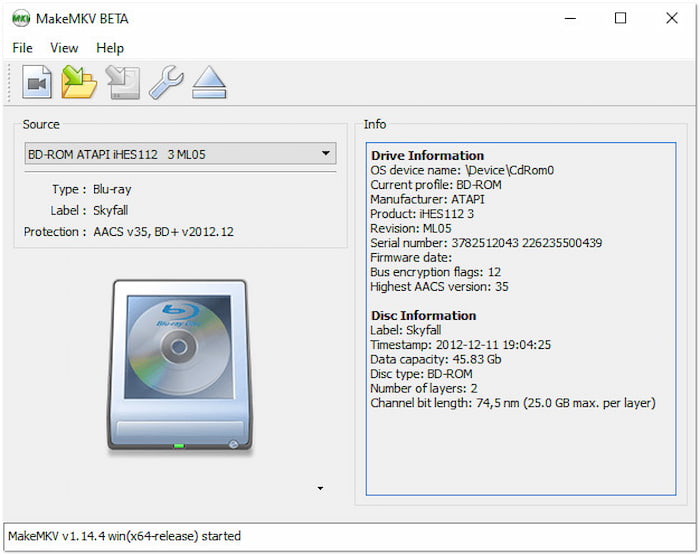
MakeMKV is a highly regarded media transcoding application that also operates as a Blu-ray copier. This software is primarily focused on Blu-ray ripping rather than traditional disc-to-disc copying. In other words, it converts Blu-ray into MKV format instead of copying it to disc. It can read standard Blu-rays and even those protected with the latest AACS and BD+ versions. Additionally, it copies Blu-rays without altering the content, including quality.
Is MakeMKV not working or crashing? Learn easy fixes here to get it running again.
Pros
- It preserves all the content, including video and audio.
- It reads standard and protected Blu-rays without interruption.
- It requires no additional software for decrypting encrypted Blu-rays.
Cons
- Its conversion speed relies on how fast your driver can read.
- Its Blu-ray decryption and processing are no longer accessible after BETA.
HandBrake
Pricing: Free and open-source
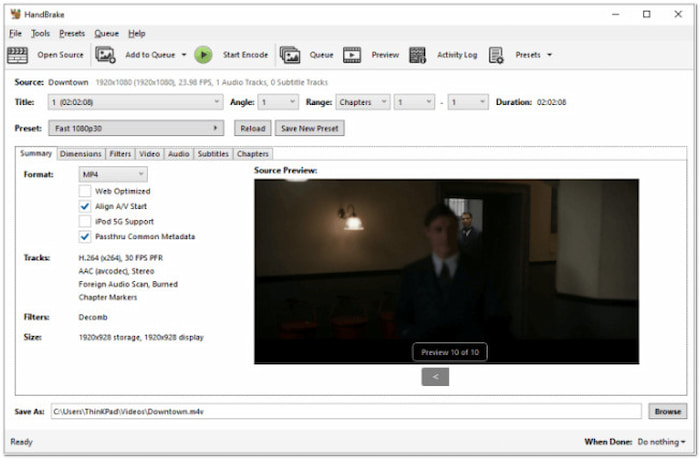
HandBrake is a highly popular open-source video transcoder software that goes beyond converting ripped Blu-rays. It supports Blu-ray sources, including physical Blu-rays, BDMV folders, and ISO image files. You can use it as a Blu-ray copy software to duplicate Blu-ray content in MP4, MKV, and WebM formats. It features title and chapter selection, batch scanning, subtitle insertion, HDR Pass-Through, video filters, and more.
Pros
- It offers advanced video settings customization.
- It supports advanced video and audio encoders.
- It is completely free to use with no hidden charges.
Cons
- It cannot decrypt protected Blu-rays alone.
- Its interface is confusing, mainly for non-technical users.
Wrapping up
Choosing the best Blu-ray copy software depends on your specific needs and requirements. From premium tools to free options, each software offers unique strengths in terms of quality, speed, and quality. However, if you're looking for a reliable, easy-to-use, and cost-effective solution, Blu-ray Master Free Blu-ray Copy is an excellent option. It supports full disc duplication and selective copying, fast performance, and high-quality output. Additionally, it can efficiently handle Blu-ray protections, which is ideal for use in commercial Blu-ray discs.
More from Blu-ray Master
Top Blu-ray Copy Software
Free tool to copy any Blu-ray file to disc, folder, or ISO images losslessly.
100% Secure. No virus
