

May 29, 2025Posted by Kevin Miller to Play Blu-ray
To properly watch Blu-rays, you must use an optical drive to load Blu-ray discs. There are many different types of optical drives, including CD drives, DVD drives, and Blu-ray drives. So, how can we determine whether an optical drive can play Blu-rays? This article aims to provide a full guide for you to tell if the optical drive can play Blu-ray. Read on to know more.

- Part 1. How to Tell If the Optical Drive Can Play Blu-ray
- Part 2. Troubleshooting of Optical Drive Can't Play Blu-ray
- Part 3. Best Blu-ray Player to Enjoy Blu-ray Movies
- Part 4. FAQs
Part 1. How to Tell If the Optical Drive Can Play Blu-ray
Do you want to know the type of your optical drive? Keep reading to know the 5 effective methods.

1. Check for Logos and Labels
To determine if the optical drive can play Blu-rays, the first and easiest way is to check the logos and labels directly on the optical drives. You need to look for the 'Blu-ray Disc' logo on the drive itself, which is often on the tray, near the eject button, or on the front of your computer. If you can find it, you can easily use it to play Blu-rays.
2. Examine the Device Manager
You can also examine the Device Manager to find out the optical drive type on your Windows and Mac computers.
For Windows
Step 1.Right-click on This PC on your computer.
Step 2.Locate Device Manager and click it.
Step 3.Locate and expand the DVD/CD-ROM drives. If the drive's name includes 'BD', it is a Blu-ray drive to read and play Blu-rays.
For Mac
Step 1.Choose the Apple menu and select the About This Mac option.
Step 2.Click System Report and navigate to Disc Burning.
Step 3.Check the Media Supported section as 'Blu-ray'.
3. Consult Your Computer's Specifications or Manual
You can also check the computer's specifications or manual to learn more information about the optical drive. If you have lost the related document, you can also search for online support, that is, check for Blu-ray drive specifications and the model number of your computer on the manufacturer's website or online merchants.
4. Check for Blu-ray Playback Software
The last method is only available for part of the computers. Certain computers that have Blu-ray drives have CyberLink PowerDVD or a comparable program pre-installed. You can be sure your drive is Blu-ray compatible if you have such software.
5. Test with a Blu-ray Disc
The most direct method is to insert a Blu-ray disc into the optical drive. If the computer can recognize and play Blu-ray discs, it indicates a Blu-ray optical drive.
Part 2. Troubleshooting of Optical Drive Can't Play Blu-ray
This part will lead you to sort out some common problems of the optical drive not playing Blu-ray discs.
1. Optical drive compatibility: Make sure your optical drive can play Blu-rays, and part 1 is specially for this.
2. Blu-ray disc problem
- Clean the Blu-ray discs: If your Blu-ray disc's surface is covered with dust, use a soft, lint-free cloth to gently remove any dust, fingerprints, or smudges on the disc surface.
- Inspect for damage: Check for warping, cracks, and scratches on the disc. Even small damage can stop playback. To determine whether the problem is with the Blu-ray disc itself, try a different one.
3. Blu-ray disc encryption: It may be because your Blu-ray discs have region codes and copy protection, which interfere with the proper playback of Blu-ray movies.
4. Blu-ray player software issue: Make sure your Blu-ray player software is up to date and can be used as usual.
5. Hardware problem
- Connection issue: If you are a Mac user, you need an external optical drive to load Blu-ray discs. You need to make sure that your optical drive is properly connected to your computer with the USB cable.
- Insufficient system resources: Proper Blu-ray playback requires sufficient system resources, such as CPU, GPU, and RAM. Ensure your computer meets this requirement.
- Lens cleaning: Clean the laser lens of your optical drive to reduce the influence of dust on its interface. You need to buy the commercially available Blu-ray lens cleaning disc to clean the lens, avoiding damage from using the common cleaning discs.
Part 3. Best Blu-ray Player to Enjoy Blu-ray Movies
Compatibility: Windows 11/10/8, Mac OS X 10.9 or above
Now, we want to introduce you to the best Blu-ray playback software, Blu-ray Master Free Blu-ray Player. It is a top choice for enjoying high-quality video and audio effects. It can load Blu-ray discs, folders, and ISO files. With decryption technologies, Blu-ray movies' copy protection can be removed to enable you to watch them without limitation. Moreover, it provides both basic and advanced settings to improve your watching experience. You can create a playlist to manage the Blu-rays. You can easily control the video playback with the hotkeys. You can even adjust screen size, brightness, and other settings. It is a free tool, and you can have a try.
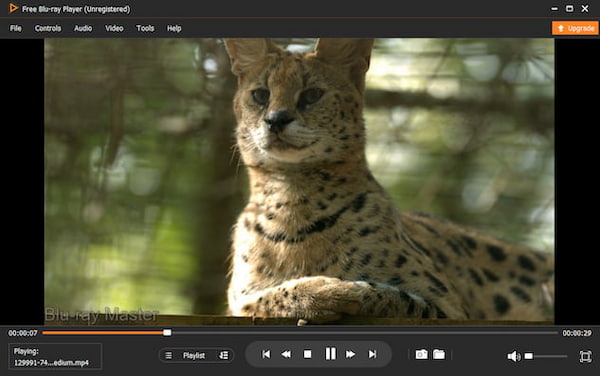
Free Download
For Windows
Secure Download
Free Download
for macOS
Secure Download
Features
- It can play Blu-ray movies in regions A, B, and C.
- It can add external subtitle files to the software.
- You can take screenshots to capture the important moments.
- It can play 3D Blu-rays and common videos.
Part 4. FAQs
-
What is an optical drive?
An optical drive is a hardware element that is equipped on computers and other devices. It can read and write data from optical discs, like CDs, DVDs, and Blu-ray discs.
-
Does my Blu-ray drive require special software?
Yes, to watch Blu-ray movies, Blu-ray playback software is typically required, like Blu-ray Master Free Blu-ray Player.
-
What is the difference between a DVD and a Blu-ray drive?
Compared to DVD drives (which use a red laser), Blu-ray drives can store a lot more data since they utilize a blue laser to read the disc.
Wrapping up
In all, we share with you the effective ways to tell if an optical drive plays Blu-rays. With this full guide, you can easily handle the optical drive problems. Besides, we bonusly recommend a powerful Blu-ray player, Blu-ray Master Free Blu-ray Player, for you to enjoy a high-quality Blu-ray watching experience.
More from Blu-ray Master
Blu-ray Tips

Easily play Blu-rays, DVDs, and various video/audio formats with rich playback features.
100% Secure. No virus
