

Mar 05, 2026Posted by Kevin Miller to Play DVD
Expert Summary
Best for 4K: Sony UBP-X800M2
Best Budget: Sony BDP-S1700
Best Premium: LG UBKM9
Best Free Choice: VLC Media Player
Best Compatibility: Blu-ray Master Free Blu-ray Player
Playing DVDs has become a challenging task nowadays since discs are not the trend anymore. But do you want to play your DVDs simply? If so, you are grateful since we have various tools we can offer to play your DVD successfully. So, what are you waiting for? Read this post and learn all the information you need to know the best methods on how to play DVDs on Windows and Mac.
Part 1. How to Pick A Good Region-free DVD Player
1.1 What Is a Region Free DVD Player
Normally, when you purchase a DVD, the disc is locked to a particular region. DVDs use numbers to specify the region code ranging from 1/2/3/4/5/6/7/8/0 for DVD, this is the designated code for each region of the world. Region free or Region 0 is a version that is uuencoded and can be played worldwide. Below are the DVD region codes:
- Region 1: Canada, the United States, and U.S. territories.
- Region 2: Japan, Europe, South Africa, the Middle East, and Greenland.
- Region 3: Southeast Asia and East Asia
- Region 4: Australia, New Zealand, the Pacific Islands, Central America, Mexico, South America, and the Caribbean
- Region 5: Eastern Europe, Russia, the Indian Subcontinent, Africa, North Korea, and Mongolia
- Region 6: China
- Region 7: Reserved for unspecified special use
- Region 8: Special international venues for air and oceanic travel
- Region 0 or Region ALL: Region-free or multi-region
A region free DVD Player can easily play any DVD, especially playing a DVD purchased in one country which may not play on a DVD player purchased in another country. With this all-region DVD player, international travelers can fully enjoy their DVDs purchased from around the globe.
1.2 How We Test the DVD Player
Our lab tested these players using imported PAL-format DVDs from Europe (Region 2) and NTSC discs from Japan (Region 2). We specifically looked for 'Plug-and-Play' capability, the speed of disc loading (handshake time), and whether the 1080p upscaling maintained color accuracy on 4K OLED screens. We also verified 'Voltage Compatibility' to ensure these units won't fry when used in different power grids (110V vs. 220V).
Hardware Player vs. Software Solution: Which is for you?
- Choose Hardware if you want a dedicated home theater experience, legacy analog outputs (RCA), or physical upscaling for an older TV. Best for: Collectors with a massive physical library.
- Choose Software if you are traveling with a laptop or want to bypass region locks without buying extra gear. Best for: Students, travelers, and tech-savvy users who prefer digital convenience.
Crucial Buyer’s Note: It is a common industry secret that major brands like Sony, LG, and Panasonic do NOT manufacture 'Region-Free' players for the retail market. The units listed above are standard models. To play discs from all regions, you must ensure you are buying a 'Pro-modded' version from specialized third-party vendors such as 220-Electronics or Bombay Electronics. These retailers physically modify the hardware or firmware to bypass Hollywood's encryption. Always look for 'Region-Free' or 'Multi-Zone' in the specific Amazon listing before clicking 'Buy'.
Part 2. Best All Region DVD Player Software for PC to Play DVDs Freely
2.1 VLC Media Player
As the world moves toward minimalist setups, VLC Media Player remains the 'Best Portable' alternative to physical hardware. By pairing a laptop with an external USB disc drive, users can bypass many region restrictions through software. In 2026, it is the go-to tool for digital nomads and students who want to watch their physical collections without carrying a bulky standalone player.
Pros
- Completely Free: No hardware purchase required if you already own a PC/Mac with a disc drive.
- Format King: Plays virtually any file format (MKV, MP4, AVI) alongside physical DVD/Blu-ray structures.
- High Portability: Ideal for travelers; your 'player' is simply an app on your laptop.
Cons
- Hardware Dependency: Requires a compatible external Blu-ray/DVD drive, which can vary in quality.
- Complexity: Bypassing region codes on Blu-rays may require additional library files (AACS), which might be difficult for non-technical users.
2.2 Blu-ray Master Free Blu-ray Player
BD Master Free Blu-ray Player is ranking the top as the best all region DVD player for Windows. This DVD player is able to scan and automatically upscale DVD/Blu-ray video to full 1080p HD, creating brighter and dynamic imagery on screen. It is fully compatible with encrypted DVD/Blu-ray discs, ISO files and folders.
What’s more, this player is fast and responsive, and plays all DVD formats (including DVD-ROM/R/RW). If you prefer to use freeware other than expensive hardware, it is time to use Blu-ray Master Free Blu-ray Player.
- Play DVD from any region including 1, 2, 3, 4, 5, 6, 7, 8, etc. for free.
- Play Blu-ray disc, ISO file and folder with original quality.
- Support playback for all 4K 1080p regular media files, including MP4, AVI, MOV, MP3, etc.
- Free of virus, malware, ads or any third-party tool.
Free Download
For Windows
Secure Download
Free Download
for macOS
Secure Download
How to Play DVD from Any Region with this Region-Free DVD Player
Step 1.Download and install this region code-free DVD player. Then, insert your DVD disc into your computer.
Step 2.Launch the program and click the Open Disc button. Then, select the disc you want to play. The program will load it automatically.
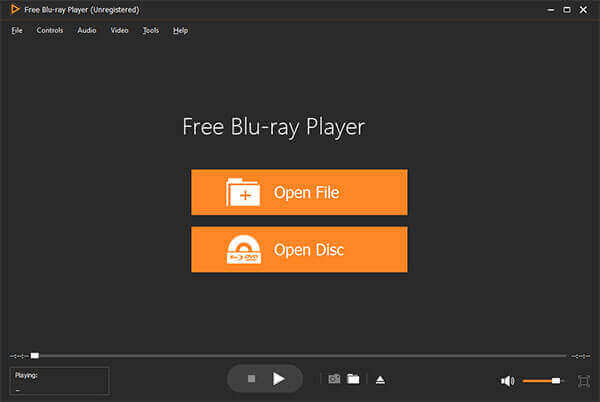
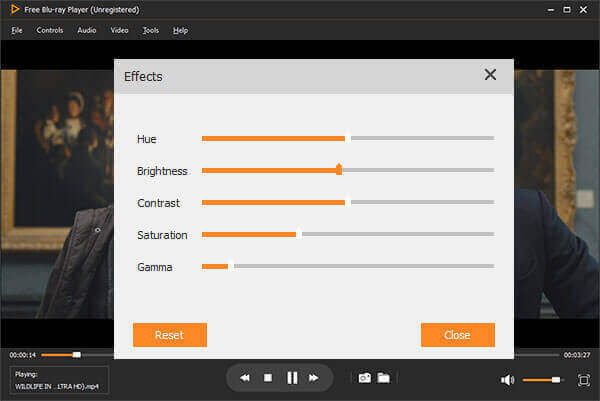
Step 3.All right, then you can watch your DVD on your computer easily. While watching the movie, you can play/pause, forward/backward, volume up/down, adjust video effects, etc.
Don’t forget, you can also use this tool to play Blu-ray movies, or any other video or audio files effortlessly.
Part 3. Top 6 Region Free Portable DVD Player
| Sony BDP-S6700 | Sony UBP-X700 | OREI DVD-Z9H | LG UBKM9 | Sony UBP-X800M2 | Sony BDP-S1700 | ||
| Best For | Balanced Performance | Value 4K HDR | Remote Control | Standard DVD Only | Simplicity & 4K | Premium Home Theater | Extreme Budget |
| Max Resolution | 4K Upscaling (1080p Native) | 4K UHD Native | 1080p Upscaling | 4K UHD Native | 4K UHD Native | 1080p Native | |
| HDR Support | No | HDR10, Dolby Vision | No | HDR10, Dolby Vision | HDR10, Dolby Vision | No | |
| Audio Features | Dolby TrueHD, DTS-HD | Dolby Atmos, DTS:X | Standard Dolby | Dolby Atmos, DTS-HD | Hi-Res Audio, SACD, DVD-A | Dolby TrueHD, DTS-HD | |
| Connectivity | Wi-Fi, Bluetooth, Ethernet | Wi-Fi, Ethernet, Dual HDMI | HDMI, RCA, USB | Wi-Fi, Ethernet, Optical | Wi-Fi, Bluetooth (LDAC), Dual HDMI | Wired Ethernet Only | |
| Disc Support | Blu-ray, DVD, CD | 4K UHD, SACD, Blu-ray, DVD | DVD, CD (No Blu-ray) | 4K UHD, Blu-ray, DVD | 4K UHD, SACD, DVD-Audio | Blu-ray, DVD, CD |
Top 1. Sony BDP-S6700
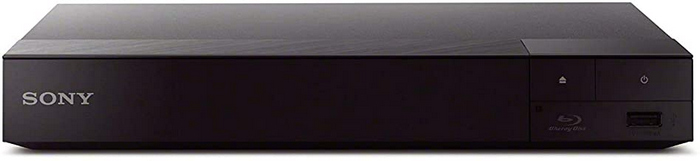
The other region-free DVD player of Sony series, Sony BDP-S6700. Along with Wi-Fi and Bluetooth support, this DVD player hardware is able to stream from your favorite apps in full HD and upscale your DVD playback to 4K video.
Pros
- Support 3D upscaling of Blu-ray/DVD discs
- Cast content from smart devices to TV
- More vivid picture
Cons
- Not support 4K UHD
Top 2. Sony UBP X-700
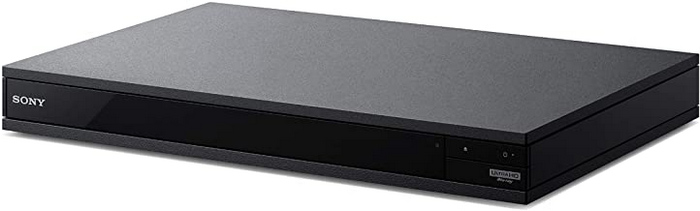
The third portable DVD player from Sony-Sony UBP X-700 is also a DVD player to play all region codes. What’s more, it will show you excellent 4K video quality and Dolby Atmos audio.
Pros
- Support beautiful color schemes
- Support Dolby Atmos audio effect
- Support 4K streaming
Cons
- Sound quality could be too strong and uncomfortable
Top 3. OREI DVD-Z9H
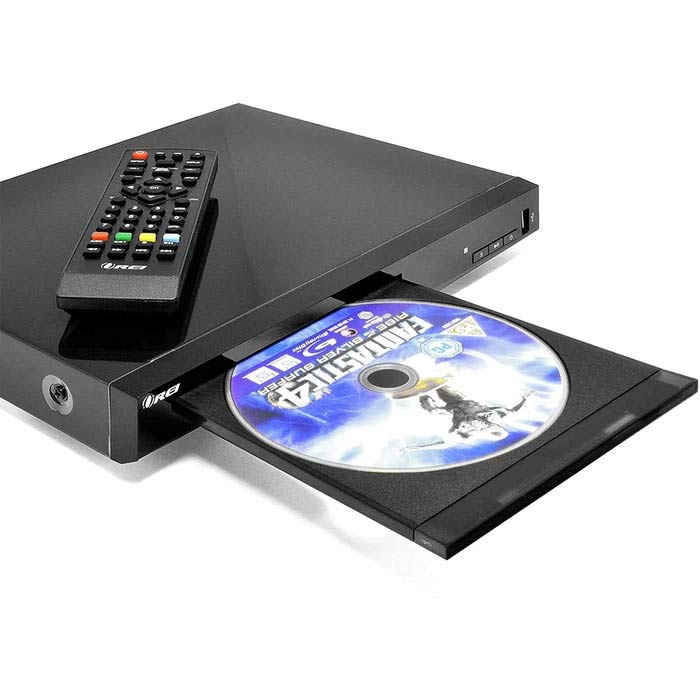
OREI DVD-Z9H is the DVD player to play all regions, from 0 to 6. Besides, the worldwide dual voltage of OREI DVD-Z9H makes users play Blu-ray discs for Zone A B C. For some old TV users, it has USB input and RCA input to connect an old TV device.
Pros
- Support playing JPEG as a slideshow
- Support remote control
- Support HDMI connection
Cons
- Low volume output
- Difficult remote layout
Top 4. LG UBKM9
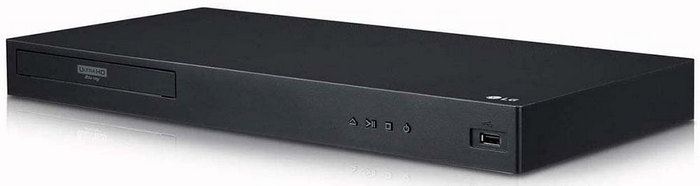
The last one is from LG. LG UBKM9 performs well with its breathtaking pictures and colors. It looks like an all-in-one DVD-playing solution with support of CD, DVD, Blu-ray, USB flash, and wireless connection.
Pros
- Secure transmission with Wi-Fi and Ethernet port
- Support full spectrum including SECAM
- Support 4K in Netflix streaming
Cons
- Only support YouTube and Netflix streaming
Top 5. Sony UBP-X800M2
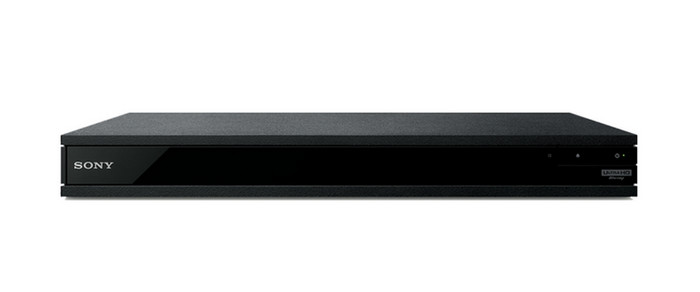
The Sony UBP-X800M2 is widely regarded as the ‘Gold Standard’ for physical media enthusiasts in 2026. Built with a high-rigidity ‘frame-and-beam’ chassis, it minimizes vibrations to deliver pristine audio and video. For audiophiles in the US and UK, it remains one of the few mainstream players supporting SACD and DVD-Audio, making it a true universal hub for high-end home theaters.
Pros
- Premium Build Quality: The heavy-duty chassis ensures near-silent operation and zero disc-read noise.
- Universal Disc Support: Ideal for collectors, playing everything from 4K UHD Blu-rays to rare SACDs and legacy DVD-Audio.
- Advanced 4K Upscaling: Its proprietary algorithm breathes new life into old standard-definition DVDs, reducing artifacts significantly compared to entry-level models.
Cons
- Manual Dolby Vision: Users must manually toggle Dolby Vision on/off in the settings menu, which can be a minor annoyance for casual viewers.
- High Price Point: Typically retails at $450+ for the pre-modified region-free version.
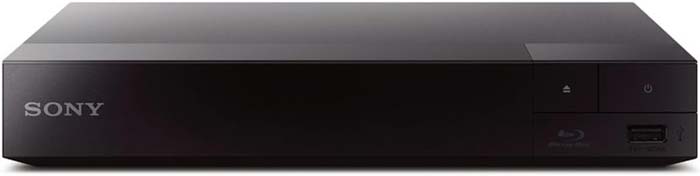
Top 6. Sony BDP-S1700
For the budget-conscious consumer, the Sony BDP-S1700 is the ‘Best Budget’ hardware solution. It is the most battle-tested entry-level player for region-free modifications. While it lacks 4K disc support, its ability to reliably play DVDs from all regions (1-8) and Blu-rays from all zones (A, B, C) makes it an essential tool for international film fans living in English-speaking territories.
Pros
- Unbeatable Value: The most affordable and stable entry-point for a multi-region hardware setup in 2026.
- Seamless Region Switching: Automatically detects DVD region codes; Blu-ray zones can be toggled via a simple remote code.
- Compact Footprint: Its small size makes it perfect for secondary rooms, dorms, or small entertainment centers.
Cons
- Basic Connectivity: Lacks 5GHz Wi-Fi (2.4GHz or Ethernet only) and lacks 4K UHD playback capabilities.
- Lightweight Design: The plastic build is functional but may feel less ‘premium’ compared to higher-end Sony models.
Part 4. How to Change Region Code on DVD Player
An error may occur when playing a DVD disc with a region code setting different than that of the drive. To avoid the error, or to set the region code for the DVD drive to a different region code, follow this procedure to change the region code setting of a DVD drive.
Step 1. Turn on your DVD player.
Step 2. Open the DVD player’s main drive, also commonly called the DVD “tray”. The region cannot be changed while a DVD is in the machine, so many DVD players require the tray to be open as an extra precaution.
Step 3. Push “Info” or “Setup” on your remote.
Step 4. Use the remote to select the “Region” option as indicated on your TV screen.
Step 5. Select “Region 9” to change the system to multi-region formatting. Regions 1 through 8 represent specific geographic locations and will not allow multi-region playback.
Part 5. FAQs of Region-Free DVD Player
-
What is the purpose of DVD region codes?
That is partly because many studios and home video companies want to control how and when DVD titles are exported to other countries.
-
Do region free players work?
Yes, region free players can recognize and plays a disc regardless of which region it came from.
-
How do I know if my DVD is region free?
The Region Code is specified on the back of the individual DVD packaging and on the disc itself. It is shown with a globe that has a region number printed over it. Region 0 discs will play on any DVD player.
Wrapping up
This post gave the list of the best region free DVD player. Now we hope that you can make a good choice for yourself. If you’d like to find all region DVD player hardware, then the above list contains 10 best DVD players for all region codes. If you prefer to use a full-featured media player freeware for playing DVDs, Blu-rays, videos, and audio on your computer, then go for Blu-ray Master Free Blu-ray Player.
More Reading
Best DVD Player

Easily play Blu-rays, DVDs, and various video/audio formats with rich playback features.
100% Secure. No virus
