

Aug 27, 2026Posted by Kevin Miller to Rip DVD
Quick Answer:
The PS5 can play DVDs, but it depends on your model. If you have the standard PS5 with a built-in disc drive or a PS5 Slim/Pro with the official detachable drive, you can insert and play DVD discs directly after a one-time online activation. If you own a Digital Edition without a disc drive, you will need to convert your DVDs into MP4 or MKV format on a computer and play them via a USB drive. Keep in mind that physical DVD playback is strictly region-locked to your console’s region.
The PlayStation 5 is among the most advanced game consoles available. It offers high-performance gaming, outstanding 4K visuals, and fast loading times. Beyond gaming, many PS5 owners are asking, does PS5 play DVD? This post will answer this question to help you understand if the PS5 you own is capable of DVD playback. The following section will discuss the PS5 Standard and Digital versions. We will cover how each version handles DVD playback with troubleshooting steps.

Table of Contents
Part 1. How We Tested DVD Playback on PS5
To give you an accurate, real-world breakdown of how the PS5 handles legacy media, we put the console through a series of hands-on tests. We tested DVD playback across different hardware revisions—including the launch PS5 Standard Edition, the original 2020 Digital Edition, and a newer PS5 Slim paired with Sony's official detachable Disc Drive. Our testing covered a wide variety of optical media, from factory-pressed Hollywood releases and multi-disc TV show box sets to home-burned DVD-R discs.
During testing, we paid particular attention to installation friction, compatibility issues, and playback performance. We verified the one-time online activation process required upon first inserting a disc, tested the playback behavior when the game console is disconnected from the internet, and evaluated the system's strict regional locking mechanism by attempting to play discs from Region 1 (USA) and Region 2 (UK) on the same device. For the digital version without a physical disc, we also tested playback of digital MP4 and MKV movie files using a USB 3.0 flash drive, and used a USB 3.0 flash drive formatted as exFAT to confirm smooth playback of media within the PS5 Media Library.
| PS5 Model | Can it Play DVD Discs Directly? | Do You Need to Rip DVDs? |
| PS5 Standard Edition |  (Built-in disc drive) (Built-in disc drive) |  |
| PS5 Slim Digital / PS5 Pro | (if you add the official Disc Drive) | (Unless you don’t buy the drive) |
| PS5 Digital Edition (Original 2020) | (No disc drive support) | (USB playback required) |
Part 2. PS5 DVD Compatibility Across All Models
Sony has released a few different versions of the PS5 since launch, and their optical disc support varies bastante.
1. PS5 Standard Edition
If you have the original, chunkier PS5 with the bulging side where the disc slot sits, you’re in luck. This model comes with an Ultra HD Blu-ray drive built right into the system. It plays standard DVDs, Blu-rays, and 4K Ultra HD Blu-ray discs right out of the box.
2. PS5 Slim Digital & PS5 Pro
Both the new PS5 Slim Digital and the PS5 Pro are available in versions with and without a optical drive. Unlike earlier digital gaming consoles, both of these models support Sony's official external optical drive accessories. If you purchase this additional optical drive and install it in your console, then complete an online pairing process, your PS5 Slim or PS5 Pro will gain full DVD and Blu-ray playback capabilities.
3. PS5 Digital Edition (Original 2020 Model)
The original 2020 Digital Edition does not have a disc drive, and it doesn't have the internal hookups for the new official attachable drive either.
Note:
You cannot plug a cheap USB external drive from Amazon into any PS5. The system lacks the drivers to recognize third-party optical drives. If you own this specific model, your only option for watching DVD movies is converting them to digital format first.
Part 3. How to Play DVDs on PS5 Standard Edition (Direct Playback)
Playing DVDs on a PS5 Standard Edition is quick and seamless. However, before you pop in your favorite movie for the first time, Sony requires a one-time online activation to license the disc playback feature.
Here’s how to set it up:
Step 1. Ensure Your PS5 is Connected to the Internet
Make sure your PS5 is connected to Wi-Fi and signed in to your PlayStation Network (PSN) account. You need a stable internet connection for this initial setup—future playback works entirely offline.
Step 2. Insert Your DVD
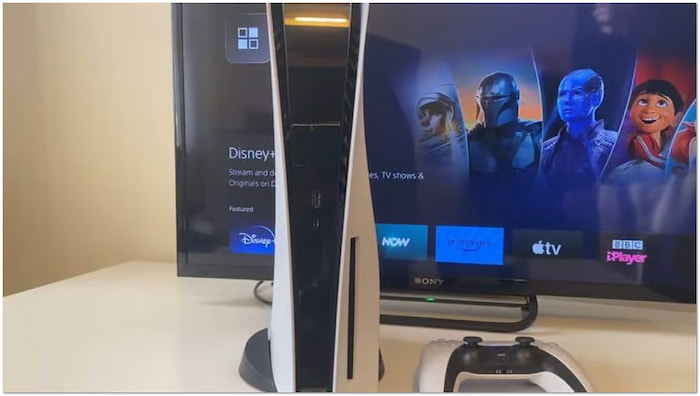
Insert the DVD into the disc slot with the labeled side facing the left (if your PS5 is standing vertically) or facing up (if it’s lying horizontally).
Step 3. Activate Disc Playback and Start Watching
The console will automatically detect the disc, run a quick online check, and enable the Disc Player feature. Once activated, a Disc Player icon will appear in the Media tab on your Home Screen. Select it with your DualSense controller and press X to play.
Troubleshooting Tip: If the movie doesn't start automatically, don't worry. Simply switch from the Games tab to the Media tab on your PS5 Home Screen, locate the Disc Icon, and hit X.
Part 4. How to Play DVDs on a PS5 Digital Edition (USB Method)
If you're using the original PS5 Digital Edition—or you simply don't want to buy the separate disc drive—you can digitize your movies on a computer and watch them on your PS5 using a USB flash drive.
4.1 Rip DVDs to Digital with Blu-ray Master Free DVD Ripper
PlayStation 5 Digital Edition doesn't have a built-in disc drive or even support external drives. Does it mean you can't play a DVD on PS5 Digital Edition? The answer is NO. Here's a workaround: Rip the DVD to digital format and transfer the digital copy to PS5 DE through USB. HandBrake and MakeMKV are the common ways for simple DVD ripping. If you want an advanced DVD ripping process, the tool below is good for you.
Blu-ray Master Free DVD Ripper can be your companion to make DVD playback on PS5 DE possible. It can rip the DVD and convert the content to 200+ formats playable on PS5. Apart from the standard DVDs, it also supports ISO files and VIDEO_TS folders. In addition, it can handle DVDs from different regions and commercial DVDs with encryption. The software adopts the latest acceleration technology to deliver a fast conversion at 20× speed. For optimized quality, it provides settings to customize the profile settings.
When you load the DVD disc on it, the software will list the DVD disc information on its interface, such as titles, audio tracks, and subtitles, which you can manually choose. In addition, it has built-in video editing tools for you to adjust DVD effects, and you can see videos on the right Preview section. It is free and available for Windows and Mac computers. Have a try!
Step 1. Download and install Blu-ray Master Free DVD Ripper via the buttons below for free. Once completed, launch the tool and insert the DVD into your computer's disc drive.
Free Download
For Windows
Secure Download
Free Download
for macOS
Secure Download
Step 2. Click Load DVD > Load DVD Disc in the upper-left navigation to load the DVD from the external drive. Then, choose from the Main Title or Full Title Lists modes in the pop-up window.
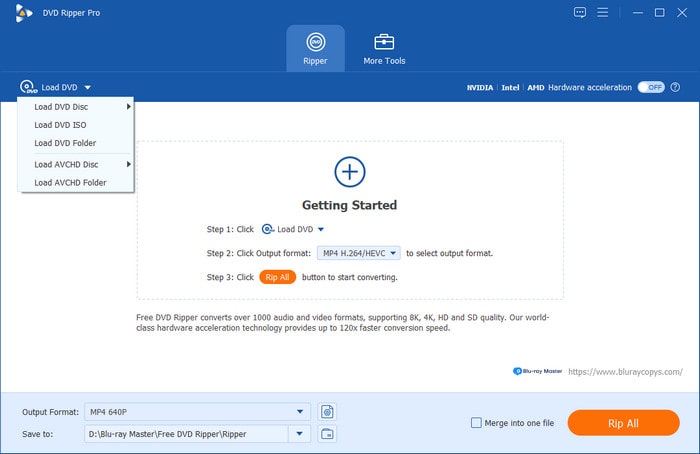
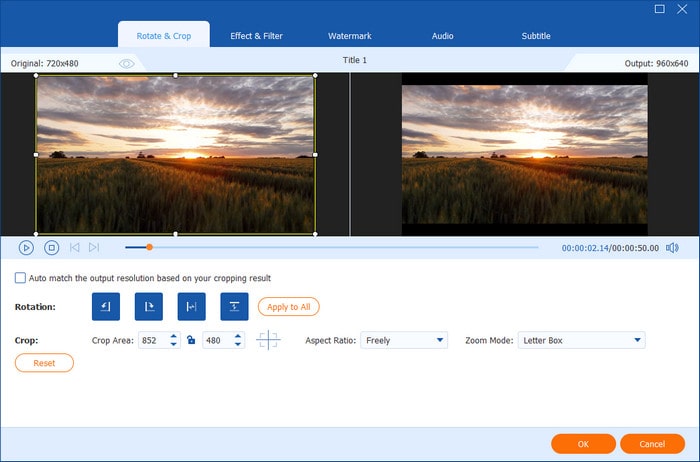
Step 3. Once the DVD is recognized, you can customize the content before conversion. Click Edit or Cut icons to access the editing tools and use them to:
- Clip: Trim unessential video sections, like long-end credits, recaps, trailers, etc.
- Crop: Remove unnecessary outer edges by adjusting the aspect ratio to eliminate black bars.
- Effect: Adjust the basic video effects, such as brightness, contrast, hue, and saturation.
- Watermark: Overlay a text or custom image watermark and adjust the size, style, and position.
- Audio: Boost the volume to 200% to fix dialogues or sounds that are hard to hear.
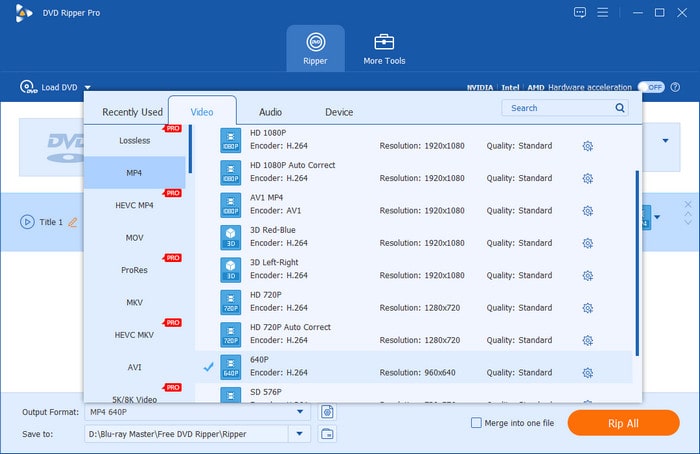
Step 4. Click the Output Format pulldown menu and proceed to the Video category. Select MP4, Same as source as your output for broad compatibility. If needed, you can click the gear icon to modify profile settings, like encoder, bitrate, and others.
Step 5. Switch to the Destination field and click the folder icon to set the output directory. After specifying the destination path, click Rip All to convert the DVD to digital format. The software will then extract the content, preparing the DVD for digital conversion.
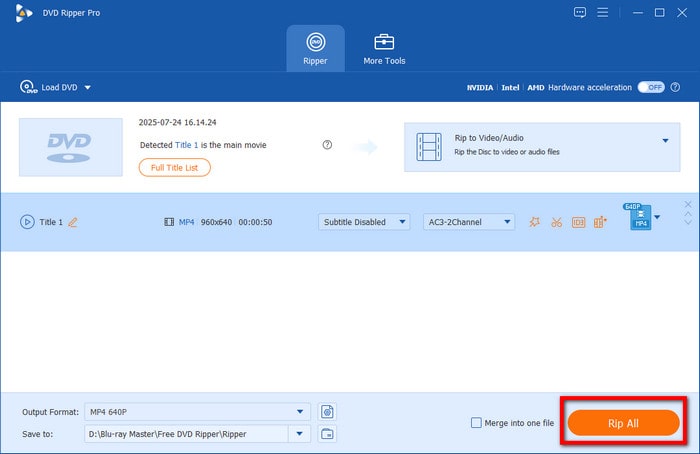
Blu-ray Master Free DVD Ripper is one of the best free DVD rippers for converting DVDs into digital files. You can convert your DVDs to high-quality digital copies for playback on PS5. You can apply a different profile for each video or the selected format.
4.2 Play Ripped DVDs on PS5 Digital Edition
Natively, PlayStation 5 Digital Edition cannot play physical DVDs as it doesn't have a disc drive. Fortunately, you can still watch your favorite movies by ripping DVDs into a digital format. You can transfer the converted DVD into a USB flash drive for playback by then.
Here's how you can play DVD on PS5 Digital Edition:
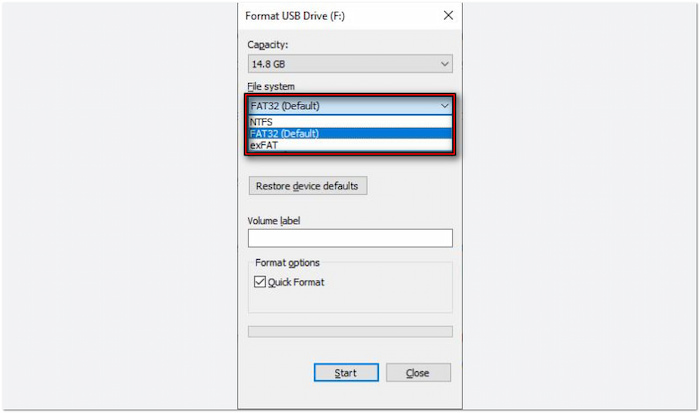
Step 1.Once done converting the DVD, store the video files on a USB drive. Beforehand, format the USB flash drive to exFAT or FAT32 since NTFS is unsupported. Open the USB drive and create a folder named Movies or Videos in the root directory. Copy your converted MP4 or MKV movie files into this folder.
PS5 DE can only play videos in MKV, MP4, or WebM format.
Note:
Do not leave video files directly in the root directory, or the PS5 may fail to detect them.
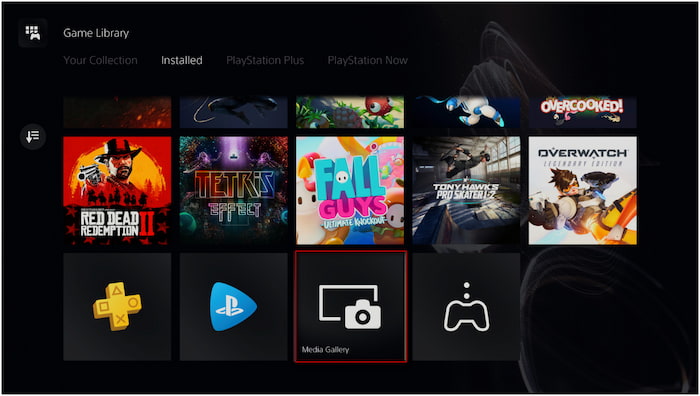
Step 2.Connect the USB flash drive containing the video files to the PlayStation 5 Digital Edition. Navigate to the Games Library screen and select Media Gallery. Select USB as the source, and a list of video files from the USB flash drive will appear. Select the video file you want to playback and press Play to watch the movie.
Though the PS5 Digital Edition doesn't have a disc drive, you can still watch DVDs by ripping them. However, there's a requirement when converting DVDs to digital format. The video file should be in MP4, MKV, or WebM format. Then, the maximum resolution should not exceed 3840×2160 for an error-free video playback.
Part 5. Troubleshooting PS5 DVD Playback
Can PS5 Play DVDs from Any Region
Can PS5 play DVDs from any region? No, the PS5 is region-locked for DVDs.
The PS5 can only play DVDs that match its region settings. For example, a Region 1 PS5 console cannot play a Region 2 DVD. Check the DVD region code, which is usually printed on the disc or case. If your DVD is from a different region, you cannot play it directly on PS5.
PS5 Won't Play DVD
PS5 only supports DVDs, DVD-ROM, DVD-R/RW (video mode, VR mode), and DVD+R/RW. If your DVD is not in one of these formats, you won't be able to play the disc on your console. If you're using a burned DVD, finalize the disc before inserting it into the PS5.
Can You Play DVDs on PS5 Without Internet
Can I play DVD on the PS5 without the internet? Yes, but only after enabling disc playback.
When playing a DVD for the first time, you must connect PS5 to the internet to activate the disc playback feature. Once activated, you don't need the internet for future playback. Connect PS5 to the internet and insert a DVD to enable playback and watch DVDs offline anytime.
Can You Use a Third-party USB External DVD Drive into a PS5 Digital Edition
No. The PS5 operating system does not include drivers for standard PC USB optical drives. Plugging a third-party external USB drive into your PS5 will only result in an unreadable device error. If you own a PS5 Slim Digital or PS5 Pro, you must use Sony’s Official Detachable Disc Drive. If you own the original 2020 PS5 Digital Edition, no physical drive will work, and your only workaround is converting DVDs to digital format on a PC first.
Why Won't My PS5 Play Audio CDs or 3D Blu-ray Discs
The PS5 disc drive lacks hardware and firmware support for Audio CDs (CD-DA) and 3D Blu-ray discs. If you insert a standard music CD or a 3D movie disc, the system will show an "Unsupported Disc" message. The console's optical pickup is specifically tuned for DVD-Video, HD Blu-ray, and 4K Ultra HD Blu-ray media.
How Do I Fix "Unrecognized Disc" or Region Code Errors on PS5
For Region Errors: Movie playback on PS5 is strictly region-locked. Ensure the region code printed on your DVD case matches your console's home region (e.g., Region 1 for US/Canada, Region 2 for UK/Europe).
- For Burnt Discs (DVD-R/RW): If you burned the DVD yourself on a computer, make sure the session was finalized (closed) during the burning process. The PS5 cannot read unfinalized discs or loose data files dragged onto a disc without a proper VIDEO_TS folder structure.
Part 6. FAQs about Playing DVDs on PS5
-
Can I play DVDs on a PS5 Digital Edition using a cheap USB external drive from Amazon?
No, you cannot. The PS5 doesn't support third-party external USB disc drives at all because it lacks the necessary drivers. If you have a PS5 Digital Edition (the original 2020 model), there is no way to play physical discs on it.
-
Why is my American PS5 not playing a DVD I bought in the UK?
DVDs have region codes to restrict playback on different areas. A North American PS5 is locked to Region 1 for DVDs, while UK discs are Region 2.
-
Does PS5 automatically upscale regular DVDs to 4K resolution?
Yes. But it just stretches the standard-definition 480p signal to fill a 4K screen, which doesn't magically make an old DVD look like native 4K or Blu-ray.
-
Do I need an internet connection to watch a DVD on PS5 for the first time?
Yes. Sony requires a one-time online activation to enable disc playback features on the PS5. You must connect your console to the internet, sign into your PlayStation account, and insert a disc to complete the activation. After that, you can play DVDs completely offline.
-
Can the PS5 Slim Digital Edition play DVDs if I buy the separate disc drive?
Yes. The PS5 Slim (and PS5 Pro) supports Sony’s official attachable Disc Drive.
Conclusion
Now we have answered the question, does PS5 play DVDs? The DVD playback capability of the PS5 depends on the console's edition. The PS5 Standard Edition is built with a disc drive, allowing you to play DVDs. Meanwhile, the PS5 Digital Edition cannot play DVDs directly since it lacks a disc drive. Still, you can enjoy your favorite DVD content by converting DVDs into digital formats. If you're a PS5 Digital Edition user, Blu-ray Master Free DVD Ripper provides the perfect solution. It lets you rip DVDs into high-quality digital formats compatible with PS5, PCs, and other devices.
More from Blu-ray Master
Various DVD Ripper Review
Fast and free ripping software to decrypt all DVDs to digital easily on your computer.
100% Secure. No virus
