

Oct 10, 2025Posted by Kevin Miller to Create DVD
Do you create or produce music and want to store it on a CD? What you need is a CD burner that supports most audio formats and can transfer them into a blank disc. One of the recommended options for Windows is CDBurnerXP, which is a tool that you can easily download from the internet. If you are wary about getting it, read this review to find out its use, features, supported platforms, and others, then decide if it is a good CD burner or not.
Table of Contents
Part 1. CDBurnerXP Overall Review
The CDBurnerXP program is a toolkit that was initially released in February 2003. Originally, it was developed for Windows 2000, but it was further updated with a fourth version, which the program is mostly written in Visual Basic.NET. Its main task was to burn audio files into CDs, but later on was modified to burn videos to DVD, Blu-ray, and others. In fact, CDBurnerXP supports a wide range of input formats, including MP3, FLAC, WMA, MP4, MOV, AVI, and many more. Furthermore, it also allows a user to burn ISO images to a blank disc, along with UDF and ISO-9660 formats. CDBurnerXP is one of the longest-running CD burners of today, and it is still available on various operating platforms, including Windows, Mac, and Linux.
Aside from its CD-burning capabilities, we listed the other features that can be found within the software. This will help to elaborate its utility and functions.
- Support common and popular audio and video formats for CD burning.
- Create ISO images despite the input type.
- It is freeware, so it is free to download and use.
- Support batch burning process for multiple media files.
- Simple UI design for quicker navigation.
- It can be integrated with an audio player for direct audio playback.
- CDBurnerXP has a high compatibility with DVD and Blu-ray.
- Able to verify the data information before processing.
- Works well for copying existing data discs.
Part 2. What We Like About CDBurnerXP
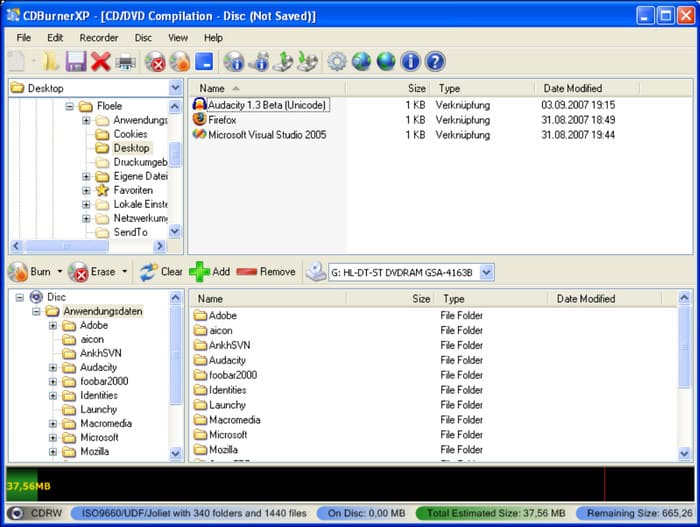
Beginner-Friendly Main Interface
Overall rating:
Having a clean interface creates a smoother workflow. All features are designed to be accessible places, which means you can learn how to utilize them in no time. Thankfully, using CDBurnerXP to burn audio CDs is not only free, but you are also uninterrupted from popups or advertisements.
Multi-Purpose CD Burner
Overall rating:
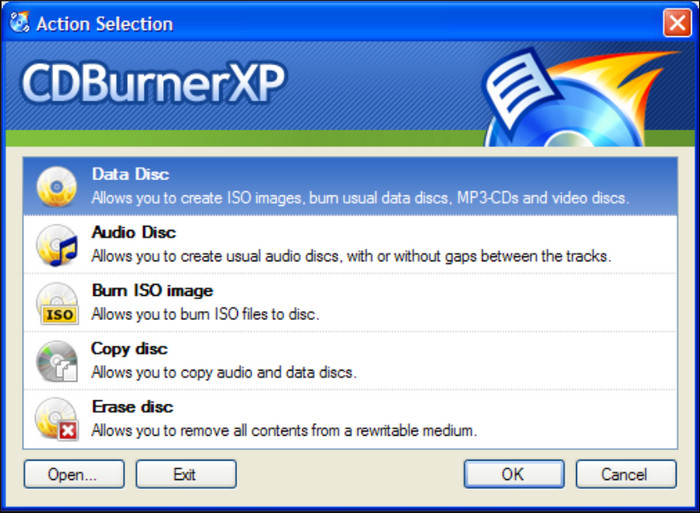
When you download CDBurnerXP and run it on your computer, the first thing that will appear is the choices for various tasks. It is proof that the software has different purposes, such as creating ISO images, burning audio files without gaps, cloning an existing disc, and removing data from a rewritable medium.
Easier File Upload Method
Overall rating:
Since the interface is made for easier complexity, another highlight we found in the tool is its drag-and-drop upload method. It helps to get files from a folder, but in a way that you can easily drag and drop them within the platform. It is a great additional function to make it easy to upload multiple media files.
Advanced Burn Options
Overall rating:
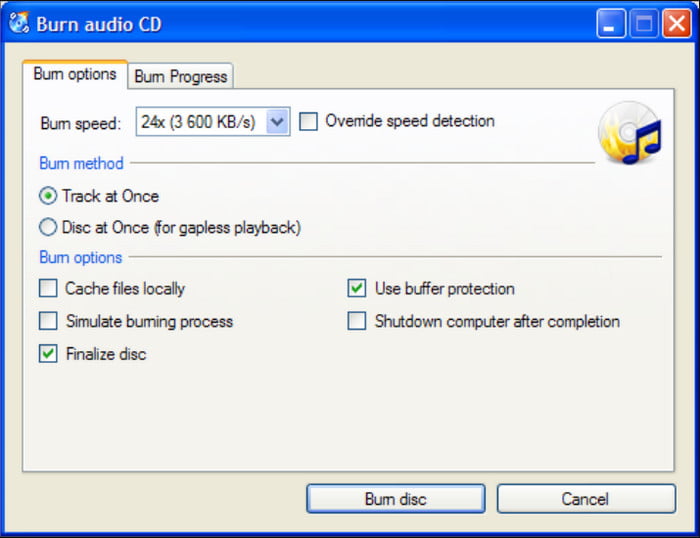
The Burning option is a separate menu for output settings. The dialog box helps you choose the desired burning speed, while a few options to choose from the burn method. Here, you can select the number of CD copies you want to burn, simulate the burning process, and more.
Safety
Overall rating:
Is CDBurnerXP safe? Yes, CDBurnerXP is generally considered safe to use. To avoid getting viruses or malware on your computer, make sure to download the software from the official website or a trusted source. Real user reviews often highlight that it's a trustworthy, lightweight program with no hidden malware or bloatware. It doesn’t come bundled with unwanted extras and runs smoothly on Windows systems.
Output Disc Types and Quality
Overall rating:
The software can burn to CD-R/RW, DVD±R/RW, DVD±DL, and Blu-ray discs. You can also use it to create ISO images. Moreover, the output disc quality is decent, which can be good as a free tool. While it covers most basic disc types, it lacks advanced authoring features like menus or chapters for video DVDs.
Price
Overall rating:
When it comes to the CDBurnerXP pricing, since its release in 2003, CDBurnerXP has been licensed as freeware. This means no monetary cost for the user. Even with different versions, the software remains free to download and install on Windows OS.
Part 3. What We Don’t Like About CDBurnerXP
No More Software Updates
It is very sad to learn that CDBurnerXP no longer receives an update from the developer. The final update release was made in November 2019, and even though it made it to the year, it is actually a disadvantage for users. The reason is the potential risk of bugs and glitches during the burning process, and this means a risk of data loss. Another thing is, that although it is yet too far, the CDBurnerXP software might not support modern formats in the near future.
Windows OS Only
Most applications are built mainly on Windows, but unfortunately, they are not released for Mac OS. This is the case for CDBurnerXP, but surprisingly, it is updated to be compatible with Windows 11 and 10, so you can still use it as a personal CD burner. But going back, it might be more advanced and powerful if the DVD burner is supported on Mac.
Input Formats
As one of the best DVD burners for Windows, CDBurnerXP supports common audio formats like MP3, WAV, OGG, FLAC, and WMA, as well as ISO files for disc images. This makes it easy to burn music or create bootable discs. However, it doesn’t support as many video formats as some other tools, so it’s not ideal for DVD movie creation.
Part 4. Final Verdict
In this CDBurnerXP review, we conclude that it is an amazing tool for CD, DVD, and Blu-ray burning. It is fit for personal use with its free service and more burning options. The bad news is that discontinued updates can lead to software glitches and a high risk of losing data during the process. While this might not always be the case, we urge you to take precautions when trying the software or use another alternative to avoid the potential loss.
Part 5. Best Alternative to CDBurnerXP
We prepared an alternative that 100% guaranteed an excellent burning result. DVD Creator is one of the advanced DVD burners of the generation, and it is available to download on Windows and Mac. So what’s the use of this alternative?
First, it is a user-friendly toolkit that supports burning videos to DVDs and Blu-rays. It supports various inputs, such as MKV, MP4, MOV, AVI, and others, and converts them to DVD discs, folders, and ISO image files in a few clicks. A tool that CDBurnerXP does not have is a video editor, which you can find on DVD Creator. Equipped with the latest DVD menu templates, a video trimmer, merger, etc. Everything is prepared for you. Check out the free version and try it on Windows and Mac.
- Advanced burning technology that supports common formats.
- No limitations and allows users to upload multiple files at once.
- Genuine video editing tools with stylish menu templates prepared.
- Configure output settings like the aspect ratio, DVD type, resolution, etc.
Free Download
For Windows
Secure Download
Free Download
for macOS
Secure Download
| DVD Creator | VS | CDBurnerXP |
| $12.45 | Price | Free |
| DVD and Blu-ray disc, folder, and ISO image | Supported Outputs | CD, DVD, Blu-ray |
| Windows 11/10/8/7, etc., Mac OS X 10.9, Sonoma, and later | Platform Compatibility | Windows 2000, Windows Server 2003, and later |
| Fast | Burning Speed | Slow |
 | Video Editing Functions |  |
| Regular Updates | |
| Real-Time Preview | |
| Create ISO Images | |
Part 6. FAQs about CDBurnerXP
-
Is CDBurnerXP a good software?
Yes, We conclude that it is a great tool for personal use. It does not require a premium or payment, and most necessary functions are provided. But the other side of the coin should not be ignored since it can risk your data loss.
-
Is CDBurnerXP free?
Yes. The tool remains free for everyone who uses Windows OS. Every software version is free to download from the official CDBurnerXP website.
-
Does CDBurnerXP work with Windows 10?
Surprisingly, yes. The CD-burning software works well on Windows 10. Since it has been updated in 2019, it can still catch up with modern technology and formats with ease.
Wrapping up
We hope that this CDBurnerXP review allows you to see its full potential for burning audio and video files into CD, DVD, and Blu-ray. While it is packed with convenient features, the software is not supported on Mac and faces an outdated system without further updates. So, in this case, DVD Creator by Blu-ray Master is recommended to achieve high-quality DVD/Blu-ray burning on Windows and Mac. Try it for free by clicking the Free Download button.
Best DVD Creator Review
