

Sep 26, 2025Posted by Kevin Miller to Create DVD
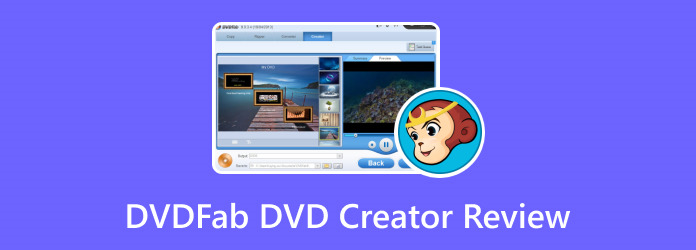
If you are to burn videos to DVD, you might as well search for an application that accomplishes excellent results. While searching, you have stumbled upon DVDFab DVD Creator, which is a desktop tool for Windows and Mac. But since you are new to DVD burning, we will help you figure out what this tool is all about, including its features, pricing, highlights, and others. This post contains all of our observations regarding the tool and how it can be worthwhile for video burning.
- Part 1. DVDFab DVD Creator Quick Review
- Part 2. DVDFab DVD Creator Features
- Part 3. DVDFab DVD Creator Pros
- Part 4. DVDFab DVD Creator Cons
- Part 5. Is DVDFab DVD Creator Worth A Try
- Part 6. Best Alternative to DVDFab DVD Creator
- Part 7. FAQs about DVDFab DVD Creator
| How We Test | |
| Steps | Descriptions |
| Software Installation | DVDFab DVD Creator’s latest version is installed on an updated computer to ensure compatibility. |
| Upload Media Files | To get the best results, we uploaded video files like MP4 and MPEG that are within the supported formats. |
| Burn DVD | Since the software has other functions like the video editor, output settings, and various output formats we used all of them to add more highlights. |
| Analyzation | After burning the DVD, the video results are thoroughly analyzed while using standard media players to open the newly burned discs. We concluded that the quality was lower than expected and the videos are slow to load on the DVD player. |
Part 1. DVDFab DVD Creator Quick Review
Overall Rating :
Multi-Burn :
Technology :
Learning Curve :
Service :
Formats :
Among DVDFab's individual products, DVD Creator is one of the top tools, with promising results. It burns and creates standard DVDs from over 200 video types. This includes MP4, MOV, M2TS, FLV, and more. Its very purpose is to turn homemade media files into discs, in the form of transferring them via physical copies to watch anywhere, and of course, free up more storage space. It is good to know that DVDFab DVD Creator is designed to support the creation of various DVD types, such as discs, folders, and ISO file images.
Part 2. DVDFab DVD Creator Features
Other than burning DVDs, here are the features included on DVDFab DVD Creator along with highlighted functions.
- Easily burns various media files to DVD without limitations.
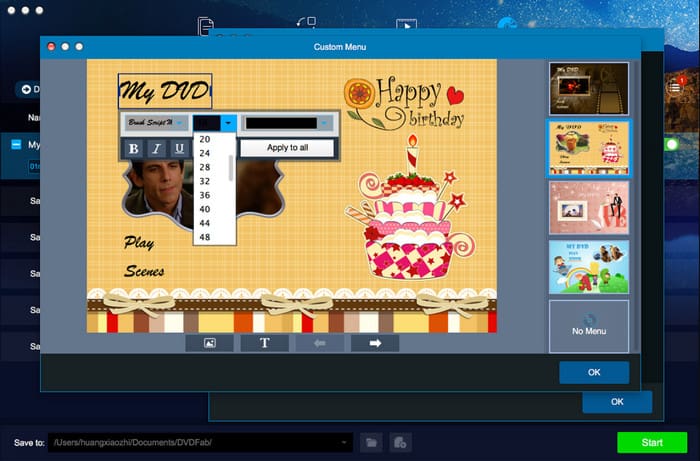
- Built-in and customizable menu templates.
- Real-time preview of the content before burning.
- Clean and straightforward user interface.
- GPU-accelerated software for the fast-speed process.
- Export DVD videos as ISO images and folders for drive-free playback on computers.
- Playable output videos on gaming consoles, media player software, and others.
Part 3. DVDFab DVD Creator Pros
System Compatibility
DVDFab DVD Creator is compatible with both Windows and macOS platforms. Each update ensures smooth operation on the latest system versions, making it suitable for home users and professionals alike.
Ease of Use
The interface is clean and intuitive, with a straightforward workflow that guides users from file import to final burn. Even beginners can navigate the tool with minimal learning curve, thanks to built-in previews and preset templates.
Input Formats
The software supports over 200 video formats, including MP4, MOV, M2TS, FLV, and MPEG. This broad compatibility allows users to import virtually any video source without needing external converters.
Output DVD Quality
While DVDFab offers fast burning speeds, the output quality may slightly degrade compared to the original source. Standard DVD players may experience slower loading times, and although users can adjust output settings, preserving full video fidelity remains a challenge.
Outstanding Multi-Thread Processing
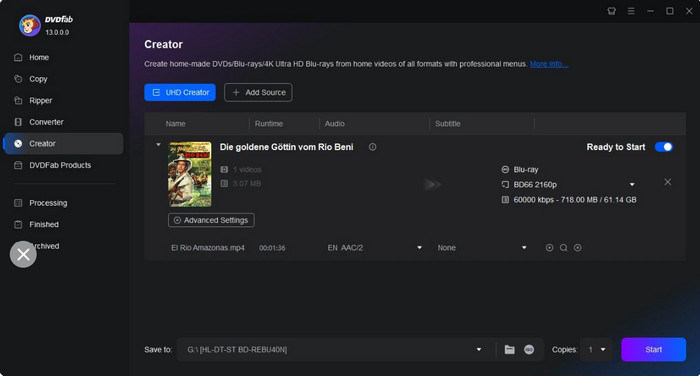
The first thing we noticed about the DVD-burning software is its ability to upload and convert multiple files simultaneously. This means it improves the user’s workflow by allowing them to process batches of videos and audio without hassle.
Stable Processing Speed
DVDFab DVD Creator is undeniably fast when it comes to burning speed. Since the processing speed is one of the important factors, the software passed this stage with a great result.
Frequent Software Updates
The good thing about DVDFab is it’s capable of providing updates to the DVD Creator. This ensures compatibility with other operating system versions, more supported formats, added features, and fixed bug issues.
Decent Customization Functions
We highlighted this part of the software because burning videos into a disc is insufficient. Using the DVDFab DVD Creator menu allows you to add audio tracks, subtitles, and other elements.
Part 4. DVDFab DVD Creator Cons
Expensive Pricing
Although the DVD burner provides decent burning performance, the pricing of the pro version is too high. DVDFab DVD Creator’s price starts at $46.99 for a one-year license, while $59.99 for the lifetime license for one computer.
No Quality Preservation
It is kind of disappointing that the DVD burner does not keep the original video quality after burning it to videos. Even with the output settings, it still lacks necessary parameters to preserve or enhance the DVD quality.
Part 5. Is DVDFab DVD Creator Worth A Try
From a usability perspective, the intuitive interface and customizable templates simplify the authoring process, even for beginners. The software’s compatibility with both Windows and macOS ensures broad accessibility, while its stable performance under heavy workloads adds to its appeal.
However, user feedback consistently highlights a few drawbacks. While burning speed is impressive, output DVD quality may suffer, particularly in terms of playback smoothness and visual fidelity. Some users report slower loading times on standard DVD players and minor compression artifacts, which could be a concern for those prioritizing pristine video quality.
To sum up, DVDFab DVD Creator is a good choice for users who require quick, adaptable DVD creation with respectable customization capabilities. Although it's not the greatest option for cinematic preservation or archival-grade quality, it produces reliable results for everyday use, particularly in faceless video production, tutorials, and promotional content.
Part 6. Is DVDFab DVD Creator Worth A Try
While DVDFab DVD Creator offers solid performance in multi-threaded processing and format support, its limitations—particularly in output quality and pricing—may deter users seeking a more balanced solution. For those looking for a cost-effective, high-quality alternative, Blu-ray Master DVD Creator stands out as a compelling choice.
This software integrates an advanced burning algorithm that better preserves the original video quality, even when converting compressed formats like FLV, MOV, 3GP, MP4, and MKV. It supports both DVD and Blu-ray creation, offering flexible output options such as disc, folder, and ISO image. And in terms of usability, Blu-ray Master DVD Creator features a lightweight interface with intuitive controls, making it ideal for beginners and professionals alike. In addition, it has a variety of customizable menu templates, ranging from holiday themes to travel styles. The software also supports subtitle input, Dolby audio, and HD/4K burning, which are often missing or limited in DVDFab’s offering.
Free Download
For Windows
Secure Download
Free Download
for macOS
Secure Download
- Easy operation with a straightforward user interface.
- Burn DVD/Blu-ray disc, folder, and ISO file image.
- Customizable menu templates for holidays, travel, etc.
- Lightweight and professional with fast-burning speed.
| DVD Creator | VS | DVDFab DVD Creator |
| $12.45 | Price | $46.99 |
| Low | CPU Usage | High |
 | Dolby Supported |  |
| Blu-ray Supported | |
| HD and 4K Burning | |
| Supported | Subtitle Input | Supported |
| Fast | Burning Speed | Average |
| Frequent | Software Updates | Frequent |
| Supported | Multiple Videos and Audio Burning | Supported |
| ISO File Supported | |
Part 7. FAQs about DVDFab DVD Creator
-
Is DVDFab DVD Creator free?
It has a free version that you can download on Windows and Mac. But be reminded that it is very limited and will require you to buy the pro version instead.
-
Is DVD Creator free?
No. DVD Creator by Blu-ray Master also offers a free version with generous features for burning DVDs and Blu-rays. Also, purchasing its lifetime license is more affordable than purchasing a DVDFab DVD Creator. You can check the free DVD burner software here.
-
How to use DVDFab for free?
Download and install the software on your computer and click the Add button from the main interface. Upload the digital videos and customize them with the DVDFab DVD Creator templates, output format, and so on. Choose the output directory, then click the Start button to initiate the burning process.
Wrapping up
We will now conclude the DVDFab DVD Creator review. We tested and observed the tool and provided an honest review of its functions and overall performance. While it has many exceptional remarks, the software also has drawbacks that are not appealing to most users. Thus, we introduce Blu-ray Master DVD Creator as an alternative because it has more professional features and excellent results. Try it today by clicking the Free Download button and see the difference between the two software in real-time.
Best DVD Creator Review
