

Oct 13, 2026Posted by Kevin Miller to Rip DVD
Quick Guide:
• Best Format for Plex: MP4 (H.264 + AAC).
• Recommended Tool: Blu-ray Master Free DVD Ripper for quick and direct DVD ripping and MakeMKV/HandBrake for free and powerful DVD conversion.
• How to Do It in 3 Steps: 1. Insert your DVD and load it into the ripper software. 2. Select MP4 format, optimize video settings, and convert. 3. Move the converted video to your Plex media folder and scan the library.
If you have a collection of physical DVDs sitting on your shelf and want to stream them via Plex to your TV, tablet, or phone, you’ll quickly hit a wall—Plex can’t read raw DVD discs or ISO files directly.
To make your classic movies and TV shows accessible on Plex, you need to digitize and convert them into a Plex-friendly format first. In this guide, we’ll show you the entire process: choosing the right format, configuring the best settings, ripping DVDs to Plex, transferring ripped DVD video to Plex to avoid buffering, and setting up your Plex library smoothly.

- Understanding Plex Compatibility & Best Settings for DVDs
- Method 1 – The Easy Dedicated Way to Rip DVD to Plex
- Method 2 – The Free Open-Source Workflow (MakeMKV + HandBrake)
- Organizing and Uploading Ripped DVDs to Your Plex Media Server
- FAQs about DVD to Plex
Understanding Plex Compatibility & Best Settings for DVDs
Before ripping DVDs, you need to learn about the video settings that are compatible with Plex. Here, we present an intuitive table to help you quickly understand the detailed parameters and reasons behind them.
| Setting | Recommended Value | Why It Matters for Plex |
| Container | MP4 (.mp4) or MKV (.mkv) | MP4 offers maximum native client compatibility (Smart TVs, iOS, Android, Apple TV). MKV is great if you want to keep raw original subtitles and multiple audio tracks. |
| Video Codec | H.264 (x264) | High Profile, Level 4.0 or 4.1. Supported natively by virtually 100% of modern streaming devices to enable Direct Play. |
| Quality (RF / CQ) | RF 18 – 20 (Constant Quality) | Offers a sweet spot between visual fidelity and small file size (usually 1.0GB – 1.5GB per movie). |
| Resolution | Maintain SD Native (720×480 for NTSC / 720×576 for PAL) | Do not upscale to 1080p or 4K during encoding. Let your Smart TV or Plex client hardware handle upscaling—it results in a sharper image and saves processing time. |
| Frame Rate | Same as Source (Peak / Constant Frame Rate) | Preserves original film motion (23.976 fps / 29.97 fps) without causing audio-video sync issues. |
| Audio Codec | AAC (Stereo) or AC3 / Dolby Digital Pass-through | AAC 2.0 ensures seamless playback on mobile devices; AC3 Passthrough retains 5.1 surround sound for home theater setups. |
| Deinterlacing | Decomb / Deinterlace Enabled | DVD video sources are interlaced. Turning on Decomb removes annoying horizontal lines during fast motion. |
Method 1 – The Easy Dedicated Way to Rip DVD to Plex
Now that we have discussed the best formats for digitizing DVD media to make it compatible with Plex, let's see the most reliable DVD ripping tool for Windows and Mac: Blu-ray Master Free DVD Ripper. Compatible with Windows 11/10/8 and macOS 10.12 or above, this DVD ripper makes for an optimal choice if you want to convert DVD videos to Plex-compatible formats such as MP4, MKV, and others. It has powerful decryption ability to handle CSS, DVD region codes, and other DVD copy protections.
In addition, you can also manually adjust the encoder, resolution, and bitrate settings of videos to make them more suitable for streaming services. The bitrate adjustment is critical for Plex since a higher bitrate requires transcoding. Lower the bitrate of converted videos for a smoother viewing experience.
Finally, the program also includes essential editing tools such as video cropper, trimmer, and video enhancer for increased customization. You can also change your transferred movies' audio tracks and subtitles for added personalization.
Now, please read our guide on using Blu-ray Master Free DVD Ripper to learn how to use it to convert DVDs to Plex formats.
Step 1.Download and install Blu-ray Master Free DVD Ripper on your computer. Then, launch the software.
Free Download
For Windows
Secure Download
Free Download
for macOS
Secure Download
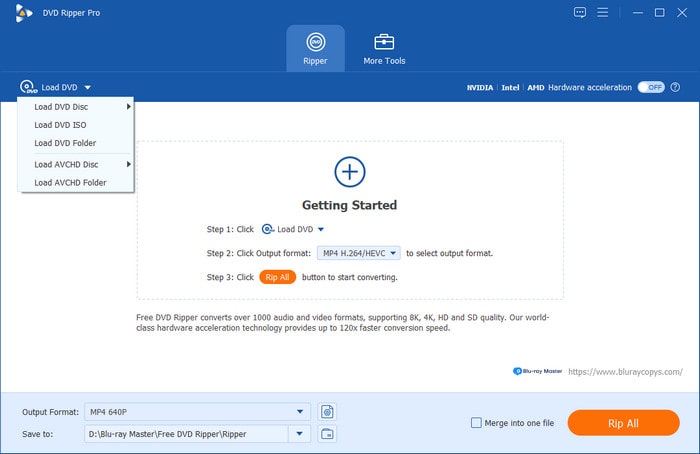
Step 2.Insert the DVD disc you want to transfer to Plex into the optical drive. In the tool's interface, click Load DVD > Load DVD Disc to import it. Choose the Main Title mode in the pop-up window.
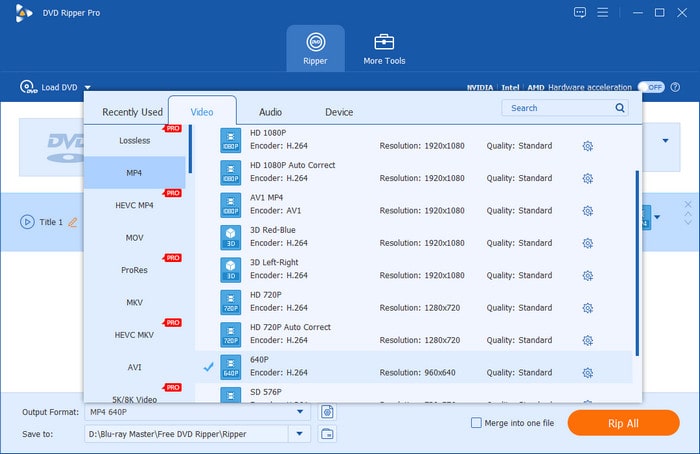
Step 3.To choose the MP4 output format, go to the Output Format section and select MP4, Same as source option under the Video category. If needed, you can click the gear button to customize the parameters.
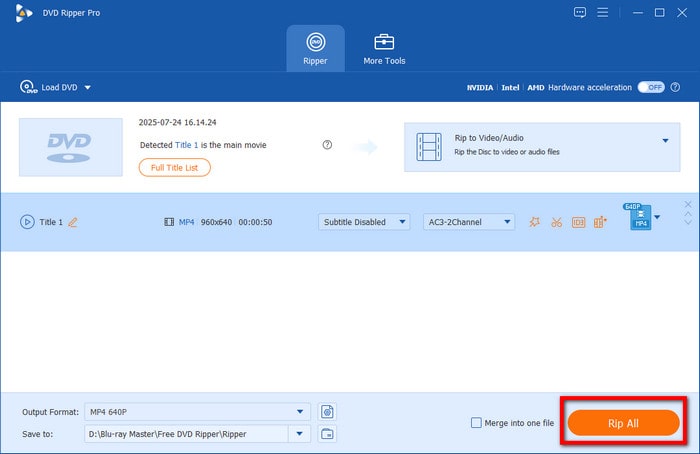
Step 4.Lastly, set a destination folder via the folder button, and select Rip All to start the DVD to MP4 conversion. Once the process is done, it will automatically open the download folder for you to transfer the ripped DVD video files to Plex.
After your DVD video has been converted digitally, you can add it to the Plex media server since the streaming service can now easily read the digital file you successfully converted, especially if you used the MP4 format that is most advisable for Plex-migrated videos.
Method 2 – The Free Open-Source Workflow (MakeMKV + HandBrake)
If you want to rip DVDs, MakeMKV is the tool that you must consider. But it can only output large MKV files. So, the combination of MakeMKV and HandBrake is a good choice for you to convert DVDs to MP4.
MakeMKV is the gold standard for DVD ripping, which can powerfully crack various DVD copy protections, including CSS, region codes, APS, and others. It will automatically scan the DVD information and list the titles, audio tracks, and subtitles for you to select. It can extract the raw, uncompressed video, audio tracks, and subtitles straight into a 1:1 MKV container.
After that, you can use HandBrake. You can use it to reduce file size, tweak H.264 video profiles, and convert it into a streamlined MP4 or MKV format optimized for Plex Direct Play. While this two-step process gives you total control over video quality and file sizes without costing a dime, it requires substantial hard drive space, extra processing time, and a learning curve for configuring HandBrake’s encoder parameters.
Step 1.Download and install MakeMKV and HandBrake on your computer. Insert a DVD disc into the optical drive.
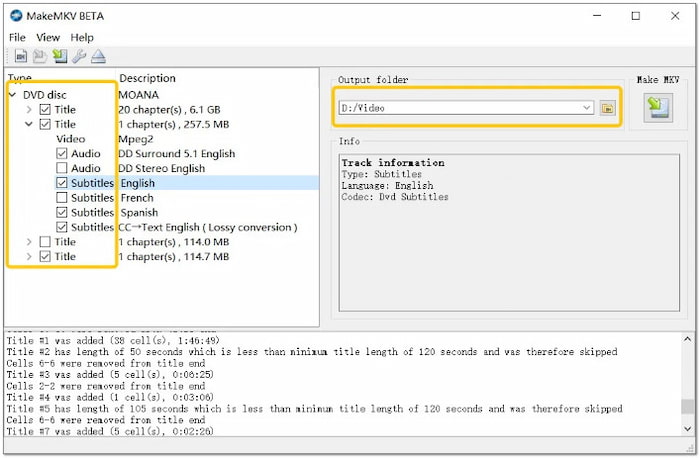
Step 2.Open MakeMKV and load the inserted DVD into the software. Then, it will automatically scan the full DVD information.
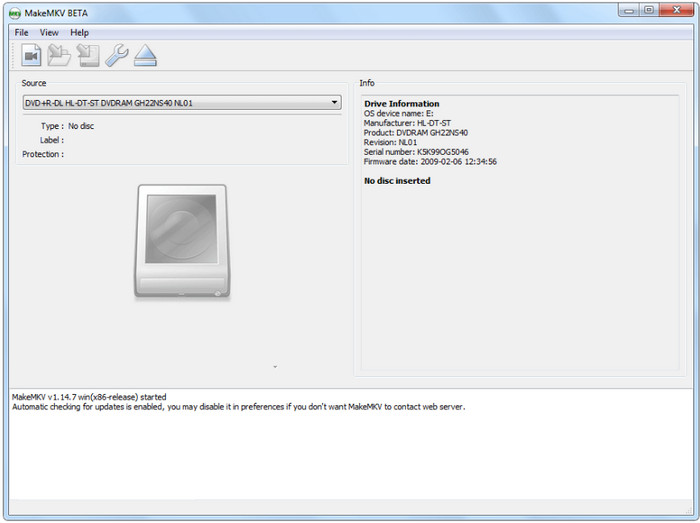
Step 3.Check and uncheck the listed titles, subtitles, and audio tracks. Then, set a destination folder and click Make MKV to start the conversion.
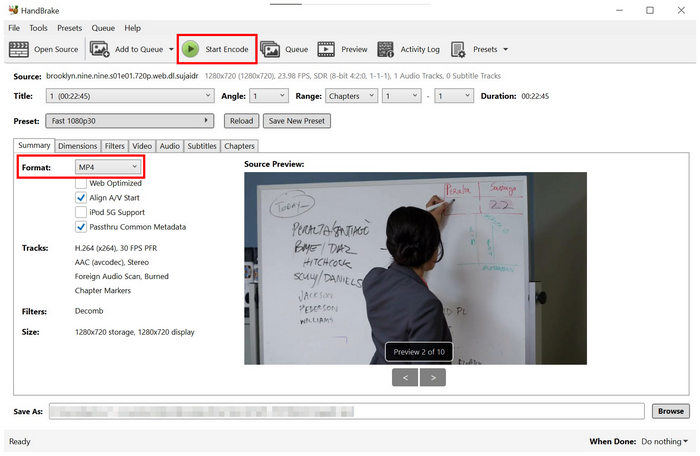
Step 4.Import the ripped MKV files into HandBrake. Choose MP4 as the output format and click the Start Encode button to convert and compress MKV to MP4.
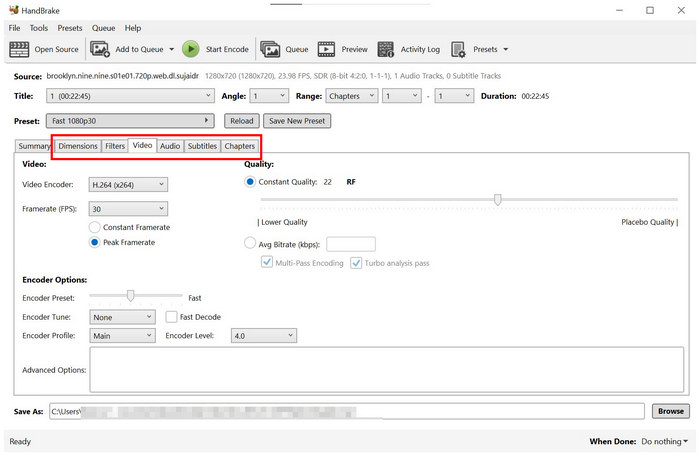
If you want, you can configure the various settings to adjust the output video effects.
For tech-savvy enthusiasts, MakeMKV and HandBrake are a popular free way to digitize DVDs for Plex. If you think it's complex, Blu-ray Master Free DVD Ripper is good for its ease of use.
Organizing and Uploading Ripped DVDs to Your Plex Media Server
Now that you are done converting the DVD media to a digital one, you only need to learn how to transfer these videos to Plex Media Player’s server. To learn how, please read the guide below. It may be tricky, but following each step will help you finish the file migration process.
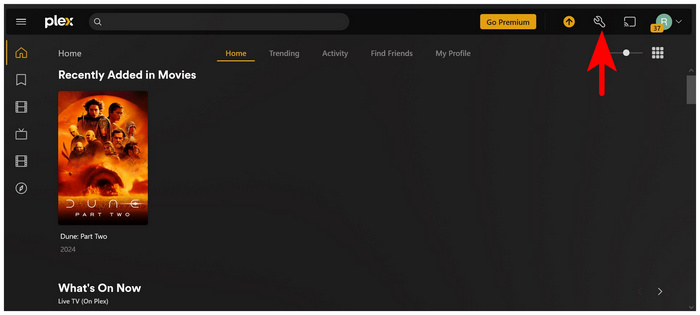
Step 1.Open the Plex Web App client and click the Settings icon.
Step 2.In the Setting menu, scroll to the Manage options and select Libraries. Click on Add Library in the Libraries menu.

Step 3.In the Library type menu that will pop up, select Movies.

Step 4.Click Add Folders and choose Browse for Media Player to open your computer’s file manager. Locate the folder where you saved the converted DVD media.
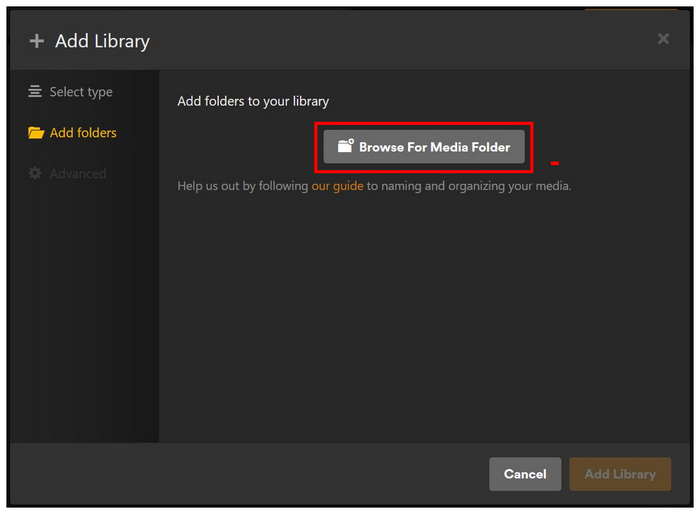
Step 5.Finally, once you have found the folder where the media is saved, click Add and confirm your selection by clicking on Add Library to the main Library menu.

Now that the video has been added to the Plex Media Server, you can watch it on any device where the Plex app can be downloaded. Some popular options include Google TV, Apple TV, Smart TV, Android, iOS, Windows, and Mac.
FAQs of DVD to Plex
-
What is the best format to rip DVDs for Plex so I don't trigger transcoding?
MP4 with H.264 video codec and AAC stereo audio is the best.
-
How can I rip commercial/encrypted DVDs to my Plex server for free?
MakeMKV can efficiently remove DVD copy protection and convert DVDs to MKV.
-
How do I keep DVD subtitles and multiple audio tracks when ripping for Plex?
You can rip DVDs to the MKV container, which naturally supports unlimited audio tracks
-
How should I name my ripped DVD files so Plex automatically finds the movie info?
Follow Plex’s official naming convention: MovieName (ReleaseYear).ext.
-
Why is my Plex lagging or buffering when playing ripped DVD MKV files?
There are mainly three reasons:
• VOBSUB Subtitles: Enabling DVD image-based subtitles forces Plex to transcode video to burn in the text.
• Audio Transcoding: Your TV/device cannot play raw AC3/DTS audio.
• Weak Server CPU: The Plex server is struggling to transcode in real time. -
Is it legal to rip my own bought DVDs to a personal Plex media server in the US?
It falls into a legal gray area under US law. It is acceptable for personal backups.
Conclusion
Digitizing your DVD collection to Plex is a good way to protect your physical media. With suitable settings, you can enjoy a smooth DVD video playback experience on various devices. Whether you prefer the zero-cost flexibility of free open-source tools like MakeMKV and HandBrake, or the effortless, one-click convenience of Blu-ray Master Free DVD Ripper, you can easily complete the DVD digitization. Download your preferred ripper today to back up your DVD collections.
More from Blu-ray Master
DVD to Devices
Fast and free ripping software to decrypt all DVDs to digital easily on your computer.
100% Secure. No virus
