

Jul 05, 2025Posted by Kevin Miller to Rip DVD
Magic DVD Ripper is among the most established options for converting and backing up DVD collections. It is made to rip DVDs to digital profiles playable on selected devices. It offers a solution for anyone wanting to preserve or repurpose their DVDs. Magic DVD became popular for its aesthetic interface, high ripping speed, and reliable output quality. This Magic DVD Ripper review will explore all the information you need about the software. We’ll highlight its features, advantages, disadvantages, and a quick guide on how to use it. Before this post ends, we will introduce an alternative to help you determine which DVD ripper is the best.

- Part 1. Quick Verdict of Magic DVD Ripper
- Part 2. Advantages and Disadvantages of Magic DVD Ripper
- Part 3. How to Use Magic DVD Ripper
- Part 4. Magic DVD Ripper Best Alternative
Part 1. Quick Verdict of Magic DVD Ripper

Magic DVD Ripper is a DVD-ripping tool compatible with Windows and Mac systems. It is built to work with DVDs and convert their content to a different profile. Some options are AVI (Xvid, DivX), MP3, MP4, MPEG2, WMV, VCD, and SVCD. Additionally, you can use it to backup DVDs to the hard drive with zero quality loss. It aims to help you enjoy your DVD movies wherever you are without needing the physical disc.
What You Need to Know About Magic DVD Ripper:
- Replicate DVD content to the hard drive without compromising the quality.
- Back up a DVD-9 to 4.7 GB disc to reduce file size with minimal quality loss.
- Option to copy only the main title or split DVD-9 into two DVD-5 for easier burning.
- Decodes DVD restrictions, like CSS, Region, RCE, Sony ARccOS, and PuppetLock.
- Convert DVD to a digital format playable on game consoles and smartphones.
Part 2. Advantages and Disadvantages of Magic DVD Ripper
Copy DVD Movie to Hard Drive
The software lets you create a 1:1 copy of a DVD directly on your hard drive. This feature ensures you can keep a complete copy of the data for archiving purposes. You can access the content once you have the copy without bedding the physical disc. However, the copied file is not optimized for playback on portable devices like smartphones.
Remove Restrictions from DVDs
The Magic DVD can bypass CSS, DVD region, RCE, Sony ARccOS, and PuppetLock restrictions. It aims to help you rip DVDs easily, regardless of their region and encryption. This feature removes playback limitations when backing up DVDs for personal use. Now, a small heads-up: Bypassing copy protections from DVDs you don’t own is illegal.
Downloads Decryption Files for New Protection DVDs
The software claims to download decryption patches automatically when new protections are released. It ensures continued compatibility with modern release restrictions. You don’t need to apply updates to handle newly encrypted discs. However, you might lose access to the decryption fixes once the software’s development is discontinued.
Copy the Main Title or Split DVD-9 into Two DVD-5
The Magic DVD provides two options for handling DVD content. First, you can back up only the main title without extras. The other option is to split a dual-layer disc into two single-layer discs. This feature allows you to save storage capacity by excluding unnecessary content. But here’s the deal: Splitting the content can interrupt playback continuity.
Compress DVD to Fit on a 4.7 GB Disc
The software can compress a DVD-9 into a single-layer 4.7 GB disc. It works by re-encoding it at a lower bit rate while trying to maintain the video quality. This feature allows you to burn the movie into more common single-layer DVDs. However, you cannot guarantee 100% quality retention as compression introduces quality loss.
High Ripping Speed and Good Output Quality
The Magic DVD delivers fast ripping speeds, converting a full-length in less than 60 minutes. The output quality is reasonable across digital formats like MP4 and MPEG2. This feature can save you time, mainly when processing extensive DVD collections. However, the speed depends on your system hardware, DVD protection, and disc condition.
Part 3. How to Use Magic DVD Ripper
Magic DVD is a simple tool that provides a convenient solution for converting. It lets you rip your physical disc into a portable, playable digital format. Beyond conversion, it enables you to copy the entire disc, backup only the main title, or split DVD-9 into two DVD-5.
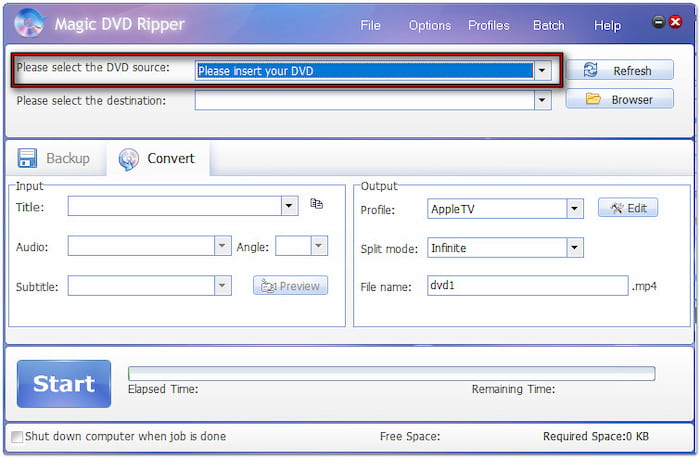
Step 1.Get your disc, insert it into your external DVD drive, and launch Magic DVD afterward. Navigate to the Convert tab and click Please Select the DVD Source to load the disc. The software will scan the disc and import its contents, including all titles available.
Step 2.Move to the Input section and select the title you want to rip. Next, switch to the Output section and click the Profile pulldown menu to choose the format. If needed, click Edit to modify the profile settings for high-quality exports.
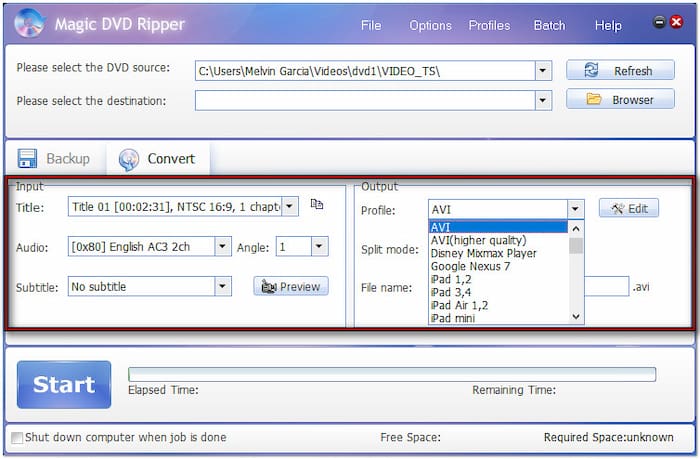
Step 3.Click Browse next to the Please Select the Destination field to specify the output directory. After all the settings, you can review the video by clicking the Preview button. Once everything is good, click Start to convert the DVD to the selected digital format.

Magic DVD offers a straightforward process for converting DVDs into digital format. Everything you need is located in one place, so you don’t need to switch between tabs. A friendly reminder: Do not use the Magic DVD Ripper crack version, as it may pose serious risks.
Do the characters speak with strong accents and use unfamiliar slang? Why not add a DVD subtitle? Subtitles can help clarify what’s being said, preventing missed dialogue.
Part 4. Magic DVD Ripper Best Alternative

If you want more flexibility and enhanced compatibility, the Blu-ray Master Free DVD Ripper is a worthy alternative. It is compatible with macOS 10.12 or later and Windows 11/10/8/7. This software goes further with over 200+ profiles, including video, audio, and device presets. It can rip DVDs with output resolutions up to 4K, surpassing the standard quality of Magic DVD.
Free Download
For Windows
Secure Download
Free Download
for macOS
Secure Download
Moreover, it can handle region-restricted DVDs (Regions 1-6), latest encryptions, and copy-protections. It adopts the constantly updated decryption technology, ensuring compatibility with newer, more encrypted discs. In addition, it includes a built-in editor with essential tools that are not present in Magic DVD.
Conclusion
You’ve now reached the end of our Magic DVD Ripper review! Magic DVD is a dependable tool for those who need to convert or back up DVDs with ease. However, its limited format support doesn’t meet the needs of users looking for more flexibility. If you need a more powerful and feature-rich alternative with updated and broad format support, the Blu-ray Master Free DVD Ripper is what you need. It supports over 200+ profiles, 4K video quality, a built-in editor, region-free decryption, and a lot more.
More from Blu-ray Master
Various DVD Ripper Review

Fast and free ripping software to decrypt all DVDs to digital easily on your computer.
100% Secure. No virus
