

Nov 03, 2025Posted by Kevin Miller to Rip DVD
Aimersoft DVD Ripper is one of the tools you will encounter when searching for a solution to rip content from your DVDs. And since it is not free, you might wonder if it's worth getting and spending money on. This review will help you decide about it as we uncover the DVD Ripper’s overall performance, results, functions, pricing, and more.
- Part 1. Overview of Aimersoft DVD Ripper
- Part 2. How We Test Aimersoft DVD Ripper
- Part 3. Full Review of Aimersoft DVD Ripper
- Part 4. What Users Say about Aimersoft DVD Ripper & Final Verdict
- Part 5. Alternative to Aimersoft DVD Ripper
- Part 6. FAQs about Aimersoft DVD Ripper
Part 1. Overview of Aimersoft DVD Ripper
Aimersoft DVD Ripper is a desktop app that mainly transfers media files from physical discs to a computer or hard drive. Since DVDs tend to limit a user from streaming it to a local media player, Aimersoft aims to liberate you by ripping and converting the videos to digital files. Of course, it also performs conversion to make the videos compatible with devices, media players, and other platforms.
Features:
- It is able to rip most DVD types with standard or HD resolutions.
- It can remove the DVD copy-protection, region codes, and other encryptions.
- Equipped with essential editing tools to merge, cut, adjust the visual, and so on.
- It can transcode DVDs for phone, laptop, and tablet playback.
- Supports changing the formats into common ones like MP4, MOV, H.264, etc.
- Include built-in presets, but configurable.
Pros
- It has a straightforward UI for a quick learning curve.
- Excellent selection of supported device, audio, and video formats.
- Editing tools that require no add-ons or plugins.
- Allow users to reset or save custom options.
Cons
- It does not rip videos from ISO image files or DVD folders.
- Possible larger files after ripping.
- The encoding process is too slow.
Part 2. How We Test Aimersoft DVD Ripper
To give you the full view of the software we are reviewing, we tested Aimersoft DVD Ripper on Mac and Windows properly using its main functions and controls. Of course, this method allows our readers to get the highest accuracy of the information so that they can decide if it's worthwhile or not.
| How We Test | |
| Step | Description |
| Installing Process | The tool is downloaded and installed on the latest version of Windows and Mac. We made sure the software was on the latest update. |
| Testing of Formats | We use various supported formats on the application to see the different results regarding the resolution, FPS, bitrate, etc. |
| Processing and exportation | The process is done through a stable network to ensure that Aimersoft is fast-speed. We also tested if the ripped files are supported according to output presets and formats. |
| Playback | Once the files are exported to designated platforms, we use the media players to see if the files are playable and working. |
Part 3. Full Review of Aimersoft DVD Ripper
Ease of Navigation
Overall Rating :
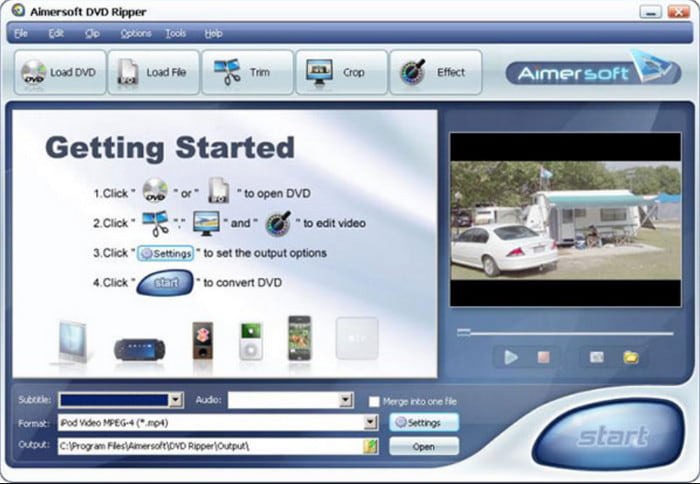
One of the things you should look for in a ripping tool is its interface because this will lead you to ease of navigation. Thankfully, Aimersoft has this character, which allows the user to learn about functions and settings easily.
Supported Media Formats
Overall Rating :
Not only is it supporting common video formats like MP4 and WMV, but Aimersoft DVD Ripper can also transform the extracted files into unique media content with file extensions like FLV, SWF, WebM, and so on.
Workable Pricing Plans
Overall Rating :
The software offers three subscription plans with different pricing. The 1-Year Subscription is $29.95 for one PC and annual billing. The second subscription is $49.95 for one PC and a lifetime license. It is a one-time fee with free updates for a year. Lastly, the Business Lifetime Plan allows you to choose how many licenses you need for multiple devices. This is a flexible subscription, so the price varies.

Excellent Output Settings
Overall Rating :
Since device compatibility will always be an issue for media content. Aimersoft DVD Ripper offers various presets with devices included, allowing you to stream ripped videos on gaming consoles, computers, TVs, and others. The output settings are most likely configurable to edit the overall quality, resolution, and so on.
Safety and Stability
Overall Rating :
Aimersoft DVD Ripper is generally regarded as a safe and stable software that can efficiently handle various DVD ripping tasks. You can install it with no reports of malware or intrusive software from its official website. It runs reliably on both Windows and macOS platforms, offering a smooth user experience with minimal crashes or performance issues.
DVD Ripping Speed
Overall Rating :
It utilizes GPU acceleration to enhance conversion speed and provides flexible options for adjusting resolution, bitrate, and audio settings. Most users are satisfied with its ripping performance.
Output Video Quality
Overall Rating :
Aimersoft DVD Ripper performs impressively when it comes to extracting and converting DVDs into multiple digital formats, offering quick processing and excellent output quality. However, the output video file, particularly when using high-quality settings, can be quite large, consuming a significant amount of disk space.
Prices
Overall Rating :
Free trial version with limited features.
Paid version with its full features.
This best DVD ripping software provides different versions for you to choose from. Aimersoft DVD Ripper's free trial has limitations on its full features. You can try the software to evaluate it and then decide whether to buy the paid version or not.
The DVD Ripper looks reliable enough for a decent ripping process. However, the test we ran for Aimersoft showed slow progress, especially for multiple files. Another thing is its huge feature restrictions on the free version, like the user might not be able to rip anything from DVDs.
Part 4. What Users Say about Aimersoft DVD Ripper & Final Verdict
At the top of our review of Aimersoft, we gather the most relevant reviews from other users across reliable websites. Here are some included:
TrustPilot
Aimersoft DVD Ripper can rip and convert DVD movies with a huge number of formats supported. While it has a free trial version, a watermark is inevitable, and most functions are unusable.
SoftSonic
I liked how this software includes all the necessary features for DVD ripping. Aside from its fast-speed ripping process, Aimersoft also has a built-in video editor and converter to enhance and improve every video ripped. With that said, the price for its pro version is too expensive, especially if you only need to use it one time.
ReviewsTown
To be honest, I only heard about this software from a forum and a user told me it was a great solution. However, the free trial version lacks functionalities to prove its goodness. Also, I didn’t like its interface because of how old-fashioned it looks. Or maybe that is only me.
Final Verdict: Is Aimersoft DVD Ripper worth a try? In all, Aimersoft DVD Ripper is a reliable DVD converting tool that is suitable for you to back up DVDs to digital. If you're looking for a fast, reliable, and user-friendly tool to convert DVDs, it can be a good choice. Though it lacks some advanced features, like customization of subtitles or support for newer disc protection, it can be enough for some casual users.
Part 5. Alternative to Aimersoft DVD Ripper
If you don’t fancy Aimersoft, you might try the best alternative for Windows and Mac. Blu-ray Master Free DVD Ripper is an outstanding ripping program that extracts content from original DVDs. Just like Aimersoft, this alternative has a built-in editing feature to improve the visuals, as well as trim, cut, and merge clips. But the best part of it is the supported media types, as it lets you rip homemade, commercial, and damaged discs but automatically enhances the quality once ripped. You can try DVD Ripper for free without a watermark or data loss.
- Bypass DVD region codes, system standards, and other encryptions.
- Support ripping discs for PAL and NTSC.
- Save and export multiple copies to various devices for iPhone, Android, and more.
- Create clones of uncompressed ISO and folders without hassle.
| Aimersoft DVD Ripper | VS | Blu-ray Master Free DVD Ripper |
| Windows 11, 10, 8, and macOS X 10.10 and above | Ease of Use | Windows 11/10, macOS 10.12 or above |
| MP4, WMV, FLV, and others | Output Formats | MP4, MKV, MOV, AVI, etc. |
| Good | Output Quality | Good |
| Fast | Burning Speed | Very Fast |
 | Decryption Ability | |
Free Download
For Windows
Secure Download
Free Download
for macOS
Secure Download
Part 6. FAQs about Aimersoft DVD Ripper
-
Is there a truly free DVD ripper?
There are a few programs that offer free ripping DVD service on desktops. Including HandBrake, MakeMKV, and VLC Media Player.
-
Are DVD rippers illegal?
If the DVD ripper can rip copy-protected content, it can be considered illegal. However, it still depends on the user who will sell the copies. If for personal use, it is not illegal to rip DVDs. Check more free DVD rippers here.
-
Is there a free version of Aimersoft DVD Ripper?
Yes. The free version offers minimal functions with restrictions on the video size, features, and quality.
-
What is the difference between Aimersoft DVD Copy VS. Aimersoft DVD Ripper?
While the DVD Ripper mainly rips and converts media files, DVD Copy allows you to clone videos, burn, and back them up to a hard drive.
Wrapping up
Wrapping up the Aimersoft DVD Ripper review. You have found out the main functions of the software, including some of its highlights and drawbacks. In case you think it is not worthwhile, choose DVD Ripper as your alternative. Its modern algorithm has far more advantages to preserve the original DVD quality and data. Click Free Download to get the free version from the official website.
More from Blu-ray Master
- MakeMKV Review: What and How Does it Work on Your DVDs
- Updated Review of VideoByte BD-DVD Ripper in 2024
- [Latest] Rip Any DVD to MP4 with VLC and Its 5 Alternatives for Free
- How to Convert DVD to Digital Formats, Like MP4, AVI, MP3, and More
- How to Rip DVD with HandBrake and The Best DVD Ripper Alternatives
Various DVD Ripper Review

Fast and free ripping software to decrypt all DVDs to digital easily on your computer.
100% Secure. No virus
