

Jun 05, 2025Posted by Kevin Miller to Rip DVD
Aura DVD Ripper is a Windows-based software that converts DVDs into digital profiles for convenient playback. The software targets those who want a simple solution to digitize DVD collections. It also includes basic and added features, making it a functional tool. This Aura DVD Ripper review will provide a complete look at the software. I’ll cover a brief introduction, rating its different performance aspects, and list its features. To help you decide further, I’ll share my reflections and experience, highlighting what worked well and what didn’t. In addition, I’ll introduce a strong alternative to give you a complete comparison. Also, this way, I can help you determine if Aura is the right choice for your DVD-ripping tasks.
- Part 1. Overall Review of Aura DVD Ripper
- Part 2. Detailed Review of Aura DVD Ripper
- Part 3. What Users Said of Aura DVD Ripper
- Part 4. Aura DVD Ripper Best Alternative
Part 1. Overall Review of Aura DVD Ripper
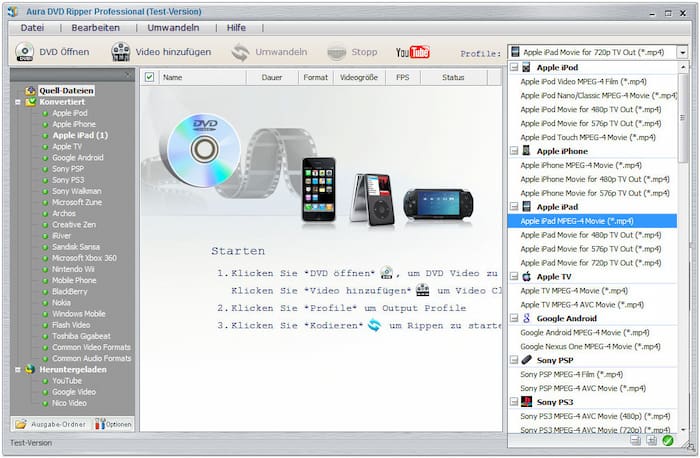
Aura DVD Ripper is a less-known DVD ripper software developed by Aura4You. It is built to rip and convert DVDs between a few profiles and device presets. It supports converting DVDs to digital profiles like AVI, FLV, Flash (SWF), MP4, and WMV. Device presets include iPod and Zune, some mobile devices, and certain media players. Beyond DVD ripping, Aura also operates as a video conversion software and YouTube video downloader.
⭐⭐⭐
⭐⭐
⭐⭐
⭐
⭐⭐
What You Need to Know About DumboFab DVD Ripper:
- Improved video and audio encoding for better sound and picture quality.
- Adopts Multi-Thread Encoding up to 8 Threads to speed up the ripping process.
- Extract soundtracks from DVDs or video files and save them in an MP3 profile.
- Converts physical media to over 30+ profiles and device presets for portable playback.
- DVD subtitles insertion with basic customization like font, size, and position adjustment.
Part 2. Detailed Review of Aura DVD Ripper
Video and Audio Encoding
Aura incorporates improved video/audio encoding to keep the DVD’s original quality during conversion. It ensures that the resulting files maintain high picture and sound quality after conversion. This software allows the configuration of basic profile settings to achieve optimal results. However, it doesn’t support newer and more advanced formats.
Multi-Thread Encoding up to 8 Threads
The software adopts multi-thread encoding, with up to 8 threads, to deliver fast processing speed. This feature improves the ripping speed when processing multiple videos in succession. It uses multi-core CPUs by dividing the workload into simultaneous tasks to reduce wait times. Now, a small heads-up: The actuarial speed still depends on system hardware specifications.
DVD or Video Files Soundtrack Extraction
Aura DVD Ripper has an added functionality to extract audio from DVDs/video files. You can save the extracted soundtrack in an MP3 profile for broad playback compatibility. This feature helps you pull out the sound to separate it from the visual content easily. But here’s the thing: the output quality might not be ideal for those seeking studio-quality results.
Conversion of DVDs to Over 30+ Profiles and Device Presets
Aura can output digital profiles and device presets, covering over 30+ formats. It includes standard profiles, such as AVI, FLV, Flash (SWF), MP4, and WMV. As for the device preset supports a few Apple devices (iPod), Zune, mobile phones, and some media players. However, the software lacks support for the latest digital formats and codecs.
Copy Protected, Encrypted, and Regional DVD Handling
The software can handle all kinds of DVDs, including DVD regions 1-6, encrypted, protected, etc. It uses an enhanced copy method to handle DVDs encrypted with the latest DVD protection technology. Also, it can decode standard copy protections like CSS, RC, RCE, etc. Now, a small heads-up: You should be careful when using it as it is bundled with viruses and unwanted software
Part 3. What Users Said of Aura DVD Ripper
Usability
The Evaluation Version (free trial) is easy to use and has a straightforward interface. It works without issue upon testing, and I found the ripping process simple. However, the interface is somewhat outdated compared to the latest DVD-ripping software.
Stability & Safety
What I focused on exploring was the software’s stability and safety. It is the most prominent and concerning area in which we should focus. I found the software unstable and, most importantly, unsafe to use. Upon installation, it comes bundled with viruses and other unwanted software that harm my computer.
Customer Service
Regarding customer service, the Evaluation Version offers no customer service access. I couldn’t contact support agents unless I upgraded to the paid version. Even after my subscription, the customer support experience is underwhelming. Although a chat option is available, their response took several days before I received feedback.
Installation & Uninstallation
The installation process with Aura is indeed problematic. As mentioned, the software is associated with bundled malware and unwanted software without the user’s explicit agreement. After my testing, I experienced difficulty in removing the software. The associated unwanted software is still installed and requires an effort to clean my system.
Part 4. Aura DVD Ripper Best Alternative

Safety is our top priority. If you need a reliable and secure alternative to Aura DVD Ripper, Blu-ray Master Free DVD Ripper is what you need. It’s fully compatible with macOS 10.12 or later and Windows 11/10/8/7. This software lets you rip any DVDs to MP4, AVI, FLV, and 200+ other profiles. It also supports converting DVDs to device-specific presets, including Apple, LG, HTS, Samsung, etc. Plus, it provides high-quality DVD ripping up to 4K resolution.
Free Download
For Windows
Secure Download
Free Download
for macOS
Secure Download
Not to mention, the Blu-ray Master Free DVD Ripper uses the latest and updated decrypting technology. It aims to help you rip DVDs from Regions 1 to 6, even those with complex encryptions and copy protections. In addition, it offers a preview function where you can view content before ripping. It also includes a built-in editor with essential tools for customizing the DVD content. Above all, it lets you set an output directory for efficient organization.
Why Consider Blu-ray Master Free DVD Ripper:
- Handles DVDs, VIDEO_TS folders, IFO files, ISO files, 99-titles, workout, etc.
- Rip DVDs to over 200+ digital profiles and device presets with up to 4K resolution.
- Decodes copy-protections, encryptions, and region restrictions from DVDs efficiently.
- Adopts Hyper-threading and Super Encode Engine to retain the DVD’s original quality.
- Uses the latest and updated acceleration technology to deliver a fast conversion speed.
Conclusion
This brings our Aura DVD Ripper review to a close! Aura is a worth-considering tool for basic DVD ripping. However, you should be cautious when installing it as it is bundled with malware and unwanted software. If you need a free, reliable, and secure tool to convert your DVDs to digital, Blu-ray Master Free DVD Ripper is what we recommend. This software can rip DVDs to over 200+ formats with up to 4K resolution. Besides, it can handle DVDs with regional restrictions, encryptions, and copy protections.
More from Blu-ray Master
Various DVD Ripper Review

Fast and free ripping software to decrypt all DVDs to digital easily on your computer.
100% Secure. No virus
