

Nov 04, 2025Posted by Kevin Miller to Rip DVD
There are numerous of video editors that can edit video file on Windows and Mac. But if you want to edit DVD videos, most video editors are not available. You need to use a DVD editor to edit a DVD video. Well, the DVD editor should be capable to rip DVD too. For instance, if you want to edit DVD video saved on a DVD disc, you need to extract video from DVD first. Later, you can edit a DVD in Windows Movie Maker, HandBrake, Adobe Premiere and all media editors, as well as this DVD editor software. Whatever, you can get 2 DVD editors to convert and edit DVD movies from this article.

- Top 1. Blu-ray Master Free DVD Ripper
- Top 2. AnyMP4 Video Converter Ultimate
- Top 3. DVDFab DVD Ripper
- Top 4. WinX DVD Ripper
- Part 5. How to Edit DVDs: Detailed Steps
- Part 6. FAQs
Top 1. Blu-ray Master Free DVD Ripper
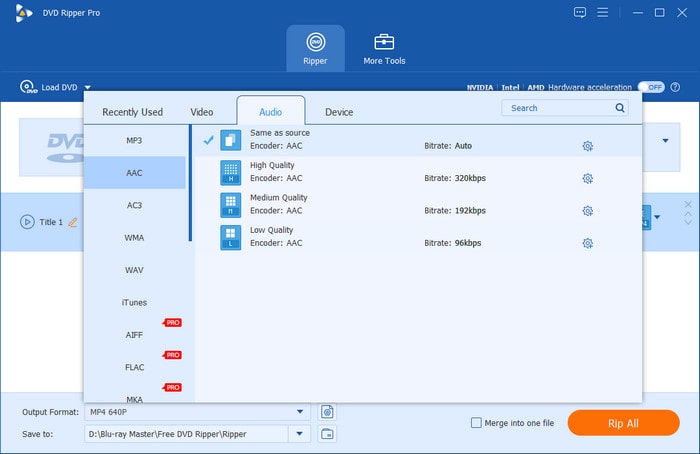
To free extract video from DVD for editing, Blu-ray Master Free DVD Ripper is your first choice. You can rip DVD disc to MP4, AVI, FLV, and other 80+ popular video formats with high quality. The DVD ripping software is also capable of ripping DVDs to 50+ phones and tablets for offline playback. Being a free DVD ripper and editor, you can only crop video and add watermarks for free. Thus, if you want to remove the black edges of the DVD movie, Blu-ray Master Free DVD Ripper is your best DVD editor freeware.
Free Download
For Windows
Secure Download
Free Download
for macOS
Secure Download
Pros
- Rich types of editing tools to cater to your different editing needs.
- Provides a library of video and audio output profiles for you to choose from.
- DVD decryption ability to edit and convert DVDs to digital.
Cons
- Lack of advanced DVD video editing tools.
- Limit high output quality in the free version (e.g., not supporting 4K).
Top 2. AnyMP4 Video Converter Ultimate
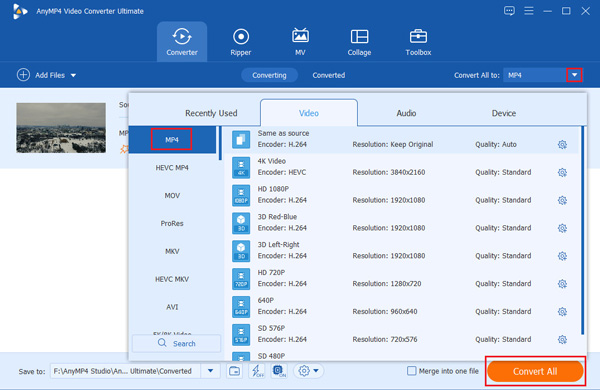
To get more DVD video editing features, you can upgrade to AnyMP4 Video Converter Ultimate. It contains the powerful DVD ripping and DVD editing features. You can edit DVD videos with cropping, clipping, rotating, adding a watermark and more. The built-in video enhancer can help you improve DVD video quality in multiple ways smartly.
Compared with the above free DVD editor, you can rip DVDs to 200+ video formats and many popular devices. Additionally, you can add external subtitles and audio tracks to DVD videos to enhance your audiovisual experience. Here are the main features you can get from the DVD video editor software.
Pros
- Convert DVD to any video format or device with high quality and fast speed.
- Support batch DVD conversion and customization.
- Edit DVD videos with selectable audio tracks and subtitles.
Cons
- The free trial version has great limitations on DVD video editing.
- You need to rip DVDs first to use various tools to edit videos on Windows/Mac.
Top 3. DVDFab DVD Ripper
DVDFab DVD Ripper is also a well-known DVD editing program. With a clear interface, you can directly navigate to the ripper section. It has basic video editing tools to enable you to adjust the subtitles, audio tracks, and even trim videos. During the editing process, it will show the comparison effects of videos before and after editing, which helps you to adjust your editing easily.

Pros
- This free DVD editing software allows you to add a watermark and easily add external subtitles.
- Provides advanced control over DVD output settings.
- AI features to upscale DVD output video quality.
Cons
- Its editing tools are limited compared to professional editing tools.
- The free trial version often restricts the output resolution.
Top 4. WinX DVD Ripper
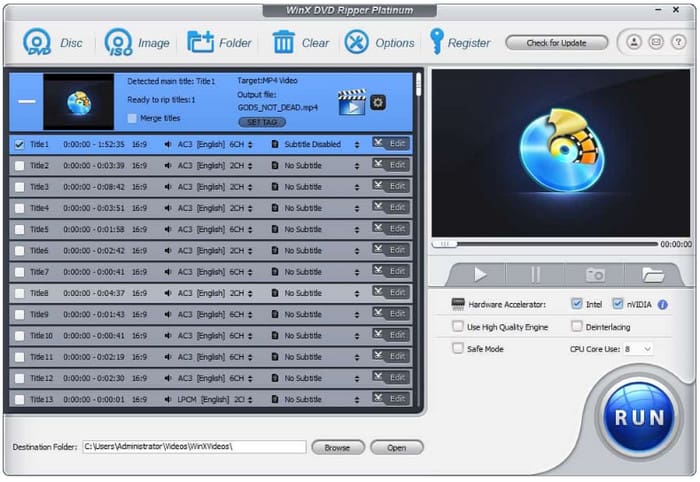
WinX DVD Ripper is one of the best DVD ripping and editing tools. To polish your DVD videos more perfectly, this tool allows you to edit your videos before ripping them. You can crop, trim, and adjust subtitles of the DVDs. Moreover, the software will show the DVD titles and audio tracks, and you can select the one you want to maintain.
Pros
- Add external subtitle files to the software.
- Multiple DVD output format choices and customization settings.
- Hardware Accelerators to facilitate the DVD ripping process.
Cons
- Its video editing features are limited.
- Its interface is a little outdated.
Part 5. How to Edit DVDs: Detailed Steps
Now, after knowing the 4 best DVD editors, read on to learn how to edit DVDs with these tools. We will show you the detailed steps using Blu-ray Master Free DVD Ripper.
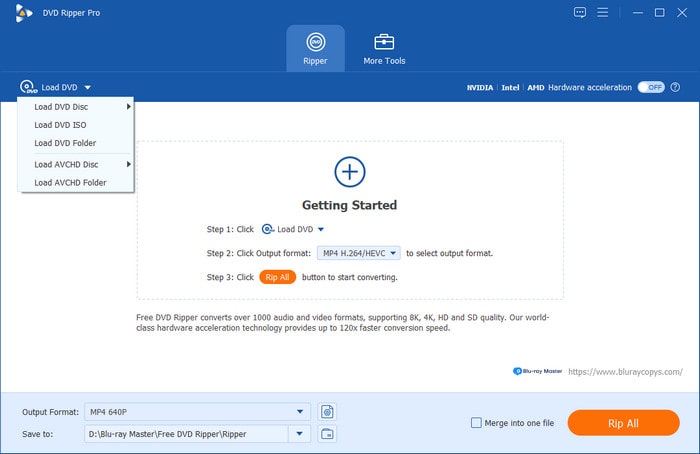
Step 1.Free download, install and launch the Free DVD Ripper. Insert the DVD disc into the DVD drive. Click Load DVD > Load DVD Disc to upload the DVD disc.
Free Download
For Windows
Secure Download
Free Download
for macOS
Secure Download
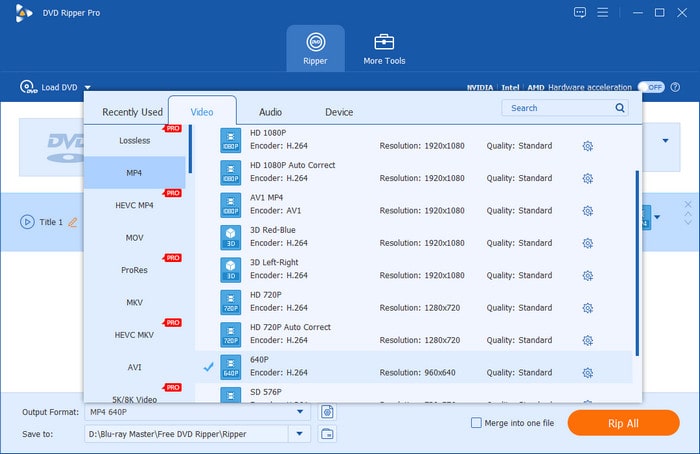
Step 2.Choose the DVD titles you want to edit. Set the output video format from the Output Format list near the bottom.
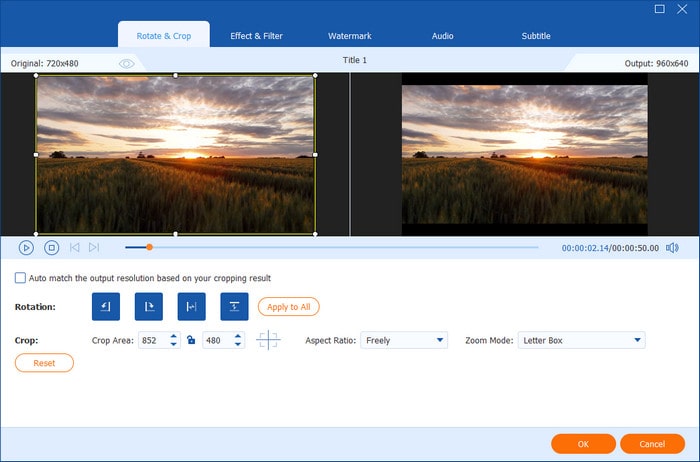
Step 3.Click Edit to access DVD editing tools. You can adjust effects, filters, watermarks, subtitles, etc. Then, click OK to save changes. Moreover, you can navigate to Crop, and Audio windows to edit DVD videos.
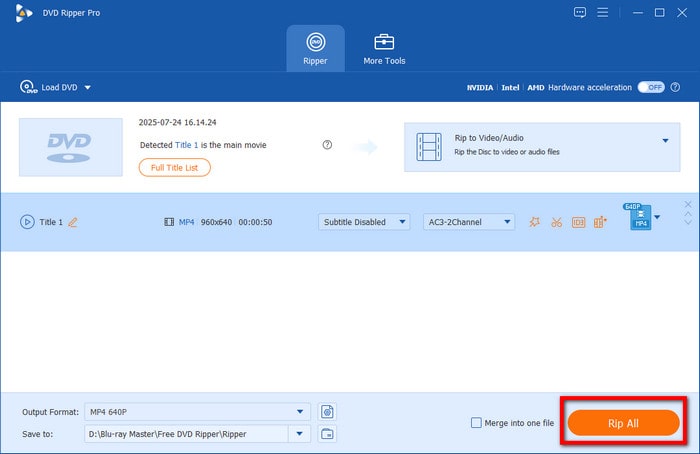
Step 4.Click Rip All to export the edited DVD video to MP4 or other common video formats.
The steps are straightforward and what you need to do is follow the above content. You can also explore its versatile features to further optimize your DVD effects.
Part 6. FAQs
-
What is a DVD editor?
A DVD editor is software that allows users to modify DVD content. This includes trimming, cropping, adding subtitles, and others.
-
Can I edit a DVD directly without ripping it first?
You can edit videos first, and then rip the DVDs. But if you just want to edit DVDs, the adjustment will not be saved.
-
Can I add subtitles or effects to DVD videos?
Yes. Many DVD editors allow you to add external subtitles, apply visual effects, and even add watermarks.
Conclusion
Now, you are clear about the 4 best DVD editors. After knowing the features, pros, and cons of these tools, it is also essential to try them by yourself. Though the free trial versions are limited, you can evaluate them first. Bonusly, we show you the detailed steps of editing and converting DVDs with Blu-ray Master Free DVD Ripper, which is a powerful tool.
More from Blu-ray Master
Top-rated DVD Ripper

Fast and free ripping software to decrypt all DVDs to digital easily on your computer.
100% Secure. No virus
