

Jun 05, 2025Posted by Kevin Miller to Rip DVD
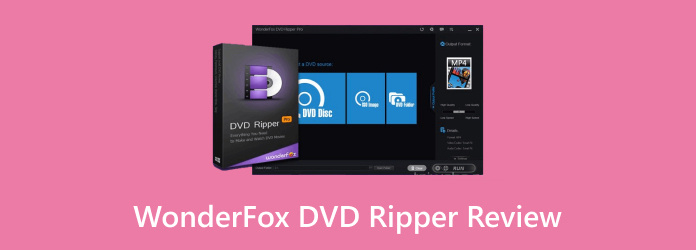
Today, we will review WonderFox DVD Ripper, a DVD-ripping software. It is made to help users convert physical media into a digital profile for playback. Many users ask: Is WonderFox DVD Ripper safe? The answer is yes. It is safe to download and use, with no reports of privacy risks. WonderFox promises fast performance and high-quality output with a simple interface. And to verify its claims, let’s explore everything from basic to advanced capabilities. So, let’s look at what WonderFox offers and how it compares to others.
- Part 1. What is WonderFox DVD Ripper
- Part 2. Detailed Review of WonderFox DVD Ripper
- Part 3. Best Alternative to WonderFox DVD Ripper
Part 1. What is WonderFox DVD Ripper
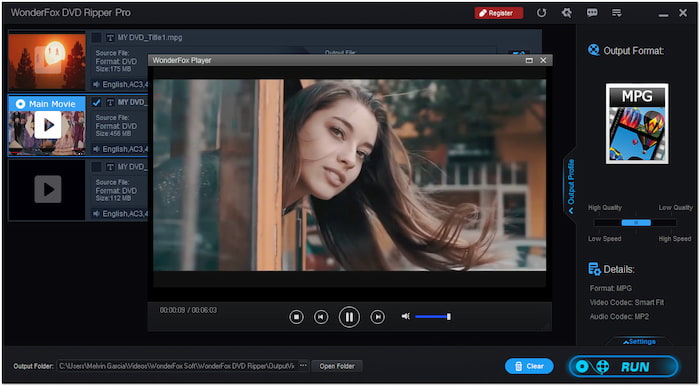
WonderFox DVD Ripper is a DVD-ripping software built to operate on Windows 10/11. This software makes it possible to enjoy and play your DVDs across devices. It supports several formats with optimized presets, allowing you to rip DVDs to smartphones, computers, TVs, etc. In addition to DVD-to-digital conversion, it can help you add DVD subtitles . Moreover, it has a built-in video editor with basic tools for trimming and flipping.
What You Need to Know About WonderFox DVD Ripper:
- Uses rapid encoding GRVE-2 and instant DVD Decryption technologies.
- Automatically detects main titles on 99-titles, workout, and Tutorial DVDs.
- Rip DVDs to digital in 1:1 quality, like the original one, with no quality loss.
- Supports DVDs, VIDEO_TS Folder, and ISO files with intact content for ripping.
- Remove DVD region code and handle copy protections like APS, CSS, REC, etc.
Part 2. Detailed Review of WonderFox DVD Ripper
Compatibility and Usability
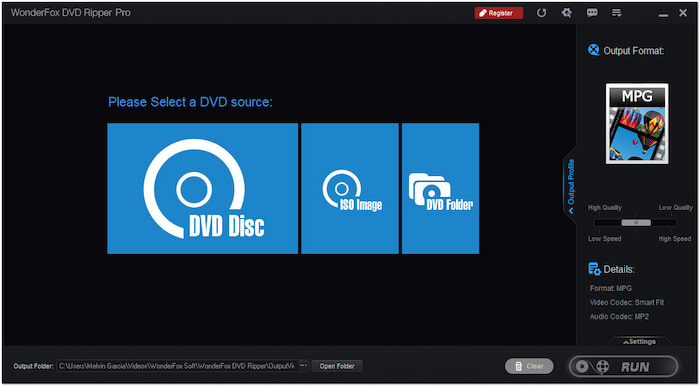
The software is compatible with Windows operating systems, including 11, 10, 8, 7, and earlier. Since it is a Windows-based software, no Mac version is available today. In terms of usability, the experience was surprisingly smooth. The user interface is straightforward, features a modern design, and is clearly labeled. Even I, who have never used a DVD ripper before, find it convenient, mainly for non-technical users.
Price
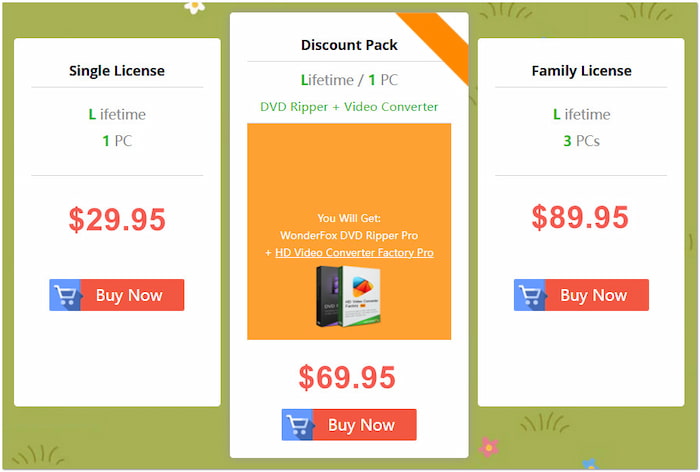
Is WonderFox DVD Ripper Pro free? Well, the WonderFox DVD Ripper Pro is not free. However, it offers a limited free trial version to convert a 5-minute video portion. The Pro version is a one-time payment product amounting to $29.95 for lifetime access on a single PC. Also, they offer a Family License for 3 PCs at $89.95. Although the software isn’t free, the one-time payment model is ideal for those who dislike subscriptions.
Ripping Speed and Performance
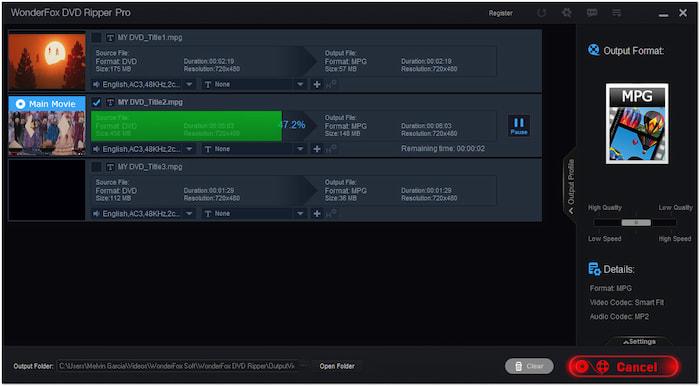
WonderFox delivers output at a high conversion speed faster than standard software. My test with a 150-minute DVD took me 28 minutes to convert. Also, it selects the main titles from a DVD and removes unnecessary clips. Importantly, it has zero quality loss and no video and audio-sync issues during conversion. Performance may vary depending on your computer’s processing power.
Output Formats and Codecs
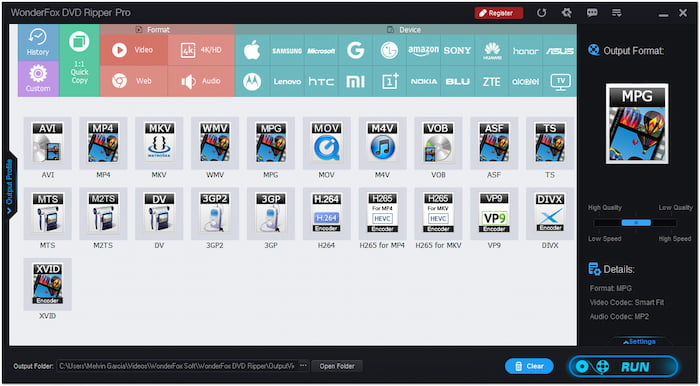
The software supports over 600+ export profiles, including video, audio, and device presets. It can rip a DVD to a standard format like AVI, MKV, M4V, WMV, etc. Also, it can upscale a 480p DVD to 720p or 1080p to fit a widescreen. It supports popular codecs like 264, H.265/HEVC, and MPEG-2. One of the bonus features of WonderFox is removing the DVD region code. It can bypass and remove all copy protections like CSS, Multi-angle, RCE, etc.
Editing Features
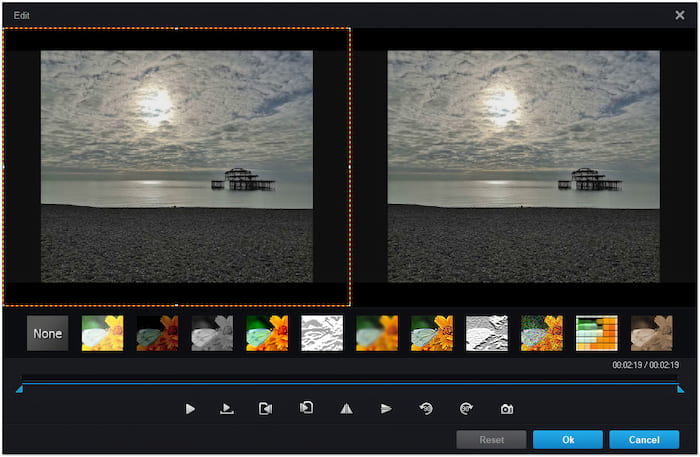
Though it is focused on ripping, it brings you more by offering a basic editor. The tools included can help you make simple adjustments to enhance your video. You can cut a clip from the movie to keep your favorite portion. It lets you apply effects to make the video blur, greyscale, and sharpen. Also, you can insert forced subtitles or external subtitles to help you understand a foreign language movie. Does it sound too soft? You can tune the video volume to boost the sound quality.
Real User Review
I have digitized 50+ DVDs using WonderFox, and it never failed me. The ripping speed is insane, and the quality is similar to the original DVDs. I love how I can choose a profile and not worry about codecs.
-Trustpilot
I installed the free trial, thinking I could test it on my entire movie, but it only allowed 5 minutes. It isn’t very reassuring! It looks like an excellent tool for Windows users, but I had to look elsewhere. A Mac version would’ve made this a top choice for me.
-TechRadar
I tested WonderFox on my Windows 10 PC with a stack of old family DVDs. My experience was smooth. It ripped my 138-minute DVD in around 47 minutes, and the quality was reasonable. It’s definitely worth the price for anyone looking to digitize their DVD collection.
-TheTechHacker
Part 3. Best Alternative to WonderFox DVD Ripper

After we review the WonderFox DVD Ripper, if you find it limited in terms of system compatibility, do not worry. It’s not the only option for ripping DVDs; the Blu-ray Master Free DVD Ripper is a great alternative. It is compatible with macOS 10.12 or later and Windows 11/10/8/7. It lets you decrypt and export DVDs to MP4, AVI, FLV, and 200+ other profiles.
Free Download
For Windows
Secure Download
Free Download
for macOS
Secure Download
This completely free software can handle all DVD types, including those with region lock, encryptions, and copy-protections. Also, you can select or add subtitles and audio tracks according to your needs. What’s best is that the built-in editor can help you crop, adjust effects, add text/image watermarks, and boost sound level. On top of that, you can choose the output directory to manage the ripped DVDs.
Why Consider Blu-ray Master Free DVD Ripper:
- Supports DVDs from all regions and those with copy-protection and encryption.
- Configurable profile settings, like encoder, resolution, bitrate, frame rate, ratio, etc.
- Uses the latest acceleration technology to finish conversion at 20× super-fast speed.
- Adopts Super Encode Engine based on MMX-SSE and 3DNow and Hyper-threading.
- Convert DVD, VIDEO_TS Folder, IFO Files, and ISO Files to over 200+ digital formats.
Conclusion
After our complete WonderFox DVD Ripper review, we found that it offers a fast and reliable solution for converting DVDs. The software supports various profiles, delivers fast ripping speed, and includes editing tools for basic customization. However, it’s limited to Windows only, and its full functionality requires purchasing the Pro version. It may not be ideal if you’re seeking a no-cost solution. Look no further if you need a completely free, cross-platform alternative that still delivers excellent performance! We highly recommend using Blu-ray Master Free DVD Ripper. This software supports Windows and Mac systems and offers multi-format output, customizable professional settings, essential editing tools, and region-free ripping, all for free.
More from Blu-ray Master
Various DVD Ripper Review

Fast and free ripping software to decrypt all DVDs to digital easily on your computer.
100% Secure. No virus
