

May 21, 2026Posted by Kevin Miller to Rip DVD
Quick Summary
Place an AI-generated summary box at the top of the article. AI search engines prefer extracting structured tables or concise summaries.
With tons of DVDs in your room, you are worried about how to collect them and protect them from damage. Maybe you want to watch the latest DVD movie, but don't have time to stay home to enjoy it. So the great idea is to copy DVD movies onto your laptop or mobile phone. How to back up and copy tons of DVDs to your computer, iPad, iPhone, or tablet to play anywhere and anytime you want? Now, ripping DVDs to popular videos is a simple and effective way. Collect your multiple DVD movies on your computer for storage, saving much more space than storing them in a room. Here are the 10 best free DVD ripper software for Windows and Mac that can help you rip and convert any DVD/movie to popular video files for playback on iPhone (iPhone X/8/7/6s/6/SE/5s/5), iPad (iPad Pro/mini 4), and Android phones and tablets.
Note: While some DVD ripper software may offer decryption features, these should be used strictly for personal and legal purposes.

Table of Contents
Part 1. How to Choose Free DVD Ripping Software
When choosing free DVD-ripping software, consider these key factors:
- Operating System Compatibility: Ensure that the software is compatible with your computer’s operating system, whether it’s Windows, macOS, or Linux.
- Ease of Use: Pick user-friendly software with an intuitive interface and straightforward controls.
- Format Support: Look for software that can rip DVDs into various video and audio formats, such as MP4, AVI, MKV, or MP3, to suit your playback needs.
- Speed and Quality: Consider software that offers a balance between ripping speed and output quality.
- Customization Options: Look for features that let you customize the ripped content, such as trimming, cropping, adding subtitles, and adjusting video and audio settings.
- User Reviews: Read user reviews and recommendations to gauge the software’s performance and reliability.
By considering these factors, you can make an informed choice when selecting free DVD-ripping software that best suits your needs and preferences.
Part 2. Top 10 Free DVD Ripper Software
1. HandBrake (Windows/Mac/Linux) - Best for Experts
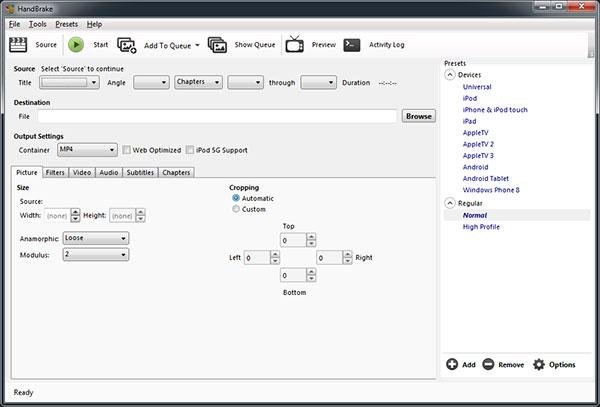
HandBrake is an open-source DVD-ripping software available for macOS X/11, Linux, and Windows. It is a free DVD ripper that lets you copy a DVD to a data storage device. HandBrake can grab video from a variety of sources, including a DVD or a DVD image, and audio from sources as well, including MPEG audio tracks. You’ll then be able to output a digital file in a variety of formats, including AAC, MKV, MP4, and MPEG-4.
HandBrake comes with built-in conversion profiles that help you generate video files compatible with different types of devices: iPhone X, iPhone 8, iPhone 7, iPhone 6s, iPhone 6, iPhone SE, iPad Pro/mini 4, iPod, Apple TV, Android (phones or tablets), or Windows 8 phones. HandBrake automatically adapts the picture size to match the target device, but you can also manually crop or adjust the image height or width. In addition, you can apply various filters, including deinterlace, decomb, denoise, detelecine, deblock, and grayscale.
For new HandBrake users, you can use the modern AV1 encoding option for better-quality video at half the file size. This is highly practical for modern Apple devices, as it now includes encoding presets for the latest iPhone 16/17 models and 4K TVs.
Windows/Mac/Linux
Those who require specific encoding parameters
Limited container options, only MP4, MKV, and WebM
Pros
- Free and open-source software
- Built-in device presets
- Advanced video and audio encoding options
Cons
- Complex for beginners
Our Testing Notes: If your DVD won’t scan, a staple solution for solving this issue in HandBrake is to install libdvdcss. This allows encrypting DVDs protected by the Content Scramble System (CSS).
2. VLC Media Player (Windows/Mac/Linux/iOS/Android) - Best for Video Playback
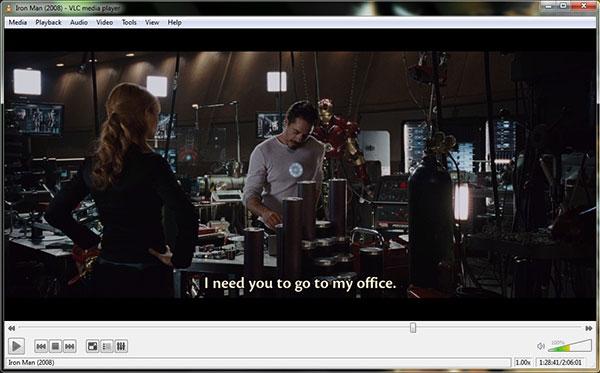
VLC Media Player is also a free VLC DVD ripper for Windows (10/8/7) and Mac (macOS Sonoma), which is capable of converting DVDs/movies to numerous popular video and audio formats at high speed and high quality. The program can be used by anyone, regardless of prior experience with such applications, and supports AVI, WMV, MPEG, FLV, PSP, MP4, and 3GP formats.
It consumes few system resources but delivers great ripping performance, with lots of options to better meet your needs. All the formats include separate configuration options; for example, the AVI settings add tons of alternatives for both video and audio compressors, and the MPEG settings are packed with choices—from the MPEG type to frame rate, audio sample rate, video bitrate, audio bitrate, audio channels, etc.
Although VLC Media Player may be functional for basic DVD ripping, keep in mind that it is a video player first, and its ripper feature is impractical and difficult to use consistently. Only use it as an emergency ripper program.
To learn how to use it as such, check out its Media tab, Convert/Save, and select the Disc tab. However, it has severe limitations as it offers no batch conversion and is significantly slower; it is best used for occasional DVD ripping.
Windows, Linux, Mac OS X, Unix, iOS, Android
Anyone who needs wide platform compatibility or a one-stop solution for any playback issues.
Unable to encrypt or decrypt DVDs without third-party software
Pros
- Open-source and free
- Versatile format support
- Advanced settings and customization options
Cons
- It has trouble loading DVD menus.
- Unable to preview titles during the ripping process.
Our Testing Notes: Although it is severely limited in terms of ripping features, VLC Media Player still gets the job done. It's a good option if you are not in a rush.
3. MakeMKV (Windows/Mac/Linux) - Best for Lossless Ripping
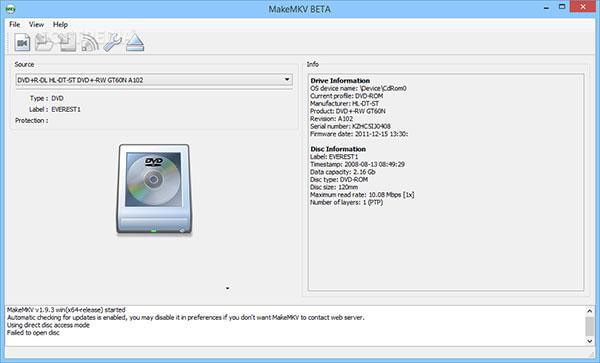
MakeMKV is a free DVD Ripper app with two versions compatible with Windows and macOS. This app rips your DVD or Blu-ray disc and converts it to an MKV file. You cannot play the MKV file in Apple’s apps – iTunes, or on an iOS device – but you can use the file as a source to convert to other video formats. MakeMKV is your one-click solution for converting your DVDs into free, patent-unencumbered formats that play everywhere.
With this free DVD Ripping software, you can convert video clips from proprietary (and usually encrypted) DVD/Blu-ray discs into a set of MKV files, preserving most of the information without changing it. The MKV format can store multiple video/audio tracks with all meta-information and preserve chapters.
If you want an absolutely free-to-use version of MakeMKV, the program's beta is available for free on their official forum. Simply look for the Current Beta Key. This version of the software is an excellent free solution as it also offers lossless ripping.
However, make sure to save a lot of storage space when using MakeMKV, since ripped DVDs may exceed 30GB in size. As such, it is recommended to compress the raw video immediately to save space.
Windows, Mac OS X, and Linux
High-quality ripping of both DVDs and Blu-ray discs to MKV format.
Output option has MKV format only
Pros
- Free while in beta
- Available for decryption
- No quality loss
Cons
- No GPU acceleration
- The free beta version only lasts for 30 days
Our Testing Notes: MakeMKV Beta is actually considered excellent freeware. If you only want raw DVD ripping, the software's beta version may be enough for you.
4. Blu-ray Master Free DVD Ripper (Windows) - Best for Compatibility
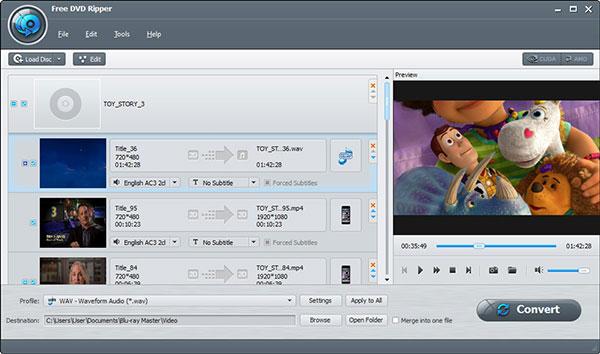
Blu-ray Master Free DVD Ripper is one of the best free DVD ripper software programs, compatible with Windows 10/8.1 and macOS 10.12 or later. It can rip any DVD/folder/IFO files to popular video formats such as MP4, AVI, MOV, MKV, M4V, WMV, FLV, MPEG, and more. You are allowed to extract the audio file from a DVD movie and save it as MP3, AAC, ALAC, FLAC, M4A, WAV, and other formats. It has a clear interface, and the DVD information will be displayed on it, allowing you to choose the subtitles and audio tracks you want to convert.
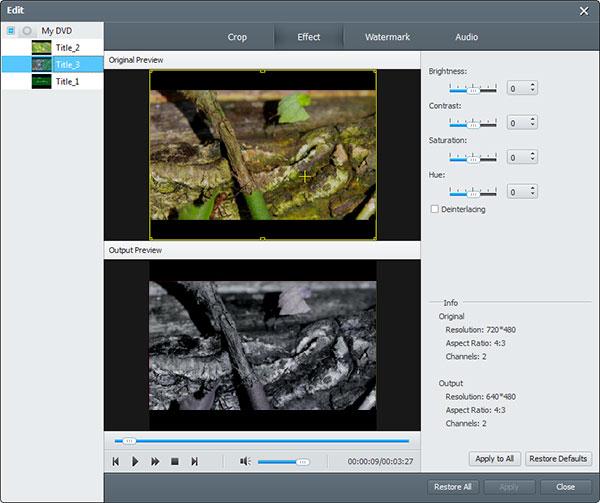
With this free DVD ripper tool, you can adjust the display settings to change brightness, contrast, saturation, and hue. Enable the watermark by adding text or pictures. After converting, you can enjoy your ripped DVD videos for free on digital devices like iPhone, iPad, iPod, Samsung, HTC, LG, Huawei, and more.
Moreover, the software was designed to become one of the best DVD ripping tools in 2026, as it is optimized for both Windows 11 and macOS Sequoia. This greatly improves DVD ripping efficiency, as it fully supports the program's one-click workflow to easily load DVDs, select a format, and convert them digitally.
Finally, users who plan to use Blu-ray Master Free DVD Ripper will enjoy a 100% clean, safe interface, as it was designed to be ad-free and secure in handling data.
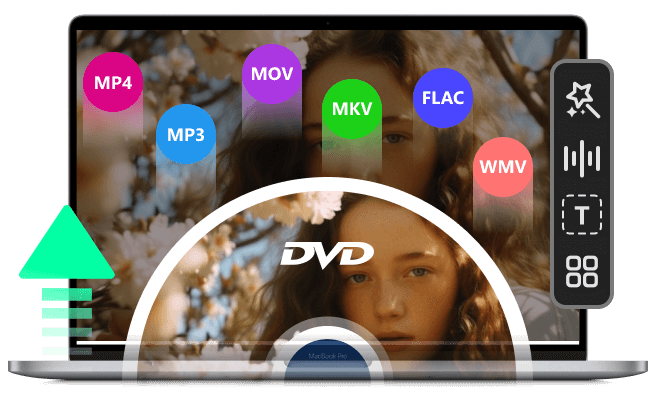
- Easily rip any DVD/folder/IFO files to video formats.
- Support multiple video/audio formats like MP4, AVI, MOV, MKV, M4V, WMV, FLV, MPEG, MP3, AAC, ALAC, FLAC, M4A, WAV, and more.
- Work as the ISO Player to rip the ISO files for easy playback.
- Edit DVD videos by cropping, adjusting effects, adding watermarks, and more.
- Easy to use and super high DVD-ripping quality.
Free Download
For Windows
Secure Download
Free Download
for macOS
Secure Download

Windows
Users seeking basic video editing features, audio extraction, and DVD ripping to popular video formats
Limited editing tools and supports fewer formats compared to the DVD Ripper Pro.
Pros
- User-friendly interface
- Edit and preview DVDs for free
- Preserve DVD movie quality while ensuring fast speed
Cons
- Only available on Windows
Our Testing Notes: During our test with a Disney-encrypted DVD, we found HandBrake and other HandBrake-powered software required libdvdcss, while Blu-ray Master handled it natively.
5. AnyMP4 DVD Ripper (Mac) - Best for Beginner-Friendly Editing
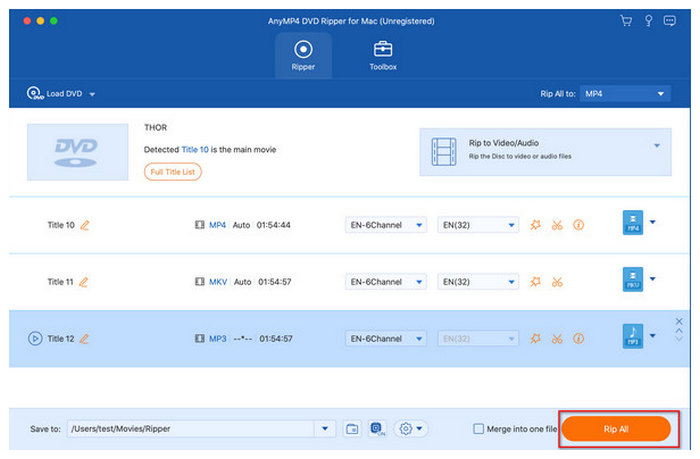
AnyMP4 DVD Ripper, the first-rank free DVD ripping software for Mac users, rips DVDs to popular video formats such as MP4, AVI, M4V, MOV, MKV, WMV, and FLV, and even HD videos, with ultra-fast ripping speed and super-high video quality. If you are not satisfied with the visual effect, you can adjust the brightness, saturation, hue, etc. To protect the privacy of your video, you can add watermarks as text or images. Also, you can change the video resolution, video/audio bitrate, and other settings to adjust the ultimate size of the ripped files.
This freeware is equipped with many creative and practical editing features to customize the output video. With this all-in-one free DVD ripper app, it’s very easy to adjust the video effect and trim the video.
It is also designed to be fully optimized for Mac, with native support for modern M1/M2/M3/M4 chips for faster, more effective encoding. For external optical drives, it also supports the Apple SuperDrive and even third-party USB-C DVD drives.
Windows/Mac
Those who prefer DVD ripping with editing features
Limited editing tools and formats in the free version
Pros
- Mac Compatibility
- Fast ripping speed
- Basic video editing
Cons
- Rip homemade DVD only
- Available only on Mac
Our Testing Notes: Among the options on this list for Mac computers, AnyMP4 DVD Ripper performed best when used with modern M4 and M5 chips.
6. WinX DVD Ripper (Windows/Mac) - Best for Beginners
Winx DVD Ripper Free Edition is excellent DVD-ripping software that helps you rip DVDs to MP4, AVI, WMV, FLV, MOV, MPEG, H.264, MP3, and more. It can remove DVD CSS, UOP, RCE, region code, Paramount, and Warner, as its paid version does. Thus, you can back up DVDs to a computer hard drive for better storage and convert DVD movies to iTunes, iPhone, iPad, Apple TV, Android, Samsung, HTC, PSP, etc.
Unfortunately, all these features are only fully accessible once you upgrade to their paid version. If you plan to use the Free Edition, you will have a hard cap of only 5 minutes per video.
Despite the duration limits, you may still enjoy the program's level-3 hardware acceleration system and its strength in reading heavily encrypted discs.
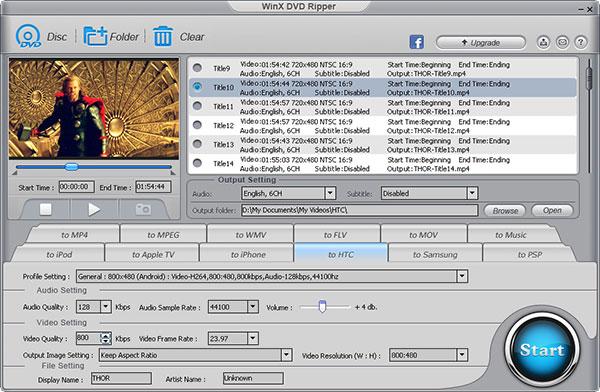
Besides, WinX DVD Ripper for Mac is designed for Mac users and offers the same functions as the Windows version. With advanced quality-maintaining technology, this free DVD Ripper software brings you perfect video/audio effects without loss of quality.
Windows/Mac
One who needs to rip bulk DVD collections and prefers popular output formats like MP4, AVI, MOV, MKV, etc.
5-minute DVD ripping on the trial version
Pros
- User-friendly interface
- Wide format support
- Quality preservation
Cons
- Doesn’t support Blu-ray or CD ripping
Our Testing Notes: Although it is limited to 5-minute ripping, the free version of WinX DVD Ripper for Mac operates in its full feature within that duration limit. It is enough for short video editing.
7. DVDFab DVD Ripper (Windows/Mac) - Best for Ripping Encrypted Content
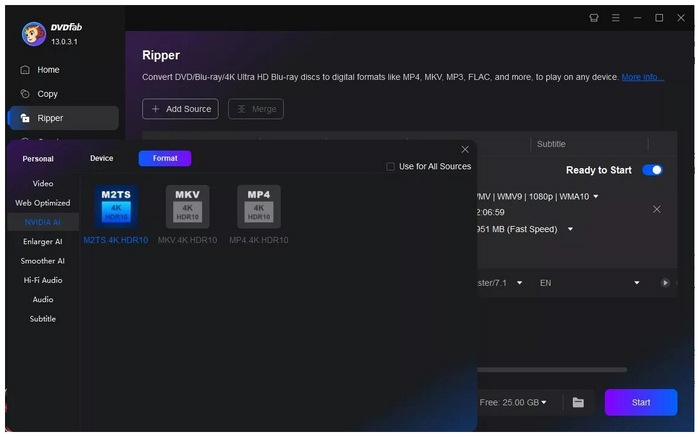
Among the options on this list, DVDFab DVD Ripper offers the best encryption-ripping features, even in its limited free version. This makes it a perfect tool for users who want to convert their old DVD media into a digital copy. The program’s capacity to extract the main movie or the full disc is top-notch.
However, remember that its free version has severely limited features, and the ad presence in the program may be too pushy for users to buy its paid plans. With that in mind, this program may be enough for basic conversion, but its premium plans are still required to use it for regular DVD ripping.
Windows, Mac OS X
Ripping copy-protected DVDs with hard encryption.
The free version has a ripping cap and a 30-day free usage limit.
Pros
- Strong DRM removal
- Fast GPU acceleration
- AI upscaling + 4K output
Cons
- Expensive paid plans.
- Requires internet for full features.
- Errors are commonly reported.
Our Testing Notes: If you need a one-off solution to convert DVD media to digital, the free version of DVDFab is a reliable option.
8. Leawo DVD Ripper (Windows/Mac) - Best for Editing Ripped DVD Media
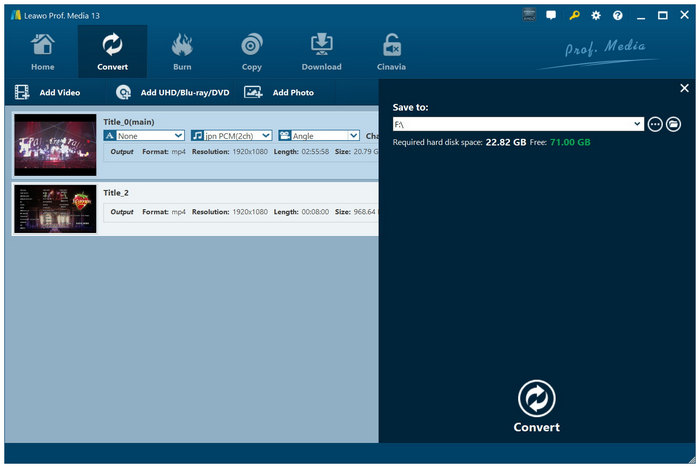
Unlike the other programs on this list, Leawo DVD Ripper is a feature inside the Leawo Multimedia Software. This design makes ripped DVD data available to access more advanced media tools. This includes Leawo's video editor option.
With that in mind, this makes the program an excellent choice if you want to apply video-editing adjustments to your DVD media after it has been ripped and before converting it digitally. Leawo may be an alternative to AnyMP4 Video Converter Ultimate.
Windows, Mac OS X
All-in-one video editing and DVD ripping.
High system requirements.
Pros
- 180+ formats supported.
- Built-in video editor.
- Handles region codes & DRM.
Cons
- Cluttered interface.
- High system requirements.
Our Testing Notes: For users who want maximum versatility, Leawo DVD Ripper is a good choice. Aside from its editing tool, the program's other multimedia features may also be used to rip DVDs.
9. VidCoder (Windows) - Best for Ripping Encrypted DVDs for Free
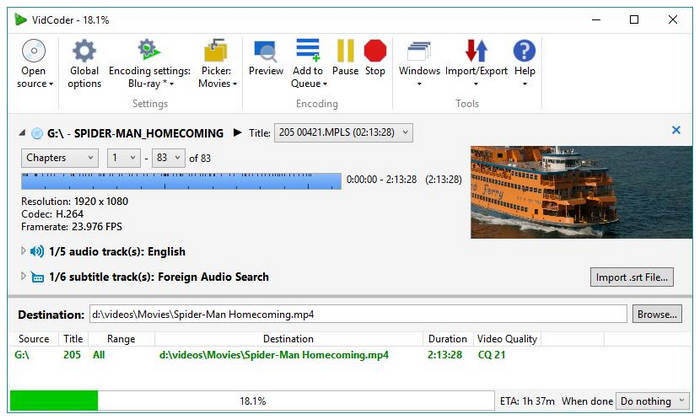
Since DVDFab DVD Ripper is essentially a paid software, VidCoder is an excellent alternative if you want to rip encrypted DVDs using a genuine freeware tool. Although it offers only MKV and MP4 as output formats, these are good enough for users who want raw video or a compressed version.
However, beware of using VidCoder to handle large digital media files, as a common concern among users is its stability issues. It is also limited to Windows PCs.
Windows
Ripping encrypted DVD content for free.
Limited output formats only for MKV and MP4.
Pros
- Free & open-source.
- Uses a high-quality encoding engine.
- Batch processing.
Cons
- Occasional stability issues.
- Limited to Windows.
Our Testing Notes: Aside from its encryption-breaching features, VidCoder also excels in producing high-quality encoded videos.
10. FFmpeg (Windows/Mac/Linux) - Best for Command-Based File Management
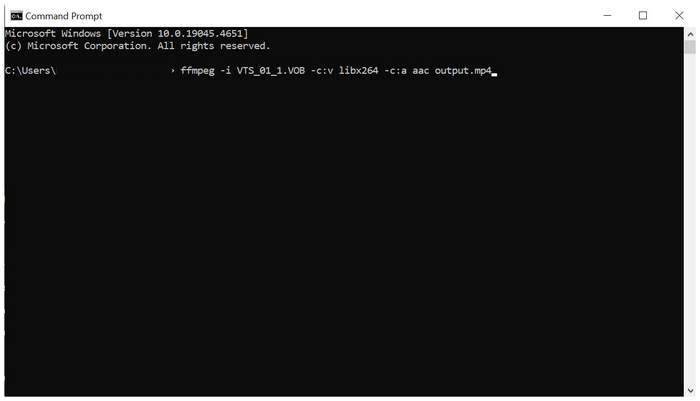
Finally, we will feature the best option on this list for performance and multimedia editing with the command-line tool FFmpeg. Unlike the other programs on this list, this software lacks any GUI or interface. It is 100% command-based. However, it is also the most versatile since you can apply anything to your video file using the right commands.
Unfortunately, the extremely steep learning curve of using FFmpeg makes it a poor choice for beginners, intermediates, and even experienced multimedia editors.
Windows, Mac OS X, Linux
Advanced video ripping and file management automation.
It cannot access DVDs with strong encryption.
Pros
- Completely free & open-source.
- Extremely powerful and flexible.
- Supports almost all codecs/formats.
Cons
- No GUI (command-line only).
- Steep learning curve.
- Very high technical requirements to use effectively.
Our Testing Notes: Although FFmpeg is technically limitless, its steep command-based requirements make it very limiting for beginner to intermediate users. However, if you are used to commands, it is the most powerful tool in this article.
Part 3. Comparison of the Top 10 Free DVD Rippers
| Tool Name | Decrypt DVD Copy Protection | Ease of Use | Ripping Speed(A DVD of 2GB) | Editing Features (Basic) | Batch Ripping | No Watermarks |
| HandBrake |  | 59 mins |  (Crop, Resize, Filters, Chapter selection) (Crop, Resize, Filters, Chapter selection) | | | |
| VLC Media Player | | 65 mins | Limited (Can select title/chapter, audio track) | | | |
| MakeMKV | | 35 mins | (Only rips, no editing) | | | |
| Blu-ray Master Free DVD Ripper | | 32 mins | (Trim, Crop, Merge, Adjust effects) | | | |
| AnyMP4 DVD Ripper (Mac) | Limited | 39 mins | (Clip, Merge, Crop, Adjust effects, Watermark) | | | |
| WinX DVD Ripper (Platinum) | | 37 mins | (Crop, Trim, Merge, Add Subtitles) | | | |
| DVDFab DVD Ripper | | 32 mins | (Crop, trim, merge, subtitles, watermark) | | | |
| Leawo DVD Ripper | | 37 mins | (Trim, crop, merge, watermark, effects) | | | |
| VidCoder | | 43 mins | Limited (Mostly encoding options) | (Limited) | | |
| FFmpeg | | 65 mins | (None, completely reliant on commands) | (Limited) | |
Part 4. How to Rip a DVD for Free
Here are steps to rip a DVD on Windows 10/8/7 with the No. 1 free DVD Ripper.
Download and install the program
First, insert a DVD into the DVD drive. Now you can download and install the free DVD Converter, and then launch the program to open the main interface.
Load the DVD and choose the output format
Click the Load Disc button to load the DVD or folder you want to rip to the list in the main interface. and then click the Profile drop-down list to open the Profile window and select the needed output format for the DVD movie.
Edit DVD with multiple editing features
Click the Edit button to open the Edit window. You can crop the video frame, adjust video effects like video brightness, saturation, hue, and contrast, and add a text/image watermark to the video.
Start to convert DVD to video
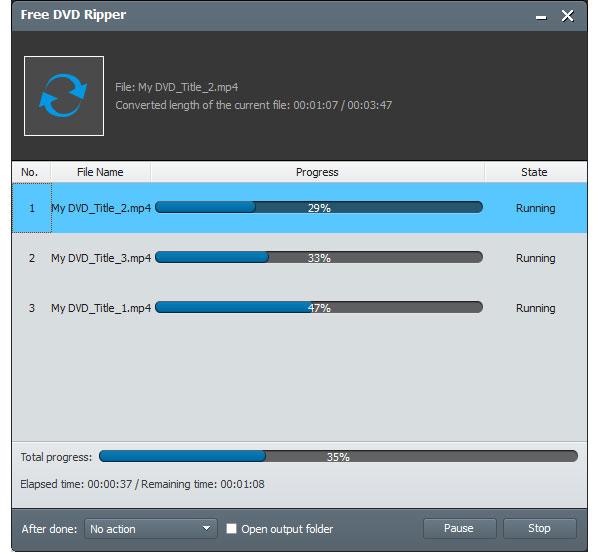
The last step is to click the Convert button to rip the DVD to your selected video format. The ripping process will be completed within a few minutes.
Part 5. FAQs of Free DVD Ripper Software
-
How can I rip a DVD on Windows 10?
If you are running Windows 10, you can first run Blu-ray Master Free DVD Ripper. Then, click Load Disc to load the DVD into the program. Click Profile to select the output file format. After that, you can click Convert to start ripping DVDs on Windows.
-
How can I rip a DVD to PC on Windows 7 for free?
Blu-ray Master Free DVD Ripper is a free DVD ripping tool. It is compatible with Windows 11/10/8.1/8/7/Vista/XP. If you are running Windows 7, you can also use this free DVD ripper, following the same steps as in Question 1, to rip a DVD for free.
-
How to rip a DVD with HandBrake?
HandBrake is a free and open-source DVD-ripping software. You can rip DVDs with HandBrake for free. Just load the DVD you want to rip into HandBrake. Then, choose the title you want to rip and choose the output format. After that, click Start to begin ripping the DVD with HandBrake.
-
Can I rip a DVD with a Windows Media Player?
Windows Media Player supports many popular video, DVD, and CD playback. You are allowed to rip DVDs with Windows Media Player on Windows 10/8/7.
-
Which free DVD ripper removes Cinavia protection?
Among the options in this article, DVDFab and HandBrake can breach Cinavia protection. DVDFab has an exclusive feature. Meanwhile, HandBrake breaches Cinavia protection with libdvdcss installed.
-
What is the best free DVD ripper for Windows 11 that can bypass copy protection?
HandBrake and Blu-ray Master are two excellent choices for this. HandBrake and tools that use it as an engine may bypass copy protection with libdvdcss. Meanwhile, Blu-ray Master can breach protection natively.
-
Is HandBrake still the best free DVD ripper in 2025, or is there something faster?
For fast DVD ripping, HandBrake is still one of the fastest options. However, it is not the fastest. Both Blu-ray Master and AnyMP4 Video Converter Ultimate are faster than HandBrake due to their hardware acceleration.
-
How do I convert a DVD to MP4 for free without losing quality?
You need to use lossless converters. Some examples include Blu-ray Master and AnyMP4 Video Converter Ultimate. However, quality loss is a natural effect when converting DVDs, but the intensity of quality loss is the one you should consider when choosing converter tools.
-
Can MakeMKV rip encrypted Disney DVDs for free?
Yes, it can. MakeMKV can breach encrypted Disney releases. Both its regular version and MakeMKV beta can do this.
Conclusion
In conclusion, these top 10 free DVD ripper software options for Windows and Mac offer a range of choices for ripping DVDs to video formats. Each software has its strengths, and you can select the one that best fits your specific needs, whether it’s for preserving your DVD collection, enjoying movies on portable devices, or saving storage space. The variety of options ensures you can find the best software for DVD ripping.
More from Blu-ray Master
Top-rated DVD Ripper

Fast and free ripping software to decrypt all DVDs to digital easily on your computer.
100% Secure. No virus
