

Nov 04, 2025Posted by Kevin Miller to Edit Video
We have encountered users who want to know how to upscale DVDs. Unlike regular videos nowadays, DVD videos, especially the old ones, are more challenging to upgrade. It is because of the older video elements that they have that make them fragile to upscale. The first thing to remember in upscaling is transforming low-resolution videos into higher ones. It is not an easy process in the first place, for it needs an interpolation algorithm that will fill the video with the required pixels. But we have good news for you because this problem is no longer a reason to fret. Why? Because we have found the most effective ways to upgrade your DVD home videos to the latest resolutions you are enjoying now, such as 1080p. So, let's not delay this any longer and immediately proceed to the solutions on how to upscale DVD to 1080p below.

- Part 1. What Is DVD Upscaling
- Part 2. Upscale DVDs with Blu-ray Master Free DVD Ripper
- Part 3. Enhance DVD Quality with EaseFab DVD Ripper
- Part 4. Upscale DVDs with Leawo DVD Ripper
- Part 5. FAQs on How to Upscale Homemade DVDs
| Best for | |
| Blu-ray Master Free DVD Ripper | Free and beginner-friendly DVD upscaling |
| EaseFab DVD Ripper | High-quality upscaling with advanced customization |
| Leawo DVD Ripper | Format versatility and device compatibility |
Part 1. What Is DVD Upscaling
DVD upscaling is a technique used to improve the resolution of standard-definition video from DVDs, usually 480p or 576p, so it looks better on modern HD or 4K TVs. Since today’s screens have way more pixels than DVDs were designed for, upscaling helps avoid a fuzzy or blocky image when the video is stretched to fit.
To upscale DVDs, one easy method is to use the DVD ripping tools to convert and upscale DVD videos to high-quality digital files, which allow you to enjoy your DVD collections in big TV screens. Read on to know how to use 3 easy tools to improve your DVD video qualities in detail.
Part 2. Upscale DVDs with Blu-ray Master Free DVD Ripper
Blu-ray Master Free DVD Ripper is a powerful DVD ripping software that you can upscale DVDs to high-quality digital files. You can load various DVD types and select the DVD titles and audio tracks you want to maintain. It provides a wide range of video output profiles, such as 4K MP4, Lossless MKV, and others. It efficiently works to maintain the quality of your DVDs even after the ripping process. It rips and works fast due to the acceleration technology that it possesses. Furthermore, it makes you enjoy an AI-powered procedure for upscaling your DVDs that can enhance your videos in no time!
Key Features
• Rip DVDs losslessly and quickly.
• Support numerous video outputs for your DVDs.
• Various editing tools to adjust DVD video effects, like filters, watermarks, etc.
• Powerful advanced technologies will process your videos.
Free Download
For Windows
Secure Download
Free Download
for macOS
Secure Download
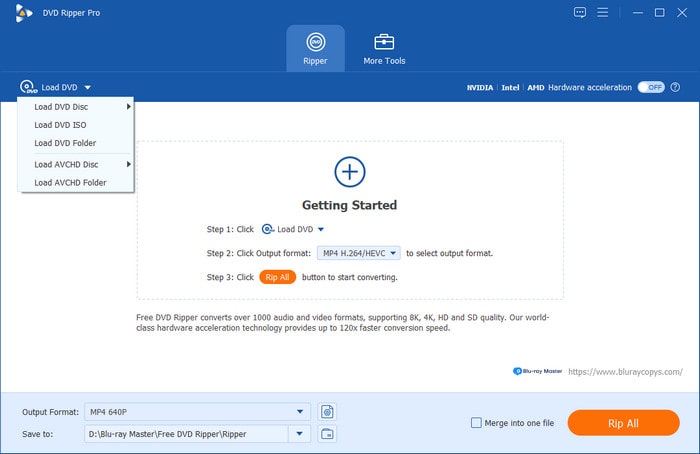
Step 1.Download , install, and launch the Blu-ray Master Free DVD Ripper. Click the Load DVD tab. Then, choose however you upload your DVD video.
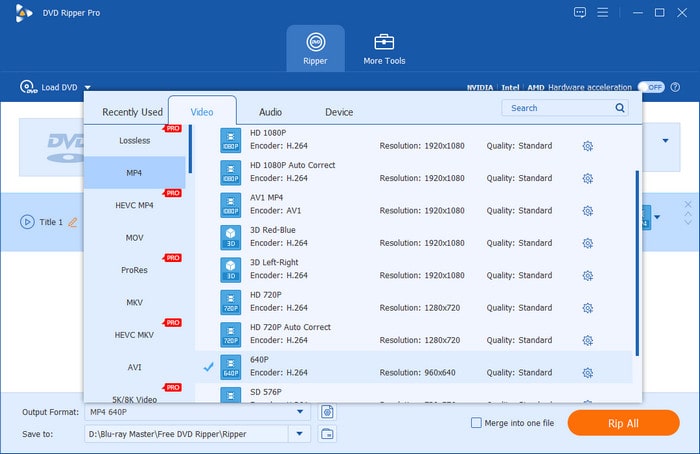
Step 2.After loading the DVD video, go to the Output Format option and choose the 4K MP4 option as your output format. Moreover, you can choose the gear icon to customize output parameters, including resolution.
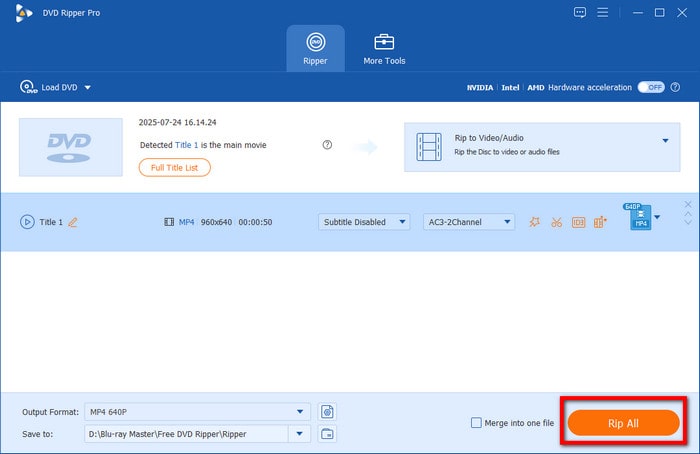
Step 3.Lastly, click the Rip All orange button at the bottom right part of the interface to start the DVD upscaling process.
Part 3. Enhance DVD Quality with EaseFab DVD Ripper
Another amazing software that you must watch out for is this EaseFab DVD Ripper. It is the secondary third-party software that holds powerful yet easy-to-use navigation. Furthermore, it maximizes the quality of your DVD output after quickly ripping it into various formats like MP4, AVI, HEVC, WMV, etc. It works with a deep edge refinement algorithm that makes the edges and residual lines fine and thin. Therefore, this DVD upscaling PC software is something that deserves to know. However, EaseFab DVD Ripper has limited features and options compared with Video Converter Ultimate. Nevertheless, if you want to try its power, follow the instructions below.
Step 1.Launch the tool, and click the Load DVD button to import the DVD video file.
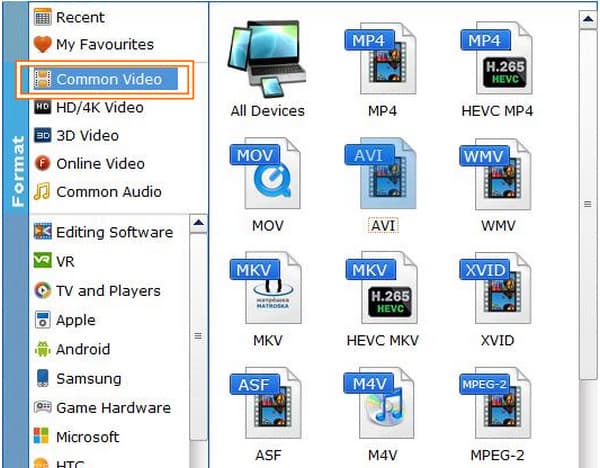
Step 2.After that, choose an output format from ripping. To do so, click the Profile tab and choose among the format choices in the Common Video option.
Step 3.After choosing the format, it will direct you to the upscale setting. Here, you need to click the Resolution, choose the 1920*1080 option, and then hit the OK tab. This will give the result of this DVD upscaling software to 1080p video.
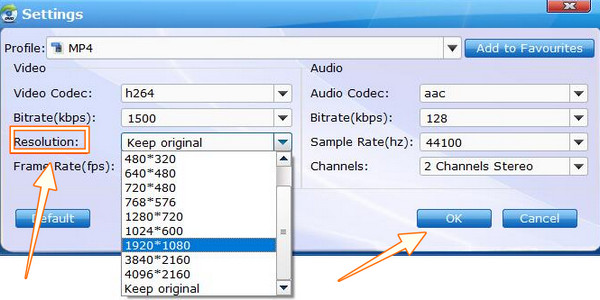
Step 4.Finally, hit the Convert button on the main interface and wait for the process to finish.
Part 4. Upscale DVDs with Leawo DVD Ripper
Finally, we have this Leawo DVD Ripper. As its name suggests, it is another DVD-ripping software that is capable of upscaling your video efficiently. Leawo DVD Ripper is a cross-platform software like Video Converter Ultimate, and aside from ripping DVDs, it also has the tools to rip Blu-rays and a video converter that claims to provide a free service for a lifetime. This software can convert your DVD videos into HD with various output formats and devices, including AVI, MKV, MP4, Android, and iPhone. However, since it's a DVD ripper, its capability to enhance and fix videos is limited. Thus, let us see how this DVD upscaling software works for this task.
Step 1.Open the tool, and click the DVD ripper or the Convert button to load the DVD file.
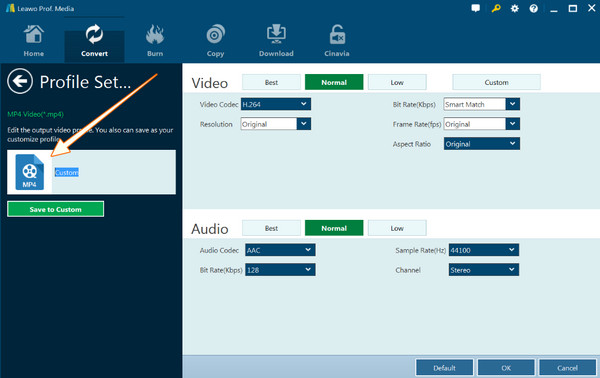
Step 2.Once the DVD file is in, go to the Format-HD Video section and choose the HD MP4 Video option. Then, click the Edit tab and select 1080p resolution.
Step 3.Finally, hit the Convert tab to start ripping.
Part 5. FAQs on How to Upscale Homemade DVDs
-
Can I upscale my homemade DVDs on my PS4?
Yes. You can try upscaling your DVD with your PS4 since it also supports playback. However, it cannot give you a better result than you wish since it is not its line of the field.
-
Why does my DVD video look bad on a 4K TV?
This might be because you are playing an old DVD video with a lower resolution. If you want to have a good display on your 4K TV, you must play an equivalent resolution that fits the aspect ratio of the TV screen.
-
Will it take time to rip and upscale DVDs?
No, if you use a practical DVD ripper and upgrader, just Video Converter Ultimate.
Conclusion
DVD Upscaling will never be a problem if you use the amazing software in this article. As you see, all of them are perfect for the task and show the efficiency we were looking for. Among them, Blu-ray Master Free DVD Ripper stands out due to its lossless result in outputs.
More from Blu-ray Master
Rip DVDs to Digital
