Quick Guide to Free DVD Ripper

Easily convert DVDs to multiple digital formats, like MP4, MKV, MOV, AVI, AAC, FLAC, etc., without losing DVD quality. Get your DVD digital backups within several clicks.

User Guide
Tips & Tricks
  • 01

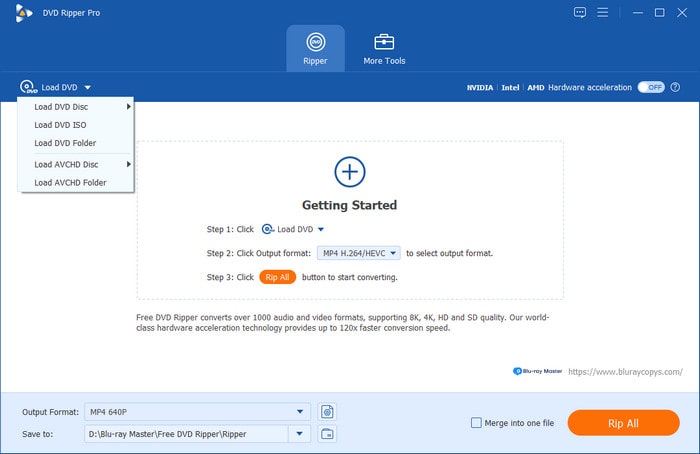
    Launch the Software and Open the DVD

    After opening the software, click Load DVD and choose one option from Load DVD Disc, Load DVD ISO, and Load DVD Folder in its drop-down options.

  • 02

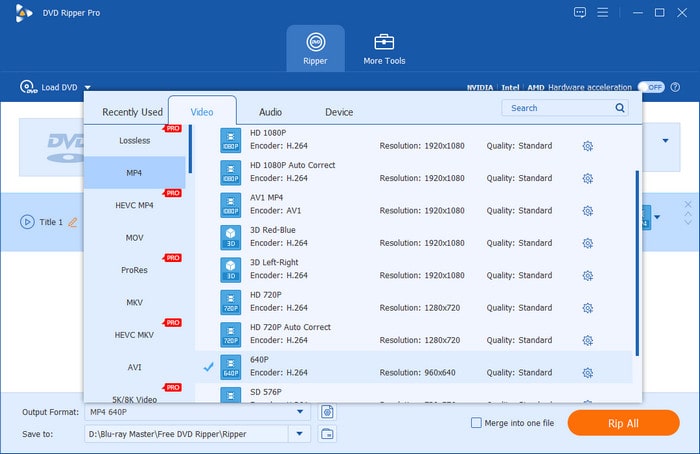
    Choose One Desired Output Format

    Click ‘Output Format’ to open its drop-down list, and there are multiple digital profiles for you to choose from. You can also quickly locate one specific format by the search bar.

  • 03

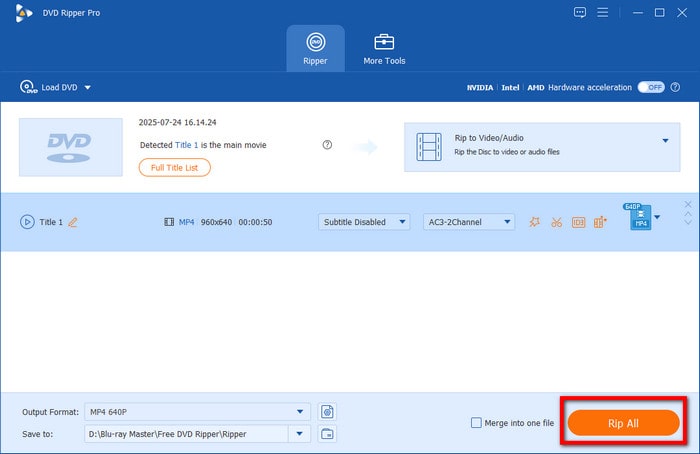
    Set Destination and Start Conversion

    Choose a destination for the resulting DVD file by clicking the folder icon, and click ‘Rip All’ to export the ripped file.

Step
Step
Step
Check detailed tutorial here

Free Vs Pro Version

Free DVD Ripper DVD Ripper
Rip DVD types DVD Disc (DVD 5, DVD 9, DVD ROM, DVD±R, DVD±RW) DVD Folder, DVD IFO Files Any DVD types (DVD±R SL/DL, DVD±R/RW/RAW, etc.)
Support AVCHD Disc/ DVD_RTAV Folder input format Yes Yes
Rip workout/ protected DVD Yes Yes
Rip 99-title DVD Yes Yes
Supported output formats 200+ 500+
Rip DVD to HD video No Yes
Rip DVD to 4K video Yes Yes
Back up DVDs to the ISO image and folder No Yes
Editing Features No Yes
GPU acceleration NVIDIA, AMD, Hardware acceleration, CUDA acceleration NVIDIA, AMD, Intel, Hardware acceleration, CUDA acceleration
GPU Acceleration No Yes
De-interlacing technology No Yes
De-Content Scrambling System (DeCSS) technology Yes Yes