

Jul 16, 2025Posted by Kevin Miller to Rip DVD
MPEG can be a great target format when you want to convert DVD and copy DVD to HDD without violating local copyright. There are lots of free and paid DVD to MPEG-2 converters offered on the internet claiming that they can help you rip DVD to MPEG-2 with ease. However, many users complain that the DVD to MPEG converting process takes really long time. And in some cases, they get a quite low-quality output MPEG file.
The DVD to MPEG-2 conversion speed and output quality are affected by many aspects like the read speed of DVD drive, computer configuration, DVD ripper/converter software, and more. Here you can’t change the hardware factors. So it’s very important to select a suitable DVD to MPEG-2 converter. Here in this post, we like to share both free and professional tools to help you convert DVD to MPEG file with fast speed and high quality.

- Part 1. Why Convert DVD to MPEG
- Part 2. Convert DVD to MPEG Free with Blu-ray Master Free DVD Ripper
- Part 3. Rip DVD to MPEG Professionally with Blu-ray Master Video Converter Ultimate
- Part 4. Convert DVD to MPEG with HandBrake
- Part 5. More Information about MPEG-2 and MPEG-4
Part 1. Why Convert DVD to MPEG
Why do you need to convert DVDs to MPEG? The main purpose of converting DVD to MPEG (or MPG, as it is commonly called) is to increase the accessibility and adaptability of DVD material. Since DVDs are a physical format, converting them to MPEG, a digital video format, enables editing, easy sharing, and playback on a larger variety of devices. Before converting DVDs to MPEG, let's have a clear understanding of MPEG.
MPEG is an expert organization that creates standards for digital audio, video, 3D graphics, and genetic data encoding. These standards aid in the development of effective methods for multimedia content representation and compression.
Essential Standards:
MPEG-1: Video CDs frequently employ MPEG-1, a technology for compressing VHS-quality video and CD-quality audio.
MPEG-2: A popular standard for high-definition television, digital television, and DVD formats. It is the foundation of the majority of DVD and digital television formats.
MPEG-4: A range of profiles and methods for compressing and encoding audio and video data are included in the MPEG-4 standard, which also supports interactive multimedia applications and streaming video.
Part 2. Convert DVD to MPEG Free with Blu-ray Master Free DVD Ripper
By converting DVD to MPEG, you can handily extract the videos from your DVDs and save them into .mpg container files without noticeably reducing quality. In this part, we would like to show you how to convert DVDs to MPEG free.
Here we recommend the Blu-ray Master Free DVD Ripper to help you decrypt the DVD copy protections on your DVD disc and then simply copy the videos to MPEG files. When importing the DVD into the software, its full title list will show in the main interface, which allows you to select part of the DVD you want to retain. It can offer you a fast DVD to MPEG conversion speed. Besides MPEG, this free DVD converter also has the capability to rip DVD to MP4, MOV, AVI, FLV, MP3, and other video/audio formats based on your needs. You can freely download it and follow the guide below to make the DVD to MPEG conversion.
Free Download
For Windows
Secure Download
Free Download
for macOS
Secure Download
Step 1.First, you need to install and run this free DVD to MPEG converter on your computer. Then insert a DVD disc into the DVD drive.

Step 2.Click Load Disc to import DVD disc to this software. After loading, all media files in the DVD disc will be displayed clearly in the interface.
Note: You can also import DVD folder and IFO files in the Load Disc drop-down options.
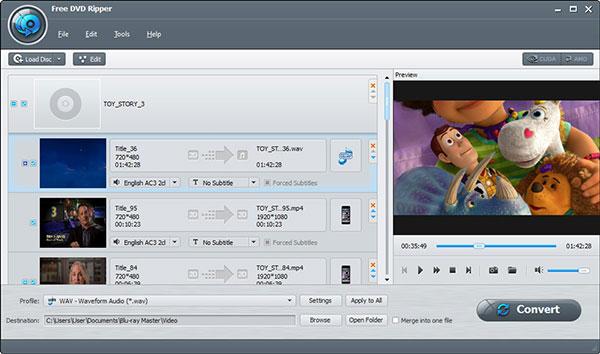
Step 3.Choose the specific movie(s) and then click the Profile option. Here you can select MPEG-2 format from the drop-down list of Profile.
Note: You can also select other MPEG-1, MPEG-4 options in the Profile.

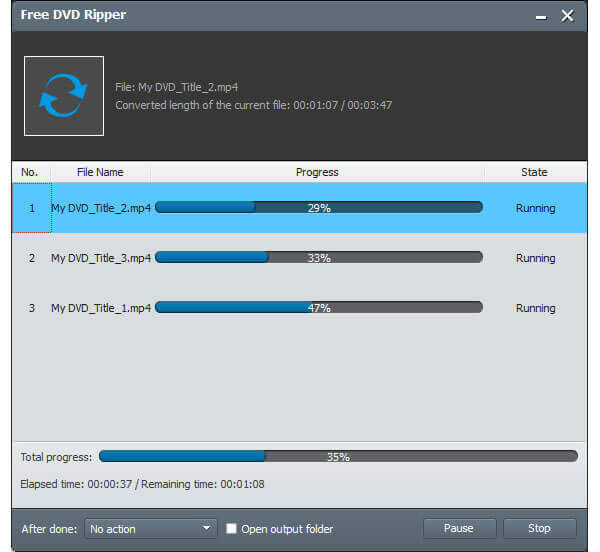
Step 4.Click the Convert button to start the conversion from DVD to MPEG-2. Besides MPEG-2, you can also rely on this free DVD ripper to convert DVD to MP4 with ease.
Part 3. Rip DVD to MPEG Professionally with Blu-ray Master Video Converter Ultimate
With the first method, you can freely convert DVDs to MPEG-2. If you want to get advanced features in DVD to MPEG conversion, you can choose the professional solution. Blu-ray Master Video Convert Ultimate is specially designed to convert DVD and MPEG files. With advanced customization features, you can manually set video parameters, like resolution, frame rate, bitrate, etc.
It enables you to rip DVDs with a super-fast speed and exactly the original image/sound quality. Moreover, it carries many frequently-used editing features for you to improve video output effects, like clip, crop, merge, adjust effects, enhance quality, watermark, 3D, and more.
Step 1.Click the download button above and then follow the instructions to quickly install this powerful DVD to MPEG converter on your computer. Then launch it and select the Ripper section on the top menu bar.

Step 2.Insert the DVD disc you want to rip. Then click Load DVD > Load DVD Disc to load the source DVD into the software for converting. After that, you can easily access all media files on your DVD.
Note: You can check the subtitles and audio tracks you want to convert in the main interface.

Step 3.Select MPEG-2 from the drop-down list of Output Format as the output format. Then click the Rip All button to start the DVD to MPEG-2 conversion.

As we mentioned above, this professional DVD ripper software is equipped with many useful editing features. Before you rip DVD disc, you can edit video and custom the output MPEG-2 video effects. Just click the "Edit" button, and you are allowed to use these editing functions. Compared with other free DVD ripper software, it can give you a faster converting speed. More importantly, it guarantees that there won't be any quality loss during the DVD conversion process. Just free download it and have a try.
Part 4. Convert DVD to MPEG with HandBrake
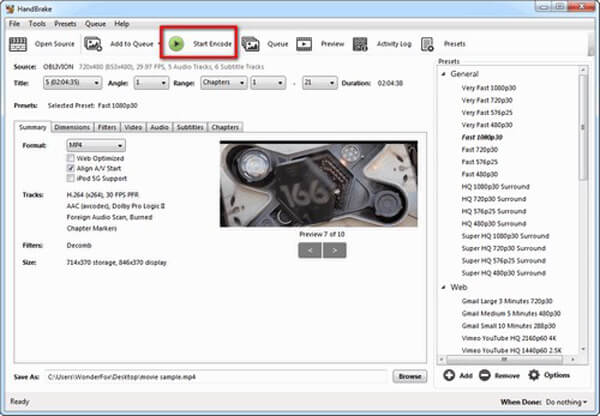
One more easy way to convert DVD to MPEG is to use HandBrake, which is a well-known converter for its free and open-source nature. It can load DVD discs, folders, and ISO files into the software and convert them to the MP4 format, which is part of the MPEG-4 standard. With the rich presets, you can easily select the desired output profile. It provides many advanced settings for you to adjust video, audio effects, and even subtitles.
Here is a quick DVD to MPEG guide using HandBrake.
Step 1.Download, install, and open HandBrake on your computer. Insert a DVD disc into your computer's optical drive.
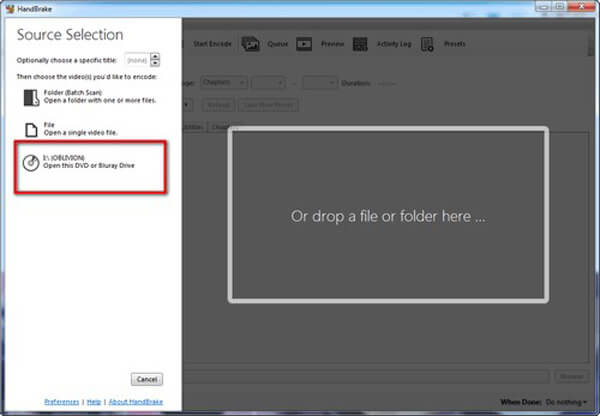
In Source Selection, select the scanned DVD disc to import it into the software.
Note: If you want to convert DVD folders or ISO images, you can choose the Folder or File options to import them in this area. You can click Open Source at the top left corner to open Source Slection.
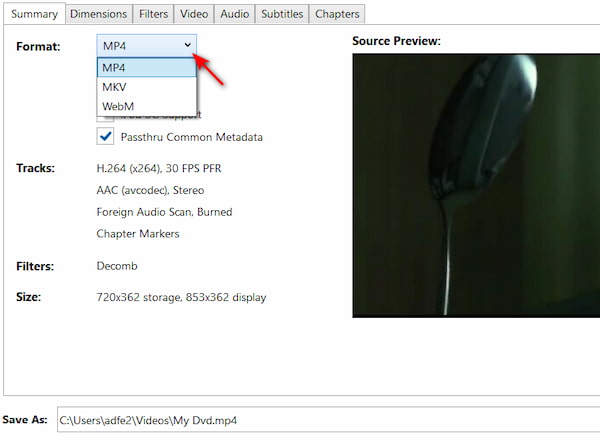
Step 2.After loading the DVD file, select MP4 as the output format in the Summary part.
Step 3.Click Browse at the bottom to set a download folder and click Start Encode at the top to start the DVD to MPEG conversion.
Part 5. More Information about MPEG-2 and MPEG-4
MPEG (Moving Picture Experts Group) is one of the most popular coding for mobile device and video players. It is formed by ISO and IEC to set standard for video and audio. MPEG-2 is the video format comprising only the main title of DVD, without any change in audio/video effect. Most standard DVD discs are encoded by MPEG-2 video. You should know that, MPG is the traditional container format used for MPEG-1 and MPEG-2 video standard.
It's quite convenient to convert DVD to MPEG-2. As it mentioned above, standard DVD is encoded by MPEG-2 video. You don't need to transcode DVD while the conversion from DVD to MPEG-2. So you can get a fast DVD to MPEG-2 converting speed. What's more, after ripping DVD to MPEG-2, the output video file will keep the original effect.
Compared with MPEG-2, MPEG-4 is a preferred format for more devices. It was developed much later than MPEG-2. Relatively speaking, MPEG-4 has more advantages that MPEG-2. It carries a smaller size than MPEG-2.
We mainly talked about how to convert DVD to MPEG-2 in this post. The DVD to MPEG-2 conversion is straightforward. The video and audio in DVD disc can be copied to a MPEG container with ease. By ripping DVD to MPEG-2, you can easily make a digital copy and watch it on your computer and portable iOS/Android device.
Wrapping up
Here are the 3 easy ways to convert DVDs to MPEG. With the intuitive steps and illustrations, you can easily get the quick methods to do this. Each method has its outstanding features. Blu-ray Master Free DVD Ripper is free and provides multiple MPEG profiles. Video Converter Ultimate can bypass almost all DVD copy protection to rip DVDs to the MPEG format. HandBrake offers rich presets and advanced features for DVD to MPEG-4 conversion.
More from Blu-ray Master
Rip DVDs to Digital

Fast and free ripping software to decrypt all DVDs to digital easily on your computer.
100% Secure. No virus
