

Jul 21, 2025Posted by Kevin Miller to Rip DVD
It is never too late to make a digital backup of your DVD collection. If you want to rip DVD to DivX or Xvid format, you just come to the right place. This article will show you 2 ways to rip DVD files with DivX or Xvid converter. DivX is a proprietary video codec, while Xvid is an open source format. Luckily, you can convert DVD files to DivX or Xvid format with the following 2 programs. Just continue reading to get more information about the DVD DivX ripper, or you can call it as DVD to Xvid ripper as well.
- Part 1. Rip DVD to DivX and Xvid with Blu-ray Master Free DVD Ripper
- Part 2. Convert DVD to DivX and Xvid with Blu-ray Master Video Converter Ultimate
- Part 3. Convert DVD to DivX and Xvid with WinX DVD Ripper
- Part 4. Which Is Your Best DVD to DivX and Xvid Ripper
Part 1. Rip DVD to DivX and Xvid with Blu-ray Master Free DVD Ripper
To extract DivX or Xvid video from DVDs for free, you should not miss Blu-ray Master Free DVD Ripper. Just as its name shows, you can convert DVD to Xvid open source for free on PC, as well as the DivX format. Moreover, it provides multiple profiles of different parameters, and you can even customize them to fit your needs, such as encoder, resolution, channel, bitrate, and others. This DVD to Xvid freeware is capable of ripping both commercial and non-commercial DVDs by decrypting DVD copy protection. You can rip DVD video and add a watermark to DVD Xvid and DivX files for free, too.
Features
1. Convert DVD to Xvid for free on PC with high output quality.
2. Convert DVD to DivX for free with all DVD encryptions.
3. Wide support of compatible DVD formats and encryption methods.
4. Safe, clean, and free to use.
Free Download
For Windows
Secure Download
Free Download
for macOS
Secure Download
Step 1.Run Free DVD Ripper. Put your DVD disc into the DVD drive. Then click Load Disc and select your inserted DVD to load DVD movies.
Note: You can directly enter DivX or Xvid into the search bar to quickly locate the formats.
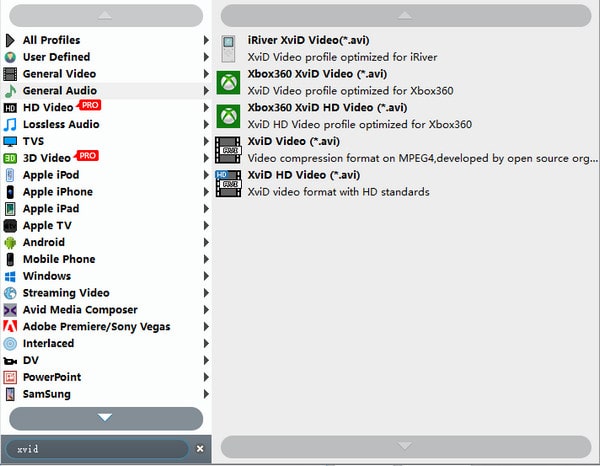
Step 2.Choose the DVD video you want to extract. From the Profile list, select Xvid or DivX as the output video format.
Note: You can directly enter DivX or Xvid into the search bar to quickly locate the formats.
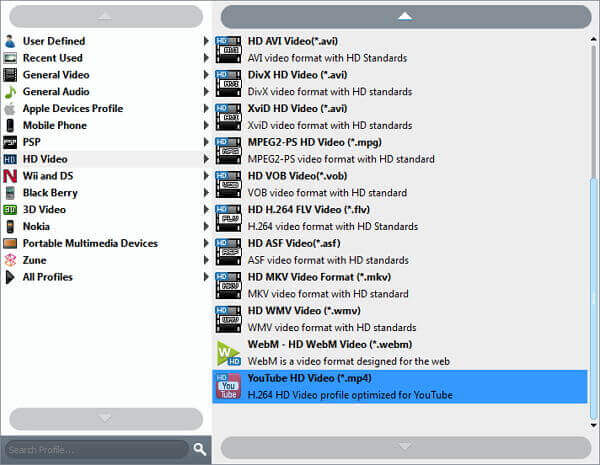
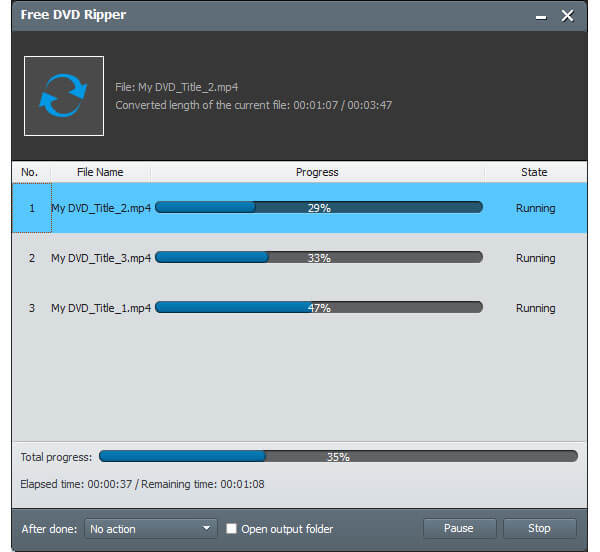
Step 3.You can click Settings to adjust output video and audio settings. At last, click Convert to rip DVD to Xvid or DivX for free.
Part 2. Convert DVD to DivX and Xvid with Blu-ray Master DVD Ripper
If you want to rip any DVD to DivX or Xvid format, Blu-ray Master Video Converter Ultimate can also be a good choice. It has a professional Ripper section that can decrypt DVDs and save video in any format without quality loss, including DivX and Xvid. It allows you to load DVD discs, folders, and ISO image files into the software and convert them. The built-in video editor can help you edit DVDs easily. You can crop, clip, merge, rotate, enhance video quality, adjust video effects, and apply more DVD video editing features.
Generally speaking, Blu-ray Master Video Converter Ultimate is excellent in its ripping speed. You can convert DVDs to DivX in one stop. Moreover, you can rip DVD files as 4K/HD/3D video formats and many other phones and tablets directly. As for DVD to DivX or DVD to Xvid conversion, you can complete the entire process without any other third-party programs.
Features
1. Rip all encrypted DVD to DivX or Xvid with the original audiovisual quality.
2. Add external audio track or subtitle to DVD DivX/Xvid video.
3. Superfast DVD ripping speed and batch conversion support.
4. Edit DVD movies with powerful video editing tools and a real-time preview window.
5. Convert DVD to DivX on Mac OS X 10.7 or above and Windows 10/8.1/8/7/Vista/XP.
Free Download
For Windows
Secure Download
Free Download
for macOS
Secure Download
Step 1.Launch Blu-ray Master Video Converter Ultimate. Insert the DVD disc. Choose the Ripper section on the top menu bar and click Load DVD to add DVD movies.
Note: You can choose a conversion format from the Main Title or Full Title List options in the pop-up window.
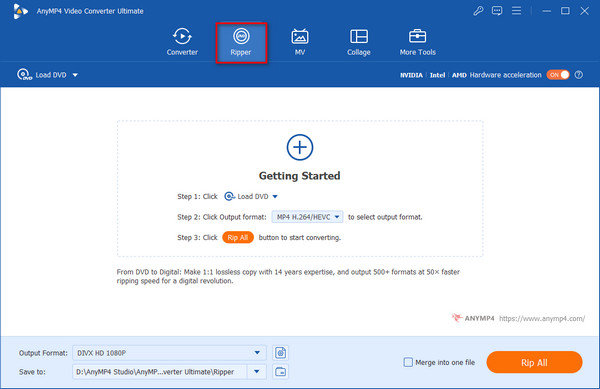
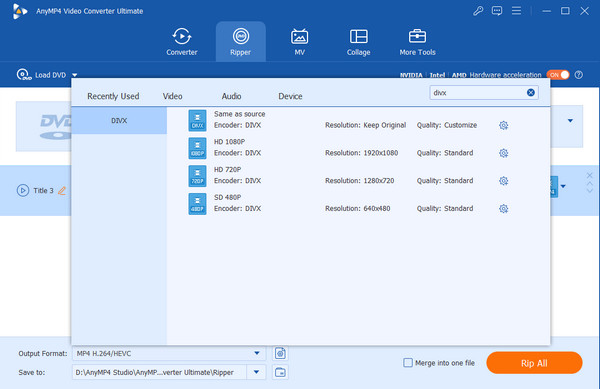
Step 2.Open the Output Format list near the bottom. Search for DivX/Xvid format directly. You can click the gear icon to adjust video resolution, frame rate, and more settings.
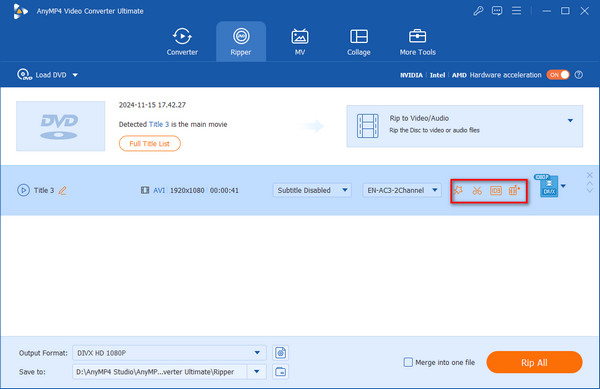
Step 3.Click the magic wand, scissors and other icons to edit DVD video. No matter you rotate, crop, clip, add watermark or apply other video effects, you can monitor all changes in the preview window immediately within this tool.
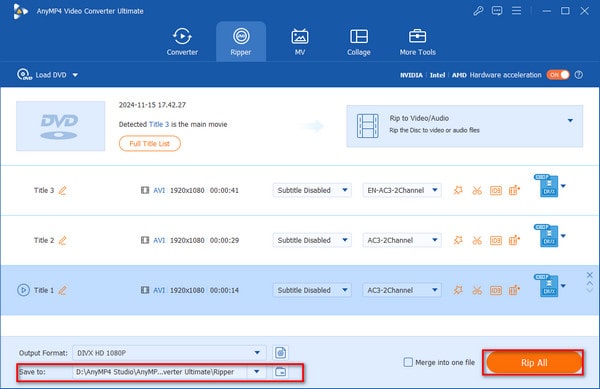
Step 4.Click the folder icon next to Save to option to change the destination folder. Later, you can click Rip All to convert DVD to Xvid or DivX with original quality.
Part 3. Convert DVD to DivX and Xvid with WinX DVD Ripper Platinum
WinX DVD Ripper Platinum is the pro version of WinX DVD Ripper, which is one of the top-rated DVD conversion tools that provides a clear interface. It offers a wide range of output profiles, and DivX is one of them. Both commercial and homemade DVDs are supported for conversion, including those with security systems like Sony ARccOS, CSS, region code, or RCE. Moreover, if you have some old, scratched, and damaged DVDs, it is also capable of handling them with ease. This DVD ripper has outperformed 95% of competitors because of its unparalleled speed, ideal quality, file size balance, and low CPU utilization.
Now, follow us to learn how to rip DVDs to DivX.
Step 1.Download WinX DVD Ripper Platinum from its official website. Install and open it on your computer.
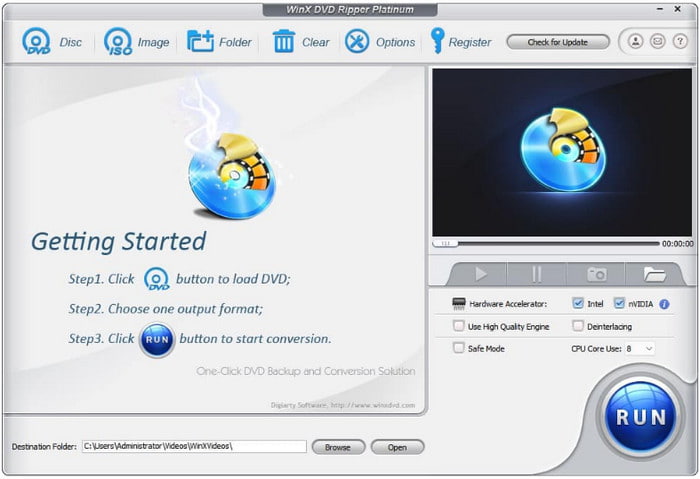
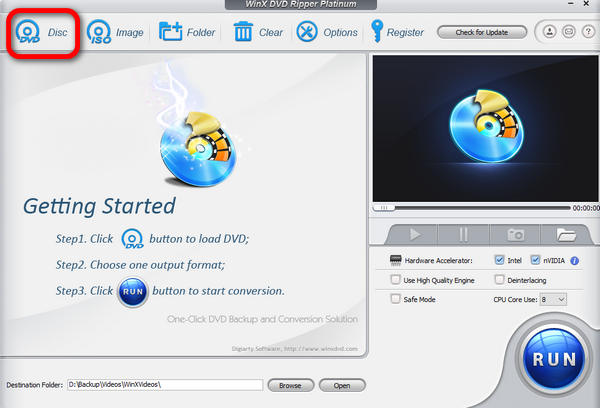
Step 2.Choose one option from Disc, Image, or Folder on the top menu bar to import the DVD file you want to convert.
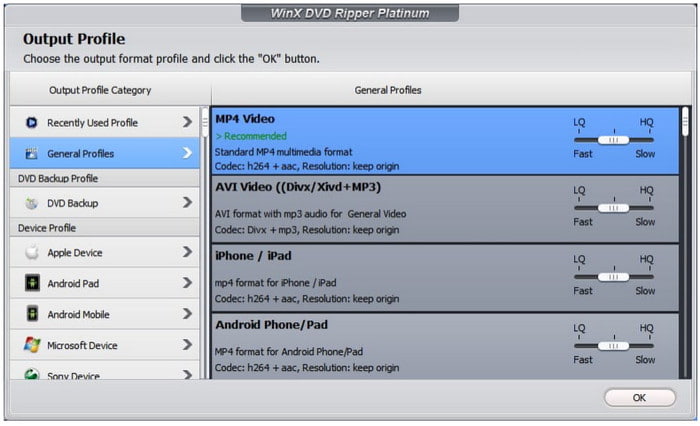
Step 3.Select PC General Video > AVI Video (DivX + Original AC3/DTS Video) in the pop-up Output Profile window and click OK to proceed.
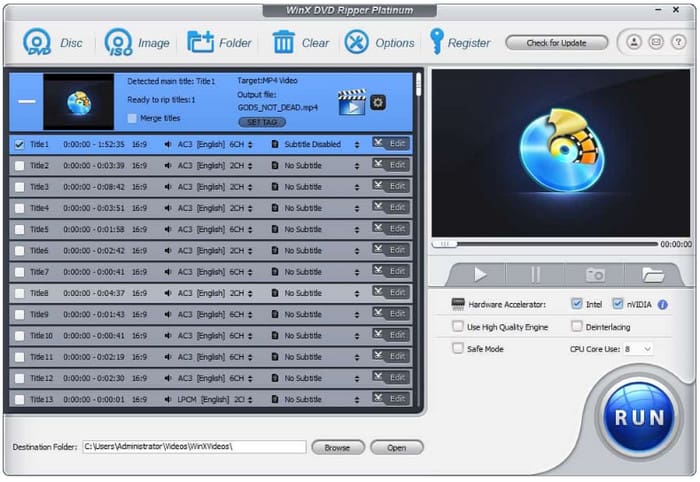
Step 4.Finally, click Browse to set the download folder and then choose RUN at the bottom right to start the DVD to DivX conversion.
Part 4. Which Is Your Best DVD to DivX and Xvid Ripper
| Blu-ray Master Free DVD Ripper | Blu-ray Master Video Converter Ultimate | WinX DVD Ripper Platinum | |
| Rip commercial DVD to DivX/Xvid |  | (Decrypt all DVDs) | |
| DVD ripping speed | Slow | Fast | Fast |
| Clip DVD video |  | | |
| Enhance video quality | | | |
| Crop DVD video | | | |
| Add watermark to DVD video | | | |
| 24×7 customer support | | | |
After ripping DVD to DivX or Xvid format, you can play the ripped DVD videos on other portable devices without a DVD player. If there is no enough storage space on your iPhone or Android, you can upload Xvid and DivX videos to cloud storage too. Be aware that the above 2 DVD rippers are only for personal use.
Conclusion
Hey, guys, now you must know how to convert DVDs to DivX and Xvid. With 3 useful methods, you can easily get DivX and Xvid videos and play them on your devices. Blu-ray Master DVD Ripper is free and provides reliable DVD conversion ability, which is the best choice for you. If you have any other questions, please comment on us!
More from Blu-ray Master
Rip DVDs to Digital

Fast and free ripping software to decrypt all DVDs to digital easily on your computer.
100% Secure. No virus
